
1. Увод
Производ је завршенview
The AfterShokz OpenMove are bone conduction headphones designed for comfort and situational awareness. They transmit audio through your cheekbones, leaving your ears open to ambient sounds. The headphones feature Bluetooth 5.0 connectivity and multiple EQ modes to optimize your listening experience for various activities.

Слика 1: Угаони view of the AfterShokz OpenMove bone conduction headphones in slate grey, showcasing their lightweight, open-ear design.
Садржај пакета
Молимо вас да проверите да ли су све ставке присутне у вашем пакету:
- AfterShokz OpenMove Headphones
- УСБ-Ц кабл за пуњење
- Чепићи за уши
- Dedicated Pouch
- User Manual (English version)
2. Подешавање
Пуњење слушалица
Before initial use, fully charge your headphones to ensure optimal battery performance.
- Connect the USB-C charging cable to the charging port located on the headphones.
- Повежите други крај кабла са УСБ адаптером за напајање (није укључен) или УСБ портом рачунара.
- The LED indicator will illuminate to show the charging status. A complete charge typically takes approximately 2 hours.
Упаривање са Блуетоотх уређајем
Follow these steps to connect your headphones to your smartphone, tablet, or other Bluetooth-enabled device:
- Уверите се да су слушалице искључене.
- Press and hold the power button for 5-7 seconds until the LED indicator flashes red and blue alternately. This indicates the headphones are in pairing mode.
- На свом уређају омогућите Блуетоотх и потражите доступне уређаје.
- Select "OpenMove by AfterShokz" from the list of detected devices.
- Once successfully paired, the LED indicator will turn solid blue.
3. Упутство за употребу
Контроле слушалица
The AfterShokz OpenMove headphones feature intuitive controls for managing audio playback and calls.

Слика 2: Детаљан view of the control buttons located on the right transducer arm, including volume and multi-function controls.
| Dugme/funkcija | Акција |
|---|---|
| Дугме за напајање | Press and hold to Power On/Off; Single press to Play/Pause audio; Single press to Answer/End Call. |
| Јачина звука (+) | Single press to Increase Volume; Long press to skip to Next Track. |
| Смањивање јачине звука (-) | Single press to Decrease Volume; Long press to go to Previous Track. |
| Multi-function Button (often combined with power) | Double press to Activate Voice Assistant; Triple press to Change EQ Mode. |
ЕК Модес
The OpenMove headphones offer three distinct equalizer modes to optimize audio for different content and listening environments.
- Стандардни режим: This mode is suitable for general outdoor listening, providing a balanced audio experience.
- Вокални режим: Designed to enhance human voices, making it ideal for listening to audiobooks, podcasts, and radio broadcasts.
- Earplug Mode: When used with the included earplugs, this mode provides a more immersive listening experience. It is suitable for noisy environments such as airplanes or trains, or for enjoying movies and games at home.
Ношење слушалица
For optimal sound quality and comfort, position the headphones correctly.
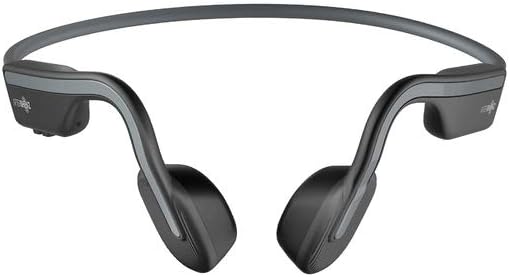
Слика 3: Предња страна view of the AfterShokz OpenMove headphones, illustrating how the band rests behind the head and the transducers sit on the cheekbones.
Position the transducers on your cheekbones, just in front of your ears. The flexible band should rest comfortably behind your head. Ensure a snug fit for optimal sound transmission and clarity.
4. Одржавање
Чишћење
Да бисте одржали дуготрајност и хигијену ваших слушалица:
- Обришите слушалице меком, дamp тканина.
- Do not use harsh chemicals or abrasive cleaners, as these can damage the materials.
- Ensure the charging port is completely dry before connecting the charging cable.
Складиштење
When not in use, store your headphones properly:
- Store the headphones in the dedicated pouch provided to protect them from dust, scratches, and minor impacts.
- Avoid storing the headphones in environments with extreme temperatures (very hot or very cold) or high humidity.
КСНУМКС. Решавање проблема
Уобичајени проблеми и решења
If you encounter any problems with your AfterShokz OpenMove headphones, refer to the table below for potential solutions.
| Иссуе | Могуће решење |
|---|---|
| Слушалице се не укључују. | Charge the headphones fully. Ensure the charging cable is securely connected. |
| Нема звука из слушалица. | Ensure the headphones are powered on and successfully paired with your device. Check the volume level on both the headphones and your connected device. |
| Упаривање са уређајем није могуће. | Ensure the headphones are in pairing mode (LED flashing red and blue). Turn off and then on Bluetooth on your device. Try restarting both the headphones and your device. |
| Лош квалитет звука или ниска јачина звука. | Adjust the position of the transducers on your cheekbones for a better fit. Experiment with different EQ modes. Ensure there are no obstructions between the headphones and your device. |
| Слушалице се не пуне. | Verify that the USB-C charging cable is properly connected to both the headphones and a working power source. Try a different USB port or power adapter. |
6. Спецификације
Техничке спецификације
Detailed technical specifications for the AfterShokz OpenMove headphones:
| Феатуре | Спецификација |
|---|---|
| Број модела | AFT-EP-000022 |
| Спеакер Типе | Претварачи коштане проводљивости |
| Фреквенцијски одзив | 20Хз - 20,000Хз |
| Осетљивост | 100 ± 3дБ |
| Осетљивост микрофона | -40дБ ± 3дБ |
| Блуетоотх верзија | 5.0 |
| Подржано Проfiles | А2ДП, АВРЦП, ХСП, ХФП |
| Домет | До 10 метара (33 стопе) |
| Трајање батерије | До 6 сати |
| Време пуњења | Отприлике 2 сата |
| Тежина | 29 грама (1.02 унци) |
| Ниво отпорности на воду | Водоотпоран |
| Технологија повезивања | бежични (Блуетоотх) |
| Укључене компоненте | Headphones, USB-C Cable, Earplugs, Pouch |
7. Гаранција и подршка
Информације о гаранцији
For detailed information regarding the product warranty, including terms, conditions, and duration, please refer to the official AfterShokz website or the warranty card included with your purchase. It is recommended to retain your proof of purchase for warranty claims.
Корисничка подршка
If you encounter any issues or have questions not addressed in this manual, please visit the AfterShokz support page on their official website. You can also contact their customer service team for further assistance.