
Увод
Thank you for choosing the HOMIDEC Office Desk with Bookshelf. This manual provides essential information for the safe and efficient assembly, operation, and maintenance of your new desk. Please read these instructions carefully before assembly and retain them for future reference.
This versatile desk features a two-in-one design, combining a spacious computer desk with integrated storage shelves, ideal for home offices, studies, or bedrooms. Its robust construction ensures durability and stability for your workspace needs.
Безбедносне информације
- Увек пажљиво пратите упутства за монтажу.
- Уверите се да су сви завртњи и причвршћивачи добро затегнути пре употребе. Периодично проверавајте и по потреби поново затегните.
- Do not overload the desk or shelves beyond the recommended weight capacity.
- Држите мале делове даље од деце током склапања како бисте спречили опасност од гушења.
- Place the desk on a level surface to ensure stability.
Подешавање и монтажа
Assembly of your HOMIDEC Office Desk is designed to be straightforward. It is recommended that two people assemble the desk for ease and safety, although it can be assembled by one person.
Пре него што почнете:
- Unpack all components and verify against the parts list (not provided in this manual, refer to included physical manual).
- Ослободите простран простор за монтажу.
- Keep all tools and hardware organized.
Кораци монтаже (опште смернице):
- Причврстите оквир: Begin by assembling the metal frame components according to the provided diagrams. Ensure all connections are finger-tightened initially.
- Инсталирајте полице: The storage shelves can only be placed on the right side of the desk. Secure them to the frame as indicated in your specific manual.
- Монтирај радну површину: Carefully place the desktop onto the assembled frame and secure it with the provided fasteners.
- Завршно затезање: Када су све компоненте на свом месту, систематски затегните све завртње и вијке користећи одговарајући алат. Немојте превише затезати.
- Подесите ножице за нивелисање: The desk is equipped with adjustable feet to ensure stability on uneven floors. Turn the feet clockwise or counter-clockwise to level the desk.
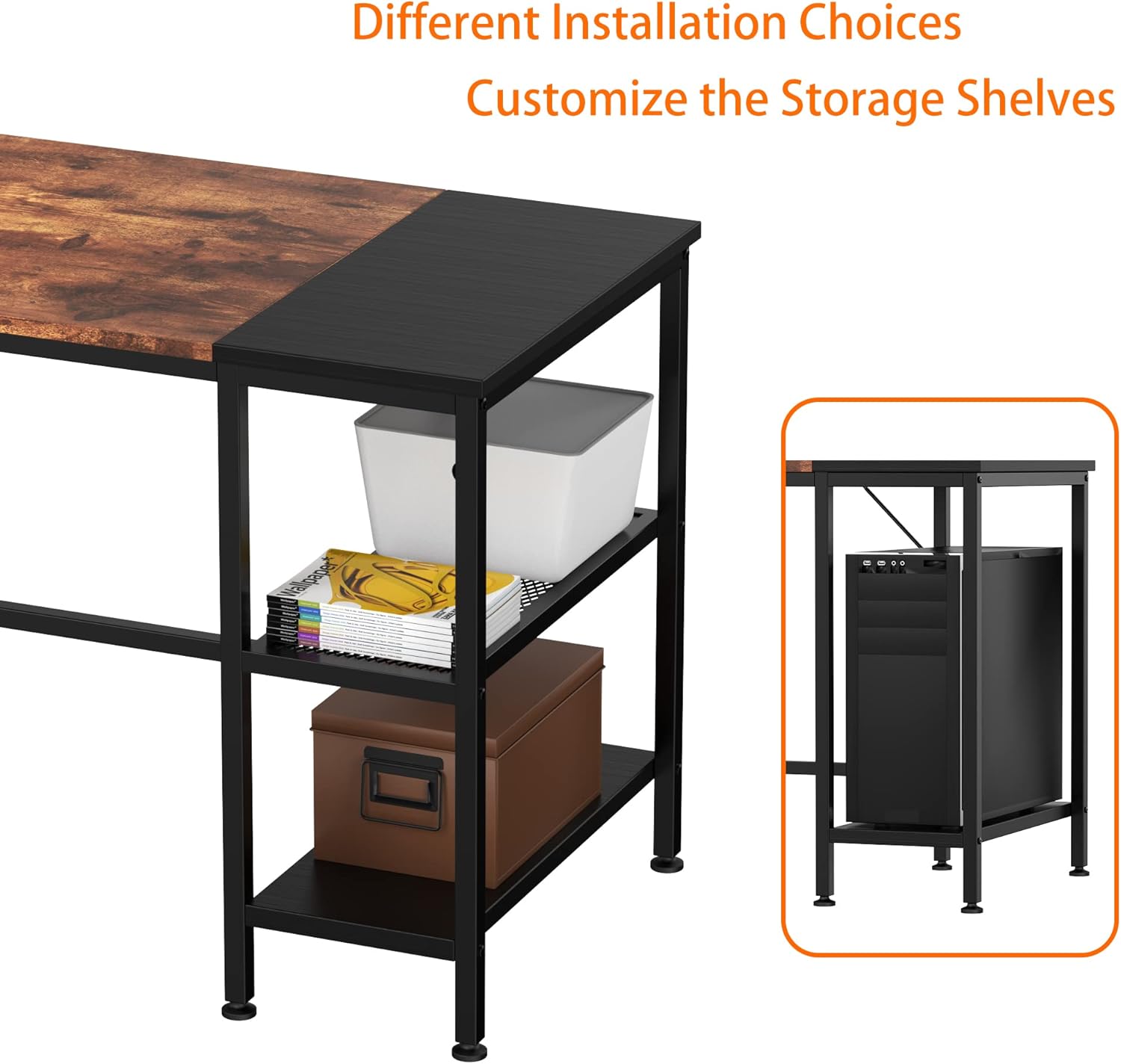
Image: Different Installation Choices for Storage Shelves. This diagram illustrates how the storage shelves can be configured on the right side of the desk, offering options for open shelving or space to accommodate a PC tower.
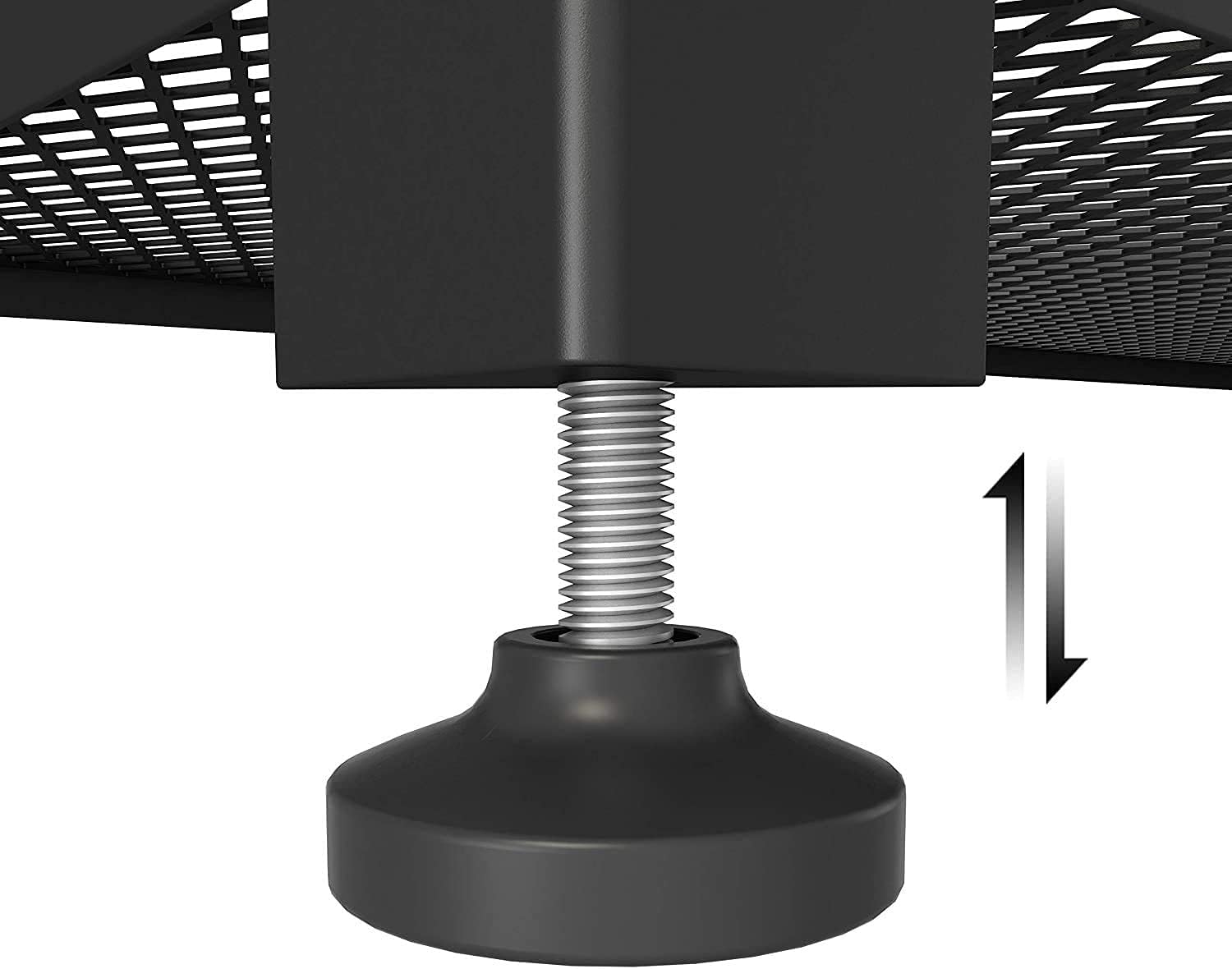
Image: Adjustable Leveling Foot. A close-up view of the adjustable leveling foot located at the base of a desk leg, demonstrating the screw mechanism used for fine-tuning height and ensuring stability on uneven surfaces.
Упутство за употребу
The HOMIDEC Office Desk is designed for versatile use in various settings, providing ample space for your work and storage needs.
- Употреба на десктопу: The spacious desktop (140x60cm) is suitable for laptops, desktop computers, monitors, keyboards, and other office accessories. Arrange your equipment to optimize your workflow and comfort.
- Полице за складиштење: Utilize the integrated 3-tier storage shelves for books, documents, stationery, potted plants, or decorative items. The shelves are designed to keep your essentials within easy reach, enhancing work efficiency.
- Дистрибуција тежине: Distribute weight evenly across the desktop and shelves. Avoid placing heavy items solely on one side to maintain stability. The desk has a maximum weight recommendation of 110 kg.

Image: Desk in Use with Dual Monitors. This image shows the HOMIDEC Office Desk set up in a room, accommodating two computer monitors, a keyboard, and a mouse on its main surface. A PC tower is neatly stored on the lower shelf of the integrated bookshelf, demonstrating practical use of the desk's features.

Image: Desk in Use with Single Monitor and Storage. This image presents the HOMIDEC Office Desk within a home office environment, featuring a single computer monitor, keyboard, and mouse. The integrated 3-tier storage shelves are utilized for organizing books and displaying decorative items, highlighting the desk's functional design.
Одржавање и њега
Proper care will extend the life and appearance of your HOMIDEC Office Desk.
- Чишћење: The desk surface is anti-scratch and wear-resistant. Wipe surfaces with a soft, damp крпом. Избегавајте абразивна средства за чишћење или јаке хемикалије које би могле оштетити завршну обраду.
- Просипање: Immediately wipe up any spills to prevent water damage or staining, especially on the wood board components. The tabletop has a protective layer designed to be waterproof.
- Заштита: Use coasters for drinks and protective pads under hot items to prevent marks.
- Причвршћивачи: Periodically check all screws and bolts to ensure they remain tight. Re-tighten if any looseness is detected.
- Окружење: Avoid exposing the desk to extreme temperatures or humidity, which can affect the material integrity.

Image: Desk Surface Detail. A close-up shot of the desk surface, showcasing the distinct textured vintage wood finish adjacent to a smooth black section. This detail highlights the desk's double color matching design and material quality.
Решавање проблема
If you encounter any issues with your HOMIDEC Office Desk, refer to the following common problems and solutions:
- Сто је климав:
- Уверите се да су сви завртњи и вијци за монтажу чврсто затегнути.
- Check if the desk is on a level surface. Adjust the leveling feet at the bottom of each leg until the desk is stable.
- Делови који недостају или су оштећени:
- Пажљиво поново проверите све материјале за паковање.
- Contact HOMIDEC customer support immediately with details of the missing or damaged parts. Refer to the "Support" section for contact information.
- Потешкоће при склапању:
- Review the assembly instructions provided with your product.
- Уверите се да користите исправну опрему за сваки корак.
- If possible, seek assistance from another person.
Спецификације
| Број модела: | FY-SJDNZ140-FGS |
| Бренд: | ХОМИДЕЦ |
| Димензије (Д к Ш к В): | 140 цм x 60 цм x 75 цм (55.12" Д x 23.62" Ш x 29.53" В) |
| Тежина: | 18.6 кг |
| Максимални капацитет тежине: | 110 кг (242 лбс) |
| Материјал: | E1 Grade Solid Particle Wood Board, Steel Frame |
| Боја: | Винtage Wood and Black |
| Потребна монтажа: | Да |
Информације о гаранцији
HOMIDEC provides a 12-месечна гаранција for this product, covering returns and exchanges for manufacturing defects. This warranty applies from the date of purchase. Please retain your proof of purchase for warranty claims.
Корисничка подршка
Should you have any questions, require assistance with assembly, or encounter any issues with your HOMIDEC Office Desk, please do not hesitate to contact our professional service team.
We are committed to providing the best service and will respond to your inquiries as soon as possible, typically within 24 hours.
Контакт информације: Please refer to the contact details provided in your product packaging or on the official HOMIDEC webсајту.