
1. Увод
This manual provides detailed instructions for the setup, operation, and maintenance of your Foxnovo Bluetooth Computer Speakers, Model MX-1. Please read this manual thoroughly before using the product to ensure proper function and longevity.

The Foxnovo MX-1 speaker positioned under a computer monitor, demonstrating its sleek design and compact form factor suitable for desktop environments.
2. Карактеристике производа
- Аудио високе верности: Equipped with dual full-range speakers for clear sound output.
- Дубоки бас: Features a sound guide port designed to enhance bass frequencies.
- Више опција повезивања: Supports Bluetooth, USB, and AUX input for versatile device connection.
- Integrated Digital Clock and Alarm: Includes a front-facing digital display with time and alarm functions.
- Широка компатибилност: Connects with various devices including PCs, laptops, smartphones, tablets, and televisions.
- Напредна аудио обрада: Utilizes Op AMP chips for optimized sound performance.
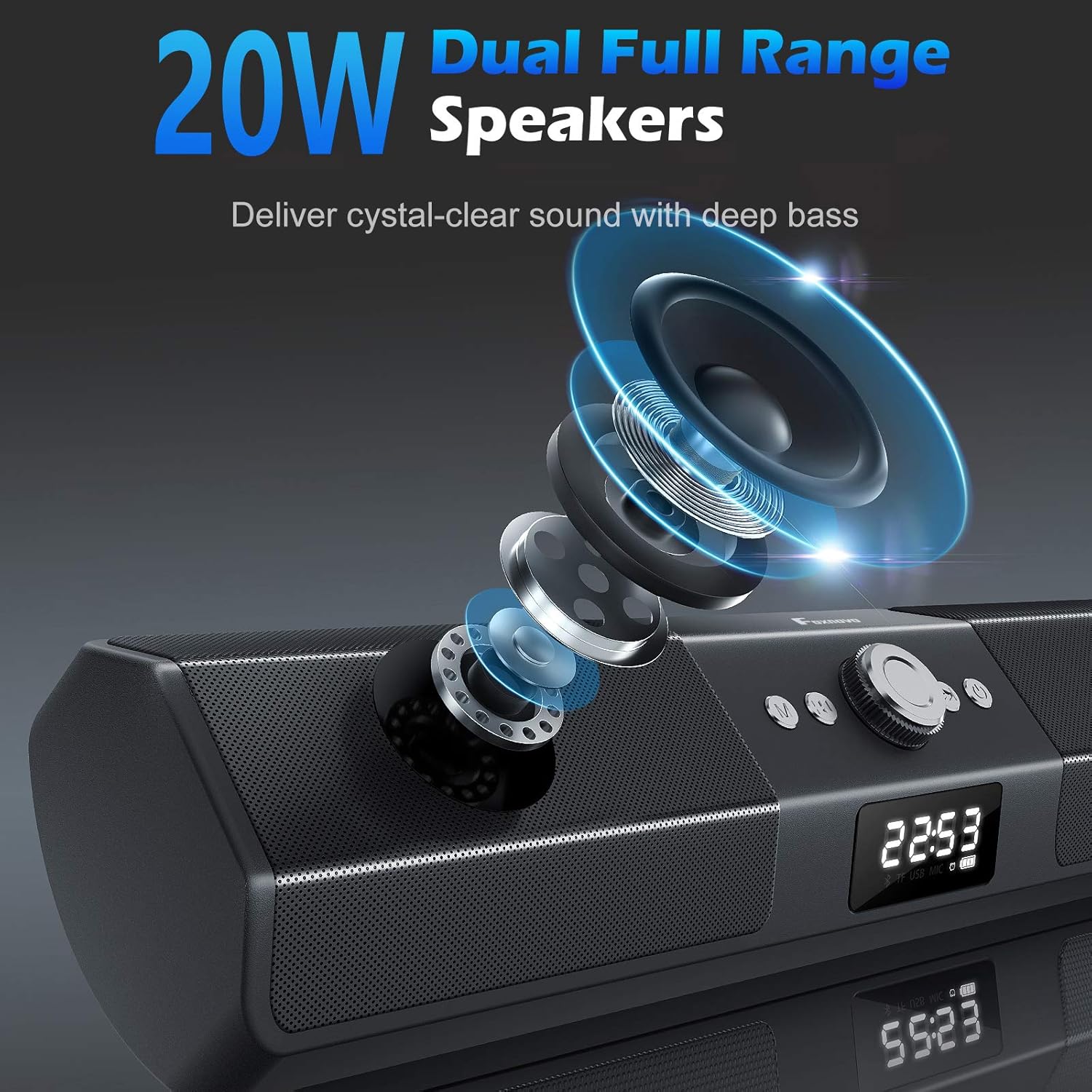
Унутрашње view of the Foxnovo MX-1 speaker, illustrating the dual full-range drivers responsible for audio output.

Крупни план view of the Foxnovo MX-1 speaker's sound guide port, designed to centralize sound and produce richer bass.

An internal component view highlighting the Op AMP chips, which contribute to the speaker's audio processing and ampосвешћење.
3. Садржај пакета
Молимо вас да проверите пакет за следеће ставке:
- Foxnovo MX-1 Bluetooth Computer Speaker
- УСБ кабл за напајање
- 3.5 мм АУКС аудио кабл
- Упутство за употребу
4. Производ је готовview
Familiarize yourself with the speaker's controls and connection ports.

Фронт view of the Foxnovo MX-1 speaker, displaying the central control knob, function buttons, and digital display.
Контроле:
- Дугме за напајање: Укључује или искључује звучник.
- Дугме за режим (М): Switches between input modes (Bluetooth, AUX, USB, TF Card).
- Дугме за јачину звука: Подешава јачину звука.
- Дугме за репродукцију/паузу: Контролише репродукцију медија.
- Дугмад за претходну/следећу нумеру: Navigates through audio tracks.
- Clock/Alarm Settings Buttons: Used for setting time and alarms.
Портови за повезивање:

Позади view of the Foxnovo MX-1 speaker, illustrating the various input and power ports.
- ДЦ 5В порт: For power input using the provided USB cable.
- АУКС порт: 3.5 мм аудио улаз за жично повезивање.
- Слот за ТФ картицу: For playing audio directly from a TF (MicroSD) card.
- УСБ порт: За репродукцију звука директно са УСБ уређаја.
5. Упутства за подешавање
5.1 Прикључак за напајање
- Connect the provided USB power cable to the DC 5V port on the back of the speaker.
- Plug the other end of the USB cable into a compatible USB power adapter (5V/1A recommended) or a computer's USB port.
- Притисните дугме за напајање да бисте укључили звучник.
5.2 Жична веза (AUX)
- Connect one end of the 3.5mm AUX audio cable to the AUX port on the speaker.
- Connect the other end of the AUX cable to the audio output jack of your device (e.g., computer, smartphone).
- Press the 'M' (Mode) button on the speaker until 'AUX' mode is selected.
5.3 Блуетоотх упаривање
- Ensure the speaker is powered on and in Bluetooth mode. If not, press the 'M' (Mode) button until 'BT' (Bluetooth) is displayed. The speaker will enter pairing mode, indicated by a flashing Bluetooth icon.
- На свом уређају (паметном телефону, таблету, лаптопу) омогућите Блутут и потражите доступне уређаје.
- Select 'Foxnovo MX-1' from the list of found devices.
- Once paired, the speaker will indicate a successful connection, and the Bluetooth icon will stop flashing.

Diagram illustrating the Foxnovo MX-1 speaker's compatibility with various devices, including smartphones, tablets, laptops, and PCs, via wired or wireless connections.
6. Упутство за употребу
6.1 Укључивање/искључивање
Press and hold the Power button for approximately 3 seconds to turn the speaker on or off.
6.2 Избор режима
Press the 'M' (Mode) button repeatedly to cycle through available input modes: Bluetooth, AUX, USB, and TF Card.
6.3 Контрола јачине звука
Rotate the central knob clockwise to increase volume and counter-clockwise to decrease volume. Volume can also be adjusted from the connected device.
6.4 Playback Control (Bluetooth/USB/TF Card Modes)
- Пусти/паузирај: Притисните дугме Репродукуј/Паузирај једном да бисте репродуковали или паузирали звук.
- Следећа нумера: Press the 'Next Track' button once to skip to the next song.
- Претходни запис: Press the 'Previous Track' button once to go to the beginning of the current song or the previous song.
6.5 Clock and Alarm Settings

The Foxnovo MX-1 speaker displaying its digital clock and alarm functions on the front panel.
The speaker features a digital clock and alarm function. Refer to the specific buttons on the unit for setting the time and configuring alarms. Typically, a dedicated 'Clock' or 'Set' button is used to enter time setting mode, and the 'Previous/Next' buttons adjust values, with the 'Play/Pause' or 'Mode' button confirming selections.
7. Одржавање
- Чишћење: Користите меку, суву крпу за чишћење површине звучника. Не користите течна средства за чишћење или абразивне материјале.
- Складиштење: Када се звучник не користи дуже време, чувајте га на хладном и сувом месту, даље од директне сунчеве светлости и екстремних температура.
- Избегавајте воду: This product is not waterproof. Keep it away from water and high humidity.
КСНУМКС. Решавање проблема
8.1 Нема звука
- Ensure the speaker is powered on and the volume is not at minimum.
- Check that the correct input mode (Bluetooth, AUX, USB) is selected.
- Verify that the audio cable (if using AUX) is securely connected to both the speaker and the source device.
- For Bluetooth, ensure the speaker is successfully paired and connected to your device.
- Check the volume level on your source device.
8.2 Проблеми са упаривањем преко Bluetooth-а
- Ensure the speaker is in Bluetooth pairing mode (flashing 'BT' icon).
- Онемогућите и поново омогућите Блутут на изворном уређају.
- Move the speaker closer to your device to ensure it is within range.
- Clear the Bluetooth device list on your source device and attempt to pair again.
8.3 Static or Distorted Sound
- Reduce the volume on both the speaker and the source device.
- Ensure audio cables are fully inserted and not damaged.
- Move the speaker away from other electronic devices that may cause interference.
- For Bluetooth, ensure there are no obstructions between the speaker and the source device.
9. Спецификације
| Бранд | Фокново |
| Број модела | МКС-1 |
| Спеакер Типе | Компјутерски звучник |
| Технологија повезивања | Блуетоотх, УСБ, АУКС |
| Бежична комуникација | Блуетоотх |
| Режим аудио излаза | Стерео |
| Максимална излазна снага звучника | 20 Ваттс |
| Однос сигнала и шума | 130 дБ |
| Компатибилни уређаји | Десктоп, лаптоп, паметни телефон, таблет, телевизор |
| Контролни метод | Додир, дугме |
| Извор напајања | Battery Powered (via DC 5V USB) |
| Димензије производа | 16.1 к 2.95 к 3.35 инча |
| Тежина артикла | 2.54 фунти |
| Боја | Црно |
| Водоотпоран | бр |
10. Информације о гаранцији
The Foxnovo MX-1 Bluetooth Computer Speakers come with a limited warranty. Please retain your proof of purchase for any warranty claims. Specific terms and conditions of the warranty may vary by region and retailer. For detailed warranty information, please refer to the documentation included with your purchase or contact Foxnovo customer support.
11. Корисничка подршка
If you encounter any issues or have questions regarding your Foxnovo MX-1 speaker that are not addressed in this manual, please contact Foxnovo customer support. Contact information can typically be found on the product packaging, the official Foxnovo webсајту или преко вашег продавца.