
Увод
The Fostex 6301DT is a compact and versatile 4-inch powered studio monitor, designed for broadcast, production facilities, mobile setups, project studios, and home recording environments. Building upon the legacy of the 6301-series, this model incorporates a D-class power amplifier and a new driver unit, featuring an energy-saving auto stand-by function. The 6301DT integrates Dante network audio capabilities, allowing playback of any two channels of Dante network audio signals, alongside traditional 1/4-inch TS analog inputs. Its ultra-rugged die-cast aluminum enclosure ensures durability for professional use.
Безбедносне информације
- Извор напајања: Прикључите уређај само на наведени извор напајањаtage. Ensure the power cord is securely connected.
- вентилација: Не блокирајте вентилационе отворе. Обезбедите адекватан проток ваздуха око уређаја како бисте спречили прегревање.
- Влага: Не излажите уређај киши, влази или прекомерној влажности. Избегавајте стављање предмета напуњених течношћу на уређај.
- Страни предмети: Do not insert any objects into the unit's openings.
- Сервисирање: Све сервисне радове препустите квалификованом сервисном особљу. Не покушавајте сами да отворите или поправите уређај.
- Пласман: Place the monitor on a stable surface. Avoid locations with excessive vibration, dust, or direct sunlight.
Садржај пакета
Проверите да ли су све ставке присутне у пакету:
- Fostex 6301DT Active Monitor Speaker
- ИЕЦ кабл за напајање
Производ је завршенview
Предња плоча

Слика 1: Контроле на предњој плочи
- Дугме за напајање: Press to turn the unit ON or OFF. An LED indicator shows the power status.
- Дугме за јачину звука: Adjusts the output level of the monitor.
Реар Панел
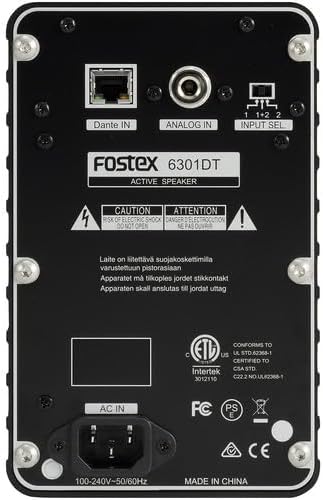
Слика 2: Прикључци на задњој плочи
- Dante IN (RJ45): Connects to a Dante network for digital audio input.
- Analog IN (1/4" TS): Connects to an analog audio source using a 1/4-inch TS cable.
- Прекидач за избор улаза: Selects the audio input channel for monitoring (1, 2, or 1+2 mixed).
- АЦ ИН: Connects the supplied IEC power cord.
Сетуп
Пласман
Place the Fostex 6301DT on a stable, flat surface. For optimal sound reproduction, position the monitor at ear level and equidistant from your listening position. An optional EB-6301 mounting bracket (not included) allows for easy surface-mounting at various angles.

Слика 3: Прampле Подешавање апликације
Повер Цоннецтион
- Ensure the monitor's power button is in the OFF position.
- Connect the supplied IEC power cord to the AC IN port on the rear panel of the monitor.
- Укључите други крај кабла за напајање у одговарајућу утичницу наизменичне струје.
Аудио везе
The 6301DT supports both analog and Dante network audio inputs.
- Аналогни улаз: Connect your analog audio source (e.g., mixer, audio interface) to the 1/4" TS Analog IN port on the rear panel using a 1/4-inch TS cable.
- Dante Network Input: Connect an RJ45 Ethernet cable from your Dante network switch or device to the Dante IN port on the rear panel.
Оперативни
Укључивање/искључивање
Press the Power button on the front panel to turn the monitor ON. The power indicator LED will illuminate. Press the button again to turn the monitor OFF.
Подешавање јачине звука
Rotate the Volume knob on the front panel clockwise to increase the output level and counter-clockwise to decrease it. Start with a low volume setting and gradually increase it to a comfortable listening level.
Избор улаза
Use the Input Select switch on the rear panel to choose the desired audio source:
- аналогни: Selects the 1/4" TS analog input.
- Dante Channel 1: Monitors the first Dante audio channel.
- Dante Channel 2: Monitors the second Dante audio channel.
- Dante Channel 1+2 (Mixed): Monitors a mix of both Dante channels.
Dante Network Configuration
For Dante network operation, you will need to use Audinate's Dante Controller software on a computer connected to the same Dante network. This software allows you to route audio signals to the Fostex 6301DT and configure its network settings. The 6301DT supports sampling frequencies of 44.1 kHz, 48 kHz, 88.2 kHz, and 96 kHz.
Одржавање
- Чишћење: Use a soft, dry cloth to clean the exterior of the monitor. Do not use abrasive cleaners, waxes, or solvents.
- Складиштење: Ако складиштите уређај дуже време, искључите га из струје и чувајте га на хладном и сувом месту, даље од директне сунчеве светлости и екстремних температура.
- вентилација: Уверите се да су отвори за вентилацију чисти од прашине и остатака.
Решавање проблема
| Проблем | Могући узрок | Решење |
|---|---|---|
| Нема излаза звука |
|
|
| Изобличен звук |
|
|
| Dante connection issues |
|
|
Спецификације

Слика 4: Димензије производа
| Феатуре | Спецификација |
|---|---|
| Број модела | AMS-6301DT |
| Спеакер Типе | Поверед Студио Монитор |
| Величина звучника | 4 инча |
| Пречник вуфера | 4 инча |
| Ampдизалица Тип | Класа Д |
| Максимална излазна снага | 20 Ваттс |
| Режим аудио излаза | Стерео |
| Број аудио канала | 2.0 |
| Технологија повезивања | RJ45 (Dante), 1/4" TS (Analog) |
| Цоннецтивити Протоцол | Данте |
| Подржани СampЛинг фреквенције | 44.1/48/88.2/96 кХз |
| Однос сигнала и шума | 85 дБ |
| Извор напајања | Цордед Елецтриц |
| Материјал кућишта | Алуминијум |
| Боја | Црно |
| Димензије артикла (Д к Ш к В) | 4.7 cm x 7.5 cm x 4.7 cm |
| Тежина артикла | 5.1 фунти |
| Додатне карактеристике | Auto stand-by function, Recessed front-panel controls |
Гаранција и подршка
Информације о гаранцији
The Fostex 6301DT is covered by a Двогодишња ограничена гаранција произвођачаМолимо вас да сачувате доказ о куповини за потребе гаранције.
Корисничка подршка
For technical assistance, troubleshooting, or warranty service, please contact American Music and Sound, the manufacturer, or your authorized Fostex dealer. Refer to the Fostex official webсајт за најновије контакт информације за подршку.