
SBS MHTWSSTYLEBTB
SBS Music Hero Wireless Bluetooth Earphones User Manual
Model: MHTWSSTYLEBTB
Увод
Thank you for choosing the SBS Music Hero Wireless Bluetooth Earphones. This manual provides essential information for the proper setup, operation, and maintenance of your device. Please read it carefully before use.

Image: The SBS Music Hero Wireless Bluetooth Earphones, shown in their light blue charging case. The earbuds are partially visible, indicating their in-ear design.
Садржај пакета
- SBS Music Hero Wireless Bluetooth Earphones
- Футрола за пуњење
- Ear tips/earpads
- УСБ кабл за пуњење
- Упутство за употребу

Слика: Крупни план view of the two individual SBS Music Hero wireless earphones, highlighting their design and earbud shape.
Водич за подешавање
1. Пуњење слушалица и футроле
Пре прве употребе, потпуно напуните слушалице и кућиште за пуњење.
- Connect the Micro-USB charging cable to the charging port on the bottom of the case.
- Повежите други крај кабла на УСБ извор напајања (нпр. рачунар, зидни адаптер).
- The LED indicator on the case will illuminate during charging and turn off when fully charged.
- Place the earphones into the charging case. The earphones will begin charging automatically.

Image: The bottom of the earphone charging case, showing the Micro-USB charging port and an LED indicator light.
A full charge for the case and earphones typically takes approximately 1 hour. The earphones provide about 2-3 hours of play time on a single charge, with the case offering additional charges for up to 24 hours of standby time.

Image: The open charging case, illustrating the estimated battery life: 2-3 hours play time, 24 hours standby time, and 1 hour charge time.
2. Упаривање са Блуетоотх уређајем
The earphones use Bluetooth technology for wireless connection.
- Уверите се да су слушалице напуњене.
- Open the charging case and remove both earphones. They will automatically enter pairing mode. The LED on one earphone will flash, indicating it's ready to pair.
- На свом уређају (паметном телефону, таблету, лаптопу) омогућите Блутут и потражите нове уређаје.
- Select "SBS Music Hero" or a similar name from the list of available devices.
- Once connected, the LED indicator on the earphone will stop flashing and remain solid or turn off, depending on the model.
If pairing fails, place the earphones back into the case, close it, and then repeat the steps.
Упутство за употребу
The earphones feature a multifunction button for controlling various functions.
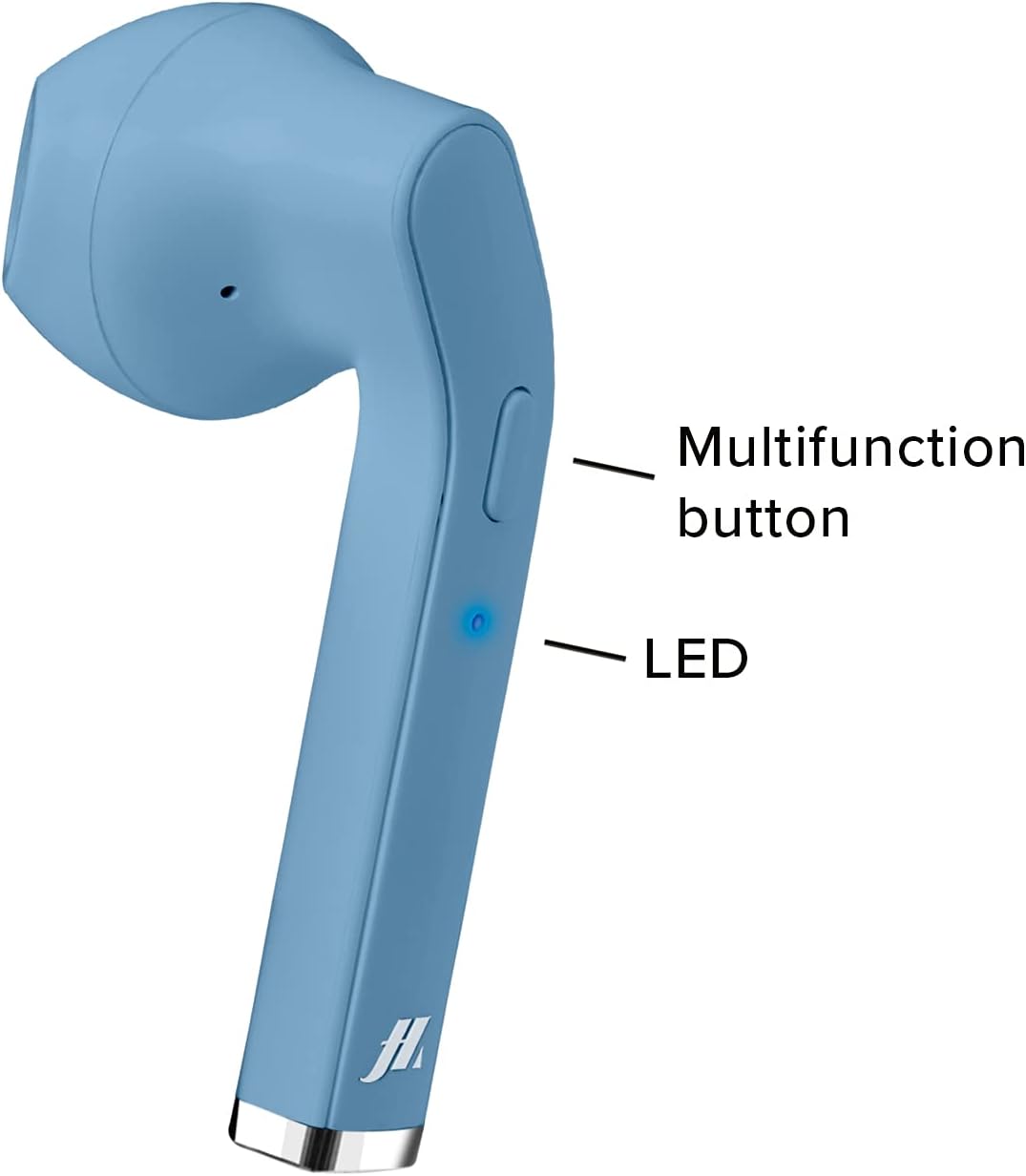
Image: A close-up of one earphone, pointing out the location of the multifunction button and the LED indicator light.
Репродукција музике
- Пусти/паузирај: Једном притисните вишенаменско дугме.
- Следећа нумера: Double-press the right earphone's multifunction button.
- Претходни запис: Double-press the left earphone's multifunction button.
Управљање позивима
- Одговори/заврши позив: Press the multifunction button once during an incoming call or during an active call.
- Одбијање долазног позива: Press and hold the multifunction button for approximately 2 seconds during an incoming call.
- Поновно бирање последњег броја: Triple-press the multifunction button.

Image: An earphone accompanied by icons illustrating its control functions: play/pause, answer/end call, reject incoming call, and redial last number.
Укључивање/искључивање
- Укључено: The earphones power on automatically when removed from the charging case. Alternatively, press and hold the multifunction button for 3 seconds.
- Искључивање: Place the earphones back into the charging case. They will power off automatically. Alternatively, press and hold the multifunction button for 5 seconds.
Одржавање и њега
- Редовно чистите слушалице и кућиште за пуњење меком, сувом крпом.
- Немојте користити абразивна средства за чишћење или раствараче.
- Keep the charging contacts on the earphones and inside the case clean to ensure proper charging.
- Avoid exposing the device to extreme temperatures, humidity, or liquids, as it is not water-resistant.
- Чувајте слушалице у њиховој футроли за пуњење када их не користите како бисте их заштитили и одржали напуњеним.
Решавање проблема
| Проблем | Могући узрок | Решење |
|---|---|---|
| Слушалице се не укључују. | Ниска батерија. | Charge the earphones and charging case fully. |
| Упаривање са уређајем није могуће. | Блутут је искључен на уређају; слушалице нису у режиму упаривања; превише су далеко од уређаја. | Ensure Bluetooth is enabled. Place earphones back in case, then remove to re-enter pairing mode. Move closer to the device. |
| Нема звука или лош квалитет звука. | Volume too low; earphones not properly connected; ear tips not sealed. | Increase volume on your device. Reconnect earphones. Adjust ear tips for a better fit. |
| Only one earphone works. | One earphone not charged; pairing issue. | Ensure both earphones are charged. Place both earphones back in the case, then remove them together to re-establish stereo pairing. |
Спецификације производа
| Феатуре | Детаљ |
|---|---|
| Број модела | MHTWSSTYLEBTB |
| Повезивање | Блуетоотх бежична технологија |
| Earphone Style | Ин-Еар |
| Материјал | Пластика |
| Фреквенцијски опсег | 20 Hz - 20,000 Hz |
| Осетљивост | 90 дБ |
| Тип батерије | Литијум-полимер (потребна 3, укључена) |
| Average Battery Life (Play Time) | 2 сата |
| Време пуњења | Approx. 1 Hour (Fast Charging) |
| Димензије | 4 к 18 к 9 цм |
| Тежина | 90 г |
| Отпорност на воду | Не (није водоотпорно) |
| Компатибилни уређаји | Smartphones, Tablets, Laptops, Desktop Computers |
| Контрола буке | Активно поништавање буке |
Информације о гаранцији
Specific warranty details are not provided in the product data. Please refer to the retailer's return policy or contact the manufacturer directly for warranty information.
Корисничка подршка
For technical support or further assistance, please contact the manufacturer or your point of purchase. Keep your product model number (MHTWSSTYLEBTB) and purchase details ready when contacting support.
Ask a question about this manual
Ask about setup, troubleshooting, compatibility, parts, safety, or missing instructions. Manuals+ will review the question and use this page’s manual context to help answer it.