
Увод
Thank you for choosing the iClever BK10 Bluetooth Wireless Keyboard. This manual provides detailed instructions on how to set up, operate, and maintain your keyboard to ensure optimal performance. Please read this manual carefully before use and retain it for future reference.
Садржај пакета
- iClever BK10 Bluetooth Wireless Keyboard
- УСБ кабл за пуњење
- Упутство за употребу
Спецификације
| Бранд | иЦлевер |
| Број модела | БК10 |
| Технологија повезивања | Блуетоотх |
| Компатибилни уређаји | Android 9+, ChromeOS (BT 4.0+), Windows 10/11, iPadOS 13.4+, macOS 10.15+ |
| Распоред тастатуре | АЗЕРТИ |
| Број кључева | 78 |
| Тип прекидача | Сциссор Свитцх |
| Извор напајања | Баттери Поверед |
| Димензије производа | 43Д к 14В к 2.5Х центиметара |
| Интерни материјал | Акрилонитрил бутадиен стирен, нерђајући челик |
Сетуп
1. Почетно пуњење
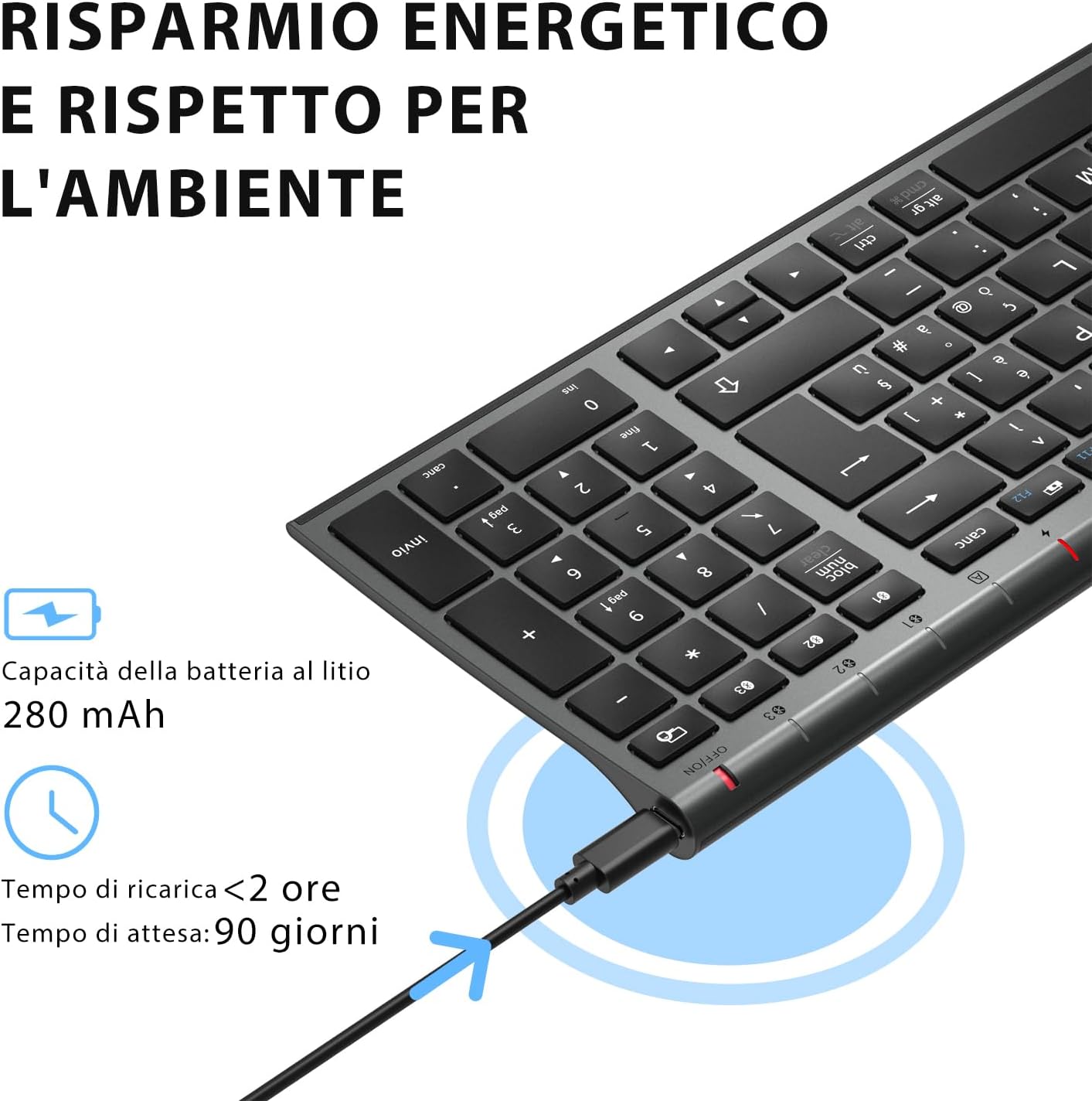
Before first use, fully charge the keyboard. Connect the provided USB charging cable to the keyboard's USB-C port and the other end to a USB power source (e.g., computer, wall adapter). The charging indicator light will show charging status and turn off when fully charged.

The iClever BK10 keyboard connected via USB-C for charging. This image details the 280 mAh lithium battery capacity, a charging time of less than 2 hours, and a standby time of 90 days.
2. Укључивање/искључивање
Locate the power switch on the keyboard. Slide the switch to the 'ON' position to power on the keyboard. Slide it to the 'OFF' position when not in use to conserve battery.
3. Блуетоотх упаривање
The iClever BK10 keyboard supports connection to up to three devices simultaneously.
- Укључите тастатуру помоћу прекидача за напајање.
- Притисните тастер Fn тастер истовремено са једним од тастера Bluetooth канала (БТ1, БТ2, или БТ3) to select a channel.
- Press and hold the selected Bluetooth channel key (e.g., БТ1) for 3-5 seconds until the indicator light for that channel starts blinking rapidly. This indicates the keyboard is in pairing mode.
- On your device (computer, tablet, smartphone), enable Bluetooth and search for available devices.
- Select "iClever BK10" (or similar name) from the list of found devices.
- Follow any on-screen prompts to complete the pairing process. The indicator light will stop blinking and remain solid for a few seconds, then turn off, indicating a successful connection.

The iClever BK10 keyboard demonstrating its ability to connect to an iPad, MacBook, and iPhone via three distinct Bluetooth channels. The image also illustrates key mapping for Windows/Android (Alt/Cmd) and iPad/Mac (Alt/Cmd) operating systems.
Управљање тастатуром
1. Пребацивање између упарених уређаја
Да бисте прелазили између упарених уређаја, једноставно притисните Fn тастер заједно са одговарајућим тастером Bluetooth канала (БТ1, БТ2, или БТ3) that your device is paired to. The keyboard will automatically connect to the selected device.
2. Function Keys (Fn)
The keyboard features a row of function keys (F1-F12) that also serve as multimedia and shortcut keys. To use the secondary function of these keys, press and hold the Fn key while pressing the desired function key.
3. Компатибилност оперативних система
The iClever BK10 keyboard is designed to be compatible with various operating systems. Key functions may adapt slightly depending on the connected OS. For optimal performance, ensure your device's Bluetooth version is 4.0 or higher.

Close-up of the iClever BK10 keyboard with a hand typing, highlighting the low-profile keys and scissor switch mechanism designed for quiet and comfortable typing.
Одржавање
1. Чишћење
To clean your keyboard, power it off and disconnect it from any devices. Use a soft, lint-free cloth slightly dampened with water or a mild cleaning solution. Avoid using harsh chemicals, abrasives, or excessive moisture. Do not spray cleaners directly onto the keyboard.
2. Брига о батерији
To prolong the battery life of your keyboard:
- Charge the keyboard fully before its first use.
- Избегавајте често потпуно пражњење батерије.
- Чувајте тастатуру на хладном и сувом месту када је не користите дуже време.
- Turn off the keyboard when transporting it or when not in use to prevent accidental key presses and battery drain.
Решавање проблема
1. Keyboard Not Connecting/Pairing
- Уверите се да је тастатура укључена и потпуно напуњена.
- Уверите се да је Блуетоотх омогућен на вашем уређају.
- Ensure the keyboard is in pairing mode (indicator light blinking).
- Покушајте да раскинете упаривање и поново упарите тастатуру из подешавања Блутут везе на уређају.
- Поново покрените и тастатуру и уређај.
- Ensure your device's Bluetooth version is compatible (BT 4.0+ recommended).
2. Keys Not Responding
- Check if the keyboard is connected to the correct device.
- Ensure the battery is not low. Charge the keyboard if necessary.
- Restart the keyboard and the connected device.
- Очистите све остатке око тастера.
3. Чести прекиди везе
- Ensure there are no strong interference sources (e.g., Wi-Fi routers, other Bluetooth devices) nearby.
- Keep the keyboard within the recommended operating range of your device.
- Уверите се да је тастатура потпуно напуњена.
Гаранција и подршка
iClever products come with a standard warranty. For detailed warranty information, technical support, or customer service, please refer to the warranty card included with your product or visit the official iClever website. Please have your product model number (BK10) and purchase information ready when contacting support.
Производ је завршенview Слике

Одозго надоле view of the iClever BK10 Bluetooth Wireless Keyboard, showcasing its full layout including the numeric keypad and function keys.
Страна view of the iClever BK10 keyboard, illustrating its ultra-thin profile with a thickness ranging from 0.16 inches to 0.45 inches.

The iClever BK10 keyboard positioned on a desk in an office environment, alongside a computer monitor, laptop, tablet, and smartphone, illustrating its versatile use in various professional and personal setups.