
Sorand AC 230V Floor Heating Thermostat
Sorand AC 230V Digital Programmable Floor Heating Thermostat User Manual
Model: AC 230V Floor Heating Thermostat
Увод
This manual provides comprehensive instructions for the installation, operation, and maintenance of your Sorand AC 230V Digital Programmable Floor Heating Thermostat. Please read this manual carefully before installation and use to ensure proper function and safety.
The thermostat is designed for electronic floor heating systems and other electrical heating elements. It features a large LCD with backlight, programmable temperature settings, and internal/external temperature sensing capabilities.
Безбедносне информације
- Инсталацију мора извршити квалификовани електричар.
- Уверите се да је напајање искључено пре инсталације или одржавања.
- Не излажите термостат води или прекомерној влажности.
- Рад у оквиру наведеног обtagе и ограничења струје.
Садржај пакета
Проверите да ли су све ставке присутне у пакету:
- 1 x Sorand AC 230V Digital Programmable Floor Heating Thermostat
- 1 x External Temperature Sensor Cable (approx. 3 meters)
- 2 к завртњи за монтажу
- 1 x Упутство за употребу (овај документ)

Image: Contents of the Sorand thermostat package, showing the main unit, external sensor cable, mounting screws, and the instruction manual.
Подешавање и инсталација
Важно: Installation should only be carried out by a qualified electrician. Ensure the main power supply is turned off before commencing any wiring work.
Дијаграм ожичења
Refer to the wiring diagram on the back of the thermostat unit for correct connections. The terminals are typically labeled as follows:
- L1, N1: Power input (AC 230V)
- LOAD (1, 2): Connection to the heating element
- NTC (5, 6): Connection for the external floor temperature sensor

Слика: Позади view of the Sorand thermostat, displaying the wiring terminals and a simplified diagram for electrical connections.
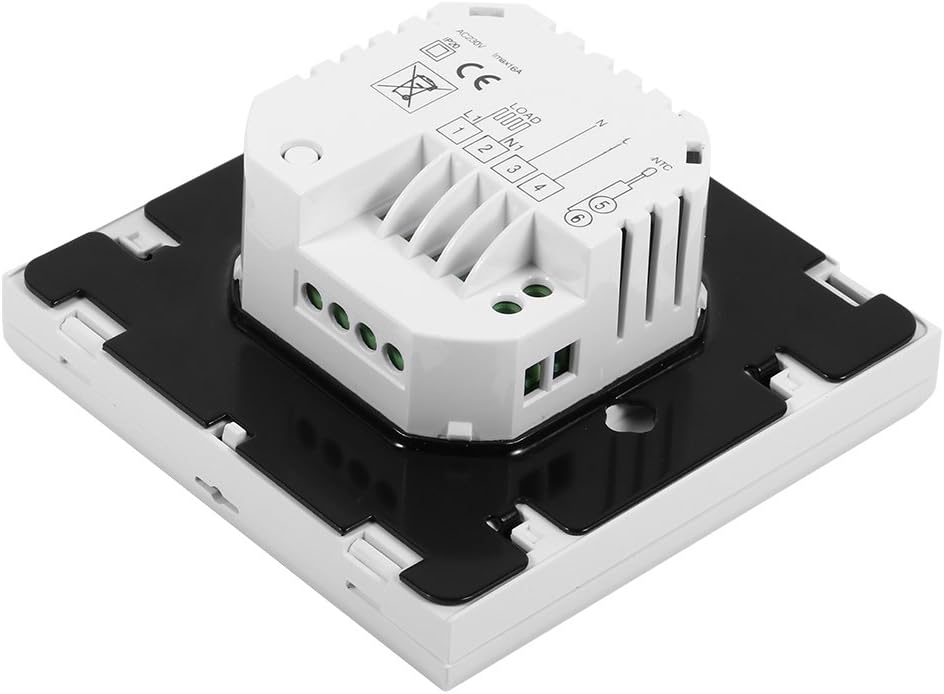
Слика: Са стране view of the Sorand thermostat, illustrating the internal components and ports for wiring connections.
Монтажа
- Prepare a standard electrical wall box (86x86mm recommended).
- Connect the power supply, heating load, and external sensor wires according to the wiring diagram.
- Carefully push the wired thermostat into the wall box.
- Secure the thermostat to the wall box using the provided screws.
- Attach the front panel of the thermostat.
Упутство за употребу
The thermostat features a large LCD and touch-sensitive buttons for easy operation.
Функције дугмета
- ⏻ (Снага): Turns the thermostat ON/OFF.
- ↻ (Mode/Cycle): Switches between manual mode and programmable mode.
- ⏱ (Clock/Time): Sets the time and enters programming mode.
- ▲ (Up Arrow): Increases temperature setting or adjusts values.
- ▼ (Down Arrow): Decreases temperature setting or adjusts values.

Слика: Фронт view of the Sorand thermostat, highlighting the LCD screen and the five touch-sensitive control buttons below it.
Подешавање времена и дана
- Притисните и држите ⏱ дугме на 3 секунде да бисте ушли у режим подешавања времена.
- Користите ▲ и ▼ дугмад за подешавање сата, а затим притисните ⏱ to confirm and move to minutes, then day of the week.
- Притисните ⏱ again to exit, or wait for 10 seconds for automatic exit.
Ручни начин рада
In manual mode, the thermostat maintains a constant temperature set by the user.
- Притисните тастер ↻ button to switch to manual mode (indicated by a hand icon or similar on the display).
- Користите ▲ и ▼ дугмад за подешавање жељене температуре.
- The thermostat will now maintain this temperature.
Programmable Mode Operation (6 Periods)
The thermostat allows for 6 programmable periods per day, enabling different temperature settings at different times.
- Притисните тастер ↻ button to switch to programmable mode (indicated by a clock icon or similar).
- Притисните и држите ⏱ button for 3 seconds to enter programming mode.
- The display will show the first period (e.g., "Period 1"). Use ▲ и ▼ to set the start time and desired temperature for this period.
- Притисните ⏱ to move to the next period and repeat the process for all 6 periods.
- After setting all periods, press ⏱ again or wait for automatic exit to save settings.
The thermostat will automatically follow the programmed schedule.
Sensor Selection (Internal/External)
The thermostat can use its internal sensor or the external floor sensor. The selection method is typically found in advanced settings or by a specific button combination. Refer to the on-screen indicators for the active sensor.
Одржавање
- Очистите дисплеј термостата и цasinОбришите меком, сувом крпом. Не користите абразивна средства за чишћење или раствараче.
- Ensure the thermostat is free from dust and debris to maintain optimal performance.
- No user-serviceable parts inside. Do not attempt to open or repair the unit.
Решавање проблема
| Проблем | Могући узрок | Решење |
|---|---|---|
| Термостат се не укључује. | Нема напајања; неисправно ожичење. | Check circuit breaker. Verify wiring connections (consult a qualified electrician). |
| Heating not turning on/off. | Incorrect temperature setting; thermostat in OFF mode; wiring issue. | Adjust set temperature. Ensure thermostat is ON. Check heating element wiring. |
| Нетачно очитавање температуре. | Sensor malfunction; incorrect sensor selected. | Verify sensor connection. Check if internal or external sensor is active. |
| Екран је празан или трепери. | Power fluctuation; internal fault. | Reset power to the thermostat. If issue persists, contact support. |
Спецификације
| Феатуре | Детаљ |
|---|---|
| Бранд | Sorand |
| Модел | AC 230V Floor Heating Thermostat |
| Воркинг Волtage | АЦ 230В, 50/60Хз |
| Струја оптерећења | 12/16A (Electric Heating) |
| Прецизност | ±0.5℃ |
| Set-point Temperature Range | 5℃ - 35℃ |
| Limit Temperature Range | 5℃ - 99℃ |
| Потрошња енергије | <0.3В |
| Температурни сензор | NTC (Internal and External) |
| Surface Size | Приближно 86 x 86 x 40 мм (3.4 x 3.4 x 1.6 инча) |
| External Sensor Cable Length | Приближно 3 метара (9.8 стопа) |
| Материјал | ПЦ+АБС |
| Дисплаи Типе | Дигитални ЛЦД са позадинским осветљењем |
| Контролни метод | Контрола додирне табле |
Гаранција и подршка
This product is covered by the manufacturer's standard warranty. Please refer to the product packaging or your point of purchase for specific warranty terms and conditions.
For technical support, troubleshooting assistance, or warranty claims, please contact your retailer or the manufacturer directly. Keep your purchase receipt as proof of purchase.
Ask a question about this manual
Ask about setup, troubleshooting, compatibility, parts, safety, or missing instructions. Manuals+ will review the question and use this page’s manual context to help answer it.