
Увод
This manual provides detailed instructions for the setup, operation, and maintenance of your BUFFBEE Glow Alarm Clock HRS-BLACK. Please read this manual thoroughly before using the product to ensure proper function and longevity.
Производ је завршенview
The BUFFBEE Glow Alarm Clock is a versatile device combining a digital alarm clock, FM radio, and a 7-color night light. It is designed to enhance your sleep and wake-up experience with customizable features.
Кључне карактеристике:
- 3-у-1 функционалност: Digital alarm clock, FM radio, and night light.
- Ноћно светло у 7 боја: Adjustable with 5 brightness levels.
- Двоструки аларми: Set two independent alarms with choice of FM radio, built-in beep, or bird sounds.
- Adjustable Display Dimmer: 0-100% brightness control for the time display.
- Осветљена дугмад: For easy operation in low light conditions.
- Тајмер за спавање: Quick nap setting from 10 to 120 minutes.
- Auto-Off Sleep Timer: Automatically turns off night light and FM radio after a set duration.
- УСБ пуњач: For charging external electronic devices.
- Опције напајања: AC powered with AAA battery backup (batteries not included).
Садржај пакета:
- 1 x BUFFBEE Glow Alarm Clock
- 1 к адаптер за напајање
- 1 к Упутство за употребу
Идентификација компоненте:
Refer to the image below for an overview of the alarm clock's buttons and display.

Слика: Фронт view of the BUFFBEE Glow Alarm Clock, showing the digital time display, alarm indicators, and control buttons on the top panel. The top edge features a light strip.
Сетуп
1. Прикључак за напајање:
- Прикључите приложени адаптер за напајање на DC улазни порт на задњој страни будилника.
- Прикључите адаптер у стандардну зидну утичницу.
2. Battery Backup (Optional):
За непрекидан рад током нестанка струјеtages, install 3 AAA batteries (not included) into the battery compartment on the bottom of the unit. The clock will maintain time and alarm settings, and the alarm will still function, but the display and night light may be limited to conserve power.

Слика: Позади view of the alarm clock showing the power input and battery compartment, alongside a power adapter and three AAA batteries (not included).
3. Почетно подешавање времена:
- When first powered on, the display will show a default time.
- Притисните и држите ВРЕМЕНСКИ СКЛОП button (usually located on the top panel) until the hour digits flash.
- Користите +/- buttons (or similar navigation buttons) to adjust the hour.
- Притисните ВРЕМЕНСКИ СКЛОП again to confirm the hour and move to minute adjustment.
- Користите +/- дугмад за подешавање минута.
- Притисните ВРЕМЕНСКИ СКЛОП још једном да бисте потврдили и изашли из режима подешавања времена.
- Да бисте прелазили између 12-часовног и 24-часовног формата, притисните 12/24Х button (if available, often combined with time set or a dedicated button).
Упутство за употребу
1. Setting Alarms (Alarm 1 & Alarm 2):
The clock supports two independent alarms.
- Притисните тастер АЛАРМ 1 дугме (или АЛАРМ 2) once to display the current alarm time.
- Притисните и држите АЛАРМ 1 (или АЛАРМ 2) дугме док цифре сати не почну да трепћу.
- Користите +/- дугмад за подешавање сата.
- Притисните тастер АЛАРМ поново притисните дугме да бисте потврдили сате и прешли на подешавање минута.
- Користите +/- дугмад за подешавање минута.
- Притисните тастер АЛАРМ button again to select the alarm sound: FM radio, built-in beep, or bird sounds. Use +/- да бисте се кретали кроз опције.
- Притисните тастер АЛАРМ button one more time to confirm and activate the alarm. An alarm icon will appear on the display.
- Да бисте искључили активни аларм, притисните одговарајуће АЛАРМ button. The alarm icon will disappear.
2. Функција одлагања:
Када се огласи аларм, притисните велико СНООЗЕ / СВЕТЛО button on top to temporarily silence the alarm for 9 minutes. The alarm will sound again after the snooze period.
3. Night Light Operation:
The alarm clock features a 7-color night light with adjustable brightness.

Image: The alarm clock shown with its top light strip illuminated in various colors, demonstrating the 7-color night light feature.
- Притисните тастер ЛИГХТ button (often combined with SNOOZE or a dedicated button) to turn the night light on/off.
- When the night light is on, press the ЛИГХТ button repeatedly to cycle through the 7 available colors.
- To adjust the brightness, use the +/- buttons while the night light is active. There are 5 brightness levels.
4. ФМ радио:
The built-in FM radio allows you to listen to your favorite stations.
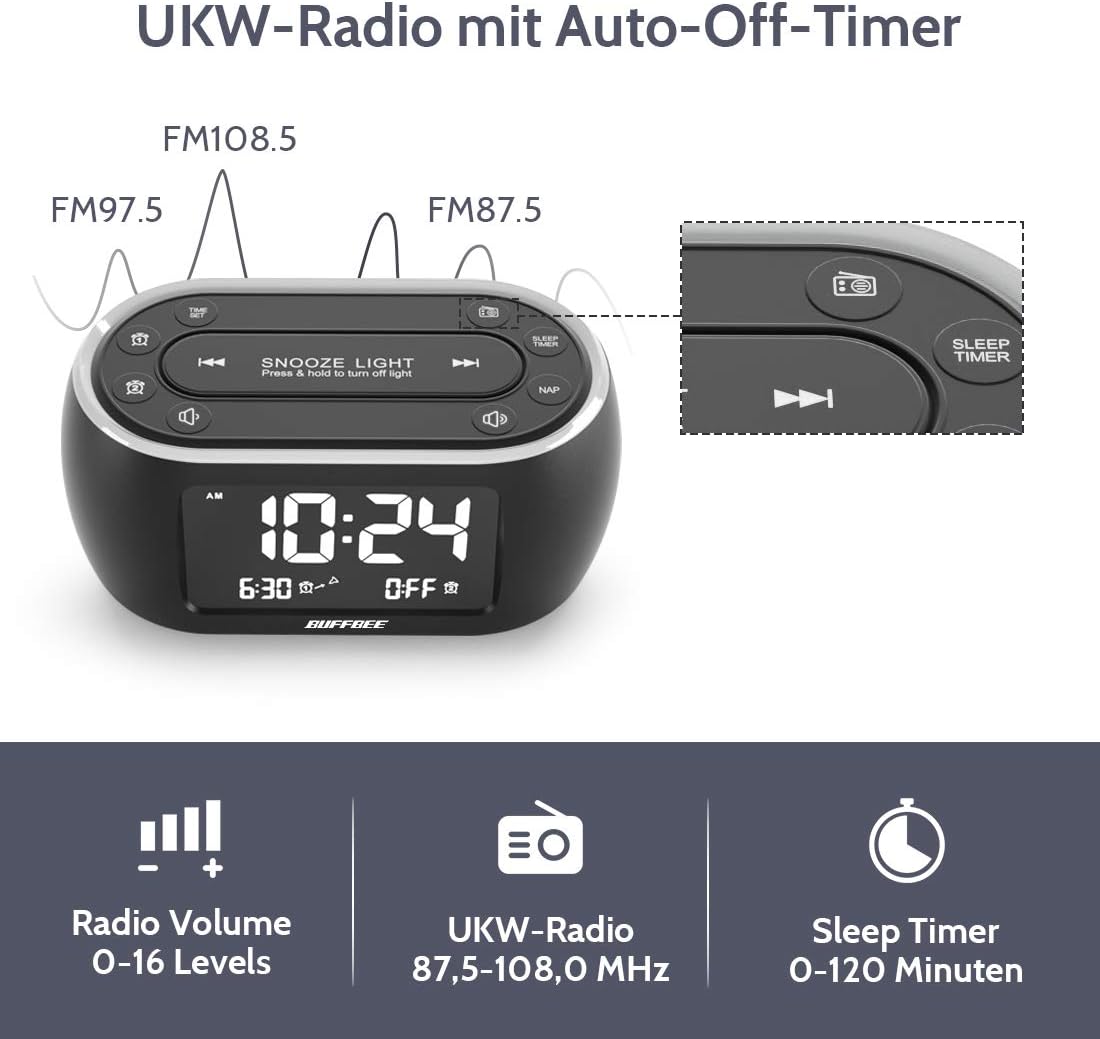
Image: The alarm clock display showing FM radio frequencies (FM108.5, FM97.5, FM87.5) and icons for radio volume and sleep timer.
- Притисните тастер РАДИО button to turn the FM radio on/off.
- Притисните тастер СЦАН button (or similar) to automatically scan and save available FM stations.
- Користите ПРЕТХОДНО/СЛЕДЕЋЕ buttons to navigate through saved stations or manually tune.
- Подесите јачину звука помоћу ВОЛУМЕ +/- buttons. The volume can be set from 0 to 16 levels.
5. Nap Timer:
The nap timer allows for quick, short sleep periods without affecting regular alarm settings.
- Притисните тастер НАП button. The display will show the default nap time (e.g., 10 minutes).
- Притисните тастер НАП button repeatedly to cycle through preset nap durations (e.g., 10, 20, 30, 60, 90, 120 minutes).
- The nap timer will start automatically after selection.
- To cancel the nap timer, press the НАП дугме док се не прикаже „ИСКЉУЧЕНО“.
6. Auto-Off Sleep Timer:
Set a timer for the night light and/or FM radio to automatically turn off after a specified duration.
- While the night light or FM radio is active, press the СЛЕЕП ТИМЕР дугме.
- Притисните тастер СЛЕЕП ТИМЕР button repeatedly to cycle through available durations (e.g., 15, 30, 60, 90, 120 minutes, or OFF).
- The selected duration will be displayed, and the timer will begin. The night light and/or FM radio will turn off automatically when the timer expires.
7. Display Dimmer:
Adjust the brightness of the main time display from 0% to 100%.

Image: Six different views of the alarm clock display, illustrating the range of brightness from very dim to fully bright, and also showing the night light dimmer.
Користите наменски ДИММЕР бирајте или ДИММЕР +/- buttons (if available) to adjust the display brightness to your preference. This allows for comfortable viewу свим условима осветљења.
8. USB Charging Port:
A USB port is located on the back of the unit for charging small electronic devices.

Image: The alarm clock with a smartphone plugged into its side USB port, indicating the charging function.
Connect your device's USB charging cable to the port. The clock must be powered by the AC adapter for the USB charging function to work.
Одржавање
To ensure the longevity and optimal performance of your BUFFBEE Glow Alarm Clock, follow these maintenance guidelines:
- Чишћење: Обришите уређај меком, сувом крпом. Не користите абразивна средства за чишћење, воскове или раствараче јер могу оштетити површину.
- Снага: Always disconnect the power adapter from the wall outlet before cleaning or if the unit will be unused for an extended period.
- Окружење: Keep the alarm clock away from direct sunlight, heat sources, and excessive moisture.
- Замена батерије: If using battery backup, replace AAA batteries annually or when the battery indicator suggests low power. Ensure correct polarity when inserting new batteries.
Решавање проблема
If you encounter issues with your BUFFBEE Glow Alarm Clock, refer to the following common problems and solutions:
| Проблем | Могући узрок | Решење |
|---|---|---|
| Приказ сата је празан или трепери. | No power or loose connection. Low battery backup. | Ensure the power adapter is securely plugged into the clock and the wall outlet. Check if AAA batteries are installed correctly and have sufficient charge. |
| Аларм се не оглашава. | Alarm not activated. Alarm volume too low. | Verify that the alarm icon is displayed. Check the alarm volume setting. Ensure the correct alarm time is set. |
| Пријем ФМ радија је лош. | Weak signal. Antenna not extended. Interference. | Extend the FM antenna fully. Try repositioning the clock. Perform an auto-scan for stations again. |
| Ноћно светло не ради. | Light function turned off. | Press the LIGHT button to turn it on. Check if the brightness is set to 0%. |
| УСБ пуњење не ради. | Clock not connected to AC power. Device not compatible. | Ensure the clock is powered by the AC adapter. Check if your device is compatible with standard USB charging. |
Спецификације
| Феатуре | Детаљ |
|---|---|
| Бранд | БУФФБЕЕ |
| Број модела | HRS-BLACK |
| Димензије (Д к Ш к В) | КСНУМКС к КСНУМКС к КСНУМКС цм (КСНУМКС к КСНУМКС к КСНУМКС инча) |
| Тежина | 330 грама (0.73 лбс) |
| Повер Инпут | АЦ 100-240В, 50/60Хз |
| Баттери Бацкуп | 3 к ААА батерије (нису укључене) |
| Дисплаи Типе | Дигитал |
| Дисплаи Бригхтнесс | 0-100% подесиво |
| Нигхт Лигхт Цолорс | 7 боја |
| Осветљеност ноћног светла | 5 нивоа подесивих |
| ФМ радио фреквенција | 87.5-108.0 МХз |
| Јачина звука аларма | 0-16 нивоа подесиви |
| Посебне карактеристике | Ambient light, Dual Alarm, Nap Timer, Sleep Timer, USB Charging Port |
Гаранција и подршка
BUFFBEE products are designed for reliability and performance. For specific warranty information, please refer to the documentation included with your purchase or contact BUFFBEE customer support.
If you require technical assistance or have questions regarding your BUFFBEE Glow Alarm Clock, please visit the official BUFFBEE webсајт или контактирајте њихову службу за кориснике. Контакт подаци се обично налазе на паковању производа или на произвођачевој webсајту.