
Увод
The Jamo C910 Subwoofer is designed to deliver powerful low-frequency performance, enhancing your audio experience for both music and movies. Featuring a 10-inch front-firing polyfiber woofer and a 300W Class D amplifier, this subwoofer combines robust acoustics with a modern design. This manual provides essential information for proper setup, operation, and care of your C910 Subwoofer.
Кључне карактеристике
- Ampдизалица: 300 вати класе Д amplifier for dynamic sound.
- Wireless Ready: Compatible with the Klipsch WA-2 wireless kit for flexible placement.
- Front-Firing Port: Allows for versatile placement, including inside cabinets, without compromising bass performance.
- Нискотонац: 10-inch front-firing polyfiber woofer.
- Укључене компоненте: Powered Subwoofer, Grille, and power cord.
- Извор напајања: Електрични са каблом.
Сетуп
1. Распакивање и постављање
Carefully remove the subwoofer from its packaging. The Jamo C910 features a front-firing port, which offers greater flexibility in placement compared to rear-ported designs. You can place it closer to a wall or even inside a cabinet without significantly affecting its performance. For optimal sound, experiment with different locations in your room.

Слика 1: Предња страна view of the Jamo C910 Subwoofer with the grille removed, highlighting the 10-inch woofer and front-firing port.
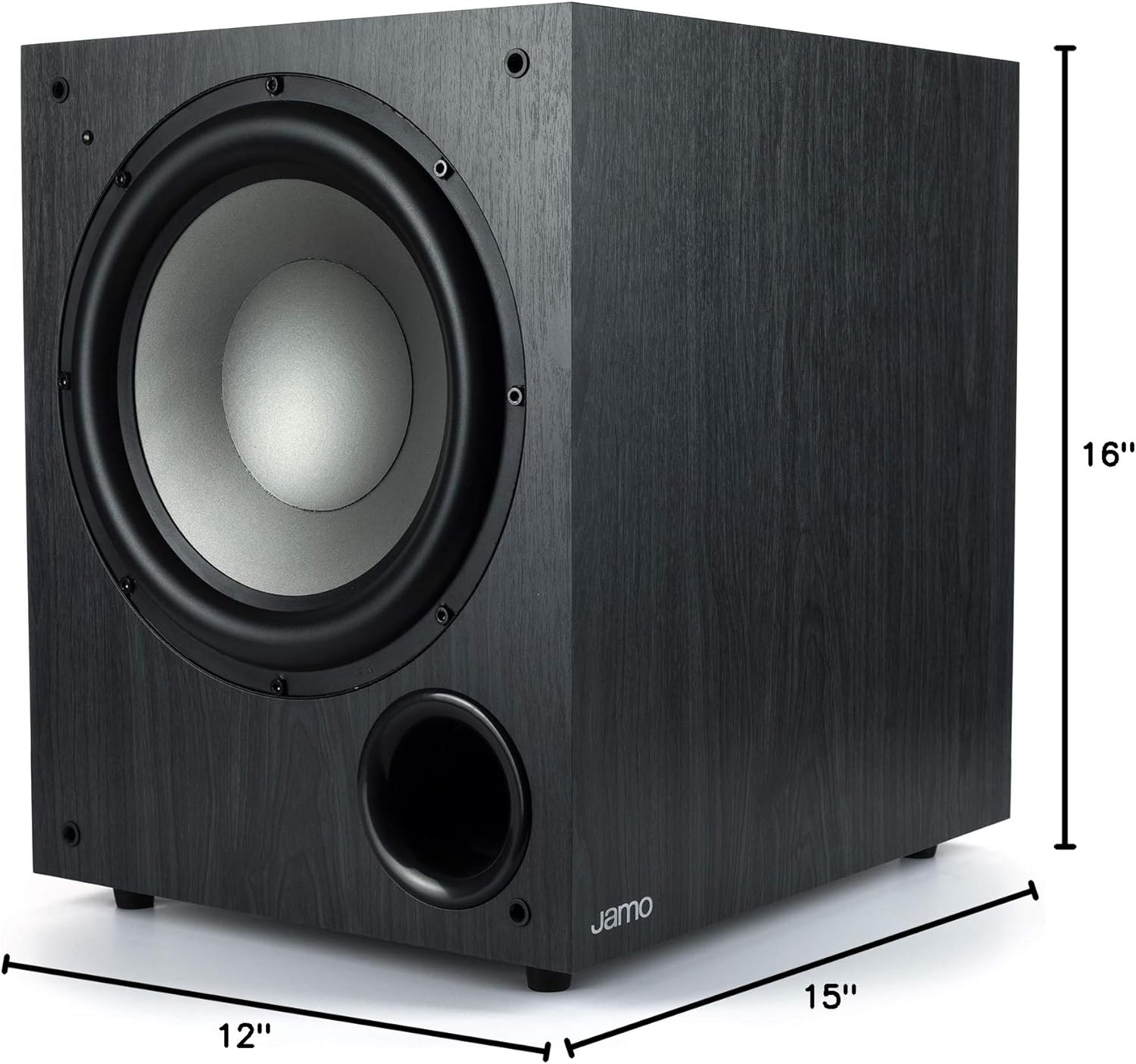
Figure 2: Product dimensions of the Jamo C910 Subwoofer, measuring 15"D x 12"W x 16"H.
2. Везе
Locate the control panel on the rear of the subwoofer. It includes various inputs and controls for integration with your audio system.

Figure 3: Rear control panel of the Jamo C910 Subwoofer, detailing connection ports and adjustment knobs.
- Line In (L/LFE, R): Use an RCA cable to connect the LFE output from your AV receiver to the L/LFE input on the subwoofer. If your receiver has stereo RCA outputs for the subwoofer, use both L and R inputs.
- WA-2 Port: This port is for connecting an optional Klipsch WA-2 wireless subwoofer kit (sold separately). This allows for wireless signal transmission to the subwoofer, eliminating the need for a long RCA cable.
- АЦ улаз: Connect the provided power cord to this input and then to a wall outlet.
3. Укључивање/искључивање
The subwoofer features an automatic power on/off function. When the power switch on the rear panel is set to "ON", the subwoofer will automatically turn on when it detects an audio signal and enter standby mode when no signal is present for a period of time. You can also manually switch it "OFF" using the toggle switch.
Оперативне контроле
The rear panel provides several controls to fine-tune the subwoofer's performance:
- Волумен: Подешава укупни излазни ниво сабвуфера. Почните са ниским подешавањем и постепено повећавајте док се бас не уклопи беспрекорно са главним звучницима.
- Frequency (Crossover): This knob sets the upper frequency limit for the subwoofer. Adjust it to match the low-frequency capabilities of your main speakers. A common starting point is around 80-100 Hz.
- Phase (0°/180°): This switch helps to ensure that the subwoofer's output is in phase with your main speakers. Experiment with both settings to find the one that produces the most impactful and coherent bass.
Одржавање
To ensure the longevity and optimal performance of your Jamo C910 Subwoofer, follow these maintenance guidelines:
- Чишћење: Use a soft, dry cloth to wipe the cabinet. Avoid abrasive cleaners or solvents.
- Пласман: Држите сабвуфер даље од директне сунчеве светлости, извора топлоте и прекомерне влаге. Обезбедите одговарајућу вентилацију око уређаја.
- решетка: The included grille can be attached to protect the woofer from dust and physical damage.
Решавање проблема
If you encounter issues with your Jamo C910 Subwoofer, refer to the following common troubleshooting tips:
- Нема звука:
- Check if the subwoofer is powered on and the power cord is securely connected.
- Verify that the audio input cable (RCA) is correctly connected to both the subwoofer and your receiver.
- Ensure the volume knob on the subwoofer is not set to minimum.
- Confirm that your AV receiver's subwoofer output is enabled and the volume is adjusted appropriately.
- Изобличен или нејасан бас:
- Adjust the Volume and Frequency (Crossover) knobs on the subwoofer.
- Experiment with the Phase switch (0° or 180°) to find the setting that provides the most cohesive bass with your main speakers.
- Проверите да ли постоје лабаве везе или оштећени каблови.
- Ensure the subwoofer is not placed in a corner or too close to a wall, which can cause excessive booming.
- Subwoofer Not Turning On Automatically:
- Ensure the power switch on the rear panel is set to "ON".
- Increase the volume output for the subwoofer from your AV receiver to ensure a strong enough signal is sent to trigger the auto-on feature.
Спецификације
| Бранд | Јамо |
| Назив модела | Ц910 |
| Спеакер Типе | Субвоофер, Воофер |
| Посебна карактеристика | Басс Боост |
| Препоручена употреба | Музика, филмови |
| Компатибилни уређаји | Паметни телефон, таблет, десктоп, телевизор, пројектор, лаптоп |
| Пречник сабвуфера | 10 инча |
| Конфигурација канала сурроунд звука | 5.1 |
| Боја | Црно |
| Укључене компоненте | Powered Subwoofer, Grille and power cord |
| Димензије производа | 15"Д к 12"Ш к 16"В |
| Тежина артикла | 30 фунти |
| Је водоотпоран | ФАЛСЕ |
| Максимални домет | 10 Meters (Wireless, with optional kit) |
| Контролни метод | Remote (with optional wireless kit) |
| Бежична комуникациона технологија | Wi-Fi (with optional wireless kit) |
| Извор напајања | Цордед Елецтриц |
| Максимална излазна снага звучника | 300 Ваттс |
| Технологија повезивања | РЦА |
| Тип монтаже | Таблетоп Моунт |
Гаранција и подршка
The Jamo C910 Subwoofer comes with a Limited Warranty. For detailed information regarding warranty coverage, terms, and conditions, please refer to the warranty card included with your product or visit the official Jamo website. For technical support or service inquiries, please contact Jamo customer service.