
R-MUSIC Booster S (RM301891)
R-MUSIC High Power Wireless Bluetooth Speaker - Booster S
Модел: РМ301891
1. Увод
Thank you for choosing the R-MUSIC Booster S High Power Wireless Bluetooth Speaker. This manual provides important information regarding the setup, operation, and maintenance of your new speaker. Please read this manual thoroughly before using the product to ensure proper function and to prevent damage.
2. Садржај пакета
Молимо вас да проверите садржај пакета након распакивања. Ако неке ставке недостају или су оштећене, обратите се продавцу.
- R-MUSIC Booster S Speaker Unit
- Адаптер за напајање/кабл за пуњење
- Wired Microphone (if included with your model)
- Упутство за употребу

Image: Wired Microphone. This microphone is typically included for karaoke or public address functions.
3. Карактеристике производа
The R-MUSIC Booster S speaker is designed for powerful and versatile audio playback. Key features include:
- High Power Audio Output (40 Watts Max)
- Бежична Блуетоотх веза
- USB Port for MP3 Playback
- MicroSD Card Reader for MP3 Playback
- 3.5mm AUX Input for Wired Connections
- Microphone Input with Echo Control
- Integrated LED Display
- Динамички ЛЕД светлосни шоу
- Portable Design with Integrated Handle

Слика: Фронт view of the R-MUSIC Booster S speaker, highlighting the speaker grille and LED lighting.

Слика: Под углом view of the speaker, showcasing its compact yet powerful design.
4. Контроле и везе
Familiarize yourself with the control panel located on the rear of the speaker.
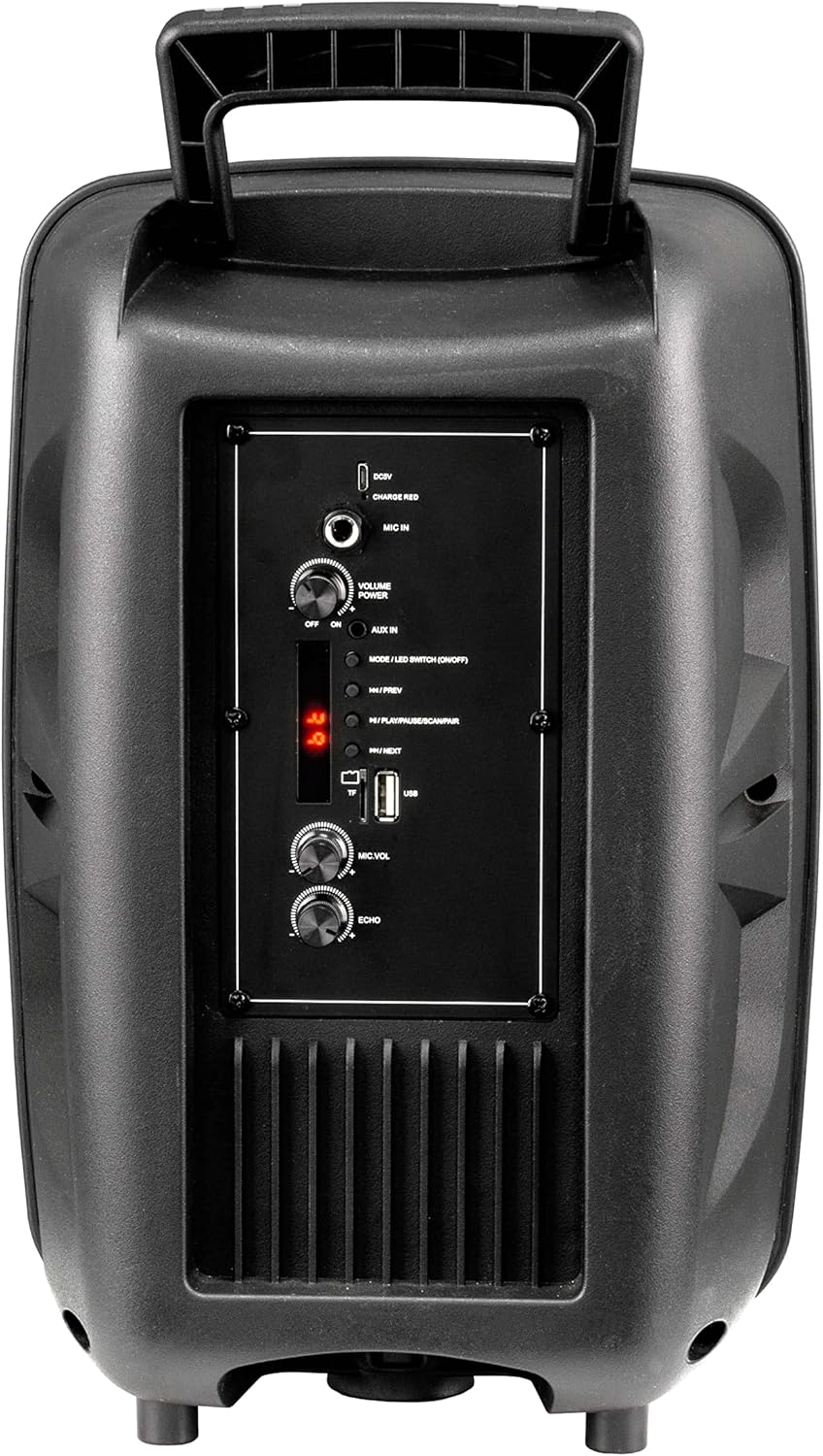
Image: Rear Control Panel Overview.
- ДЦ 5В Улаз: Улаз за напајање за пуњење звучника.
- CHARGE RED Indicator: Lights up red when charging.
- МИЦ ИН: 6.35mm jack for connecting a wired microphone.
- VOLUME POWER (OFF/ON): Rotary knob to turn the speaker ON/OFF and adjust the master volume.
- АУКС ИН: 3.5mm audio input for connecting external audio devices.
- MODE / LED SWITCH (ON/OFF): Press to switch between input modes (Bluetooth, USB, MicroSD, AUX). Press and hold to turn the LED light show ON/OFF.
- |<< / PREV: Притисните за прелазак на претходну нумеру.
- >>| / NEXT: Притисните за прелазак на следећу нумеру.
- >|| / PLAY/PAUSE / SCAN/PAIR: Press to play or pause audio. In FM mode, press and hold to scan for stations. In Bluetooth mode, press and hold to initiate pairing.
- TF (MicroSD) Card Slot: Insert a MicroSD card for MP3 playback.
- УСБ порт: Уметните УСБ флеш диск за репродукцију МП3 датотеке.
- МИЦ.ВОЛ: Rotary knob to adjust the microphone volume.
- ЕЦХО: Rotary knob to adjust the microphone echo effect.
5. Подешавање
5.1. Пуњење звучника
Before first use, fully charge the speaker. Connect the provided charging cable to the DC 5V input on the rear panel and plug the other end into a suitable USB power source (e.g., USB wall adapter, computer USB port). The "CHARGE RED" indicator will light up during charging and turn off when fully charged.
5.2. Укључивање/искључивање
Rotate the "VOLUME POWER" knob clockwise to turn the speaker ON. Rotate it counter-clockwise until it clicks to turn the speaker OFF.
6. Упутство за употребу
6.1. Блуетоотх режим
- Turn on the speaker. It will automatically enter Bluetooth pairing mode, indicated by a flashing "BLUE" on the LED display.
- Омогућите Блутут на свом мобилном уређају (паметном телефону, таблету, рачунару).
- Тражи "R-MUSIC BOOSTER S" (or similar name) in your device's Bluetooth list and select it to pair.
- Once successfully paired, the speaker will emit a confirmation tone, and the "BLUE" indicator will stop flashing.
- You can now play audio from your device through the speaker. Use the speaker's control buttons or your device to control playback.
6.2. Репродукција са USB / MicroSD картице
- Insert a USB flash drive or MicroSD card (pre-loaded with MP3 audio fileс) у одговарајући порт.
- The speaker will automatically switch to USB or TF (MicroSD) mode and begin playing the first compatible audio file.
- Use the "|<<" and ">>|" buttons to navigate between tracks. Use the ">||" button to play or pause.
6.3. Режим AUX улаза
- Повежите један крај аудио кабла од 3.5 мм (није укључен) са AUX IN портом на звучнику.
- Connect the other end to the headphone jack or audio output of your external device (e.g., MP3 player, laptop).
- Press the "MODE" button until "AUX" is displayed on the LED screen.
- Play audio from your external device. Volume can be controlled via the speaker's master volume knob or your external device.
6.4. Употреба микрофона
- Connect a wired microphone to the "MIC IN" jack.
- Adjust the microphone volume using the "MIC.VOL" knob.
- Adjust the echo effect using the "ECHO" knob.
6.5. LED Light Show
Press and hold the "MODE / LED SWITCH" button to toggle the dynamic LED light show ON or OFF.
7. Одржавање
- Очистите звучник меком, сувом крпом. Не користите абразивна средства за чишћење или раствараче.
- Држите звучник даље од воде, влаге и екстремних температура.
- Не блокирајте отворе за вентилацију.
- Чувајте звучник на хладном и сувом месту када га не користите дуже време.
КСНУМКС. Решавање проблема
| Проблем | Могући узрок | Решење |
|---|---|---|
| Нема струје | Battery is depleted; Power knob is off. | Charge the speaker; Rotate the VOLUME POWER knob clockwise to turn on. |
| Нема звука | Volume too low; Incorrect mode selected; Device not paired (Bluetooth); Cable not connected (AUX). | Повећајте јачину звука; Притисните дугме MODE да бисте изабрали исправан улаз; Поново упарите Bluetooth уређај; Проверите везу AUX кабла. |
| Блуетоотх упаривање није успело | Звучник није у режиму упаривања; Уређај је предалеко; Сметње. | Ensure speaker is in Bluetooth mode (flashing BLUE); Move device closer; Turn off other Bluetooth devices. |
| USB/MicroSD not playing | Неподржано file формат; Оштећен files; Card/drive not inserted correctly. | Осигурати files are MP3 format; Try another USB/MicroSD; Re-insert card/drive. |
9. Спецификације
- Модел: RM301891 (Booster S)
- Бренд: Р-МУСИЦ
- Повезивање: Bluetooth, USB, MicroSD, 3.5mm AUX
- Максимална излазна снага: 40 Ваттс
- Тип звучника: Subwoofer (as per product data, likely refers to bass capability)
- Тип монтаже: Флоор Стандинг
- Димензије (паковање): 44.4 x 30.1 x 22.6 цм (приближно 17.5 x 11.8 x 8.9 инча)
- Weight (Packaging): 1.9 килограма (приближно 4.2 лбс)
- Улазна снага: ДЦ 5В
10. Безбедносне информације
- Do not disassemble or modify the speaker. This may cause electric shock, fire, or product damage.
- Do not expose the speaker to rain, moisture, or extreme temperatures.
- Избегавајте испуштање или излагање звучника јаким ударима.
- Чувати ван домашаја деце.
- Користите само назначени кабл за пуњење и адаптер за напајање.
- Дуготрајно слушање при високим нивоима јачине звука може довести до оштећења слуха.
11. Гаранција и подршка
R-MUSIC products are designed and manufactured to the highest quality standards. For warranty information and technical support, please refer to the warranty card included with your product or contact your local retailer. Keep your purchase receipt as proof of purchase.
For further assistance, you may visit the official R-MUSIC webсајту или се обратите њиховом одељењу за корисничку подршку.