
1. Увод
The ProForm Carbon T7 Smart Treadmill is designed to provide an effective and engaging cardiovascular workout experience in your home. Featuring a 7-inch HD touchscreen and integration with iFIT, this treadmill offers a variety of interactive training options. This manual provides essential information for the safe assembly, operation, maintenance, and troubleshooting of your Carbon T7 treadmill.

This image shows the ProForm Carbon T7 Smart Treadmill from a front-side angle, highlighting its console with a 7-inch HD touchscreen, the running deck, and the sturdy frame.
2. Важне информације о безбедности
Before operating the ProForm Carbon T7 Smart Treadmill, please read all instructions carefully. Keep this manual for future reference. Failure to follow these instructions could result in injury or damage to the product.
- Увек се консултујте са лекаром пре него што започнете било који програм вежбања.
- Поставите траку за трчање на равну површину са најмање 2 метра (6.5 стопа) слободног простора иза ње и 0.5 метара (1.6 стопе) са сваке стране.
- Држите децу и кућне љубимце подаље од траке за трчање током рада.
- Не користите траку за трчање ако је оштећен кабл за напајање или утикач или ако не ради исправно.
- Wear appropriate exercise clothing and athletic shoes. Avoid loose clothing that could get caught in moving parts.
- Always use the safety key. Attach the clip to your clothing before starting the treadmill.
- Немојте се пењати на траку за трчање нити силазити са ње док се трака креће.
- Do not attempt to adjust or repair the treadmill yourself. Contact qualified service personnel.
3. Скупштина
The ProForm Carbon T7 Treadmill requires assembly. For detailed, step-by-step 3D instructions, download the free Bilt app on your smartphone or tablet. Ensure all parts are present before beginning assembly. It is recommended to have two people for assembly due to the weight and size of the components.
- Unpack all components and place them on a clear, flat surface.
- Follow the instructions provided in the Bilt app or the included assembly guide.
- Ensure all bolts, nuts, and screws are securely tightened before use.

The ProForm Carbon T7 Smart Treadmill is shown in its upright, folded configuration, illustrating its SpaceSaver design for compact storage when not in use.
4. Операција
4.1 Почетак рада
- Прикључак за напајање: Укључите кабл за напајање у уземљену утичницу.
- Сигурносни кључ: Attach the safety key clip to your clothing and insert the safety key into the console. The treadmill will not operate without the safety key in place.
- Standing on the Treadmill: Stand on the foot rails, not the running belt, before starting your workout.
- Започињање тренинга: Press the 'Start' button on the console. The belt will begin to move at a low speed.
4.2 Using the Console and 7" HD Touchscreen
The Carbon T7 features a 7-inch HD interactive touchscreen display that allows you to stream iFIT workouts directly. The console also includes physical buttons for quick adjustments.
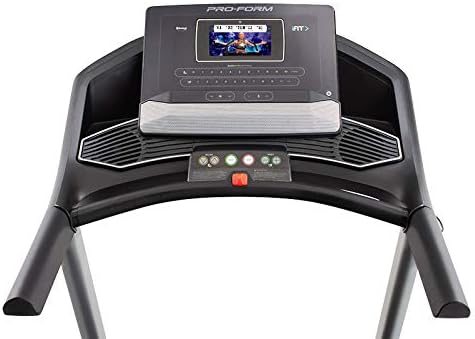
Детаљно view of the treadmill's console, featuring the 7-inch HD touchscreen display, control buttons for speed and incline, and integrated speakers.
- Навигација на екрану осетљивом на додир: Use the touchscreen to browse iFIT workouts, adjust settings, and view workout metrics.
- QuickSpeed Controls: Use the 'Speed' buttons or quick-select buttons on the console to adjust the running belt speed from 0 to 10 MPH.
- Quick Incline Controls: Use the 'Incline' buttons or quick-select buttons to adjust the incline from 0% to 10%.
- Заустављање тренинга: Press the 'Stop' button to pause or end your workout. Remove the safety key to fully power off the treadmill.
4.3 iFIT Integration
Your ProForm Carbon T7 Treadmill includes a 30-Day iFIT Family Membership. iFIT provides access to live workouts, studio classes, and global workouts led by expert personal trainers. With iFIT, your trainer can auto-adjust your treadmill's speed and incline for an optimized and immersive exercise experience.
- Activating iFIT: Follow the on-screen prompts on the 7-inch HD touchscreen to activate your iFIT membership.
- Избор тренинга: Browse the iFIT library for a wide range of workouts, including running, walking, and cross-training.
- Trainer Control: During iFIT workouts, the treadmill's speed and incline may automatically adjust according to the trainer's program. You can override these adjustments manually if needed.

A woman is shown actively running on the ProForm Carbon T7 Smart Treadmill, demonstrating its use in a typical home environment. The treadmill's running deck and console are visible.
5. Одржавање
Regular maintenance ensures the longevity and optimal performance of your ProForm Carbon T7 Treadmill.
- Чишћење: Regularly wipe down the treadmill surfaces with a damp тканина. Избегавајте употребу абразивних средстава за чишћење или растварача.
- Belt Cleaning: Periodically clean the running belt and the area beneath it to prevent debris buildup.
- Подмазивање каиша: The running belt is pre-lubricated. Refer to the full product manual for specific lubrication instructions and frequency, typically required after a certain number of hours of use.
- Поравнање и затезање каиша: Check the running belt for proper alignment and tension. Adjust as needed according to the detailed instructions in the full product manual.
- Преглед кабла за напајање: Inspect the power cord for any damage. If damaged, discontinue use and contact customer support.
КСНУМКС. Решавање проблема
If you encounter issues with your ProForm Carbon T7 Treadmill, refer to the table below for common problems and solutions.
| Проблем | Могући узрок | Решење |
|---|---|---|
| Трака за трчање се не укључује. | Power cord not plugged in; circuit breaker tripped; safety key not inserted. | Ensure power cord is securely plugged in. Check household circuit breaker. Insert safety key fully into the console. |
| Трака за трчање се не помера. | Safety key not inserted; 'Start' button not pressed; motor overload. | Insert safety key. Press 'Start'. If motor overload, reduce load and try again. |
| Каиш клизи или оклева. | Затегнутост каиша је превише лабава; каиш захтева подмазивање. | Adjust belt tension according to the full manual. Lubricate the belt if necessary. |
| Console display is blank or unresponsive. | Power issue; software glitch. | Ensure power is connected. Try unplugging the treadmill for 60 seconds and plugging it back in. If issue persists, contact customer support. |
7. Спецификације
Key technical specifications for the ProForm Carbon T7 Smart Treadmill:
| Феатуре | Детаљ |
|---|---|
| Број модела | ПФТЛ87720 |
| Димензије производа (Д к Ш к В) | 186.69 цм x 89.41 цм x 146.05 цм (73.5" x 35.2" x 57.5") |
| Тежина артикла | 97.98 кг (216 лбс) |
| Моторна коњска снага | 2.6 CHP (Continuous Horsepower) |
| Спеед Ранге | 0-10 MPH (0-16 KPH) |
| Распон нагиба | 0-10% Digital Quick Incline |
| Tread Belt Size | 20" x 55" (51 цм x 140 цм) |
| Дисплаи | 7" HD Interactive Touchscreen |
| Тежина Капацитет | 300 фунти (136 кг) |
| Материјал оквира | легирани челик |
| Извор напајања | Цордед Елецтриц |
| Посебне карактеристике | SpaceSaver Design, ISO Flex Deck Cushioning |
8. Гаранција и корисничка подршка
Your ProForm Carbon T7 Smart Treadmill is backed by a comprehensive warranty to ensure your peace of mind.
- Гаранција на оквир: 10 године
- Гаранција на делове и рад: 1 година
For warranty claims, technical assistance, or to order replacement parts, please contact ProForm customer support. Refer to the contact information provided in your product packaging or on the official ProForm webсајту.