
1. Увод
The Vgate VR800 OBD2 Scanner is a powerful and user-friendly diagnostic tool designed for automotive enthusiasts and professional mechanics alike. It provides comprehensive diagnostic functions for OBD-II/EOBD compliant vehicles, enabling users to quickly identify and resolve issues related to the Check Engine Light (CEL). This manual provides detailed instructions on how to set up, operate, and maintain your VR800 scanner to ensure optimal performance and accurate vehicle diagnostics.
2. Производ је готовview
The Vgate VR800 is a handheld diagnostic device featuring a color LCD display, intuitive button layout, and a durable OBD-II connector cable. Its compact design allows for easy portability and use in various automotive environments.
2.1 кључне компоненте
- ЛЦД екран у боји: Provides clear and detailed diagnostic information.
- Дугмад за навигацију: Стрелице горе, доле, лево, десно за навигацију по менију.
- Дугме ОК: Потврђује изборе.
- Дугме I/M: Shortcut for I/M Readiness status.
- Question Mark (?) Button: Provides help and DTC lookup information.
- Дугме за повратак: Враћа се на претходни екран.
- OBD-II конектор: Connects the scanner to the vehicle's diagnostic port.
- УСБ порт: For software updates and data printing.

3. Карактеристике
The Vgate VR800 OBD2 Scanner offers a comprehensive set of features for vehicle diagnostics:
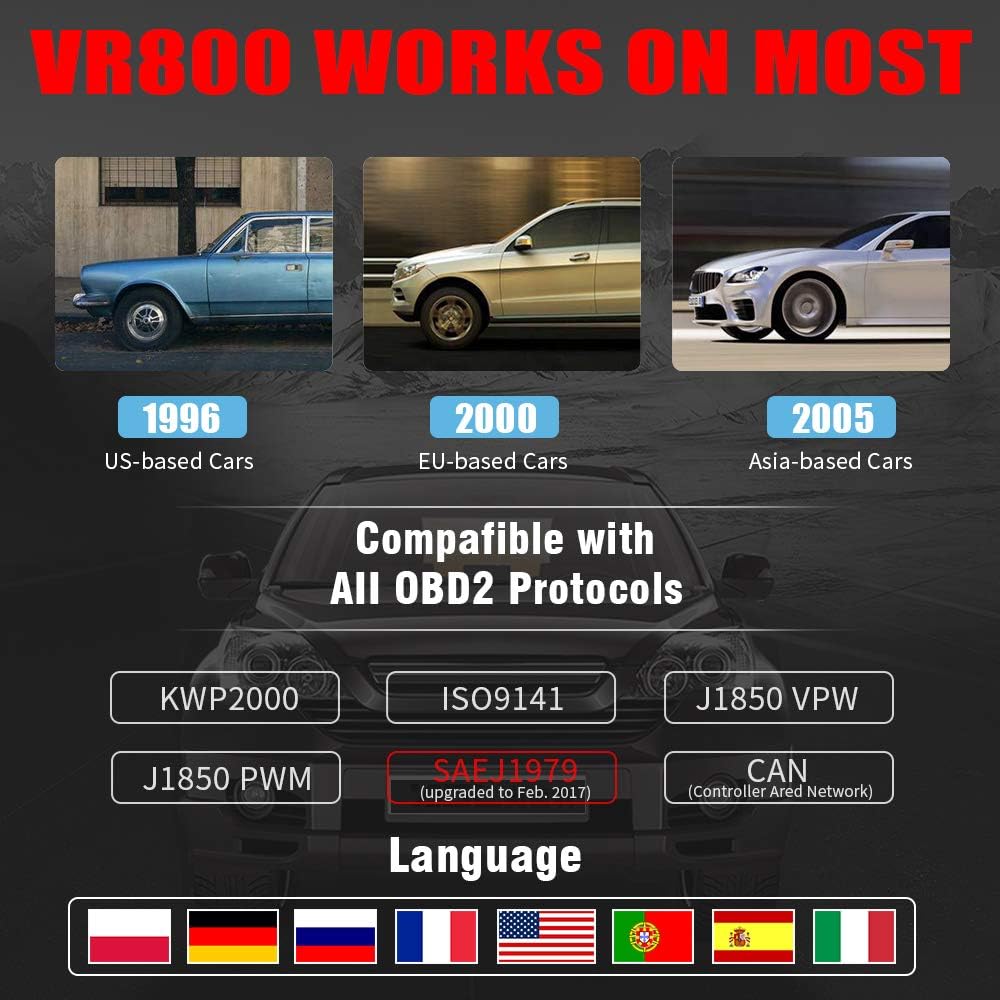
- All OBD2 Protocols Support: Compatible with ISO9141, KWP2000, J1850 PWM, J1850 VPW, and CAN protocols. Compliance with SAEJ1979 has been upgraded to the latest standards (February 2017).
- Широка компатибилност возила: Works with most American vehicles manufactured after 1996, European vehicles after 2000, and Asian vehicles after 2005. Applicable to OBD-II/CAN/EOBD-compliant vehicles, including light-duty trucks (6.5T or less), SUVs, and minivans.
- Smog Check Helper (I/M Readiness): Features Red-Yellow-Green LEDs and a built-in speaker to indicate readiness status for emissions testing. Dedicated I/M and '?' shortcut keys provide quick access to readiness checks.
- Full OBD Service Modes: Quickly reads and checks Diagnostic Trouble Codes (DTCs), views freeze frame data, reads live PCM data stream, performs On-Board Monitor tests, and displays live O2 sensor test data.
- Built-in DTC Lookup Library: Allows accurate determination of the causes of the Check Engine Light.
- Accurate Battery Status Check: Reads real-time battery and voltagе информације.
- Подршка за више језика: Available in English, French, German, Italian, Spanish, Russian, Polish, and Portuguese.
- Data Logging and Printing: Supports data logging and connection to a PC for printing diagnostic data files.



4. Подешавање
Follow these steps to set up your Vgate VR800 OBD2 Scanner:
- Пронађите OBD-II порт: OBD-II порт се обично налази испод контролне табле на страни возача. Погледајте упутство за употребу вашег возила ако га не можете пронаћи.
- Повежите скенер: Plug the VR800's OBD-II connector cable firmly into the vehicle's OBD-II port.
- Укључено: The scanner will automatically power on once connected to the vehicle's OBD-II port. No external power source or batteries are required as it draws power directly from the vehicle.
- Initial Setup (if prompted): If this is your first time using the scanner or after a factory reset, you may be prompted to select a language. Use the navigation buttons to select your preferred language and press OK.

5. Упутство за употребу
Once the scanner is connected and powered on, you can begin diagnosing your vehicle.
5.1 Навигација кроз мени
Користите UP и ДОВН arrow buttons to scroll through menu options. Press the OK button to select an option. Press the Повратак дугме за повратак на претходни екран.
5.2 Читање дијагностичких кодова грешака (DTC)
- Из главног менија изаберите Прочитајте ДТЦ.
- The scanner will display any active or pending DTCs. Each code will have a brief description.
5.3 Clearing DTCs
Warning: Clearing DTCs will erase all diagnostic trouble codes from the vehicle's computer and may reset readiness monitors. Ensure you have addressed the underlying issue before clearing codes.
- Из главног менија изаберите Обришите ДТЦ.
- Confirm your selection when prompted. The scanner will attempt to clear the codes.
5.4 I/M Readiness Function
The I/M Readiness function checks if the various emissions-related systems on the vehicle are operating correctly and if they have completed their self-tests.
- Притисните посвећено И/М дугме на скенеру.
- The display will show the status of various monitors (e.g., O2 Sensor, EVAP, Catalyst). A green light indicates ready, yellow indicates pending, and red indicates not ready or a fault.
5.5 Viewинг Ливе Дата
Live Data allows you to view real-time sensor data from the vehicle's engine control unit (ECU).
- Из главног менија изаберите Ливе Дата.
- Choose the specific data parameters you wish to view (e.g., engine RPM, vehicle speed, O2 sensor voltagи).
5.6 ДТЦ тражење
If you have a DTC and need more information, use the built-in DTC lookup library.
- Из главног менија изаберите ДТЦ Лоокуп или притисните тастер ? button when a DTC is displayed.
- Enter the DTC code (if not already displayed) to get a detailed description and possible causes.
5.7 Провера статуса батерије
To check your vehicle's battery voltage and status:
- Из главног менија изаберите Батерија.
- Скенер ће приказати тренутни капацитет батеријеtage and an estimated charge percentage.
6. Одржавање
Proper maintenance ensures the longevity and accuracy of your Vgate VR800 scanner.
- Чишћење: Користите меку, суву крпу за чишћење спољашњости скенера. Не користите абразивна средства за чишћење или раствараче.
- Складиштење: Чувајте скенер на чистом, сувом месту, даље од екстремних температура и директне сунчеве светлости.
- Ажурирања софтвера: Regularly check for software updates to ensure compatibility with the latest vehicle models and diagnostic protocols. Updates can typically be performed by connecting the scanner to a PC via the USB port and using the provided update software.
КСНУМКС. Решавање проблема
If you encounter issues while using your Vgate VR800 scanner, refer to the following common problems and solutions:
- Скенер се не укључује:
- Уверите се да је OBD-II конектор безбедно прикључен у порт возила.
- Verify the vehicle's ignition is in the ON position (engine can be off).
- Проверите осигурач возила за OBD-II порт (консултујте упутство за ваше возило).