
1. Увод
The Aputure Amaran 200d is a high-output 200W LED video light designed for professional and enthusiast filmmakers and photographers. It offers exceptional color fidelity, versatile control options, and a robust build, making it suitable for various lighting scenarios. This manual provides detailed instructions for the safe and effective use of your Amaran 200d.

Figure 1.1: The Amaran 200d LED Video Light with its standard reflector mounted on a light stand.
2. Безбедносне информације
Молимо вас да прочитате и разумете сва безбедносна упозорења и упутства пре употребе овог производа. Непоштовање ових упутстава може довести до струјног удара, пожара или озбиљних повреда.
- Do not expose the light to water or high humidity.
- Do not disassemble or modify the light. Refer all servicing to qualified personnel.
- Ensure the power supply is compatible with the local voltagе (100-240В).
- Do not block the ventilation openings on the light fixture. Overheating can cause damage.
- Avoid direct eye exposure to the LED light source when it is powered on.
- Always secure the light fixture properly on a stable light stand before operation.
3. Шта је у кутији
Проверите да ли су све компоненте присутне након распакивања:
- Amaran 200d LED Lamp Глава
- Standard Bowens Mount Reflector
- Јединица за напајање наизменичном струјом
- Кабл за напајање наизменичном струјом

Figure 3.1: Included components of the Amaran 200d package.
4. Подешавање
4.1 Mounting the Light Head
- Attach the Amaran 200d lamp head to a compatible light stand using the integrated mounting bracket.
- Secure the light head by tightening the locking knob on the mounting bracket.

Figure 4.1: The Amaran 200d securely mounted on a light stand.
4.2 Причвршћивање рефлектора
- Align the three mounting prongs of the standard reflector with the Bowens Mount on the front of the lamp глава.
- Insert the reflector into the mount and twist clockwise until it locks securely into place.
4.3 Прикључак за напајање
The Amaran 200d supports both AC and DC (48V) power input.
- Connect the AC power cable to the power supply unit.
- Connect the power supply unit's output cable to the 48V DC input port on the rear of the Amaran 200d lamp глава.
- Plug the AC power cable into a suitable wall outlet.
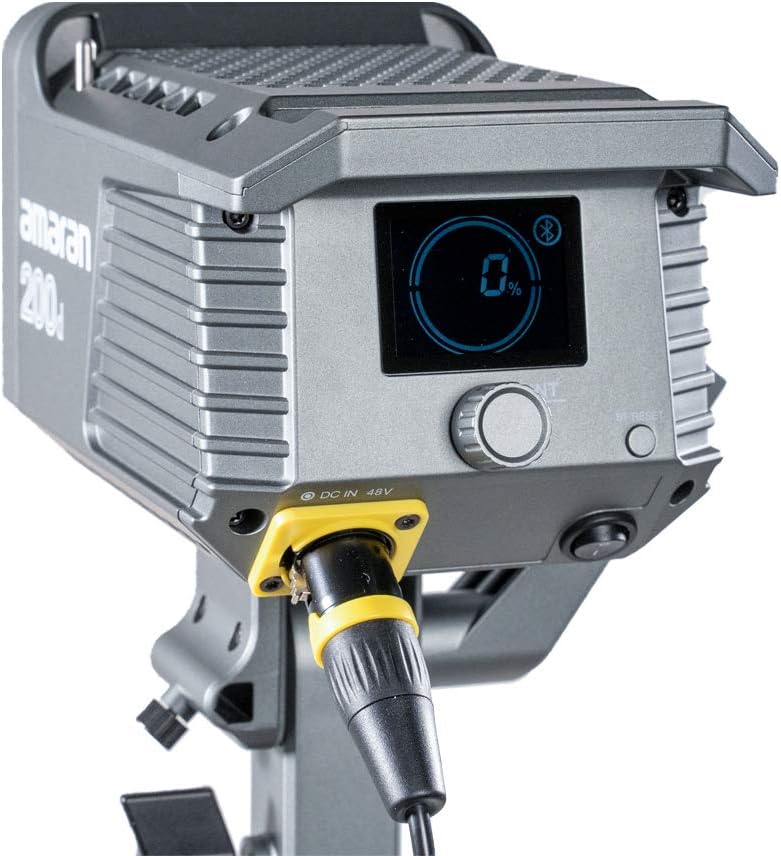
Figure 4.2: Detail of the DC 48V power input on the Amaran 200d.
5. Оперативни
5.1 Укључивање/искључивање
Locate the power switch on the rear panel of the light head. Flip the switch to the 'ON' position to power on the device. Flip it to 'OFF' to power down.
5.2 Контрола осветљености
The Amaran 200d features an INT adjustment knob for brightness control (0-100%).
- Rotate the INT knob clockwise to increase brightness.
- Rotate the INT knob counter-clockwise to decrease brightness.
- Press the INT knob to quickly cycle through preset brightness levels: 20%, 40%, 60%, 80%, 100%.
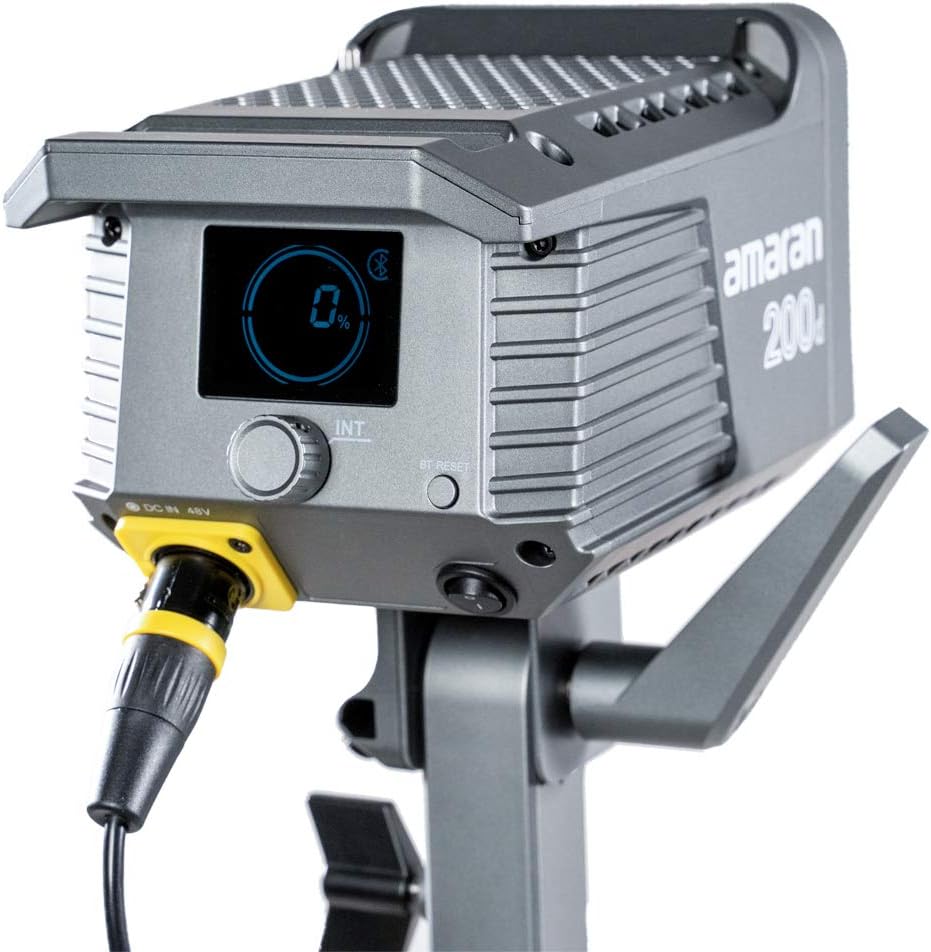
Figure 5.1: The control panel of the Amaran 200d, showing the display and adjustment knob.
5.3 светлосних ефеката
The Amaran 200d includes 8 pre-programmed lighting effects:
- Папараззи
- Ватромет
- Муња
- Неисправна сијалица
- TV
- Бреатх
- Фласх
- Експлозија
These effects can be accessed and controlled via the Sidus Link App.
5.4 Контрола апликације Сидус Линк
The Amaran 200d supports 2.4G Bluetooth control via the Sidus Link App, allowing remote adjustment of brightness, lighting effects, and frequency.
- Download the Sidus Link App from your device's app store.
- Уверите се да је Блуетоотх омогућен на вашем мобилном уређају.
- Open the Sidus Link App and follow the on-screen instructions to connect to your Amaran 200d.
- Once connected, you can control various parameters of the light remotely.

Figure 5.2: Controlling the Amaran 200d via the Sidus Link App.
6. Одржавање
6.1 Чишћење
- Увек искључите напајање пре чишћења.
- Use a soft, dry cloth to wipe the surface of the light.
- Немојте користити јаке хемикалије или абразивне материјале.
6.2 Складиштење
- Чувајте лампу на хладном и сувом месту, заштићено од директне сунчеве светлости.
- If storing for extended periods, disconnect the power supply.
КСНУМКС. Решавање проблема
| Проблем | Могући узрок | Решење |
|---|---|---|
| Светло се не укључује. | No power supply; loose connection; faulty power supply. | Check power cable connection; ensure outlet is working; test with another power supply if available. |
| Светло трепери или је нестабилно. | Loose power connection; overheating; interference. | Secure all connections; ensure proper ventilation; move away from other electronic devices. |
| Апликација Сидус Линк не може да се повеже. | Блутут искључен; светло није у режиму упаривања; проблем са апликацијом. | Ensure Bluetooth is on; restart light and app; try pairing again. |
8. Спецификације
- Димензије производа: 13 к 11.4 к 21 инча
- Тежина артикла: 10.34 фунти
- Број модела: 200Д
- Бренд: Апутуре
- Технологија повезивања: Блутут, радио фреквенција
- Опис режима блица: Constant illumination, adjustable brightness, 8 built-in lighting effects
- Температура боје: 5600К (дневно светло)
- ЦРИ: ≥95
- ТЛЦИ: ≥96
- Осветљење: Up to 65,000 lux@1m (with Hyper-Reflector)
- Монтирај: Universal Bowens Mount
- Улазна снага: 48В ДЦ
9. Гаранција и подршка
Aputure products are designed for durability and performance. For specific warranty details and terms, please refer to the warranty card included with your product or visit the official Aputure website. For technical support, troubleshooting assistance, or service inquiries, please contact Aputure customer support through their official channels.
Optional protection plans are available for purchase, such as 2-Year and 3-Year Protection Plans, which can provide extended coverage beyond the standard manufacturer's warranty.
За више информација посетите Продавница опреме.