
Увод
The Clean Remote CR3HOME is a universal TV remote control designed for simplicity and ease of use. It features a nonporous, sealed membrane surface for easy cleaning and enhanced hygiene. This remote is compatible with nearly all TV brands and cable boxes, offering a streamlined control experience without unnecessary buttons.
This manual provides instructions for setting up, operating, maintaining, and troubleshooting your CR3HOME remote control.
Производ је завршенview
The Clean Remote CR3HOME features a basic key layout, focusing on essential functions for TV and cable box control. It is designed to be user-friendly for all ages.

Слика: Фронт view of the Clean Remote CR3HOME, highlighting its simple key layout and absence of input, menu, or guide buttons.
Кључне карактеристике укључују:
- Universal compatibility with most TV brands and cable boxes.
- Nonporous, sealed membrane surface for easy cleaning.
- Simplified button layout: No Input, Menu, or Guide buttons.
- Large, easy-to-press buttons.
Упутства за подешавање
1. Инсталација батерије
- Пронађите одељак за батерије на полеђини даљинског управљача.
- Померите поклопац батерије надоле да бисте га отворили.
- Уметните две (2) ААА батерије, водећи рачуна о исправном поларитету (+ и -) као што је назначено унутар одељка.
- Replace the battery cover by sliding it back into place until it clicks.
2. TV Pairing
The CR3HOME remote is designed for quick setup with most televisions.
- For Samsung and LG TVs: The remote instantly replaces and works with these brands without any setup required. Simply point and use.
- For All Other TV Brands (One-Touch Setup):
- Ensure your TV is turned ON.
- Point the CR3HOME remote at your TV.
- Притисните и држите СЕТУП дугме док се црвена индикаторска лампица на даљинском управљачу не упали и не остане упаљена.
- Док држите СЕТУП дугме, притисните дугме ТВ МОЋ button once. The red light will blink.
- Release both buttons. The remote will now attempt to find the correct code for your TV. Test the remote by pressing the ТВ МОЋ button. If the TV turns off, the setup is complete.
- If the TV does not turn off, repeat steps 3-5. The remote cycles through codes quickly, so you may need to try a few times.
3. Cable Box Setup
The CR3HOME remote offers simple setup for cable boxes.
- Ensure your cable box is turned ON.
- Point the CR3HOME remote at your cable box.
- Притисните и држите СЕТУП дугме док се црвена индикаторска лампица на даљинском управљачу не упали и не остане упаљена.
- Док држите СЕТУП дугме, притисните дугме ЦБЛ button once. The red light will blink.
- Release both buttons. The remote will now attempt to find the correct code for your cable box. Test the remote by pressing the ЦХ+ or ЦХ- buttons. If the channel changes, the setup is complete.
- If the channel does not change, repeat steps 3-5.
Упутство за употребу
The Clean Remote CR3HOME is designed for straightforward operation with its essential buttons.
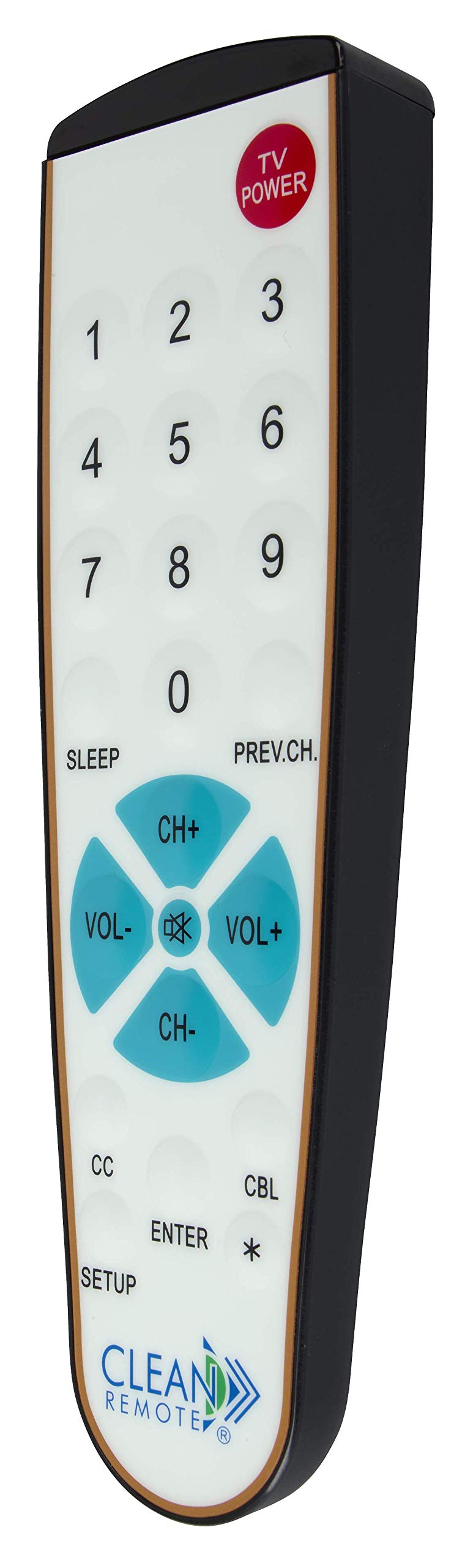
Слика: Детаљна view of the Clean Remote CR3HOME, illustrating the layout of its power, number, volume, and channel buttons.
- TV POWER: Укључује или искључује ваш телевизор.
- Дугмад са бројевима (0-9): Користи се за директан унос бројева канала.
- ВОЛ+ / ВОЛ-: Повећава или смањује јачину звука.
- ЦХ+ / ЦХ-: Мења канал нагоре или надоле.
- PREV.CH: Враћа се на претходно viewед цханнел.
- СПАВАЊЕ: Activates the TV's sleep timer function (if supported by your TV).
- CC (Closed Captioning): Toggles closed captioning on or off (if supported by your TV).
- ЕНТЕР: Confirms selections or channel entries.
- *: May function as a dash or special character depending on the TV/cable box.
Напомена: This remote intentionally omits Input, Menu, and Guide buttons to prevent accidental changes to TV settings, making it ideal for environments where simplicity is key.
Одржавање
The Clean Remote CR3HOME is designed for easy maintenance due to its spill-proof and sealed construction.
- Чишћење: To clean the remote, simply wipe its nonporous, sealed membrane surface with a damp cloth or a mild disinfectant wipe. Avoid using abrasive cleaners or submerging the remote in liquid.
- Замена батерије: Replace batteries when the remote's indicator light becomes dim or the remote becomes unresponsive. Always use fresh AAA batteries.
- Складиштење: Store the remote in a dry place away from extreme temperatures.
Решавање проблема
- Даљински не реагује:
- Проверите да ли су батерије правилно уметнуте и да ли су истрошене. Замените их ако је потребно.
- Ensure there is a clear line of sight between the remote and the TV/cable box. Remove any obstructions.
- Make sure you are within the effective range of the remote (typically up to 20 feet).
- Remote not controlling TV/Cable Box after setup:
- Repeat the TV Pairing or Cable Box Setup steps carefully. The remote cycles through codes, and sometimes it may require multiple attempts to find the correct one.
- Ensure the TV/cable box is powered on during the setup process.
- Нека дугмад не раде:
- Verify that the button functionality is supported by your specific TV or cable box model.
- Remember that the CR3HOME intentionally does not have Input, Menu, or Guide buttons.
Спецификације
| Бранд | ЦЛЕАН РЕМОТЕ |
| Број модела | CR3HOME |
| Посебна карактеристика | Spillproof, Universal |
| Компатибилни уређаји | Television, Cable Box |
| Технологија повезивања | Инфрацрвени |
| Тип контролера | Контрола дугмета |
| Извор напајања | 2 к ААА батерије (нису укључене) |
| УПЦ | 816466021271 |
Информације о гаранцији
Clean Remote products are typically covered by a limited manufacturer's warranty. Please refer to the packaging or the official Clean Remote webсајт за конкретне услове и одредбе гаранције, укључујући детаље о трајању и покривености. Сачувајте доказ о куповини за потребе подношења захтева за гаранцију.
Корисничка подршка
For further assistance, technical support, or inquiries regarding your Clean Remote CR3HOME, please visit the official Clean Remote webсајт или контактирајте њихову службу за кориснике. Контакт информације се обично могу наћи на паковању производа или на произвођачевој webсајту.