
1. Увод
Хвала вам на куповиниasing the Boytone BT-120MX 12 Channel Bluetooth Studio Audio Mixer. This professional audio mixer is designed for a variety of applications, including studio recording, live performances, and DJ setups. It features 12 channels, Bluetooth connectivity, a USB MP3 player, PC recording capabilities, 48V phantom power, and a 24-bit digital effect processor. This manual provides detailed instructions for setup, operation, and maintenance to ensure optimal performance and longevity of your device.
2. Безбедносне информације
- Напајање: Користите само наведени адаптер за напајање. Уверите се да је јачина звукаtagе одговара вашем локалном извору напајања.
- Вода и влага: Не излажите миксер води, киши или прекомерној влази. Избегавајте стављање предмета напуњених течношћу на уређај.
- вентилација: Обезбедите одговарајућу вентилацију око уређаја. Не блокирајте вентилационе отворе.
- Извори топлоте: Keep the mixer away from heat sources such as radiators, heat registers, stoves, or other heat-producing appliances.
- Чишћење: Disconnect power before cleaning. Use a dry, soft cloth. Do not use liquid cleaners or aerosols.
- Сервисирање: Не покушавајте сами да сервисирате овај производ. Све сервисирање препустите квалификованом сервисном особљу.
- Фантомска снага: When using 48V phantom power, ensure condenser microphones are connected before activating to prevent damage.
3. Садржај пакета
Проверите да ли су све ставке присутне у пакету:
- Boytone BT-120MX Audio Mixer
- Повер Адаптер
- УСБ кабл
- Кориснички приручник (овај документ)
4. Производ је готовview
The Boytone BT-120MX is a versatile 12-channel mixer designed for comprehensive audio control. It features a robust metal chassis and intuitive controls for various audio sources.

Слика 4.1: Предња страна view of the Boytone BT-120MX Audio Mixer. This image displays the full layout of the mixer's controls and input/output sections.
4.1 Улазно/излазне везе
The mixer offers a wide range of connectivity options for various audio equipment.

Слика 4.2: Детаљно view of the input and output ports on the Boytone BT-120MX. This includes XLR/1/4" combo jacks, RCA inputs, 1/4" mono/stereo inputs, send/return jacks, and main outputs.
- XLR/1/4" Combo Inputs (Channels 1-4): For microphones (XLR) or line-level instruments (1/4").
- 1/4" Line Inputs (Channels 5-12): For line-level instruments or audio devices.
- RCA Inputs (Stereo Pairs): For connecting consumer audio devices.
- Main Outputs (1/4" L/R): Повежите се на напајање ampлифери или звучници са напајањем.
- Headphone Jack (1/4"): For monitoring audio.
- УСБ порт: For PC recording/playback and USB MP3 player functionality.
4.2 Карактеристике контролне табле
The mixer's control panel provides comprehensive adjustments for each channel and master output.

Figure 4.3: Close-up of the Bluetooth and USB section of the Boytone BT-120MX. This highlights the USB port for media playback and PC connection, and the Bluetooth indicator.
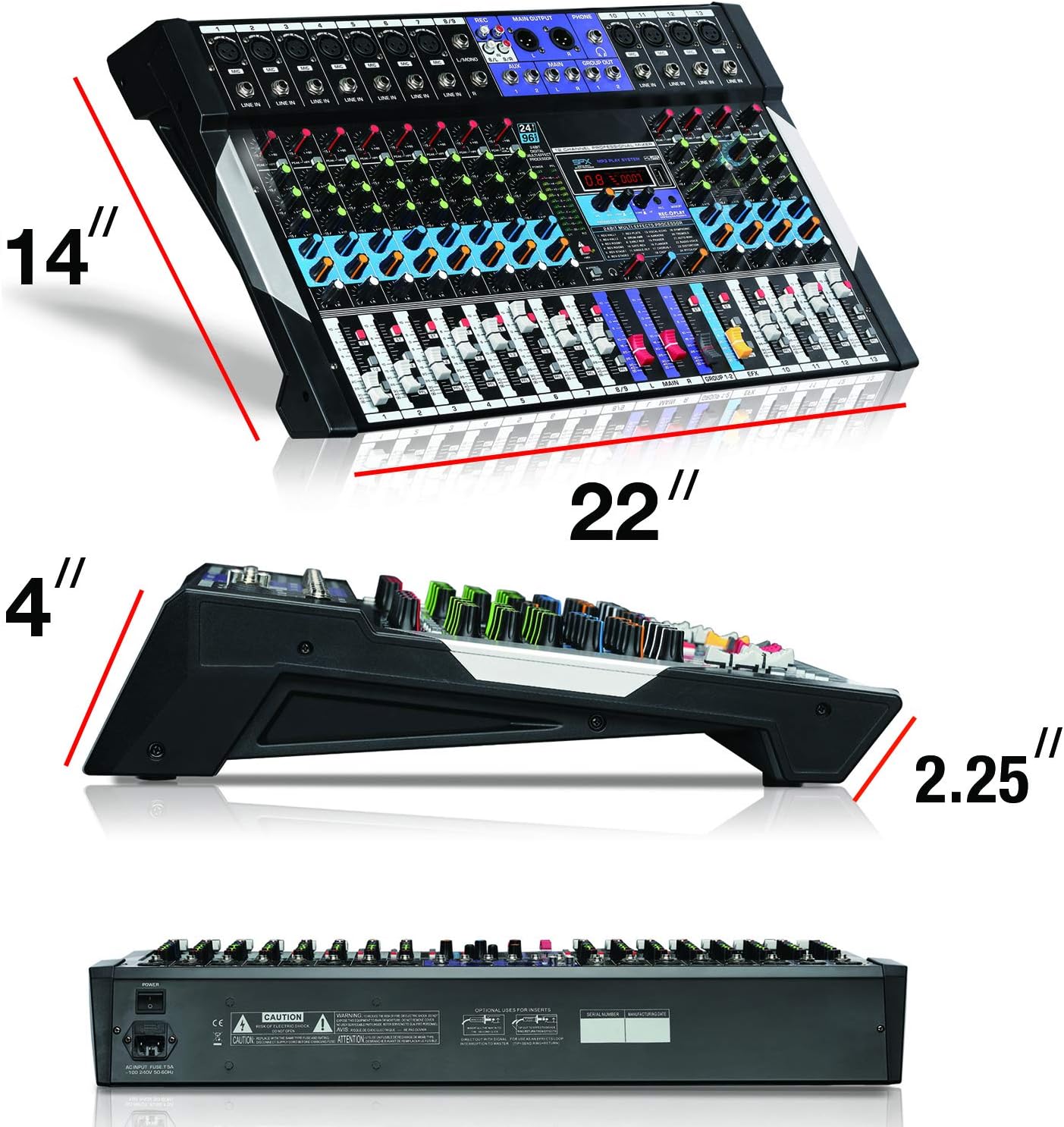
Figure 4.4: Close-up of the 24-bit digital multi-effect processor section. This shows the display, parameter controls, and effect selection options.
- Гаин Цонтрол: Подешава осетљивост улаза за сваки канал.
- High, Mid, Low EQ: Three-band equalizer for tone shaping on each channel.
- AUX Send: Controls the level of the channel signal sent to the AUX output for external effects or monitoring.
- Пан Цонтрол: Подешава стерео позицију сигнала канала.
- Цханнел Фадерс: Controls the volume level of individual channels.
- Main Mix Faders: Контролише укупну излазну јачину звука.
- +48V Phantom Power Switch: Activates phantom power for condenser microphones.
- 24BIT Digital Multi Effect Processor: Provides various digital effects (e.g., reverb, delay) with parameter adjustments.
- USB/MP3 Player Controls: Playback, pause, skip, and mode selection for USB media.
- Блуетоотх индикатор: Приказује статус Bluetooth везе.
5. Водич за подешавање
Follow these steps to set up your Boytone BT-120MX mixer.
5.1 Прикључак за напајање
- Уверите се да је прекидач за напајање миксера у положају ИСКЉУЧЕНО.
- Connect the power adapter to the mixer's power input.
- Укључите адаптер за напајање у одговарајућу електричну утичницу.
5.2 Повезивање аудио извора
- микрофони: Connect XLR microphones to the XLR inputs (Channels 1-4). If using condenser microphones, ensure the +48V phantom power is OFF before connecting, then activate it after connection.
- Instruments/Line Devices: Повежите инструменте (нпр. клавијатуре, гитаре) са претходнимamps) or other line-level devices to the 1/4" line inputs or RCA inputs.
- УСБ уређај: Убаците УСБ флеш диск са МП3 fileс у УСБ порт за репродукцију.
5.3 Повезивање излазних уређаја
- Звучници/Ampослободиоци: Connect the mixer's MAIN OUT (1/4" L/R) to your power ampлифиер или активни звучници.
- Слушалице: Connect headphones to the 1/4" HEADPHONE jack for monitoring.
5.4 PC Connection for Recording/Playback
- Connect the mixer to your computer using a USB cable.
- Your computer should recognize the mixer as an audio device. Select it as the input/output device in your audio software settings.
6. Упутство за употребу
6.1 Basic Mixing
- Turn on the mixer and all connected audio devices.
- Set all channel faders and the main mix faders to their lowest position.
- For each active channel, gradually increase the GAIN control until the PEAK LED flashes only occasionally.
- Adjust the HIGH, MID, and LOW EQ controls to shape the tone of each input.
- Slowly raise the channel fader for each input to the desired level.
- Adjust the MAIN MIX faders to control the overall output volume.
- Use the PAN control to position the sound within the stereo field.
6.2 Bluetooth повезивање
- Press the MODE button on the USB/MP3 player section until 'BT' or 'Bluetooth' is displayed.
- On your Bluetooth-enabled device (smartphone, tablet, etc.), search for available devices.
- Select 'Boytone Mixer' or a similar name from the list to pair.
- Once paired, audio from your device will stream wirelessly to the mixer. Adjust the USB/MP3 channel fader for volume control.
6.3 Репродукција MP3 меморије са USB-а
- Уметните УСБ флеш диск који садржи МП3 аудио fileс у УСБ порт.
- The mixer will automatically switch to USB mode or you may need to press the MODE button.
- Use the PLAY/PAUSE, PREVIOUS, and NEXT buttons to control playback.
- Adjust the USB/MP3 channel fader for volume control.
6.4 PC Recording
- Connect the mixer to your PC via USB.
- Open your preferred Digital Audio Workstation (DAW) software (e.g., Audacity, GarageBand, Ableton Live).
- In your DAW's audio settings, select the Boytone mixer as the input device.
- Arm a track for recording and begin recording. The main mix output of the mixer will be sent to your PC.
6.5 Процесор дигиталних ефеката
- Use the PROGRAM knob to select from the available 24 digital effects (e.g., Reverb, Delay, Chorus). The selected effect number will be displayed.
- Adjust the PARAMETER knob to fine-tune the selected effect (e.g., decay time for reverb, delay time for echo).
- Use the EFX SEND controls on each channel to send a portion of that channel's signal to the effects processor.
- Adjust the EFX RETURN fader to control the overall volume of the applied effect in the main mix.
6.6 +48V Phantom Power
The +48V phantom power supplies voltage to condenser microphones. Ensure dynamic microphones are not connected when phantom power is active, as this may cause damage.
- Connect your condenser microphone(s) to the XLR inputs.
- Locate the +48V PHANTOM POWER switch and activate it. The indicator LED will illuminate.
- Deactivate phantom power before disconnecting condenser microphones.
7. Одржавање
- Чишћење: Regularly wipe the mixer's surface with a soft, dry cloth. Avoid abrasive cleaners or solvents.
- Складиштење: Када се не користи, чувајте миксер на хладном и сувом месту, даље од директне сунчеве светлости и екстремних температура.
- Управљање кабловима: Уверите се да каблови нису запетљани или оптерећени, што може довести до оштећења.
КСНУМКС. Решавање проблема
| Проблем | Могући узрок | Решење |
|---|---|---|
| Нема излаза звука | Power off; incorrect connections; faders down; gain too low; output device issues. | Check power, all cable connections, channel faders, main mix faders, and gain controls. Verify external amplifier/speakers are on and working. |
| Изобличен звук | Gain too high; input signal too strong; damaged cables. | Reduce GAIN control. Check input source level. Replace faulty cables. |
| Блуетоотх се не повезује | Mixer not in Bluetooth mode; device too far; interference; device already paired. | Ensure mixer is in BT mode. Move device closer. Disconnect from other Bluetooth devices. Try re-pairing. |
| USB MP3 not playing | Нетачно file format; USB drive not recognized; mixer not in USB mode. | Осигурати files are MP3 format. Try a different USB drive. Press MODE to select USB. |
| Фантомско напајање не ради | Switch not activated; faulty microphone/cable. | Ensure +48V switch is ON and indicator is lit. Test with another condenser microphone or XLR cable. |
9. Спецификације
| Феатуре | Детаљ |
|---|---|
| Бранд | Боитоне |
| Модел | БТ-120МКС |
| Број канала | 12 |
| Технологија повезивања | Блуетоотх, УСБ |
| Извор напајања | Цордед Елецтриц |
| Фреквенцијски одзив | 20 Hz - 20 kHz |
| Тип излазног конектора | RCA, TRS (1/4") |
| Типови аудио улаза | XLR, RCA, 1/4" mono/stereo, USB |
| Волtage | 110В |
| Пхантом Повер | +48В |
| Дигитал Еффецтс | 24-bit Multi Effect Processor |
| Тежина артикла | 18 фунти |
| УПЦ | 643307992601 |
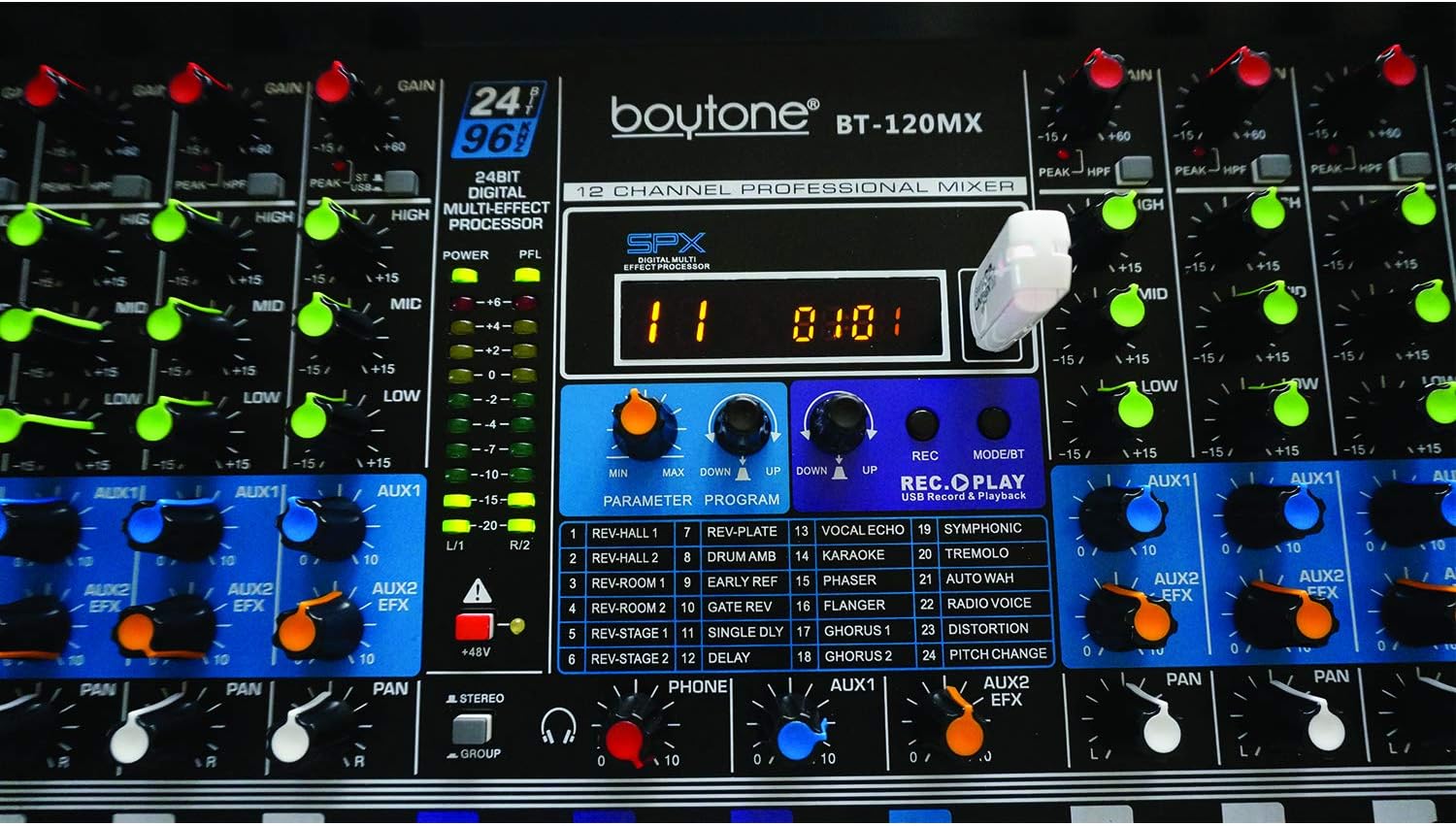
Figure 9.1: Dimensions of the Boytone BT-120MX mixer, showing approximate height, width, and depth.
10. Гаранција и подршка
Boytone products are designed for reliability and performance. This product is covered by a limited warranty against defects in materials and workmanship. For specific warranty terms and conditions, please refer to the warranty card included with your product or visit the official Boytone webсајту.
For technical support, troubleshooting assistance, or service inquiries, please contact Boytone customer support through their official website or the contact information provided in your product packaging. Please have your model number (BT-120MX) and purchase information ready when contacting support.