
1. Увод
Welcome to the Xtrfy M42 RGB Ultra-Light Gaming Mouse user manual. The Xtrfy M42 is engineered for high performance and comfort, featuring an ultra-light design, state-of-the-art components, and an adjustable symmetrical shape. This manual will guide you through the setup, operation, customization, and maintenance of your new gaming mouse.

Figure 1.1: Xtrfy M42 RGB Ultra-Light Gaming Mouse (Miami Blue edition)
2. Садржај пакета
Проверите да ли су све ставке присутне у паковању вашег производа:
- Xtrfy M42 RGB Ultra-Light Gaming Mouse
- Two sizes of interchangeable mouse shells
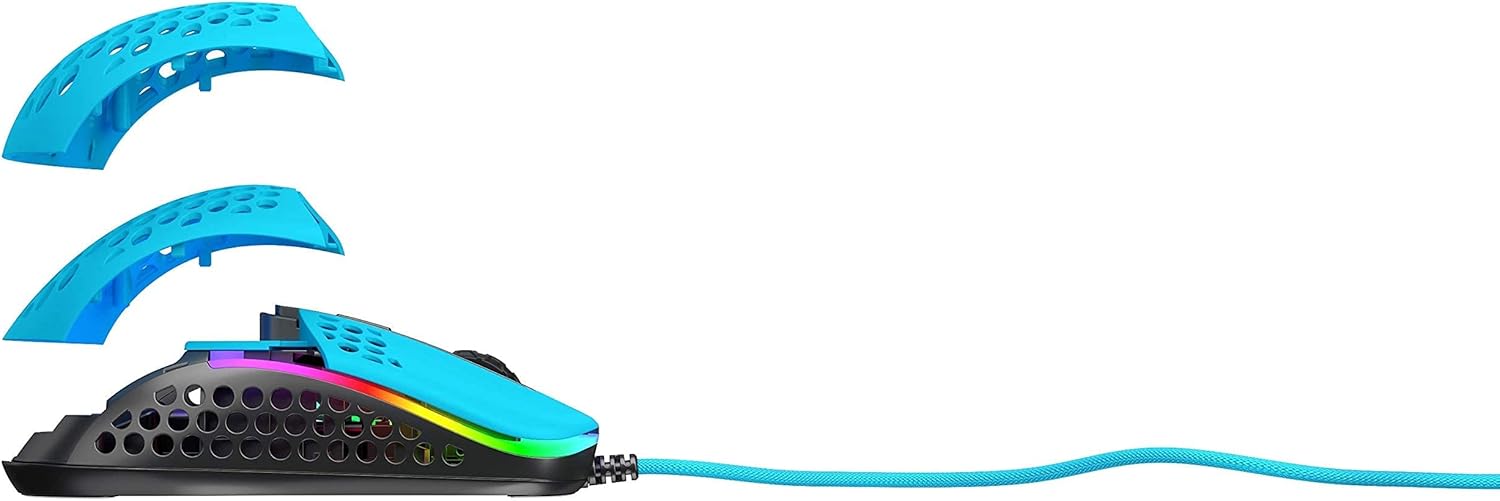
Figure 2.1: Xtrfy M42 with interchangeable top shells
3. Подешавање
Follow these steps to set up your Xtrfy M42 gaming mouse:
- Повежите миш: Plug the USB connector of the Xtrfy M42 mouse into an available USB port on your computer.
- Инсталација драјвера: The mouse is plug-and-play and typically does not require additional driver software. Your operating system will automatically detect and install the necessary drivers.
- Почетни тест: Move the mouse and click the buttons to ensure it is functioning correctly.

Figure 3.1: Xtrfy M42 connected via USB cable
4. Упутство за употребу
The Xtrfy M42 offers various functions for an optimized gaming experience.
4.1 Основне функције
- Леви клик: Примарно дугме за акцију.
- Десни клик: Secondary action button.
- Точак за померање: Scrolls content up or down. Can also be clicked for a middle-click function.
- Бочна дугмад: Typically used for forward/backward navigation or custom in-game commands.
4.2 ДПИ подешавање
The Xtrfy M42 features a Pixart 3389 sensor, allowing for precise DPI (Dots Per Inch) adjustments. The DPI button, usually located behind the scroll wheel, cycles through preset DPI levels. Refer to the Xtrfy website for specific DPI steps and corresponding LED indicators.
4.3 RGB осветљење
The mouse features customizable RGB lighting. All settings for LED effects, brightness, and color selection are controlled directly on the mouse, without the need for software. Consult the Xtrfy website or product packaging for specific button combinations to adjust RGB settings.
4.4 Стопа анкетирања
The polling rate, which determines how often the mouse reports its position to the computer, can typically be adjusted on gaming mice. Information on adjusting the polling rate for the M42 can be found on the official Xtrfy support page.
5. Прилагођавање
The Xtrfy M42 is designed with an adjustable symmetrical shape to accommodate various grip styles (palm, claw, fingertip) and hand sizes. This is achieved through interchangeable parts.
5.1 Changing Mouse Shells
The mouse comes with two different sized top shells. To change the shell:
- Gently detach the currently installed top shell from the mouse body.
- Align the desired new top shell with the mouse body and press it firmly until it clicks into place.
This allows you to modify the mouse's hump height and overall feel for optimal comfort and control.
Figure 5.1: Illustration of interchangeable mouse shells
6. Одржавање
Proper maintenance ensures the longevity and performance of your Xtrfy M42 gaming mouse.
6.1 Чишћење миша
- Искључите миш из рачунара пре чишћења.
- Користите меку, суву крпу која не оставља влакна да обришете површину миша.
- За тврдокорну прљавштину, благо дampОбришите крпу водом или благим раствором за чишћење. Избегавајте јаке хемикалије.
- Use compressed air to clear dust from the holes in the shell and around buttons.
6.2 Caring for PTFE Skates
The M42 features 100% PTFE skates for smooth glide. Keep the mouse pad and the underside of the mouse clean to prevent debris from accumulating on the skates, which can affect glide performance. Avoid scratching or damaging the skates.

Figure 6.1: Underside of the Xtrfy M42 mouse, highlighting the PTFE skates
КСНУМКС. Решавање проблема
If you encounter issues with your Xtrfy M42 mouse, try the following solutions:
- Миш не реагује:
- Уверите се да је УСБ кабл безбедно повезан са рачунаром.
- Покушајте да прикључите миш на други УСБ порт.
- Поново покрените рачунар.
- Tracking Issues (Jittery or No Movement):
- Очистите оптички сензор на доњој страни миша меком, сувом крпом.
- Уверите се да користите миш на одговарајућој површини (нпр. подлога за миш). Избегавајте површине са високим рефлектујућим својствима или провидне површине.
- RGB осветљење не ради:
- Check if the RGB lighting has been turned off via the on-mouse controls.
- Уверите се да је миш правилно повезан и да прима напајање.
For further assistance, refer to the Xtrfy official support resources.
8. Спецификације
| Феатуре | Детаљ |
|---|---|
| Број модела | М42 |
| Сензор | Pixart 3389 Optical |
| Прекидачи | Pro player-optimized, rated for 20 million clicks |
| Тежина | Отприлике 2.08 унци (59 грама) |
| Димензије (Д к Ш к В) | 4.65 к 2.48 к 1.5 инча (11.8 к 6.3 к 3.8 цм) |
| Повезивање | УСБ |
| Клизаљке | 100% PTFE with rounded edges |
| Осветљење | Customizable RGB |
| Облик | Adjustable Symmetrical (with interchangeable parts) |
9. Гаранција и подршка
The Xtrfy M42 RGB Ultra-Light Gaming Mouse is covered by a manufacturer's warranty. For detailed warranty information, including terms and conditions, please refer to the warranty card included with your product or visit the official Xtrfy webсајту.
For technical support, frequently asked questions, or to download the latest firmware (if applicable), please visit the Xtrfy support page: