
Увод
This manual provides essential instructions for the proper use and maintenance of your Vikefon Type C Charging and Data Cable. This 1-meter cable is designed for efficient charging and high-speed data transfer between your Type C enabled devices and compatible power sources or computers.

Image: The Vikefon Type C Charging and Data Cable, featuring a standard USB-A connector on one end and a reversible USB-C connector on the other.
Карактеристике производа
- USB Connector Quality: Ensures reliable charging and high-speed data transmission.
- Излазна снага: Supports up to 5V, 3 Amp за брзо пуњење.
- Универзална компатибилност: Fully compatible with all Type C mobile devices for fast charging and syncing.
- Reversible USB Type-C Connector: Allows for quick and easy connections in any orientation.
- Издржљив дизајн: Features intricate nylon braiding for enhanced durability and longevity, outlasting standard cables.
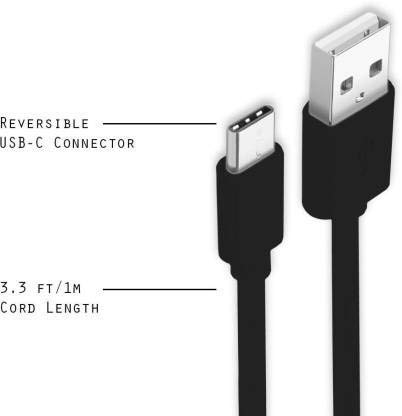
Image: A diagram illustrating the reversible nature of the USB-C connector and the cable's 1-meter (3.3 ft) cord length.
Сетуп
- Идентификујте конекторе: The cable has a standard USB-A connector on one end and a smaller, oval-shaped USB Type-C connector on the other.
- Повезивање са извором напајања/рачунаром: Insert the USB-A end of the cable into a compatible USB port on a wall adapter, power bank, car charger, or computer.
- Повежите се са уређајем: Insert the USB Type-C end into the charging/data port of your smartphone, tablet, or other Type C enabled device. The USB Type-C connector is reversible, so it can be inserted in either orientation.
- Потврдите везу: Ensure both ends are securely connected. Your device should indicate that it is charging or connected for data transfer.
Упутство за употребу
Пуњење вашег уређаја
- Connect the USB-A end of the cable to a compatible USB power adapter (e.g., wall charger, car charger, power bank).
- Connect the USB Type-C end to your device's charging port.
- Ensure the power adapter is plugged into a live power outlet. Your device should begin charging.
Пренос података
- Повежите USB-A крај кабла са USB портом на рачунару.
- Connect the USB Type-C end to your device.
- On your device, you may receive a prompt asking to allow data access or to select a USB connection mode (e.g., "File Transfer," "MTP"). Select the appropriate option to enable data transfer.
- Ваш уређај би требало да се појави као преносиви диск или медијски уређај на рачунару, што вам омогућава да пренесете files.
Одржавање
- Правилно руковање: Always grasp the connector head when plugging or unplugging the cable. Avoid pulling directly on the cable itself to prevent damage to the internal wires.
- Избегавајте савијање: Do not excessively bend or crimp the cable, especially near the connectors, as this can cause internal wire breakage.
- Складиштење: Store the cable in a clean, dry place away from extreme temperatures and direct sunlight. Avoid tangling the cable.
- Чишћење: If necessary, gently wipe the cable and connectors with a dry, soft cloth. Do not use liquids or abrasive cleaners.

Слика: Крупни план view highlighting the durable metal heads of the Vikefon Type C cable connectors, designed for anti-oxidation and corrosion resistance.
Решавање проблема
- Уређај се не пуни:
- Уверите се да су оба краја кабла добро повезана.
- Проверите да ли адаптер за напајање исправно функционише и да ли је укључен у утичницу под напоном.
- Покушајте да користите други адаптер за напајање или УСБ порт.
- Check your device's charging port for any debris or damage.
- Споро пуњење:
- Ensure you are using a power adapter that supports fast charging (e.g., 3A output).
- Затворите све непотребне апликације у позадини на уређају.
- Нема преноса података:
- Confirm the cable is properly connected to both your device and computer.
- On your device, check the notification panel for USB options and select "File Transfer" or "MTP."
- Покушајте да се повежете на други УСБ порт на рачунару.
- Поново покрените и уређај и рачунар.
Спецификације
| Феатуре | Детаљ |
|---|---|
| Бранд | Vikefon |
| Назив модела | Тип Ц |
| Број модела | Тип Ц 0129 |
| Тип конектора | USB Type C (Male-to-Male) |
| Цабле Типе | УСБ |
| Компатибилни уређаји | Laptop, PC, Smartphone (e.g., Xiaomi Redmi 8A, Poco M2, Poco M2 Pro, Samsung, Motorola, Lenovo, Lava, Sony, HTC, LG, Karbonn, Maxx) |
| Посебне карактеристике | Charging Wire, Durable, High Data Transfer Rate, High Quality, Long Length |
| Брзина преноса података | Up to 0.48 Gigabits Per Second (480 Mbps) |
| Технологија повезивања | УСБ |
| Спецификација Мет | ИСО |
| Боја | Црно |
| Облик предмета | Роунд |
| Outer Material Type | Rubber (with Nylon Braiding) |
| Цабле Ленгтх | 1 Метер |
Гаранција и подршка
Specific warranty details for the Vikefon Type C Charging and Data Cable are not provided in this manual. For information regarding warranty coverage, returns, or technical support, please refer to the product packaging or contact the manufacturer directly through their official channels.