
Увод
This manual provides comprehensive instructions for the Vivitar Podcast and Social Media Microphone MIC918. This high-quality condenser microphone is designed for clear audio capture for various applications, including podcasting, live streaming, gaming, voice-overs, and vocal recording. It features a simple plug-and-play USB connection, integrated volume control, and a stable tripod stand for optimal positioning.
Безбедносне информације
- Do not expose the microphone to water or excessive moisture.
- Избегавајте екстремне температуре или директну сунчеву светлост.
- Do not attempt to disassemble or modify the microphone. This will void the warranty.
- Држите микрофон даље од јаких магнетних поља.
- За чишћење користите само меку, суву крпу.
Производ је завршенview
Садржај пакета
- Vivitar MIC918 Microphone Unit
- Статив за статив
- Интегрисани УСБ кабл за повезивање
Microphone Components
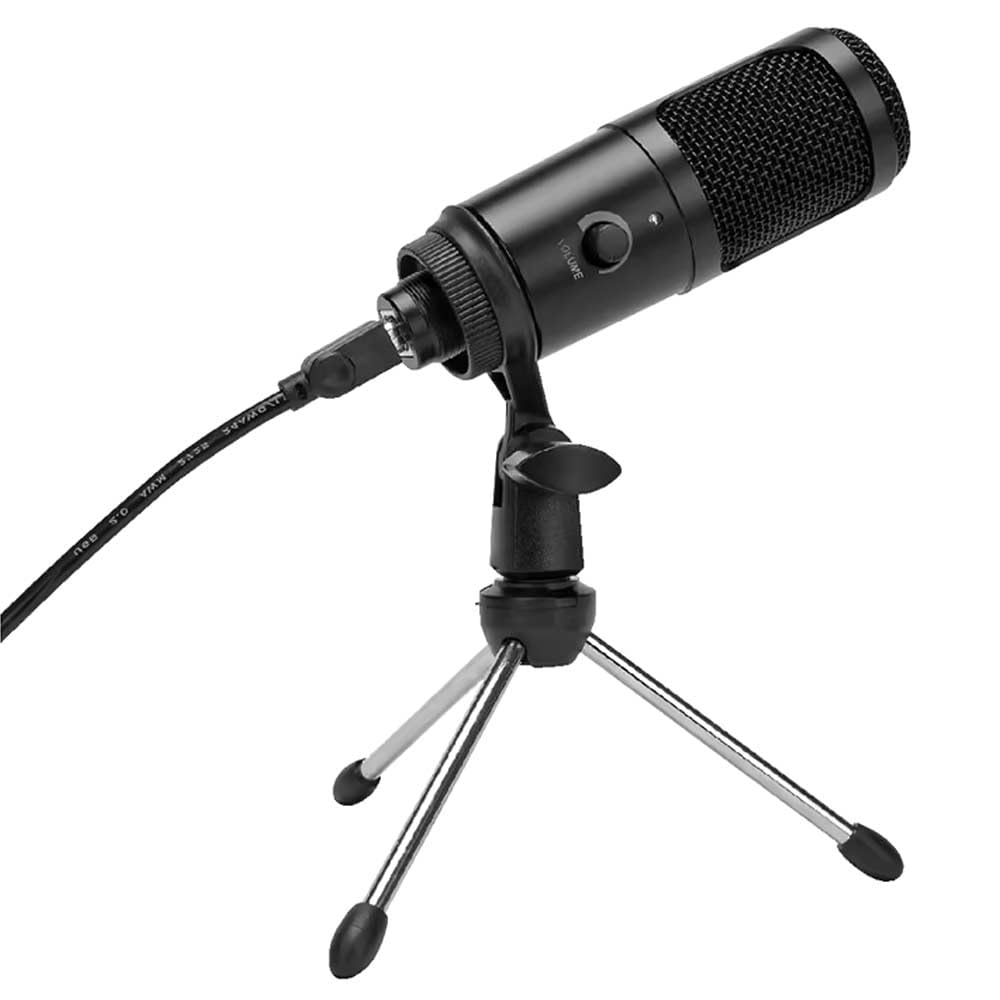
Слика 1: Vivitar MIC918 Microphone unit attached to its tripod stand, showing the integrated USB cable.

Слика 2: Сиде view of the Vivitar MIC918 Microphone, highlighting the volume control knob and the Vivitar brand logo.
The microphone unit features a durable metal construction. The front side includes a volume control knob for easy audio level adjustments. The microphone is designed with a unidirectional polar pattern to focus on sound directly in front of it, reducing background noise.
Сетуп
Повезивање микрофона
- Саставите штанд: If not already assembled, unfold the tripod stand and ensure it is stable on a flat surface. Securely attach the microphone unit to the stand's mounting point. The rotating shaft ring allows for angle adjustment.
- Повежите се са уређајем: Plug the integrated USB cable from the microphone into an available USB port on your computer, laptop, or compatible gaming console.
- Плуг анд Плаи: The Vivitar MIC918 is a plug-and-play device. Your operating system (Windows, macOS, etc.) should automatically detect and install the necessary drivers. No additional software installation is typically required.
- Изаберите као улазни уређај: After connecting, navigate to your device's sound settings or the audio settings within your recording/streaming software. Select the "Vivitar MIC918" or similar USB audio device as your primary input (microphone) device.
Оперативни
Подешавање јачине звука
The microphone features a built-in volume control knob located on its side (refer to Figure 2). Rotate this knob clockwise to increase the microphone's input sensitivity (volume) and counter-clockwise to decrease it. Adjust this to achieve the desired recording level without distortion.
Позиционирање микрофона
For optimal audio capture, position the microphone directly in front of the sound source (e.g., your mouth for speaking or singing). The tilting tripod stand allows you to adjust the microphone's angle to best suit your needs. Due to its unidirectional polar pattern, the microphone is most sensitive to sounds coming from the front and less sensitive to sounds from the sides or rear, helping to minimize ambient noise.
Одржавање
- Чишћење: Use a soft, dry, lint-free cloth to wipe the microphone's exterior. Do not use liquid cleaners, aerosols, or solvents.
- Складиштење: When not in use, store the microphone in a clean, dry place, away from dust and extreme temperatures.
- Руковање: Пажљиво рукујте микрофоном. Избегавајте да га испустите или изложите јаким ударцима.
Решавање проблема
| Проблем | Могући узрок | Решење |
|---|---|---|
| Нема звука из микрофона. | Микрофон није правилно повезан. Изабран је погрешан улазни уређај. Јачина звука микрофона је прениска. | Ensure USB cable is securely plugged into both the microphone and the device. Verify that "Vivitar MIC918" is selected as the input device in your system's sound settings or recording software. Increase the volume using the knob on the microphone and check system input levels. |
| Poor sound quality (e.g., muffled, too quiet, background noise). | Incorrect microphone positioning. High ambient noise. Input level too high or too low. | Position the microphone closer to the sound source and ensure it's facing directly towards it. Record in a quieter environment. Adjust the microphone's volume knob and system input levels to an optimal range, avoiding clipping or being too faint. |
| Рачунар не препознаје микрофон. | Неисправан УСБ порт или кабл. System driver issue. | Покушајте да повежете микрофон на други УСБ порт на рачунару. Restart your computer. If the issue persists, check your operating system's device manager for any driver conflicts or updates. |
Спецификације
| Феатуре | Спецификација |
|---|---|
| Бранд | Уживо |
| Број модела | МИЦ918 |
| Повезивање | USB (Plug and Play) |
| Тип микрофона | Кондензатор |
| Полар Паттерн | Једносмерно |
| Однос сигнала и шума | 78 дБ |
| Материјал кућишта | Метал |
| Тежина артикла | 0.95 фунти (приближно 0.43 кг) |
| Димензије артикла (Д к Ш к В) | 8.86 x 5.36 x 2.49 инча (приближно 22.5 x 13.6 x 6.3 цм) |
| Извор напајања | Електрични са каблом (преко УСБ-а) |
| Компатибилни уређаји | Computers, Laptops, Gaming Consoles |
Информације о гаранцији
The Vivitar Podcast and Social Media Microphone MIC918 comes with a 3-Year USA Warranty. For specific terms, conditions, and to register your product, please refer to the official Vivitar webсајт или директно контактирајте њихову корисничку подршку. Сачувајте доказ о куповини за потребе гаранције.
Корисничка подршка
For further assistance, technical support, or inquiries regarding your Vivitar MIC918 microphone, please visit the official Vivitar website or contact their customer service department. Contact information can typically be found on the Vivitar webсајт у одељцима „Подршка“ или „Контактирајте нас“.