
Naztech 15350
Naztech Xpods PRO True Wireless Noise Cancelling Earbuds
Модел: 15350
Brand: Naztech
Увод
The Naztech Xpods PRO are advanced true wireless noise-cancelling earbuds designed for an immersive audio experience and clear communication. Featuring HD sound, touch controls, and IPX4 water resistance, these earbuds are suitable for various activities, including sports and daily use. They come with a wireless charging case for extended playtime and convenient recharging.

Image: Naztech Xpods PRO earbuds, charging case, and product packaging, highlighting key features like 25 hours play time and touch controls.
Сетуп
Шта је у кутији
- Футрола за бежично пуњење
- УСБ-Ц кабл за пуњење
- 6 Sets of Silicone Ear Tips (3 sizes, 2 colors)
Пуњење слушалица и футроле
Before first use, fully charge the Xpods PRO and their charging case. The case can be charged via the included USB-C cable or a Qi-compatible wireless charging pad.
- УСБ-Ц пуњење: Повежите USB-C кабл са портом за пуњење на кућишту и са извором напајања.
- Бежично пуњење: Place the charging case on a Qi-compatible wireless charging pad. Ensure the case is properly aligned for charging.
A 10-minute quick charge provides approximately 1 hour of playback. A full charge offers up to 5 hours of playtime for the earbuds, with the charging case providing an additional 20 hours, totaling 25 hours of playtime.
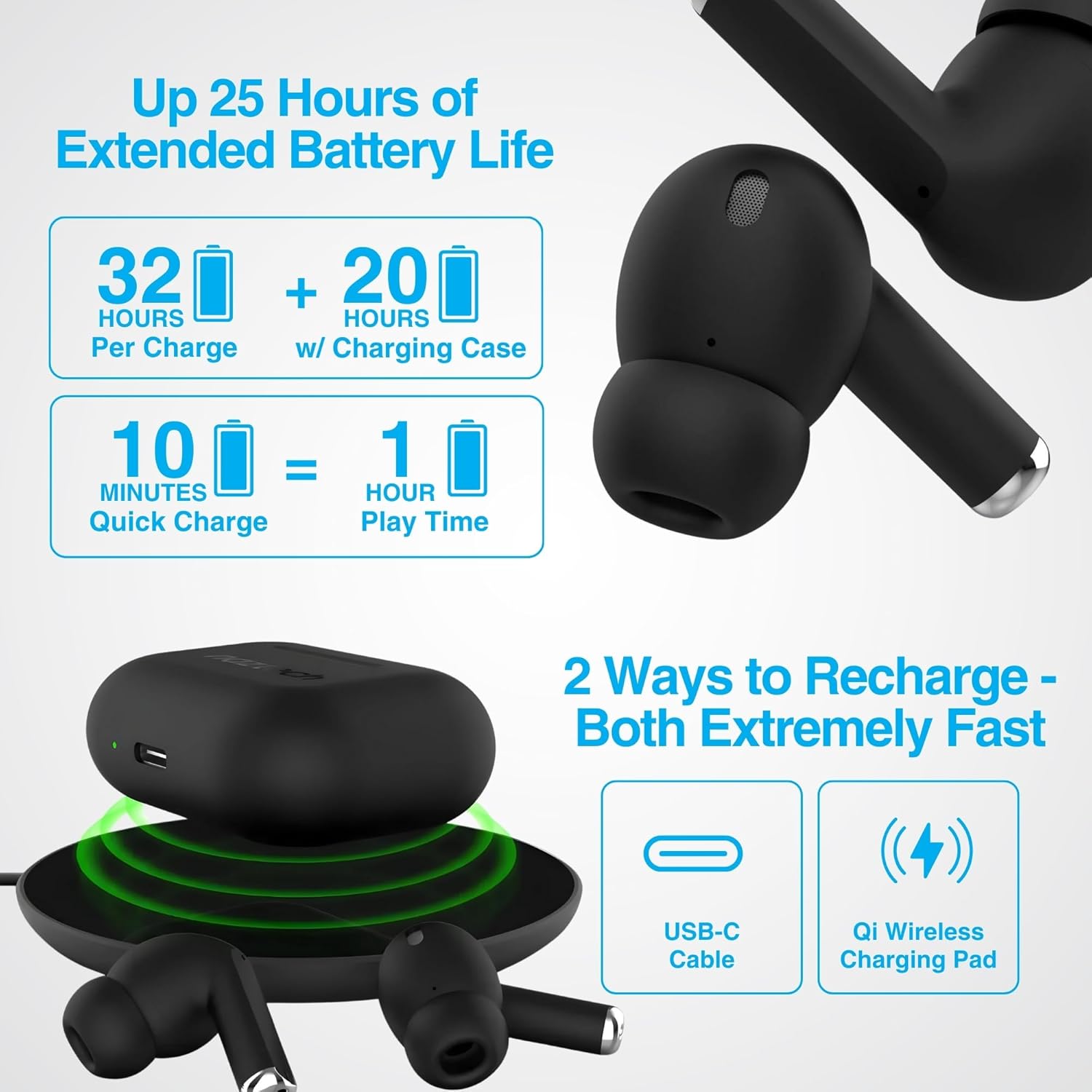
Image: Illustration showing USB-C and Qi wireless charging options for the Naztech Xpods PRO case, along with battery life indicators.
Упаривање са вашим уређајем
- Уверите се да су слушалице напуњене.
- Отворите кућиште за пуњење. Слушалице ће аутоматски ући у режим упаривања.
- На свом уређају (паметном телефону, таблету итд.) идите на подешавања Bluetooth-а и омогућите Bluetooth.
- Select "NAZTECH Xpods PRO" from the list of available devices.
- Када се повежу, чућете звучну потврду и слушалице ће бити спремне за употребу.
The Xpods PRO feature Bluetooth 5.0 for stable connectivity up to 33 feet (10 meters) and auto-pair technology for seamless re-connection with previously paired devices.

Image: A smartphone screen showing the "NAZTECH Xpods PRO" listed in Bluetooth settings, demonstrating universal compatibility with various devices.
Упутство за употребу
Додирните контроле
The Xpods PRO feature intuitive touch sensor controls on each earbud for easy management of audio playback and calls.
| Акција | Контрола |
|---|---|
| Пусти/паузирај музику | Један додир на обе слушалице |
| Нект Трацк | Двапут додирните десну слушалицу |
| Превиоус Трацк | Двапут додирните леву слушалицу |
| Одговори/Заврши позив | Један додир на обе слушалице |
| Одбаци позив | Притисните и држите било коју слушалицу 2 секунде |
| Активирајте гласовни помоћник | Трипут додирните било коју слушалицу |

Image: Diagram illustrating the touch control functions on the Naztech Xpods PRO earbuds.
Ношење слушалица
For optimal sound quality and a secure fit, choose the silicone ear tips that best suit your ear canal. The Xpods PRO come with 6 sets of silicone ear tips in 3 sizes and 2 colors to ensure a comfortable and noise-isolating fit.

Image: Naztech Xpods PRO earbuds shown with various silicone ear tip sizes, emphasizing customizable fit.
Поништавање буке
The Xpods PRO feature Passive Noise Cancellation through their closed-system design, which helps to immerse you in music by preserving low-frequency bass richness and reducing ambient noise. Dual microphones with advanced voice capture technology filter out wind and background noise for clear conversations.

Image: A person using Naztech Xpods PRO, illustrating the clear call quality and passive noise cancellation features.
Одржавање
Чишћење
To maintain optimal performance and hygiene, regularly clean your Xpods PRO earbuds and charging case. Use a soft, dry, lint-free cloth to wipe down the surfaces. For ear tips, you may gently wipe them with a slightly damp cloth and allow them to dry completely before reattaching.
Avoid using abrasive materials, solvents, or harsh chemicals, as these can damage the product.
Отпорност на воду (ИПКС4)
The Naztech Xpods PRO are rated IPX4 water-resistant, meaning they are protected against splashing water from any direction. This makes them suitable for workouts and light rain. However, they are not designed for submersion in water or exposure to pressurized water jets. Do not use them while swimming or showering.

Image: A person wiping sweat from their face, indicating the IPX4 water-resistant rating of the Naztech Xpods PRO for active use.
Складиштење
When not in use, store your Xpods PRO in their charging case to protect them from dust, dirt, and physical damage. Store the case and earbuds in a cool, dry place away from extreme temperatures and direct sunlight.
Решавање проблема
If you encounter issues with your Naztech Xpods PRO, refer to the following common solutions:
Слушалице се не упарују или не повезују
- Проверите батерију: Уверите се да су и слушалице и кућиште за пуњење довољно напуњене.
- Поново упарите: Turn off Bluetooth on your device, place earbuds back in the case, close and reopen the case. Then, re-enable Bluetooth on your device and try pairing again.
- Заборави уређај: On your device's Bluetooth settings, "forget" or "unpair" the "NAZTECH Xpods PRO" and then attempt to pair from scratch.
- Удаљеност: Ensure your device is within the 33ft (10m) Bluetooth range.
- сметње: Удаљите се од других бежичних уређаја који могу изазвати сметње.
Sound Quality Issues (e.g., Static, Low Volume)
- Чисте слушалице: Ensure the mesh filters and ear tips are clean and free of debris.
- Прилагођавање врху уха: Experiment with different sized silicone ear tips to ensure a proper seal in your ear canal, which significantly impacts sound quality and bass response.
- Квалитет извора: Ensure the audio source (music file, streaming service) is of high quality.
- Јачина звука уређаја: Проверите нивое јачине звука и на повезаном уређају и на слушалицама.
Проблеми са пуњењем
- Провера кабла: Ensure the USB-C cable is securely connected to both the case and the power source. Try a different USB-C cable and power adapter if available.
- Бежична подлога: If using wireless charging, ensure the case is correctly positioned on the charging pad and the pad is powered on.
- Положај слушалица: Уверите се да су слушалице правилно постављене у кућиште за пуњење, тако да правилно додирују пинове за пуњење.
Спецификације
| Феатуре | Детаљ |
|---|---|
| Назив модела | NAZTECH Xpods PRO |
| Број модела ставке | 15350 |
| Технологија повезивања | Бежично (Bluetooth 5.0) |
| Домет | До 33фт / 10м |
| Тип контроле | Touch (Media Control) |
| Контрола буке | Пасивно уклањање буке |
| Оцена водоотпорности | ИПКС4 |
| Укупно време репродукције | До 25 сати (са футролом за пуњење) |
| Earbud Playtime (per charge) | До 5 сати |
| Куицк Цхарге | 10 минута пуњења за 1 сат репродукције |
| Интерфејс за пуњење | USB-C, Qi бежично пуњење |
| Укључене компоненте | USB-C Charging Cable, 6 Sets of Silicone Ear Tips, Wireless Charging Case |
| Материјал | Пластика |
| Димензије производа | 2.39 к 1.81 к 0.91 инча |
| Тежина артикла | 4.4 унци |
Гаранција и подршка
Naztech products are designed for quality and performance. While specific warranty details are not provided in this manual, Naztech generally backs its products with warranties. For detailed warranty information, product support, or technical assistance, please visit the official Naztech webсајт или директно контактирајте њихову корисничку службу.
Више информација и ресурса за подршку можете пронаћи посетом Naztech Store on Amazon или њихов службеник webсајту.
Ask a question about this manual
Ask about setup, troubleshooting, compatibility, parts, safety, or missing instructions. Manuals+ will review the question and use this page’s manual context to help answer it.