
1. Увод
The Carrera RC Mario Kart Yoshi Quad (Model 370200997X) is a remote-controlled vehicle designed for users aged 6 and up. This manual provides essential information for the safe and optimal use of your RC Yoshi Quad, ensuring an enjoyable experience. Please read all instructions carefully before operating the product.
2. Шта је у кутији
Пажљиво распакујте све компоненте и уверите се да су укључене следеће ставке:
- Carrera RC Yoshi Quad Vehicle
- Ремоте Цонтрол
- 3.2V 700 mAh LiFePo4 Battery (for vehicle)
- УСБ кабл за пуњење
- Упутство за употребу

Image: The Carrera RC Mario Kart Yoshi Quad shown in its original retail packaging, indicating included components.
3. Подешавање
3.1. Пуњење акумулатора возила
Before first use, fully charge the vehicle's 3.2V 700 mAh LiFePo4 battery. The charging process typically takes approximately 50 minutes.
- Connect the USB charging cable to the vehicle's charging port.
- Укључите други крај USB кабла у компатибилан USB извор напајања (нпр. рачунар, USB адаптер за зид, преносни адаптер).
- The charging indicator light on the vehicle or cable will show the charging status (refer to specific indicator behavior in the quick start guide if available).
- Once charging is complete, disconnect the cable.

Image: The Yoshi Quad vehicle, ready for battery charging via its USB cable.
3.2. Инсталација батерије даљинског управљача
The remote control requires batteries for operation. Please ensure you use the correct type and polarity.
- Пронађите одељак за батерије на полеђини даљинског управљача.
- Отворите поклопац одељка за батерије.
- Insert the required batteries (e.g., AA or AAA, typically 2x) according to the polarity markings (+/-).
- Добро затворите поклопац одељка за батерије.
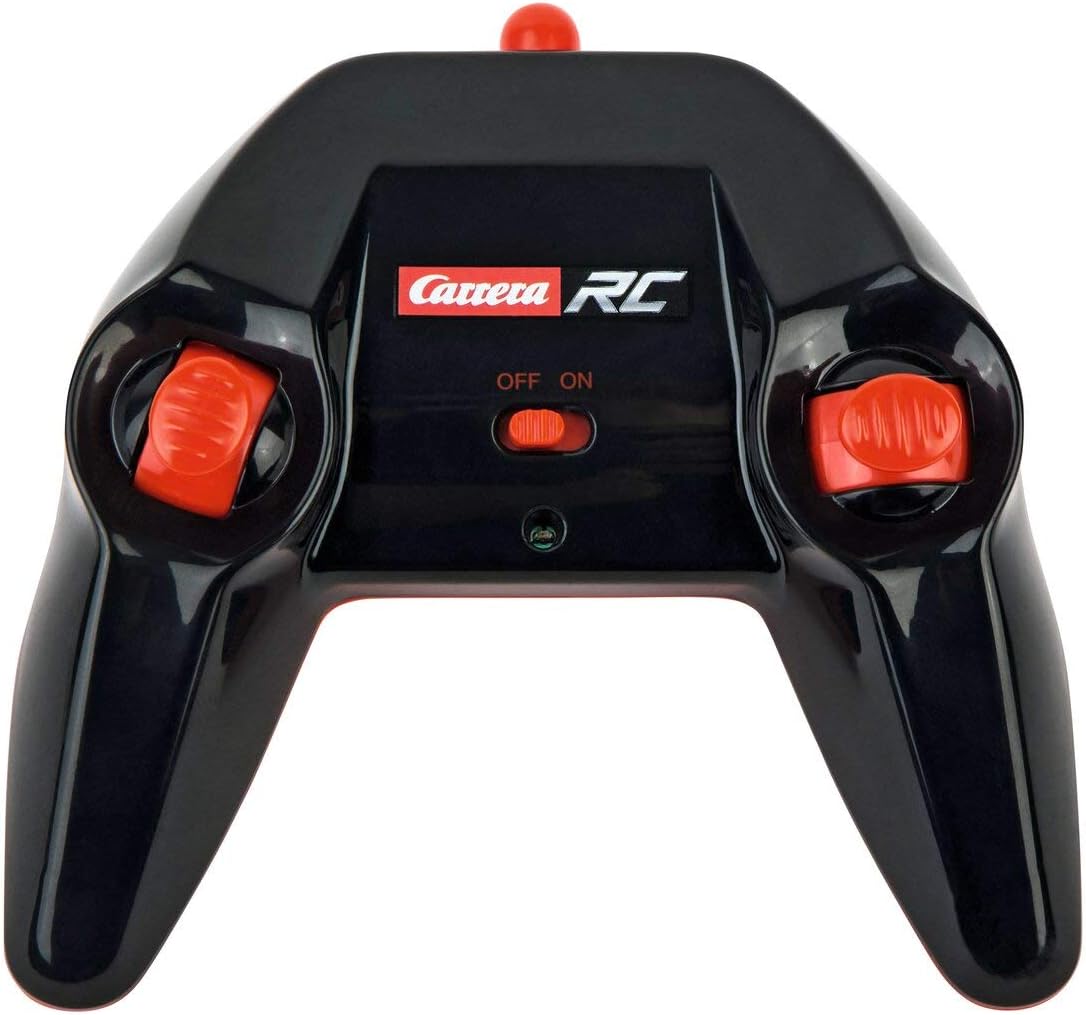
Image: The Carrera RC remote control, showing its design and controls.
3.3. Pairing the Vehicle and Remote Control
To establish a connection between the vehicle and the remote control, follow these steps:
- Ensure both the vehicle and the remote control have fresh or fully charged batteries.
- Turn on the vehicle using its power switch.
- Укључите даљински управљач помоћу његовог прекидача за напајање.
- The vehicle and remote control should automatically pair. A successful connection is usually indicated by a solid light on both devices (refer to your quick start guide for specific light indicators).
Video: This video demonstrates the unboxing, battery installation, and initial pairing process for the Carrera RC Mario Kart Yoshi Quad.
4. Упутство за употребу
Once paired, you can begin operating your Carrera RC Yoshi Quad.
- Напред назад: Use the throttle trigger or joystick on the remote control to move the vehicle forward or backward.
- Управљање: Use the steering wheel or directional controls on the remote control to turn the vehicle left or right.
- брзина: The Yoshi Quad can reach speeds of up to 9 km/h. Adjust your control input for desired speed.
- Опсег: Operate the vehicle within the specified range of the remote control to maintain connection and avoid loss of control.
Мере предострожности:
- Always operate in open areas, away from people, pets, and obstacles.
- Do not operate near water or in wet conditions.
- Avoid operating on public roads or near traffic.
- Supervise younger children during operation.
5. Одржавање
5.1. Чишћење
To maintain the appearance and functionality of your RC Yoshi Quad:
- Обришите возило и даљински управљач меком, сувом крпом након сваке употребе.
- Do not use harsh chemicals or solvents, as these can damage the plastic.
- Avoid getting water into electronic components.
5.2. Нега и складиштење батерије
- Always remove batteries from the remote control if not in use for extended periods.
- Store the vehicle's LiFePo4 battery in a cool, dry place, away from direct sunlight and extreme temperatures.
- Немојте препунити или потпуно испразнити батерију.
КСНУМКС. Решавање проблема
If you encounter issues with your RC Yoshi Quad, refer to the following common problems and solutions:
| Проблем | Могући узрок | Решење |
|---|---|---|
| Возило се не помера. | Low or uncharged vehicle battery. Remote control batteries are dead or incorrectly installed. Vehicle and remote not paired. | Напуните акумулатор возила. Replace/install remote control batteries correctly. Re-pair vehicle and remote control. |
| Poor control range or intermittent connection. | Interference from other RC devices or electronics. Рад ван ефективног домета. Ниске батерије. | Move to a different location. Operate closer to the vehicle. Напуните/замените батерије. |
| Возило се креће споро или неправилно. | Слаб акумулатор возила. Препрека у точковима/осовинама. | Напуните акумулатор возила. Check and clear any obstructions. |
7. Спецификације
| Бранд | Царрера |
| Назив модела | 370200997Кс |
| карактер | Yoshi |
| Врста возила | Куад |
| Материјал | Пластика |
| Боја | Multicolor (predominantly Green) |
| Узраст (опис) | 6+ година |
| Мак Спеед | 9 Kilometers per hour |
| Извор напајања | Баттери Поверед |
| Vehicle Battery Type | 1 Lithium-ion (3.2V 700 mAh LiFePo4) - included |
| Време пуњења | Прибл. 50 минута |
| Оперативно време | До 30 минута |
| Тип даљинског управљача | Radio Control (2.4 GHz) |
| Димензије (ставка) | 36.5 к 20.5 к 23 центиметара |
| Тежина (артикал) | 1.06 килограма |
| Посебна карактеристика | Трепћуће светло |
| Земља порекла | Кина |
8. Гаранција и подршка
8.1. Гаранција произвођача
This Carrera RC product is covered by a Двогодишња гаранција произвођачаМолимо вас да сачувате доказ о куповини за евентуалне рекламације у вези са гаранцијом. Гаранција покрива недостатке у материјалу и изради при нормалној употреби.
8.2. Корисничка подршка
For technical assistance, spare parts, or warranty inquiries, please contact Carrera customer support. Refer to the contact information provided on the product packaging or the official Carrera webсајту.