
иТОМА 525
iTOMA DAB/FM Radio Alarm Clock Model 525
Марка: iTOMA
Увод
This manual provides comprehensive instructions for the iTOMA DAB/FM Radio Alarm Clock Model 525. It covers setup, operation, maintenance, and troubleshooting to ensure optimal use of your device. This alarm clock features dual alarms, DAB and FM radio with presets, Bluetooth 5.3 connectivity, and a dimmable LCD display.

This image displays the iTOMA DAB/FM Radio Alarm Clock Model 525 from the front, highlighting its digital display and icons representing key features such as volume, snooze, dual alarm, 40 presets, dimmer, and DAB/FM radio.
Сетуп
1. Садржај пакета
- 1 x iTOMA DAB/FM Radio Alarm Clock Model 525
- 1 к адаптер за напајање
- 1 к Водич за брзи почетак
2. Прикључак за напајање
- Connect the power adapter to the DC IN port on the back of the alarm clock.
- Укључите адаптер за напајање у стандардну зидну утичницу.
- The display will light up, and the clock will automatically attempt to set the time via DAB signal.
3. Подешавање антене
For optimal DAB and FM radio reception, fully extend the wire antenna located at the back of the unit. Adjust its position for the best signal quality.
Упутство за употребу
1. Подешавање времена
- If the time is not set automatically, or if you wish to adjust it manually, refer to the Quick Start Guide for specific button presses.
- The device supports both 12-hour and 24-hour time display formats.
2. DAB and FM Radio
Enjoy a premium radio experience with both DAB and FM technologies. Upon first power-on, the device automatically tunes to all available radio stations.

The alarm clock is shown with 'DAB' and 'FM' radio signal icons, illustrating its capability to receive both digital and analog radio broadcasts. The display shows 'BBC RADIO'.
- Аутоматско подешавање: The radio will scan and store available stations automatically.
- Ручно подешавање: Use the TUNE+/- buttons to manually search for stations.
- Пресетс: You can preset up to 40 favorite stations (20 DAB / 20 FM) for quick access.
- Мерач спавања: Set the radio to play for 5 to 120 minutes before automatically turning off.
3. Dual Alarms
The dual alarm function allows you to set two separate alarms for different times or days.

This image details the dual alarm functionality, showing two alarm icons (AL1 and AL2) with their respective set times (8:30 and 13:00) and options for wake-up modes (FM/DAB or Buzzer) and alarm schedules (All-7-Day, Weekday, Weekend).
- Подешавање аларма: Alarms can be set for everyday, weekdays (Monday-Friday), or weekends (Saturday-Sunday).
- Звук аларма: Choose to wake up to DAB radio, FM radio, or a buzzer sound.
- Јачина звука аларма: Adjust the alarm volume independently for each alarm.
- Аларм укључен/искључен: Use the dedicated ON/OFF buttons to activate or deactivate each alarm.
4. Блуетоотх повезивање
Easily play music from your compatible mobile device using Bluetooth 5.3.

This image shows the iTOMA alarm clock from a top-down perspective, with a smartphone nearby playing music, indicating the device's Bluetooth connectivity for audio streaming.
- Притисните дугме МОДЕ да изаберете Блуетоотх режим.
- На свом мобилном уређају омогућите Блуетоотх и потражите доступне уређаје.
- Select "iTOMA 525" (or similar) from the list to pair.
- Once paired, you can stream audio from your device to the alarm clock.
5. Dimmable LCD Display
The 4-level brightness control allows you to adjust the LCD screen's luminosity to your preference, ensuring clear time visibility while minimizing unnecessary light during sleep.
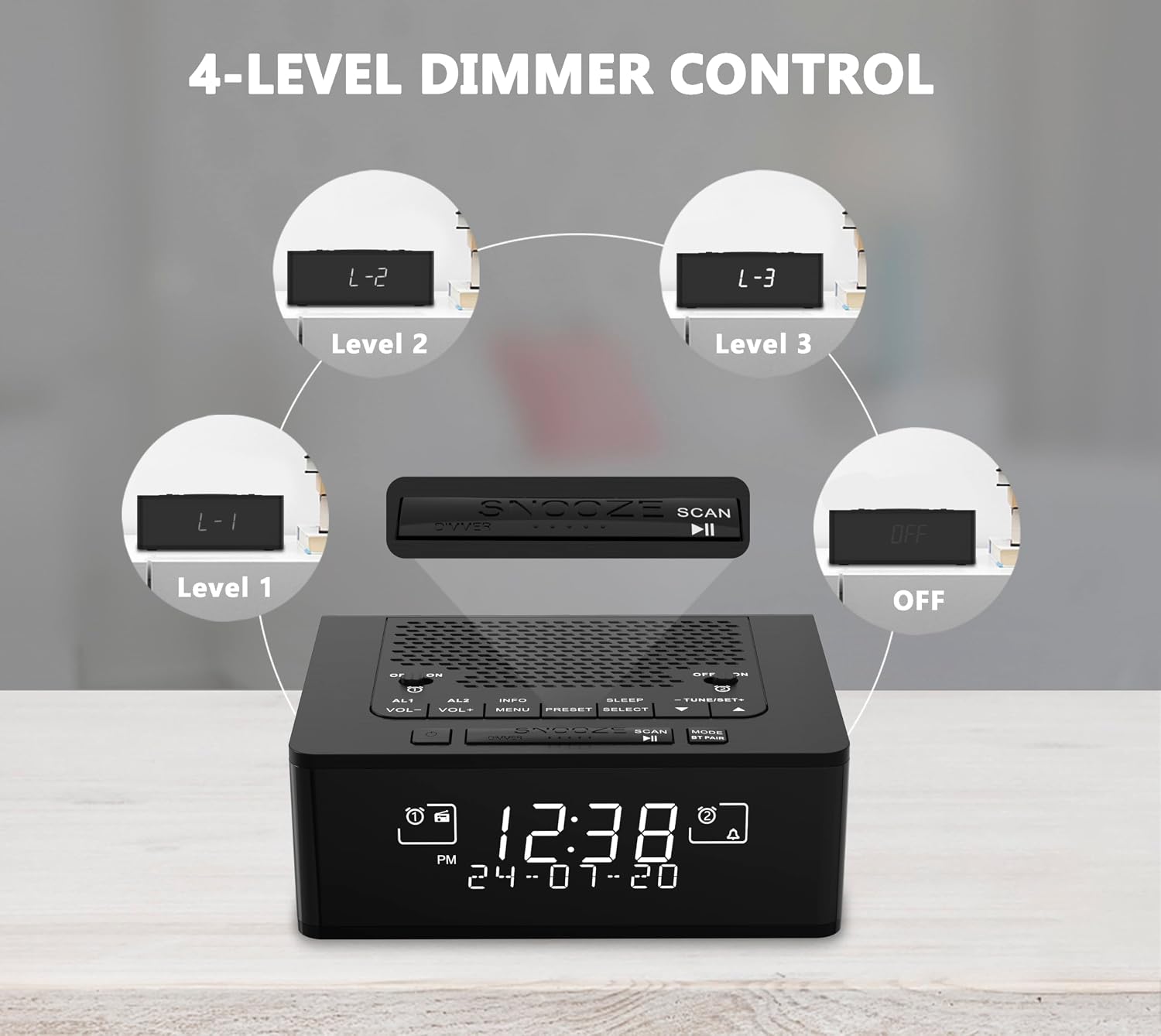
The image illustrates the four levels of display brightness (L-1, L-2, L-3, and OFF) available on the iTOMA alarm clock, allowing users to adjust the LCD screen's luminosity for comfort.
- Press the DIMMER button to cycle through the four brightness levels (L3, L2, L1, OFF).
- Select the level that best suits your environment.
6. Функција одлагања
When an alarm sounds, press the large SNOOZE button to temporarily silence the alarm for a set period (e.g., 9 minutes). The alarm will sound again after the snooze period ends.
Одржавање
- Чишћење: Use a soft, dry cloth to clean the surface of the alarm clock. Do not use liquid cleaners or abrasive materials.
- Складиштење: Ако складиштите уређај дуже време, искључите га из извора напајања и чувајте га на хладном и сувом месту.
- Избегавајте влагу: Држите уређај даље од воде и високе влажности.
Решавање проблема
| Проблем | Могући узрок | Решење |
|---|---|---|
| Нема напајања/Екран је искључен | Адаптер за напајање није повезан или је утичница неисправна. | Уверите се да је адаптер за напајање безбедно повезан и да је утичница функционална. |
| Лош радио пријем | Антена није издужена или је сигнал лош. | Fully extend the antenna and try repositioning the unit for better signal. |
| Аларм се не оглашава | Аларм није активиран или је јачина звука прениска. | Check if the alarm is enabled (AL1/AL2 ON) and ensure the alarm volume is set appropriately. |
| Блуетоотх упаривање није успело | Device not in pairing mode or too far. | Ensure the alarm clock is in Bluetooth mode and your mobile device is within range. Restart both devices if necessary. |
Спецификације
- Бренд: иТОМА
- Број модела: 525-ЕУ
- Тип приказа: Дигитал
- Посебне карактеристике: Alarm, Radio (DAB/FM), Bluetooth 5.3, Dimmable LCD
- Димензије производа: 11.5 cm (Length) x 5.8 cm (Height)
- Извор напајања: Електрични кабл
- Тип материјала: Пластика
- ГТИН: 711221617389
- УПЦ: 711221617389
Информације о гаранцији
This product comes with a manufacturer's warranty. For detailed information regarding warranty coverage, terms, and conditions, please refer to the documentation included with your purchase or visit the official iTOMA webсајту.
Подршка
If you encounter any issues not covered in this manual or require further assistance, please contact iTOMA customer support. Contact details can typically be found on the manufacturer's webсајту или у паковању производа.
Ask a question about this manual
Ask about setup, troubleshooting, compatibility, parts, safety, or missing instructions. Manuals+ will review the question and use this page’s manual context to help answer it.