
1. Производ је готовview
The KAIDI KD-763 is a wired gaming headset designed for use with the PlayStation 4 (PS4) console and other compatible devices with a 3.5mm audio jack. It features over-ear cups for immersive sound, a rotary microphone for clear communication, and an inline volume control for convenient audio adjustments. The headset also includes an LED lighting effect, typically powered via a USB connection.
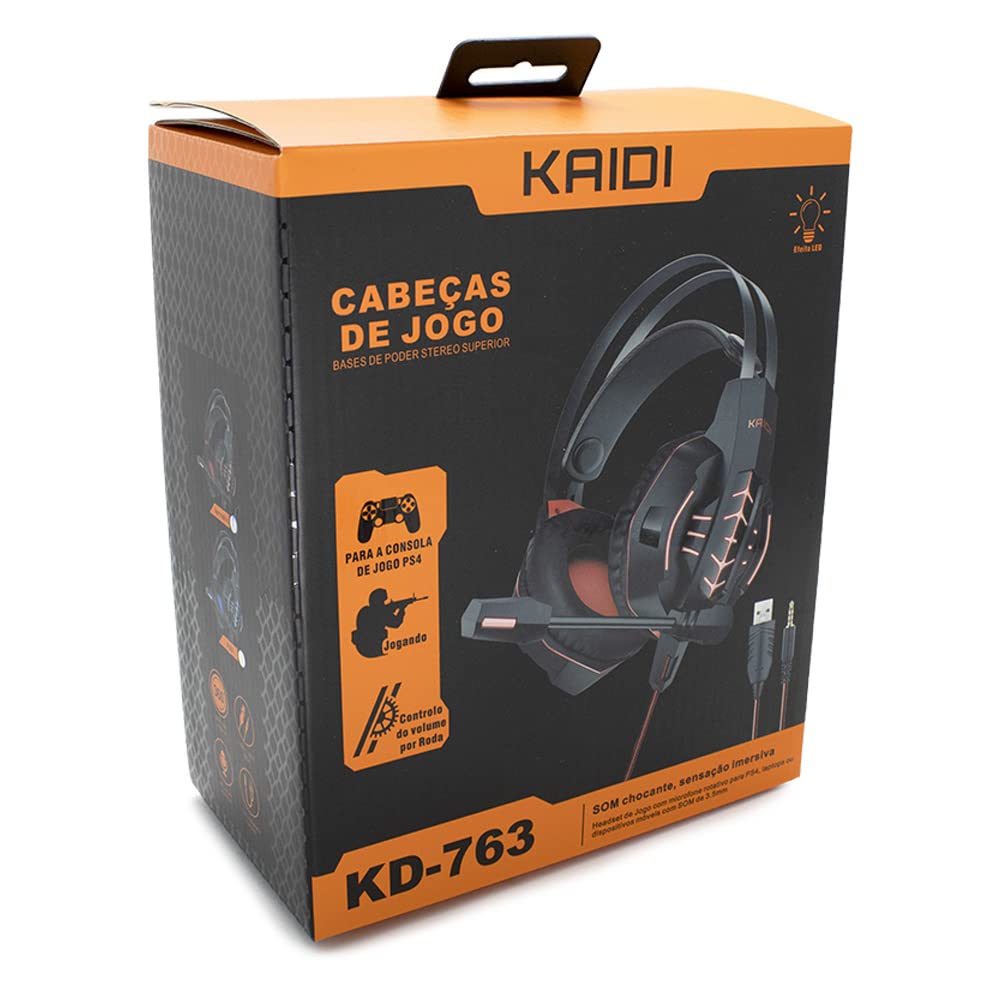
Слика 1.1: The KAIDI KD-763 PS4 Gaming Headset packaging, showing the headset, its features, and compatibility with PS4.
2. Безбедносне информације
- Избегавајте дуже слушање музике на великој јачини звука како бисте спречили оштећење слуха.
- Не излажите слушалице екстремним температурама, влажности или директној сунчевој светлости.
- Држите слушалице даље од воде и других течности.
- Do not attempt to disassemble or modify the headset. This may void the warranty and cause damage.
- Clean the headset with a soft, dry cloth only.
- Чувати ван домашаја деце.
3. Садржај пакета
Молимо вас да проверите садржај паковања након отварања. Ако неке ставке недостају или су оштећене, обратите се продавцу.
- KAIDI KD-763 Gaming Headset
- Кориснички приручник (овај документ)
4. Водич за подешавање
- Connect to PS4 Controller: Locate the 3.5mm audio jack on your PS4 controller. Insert the 3.5mm connector from the KD-763 headset firmly into this port.
- Powering LED Lights (Optional): If your headset features LED lighting, connect the USB connector from the headset to an available USB port on your PS4 console or a compatible USB power adapter. The LED lights will illuminate once connected.
- Прилагодите величину слушалица: Extend or retract the headband to ensure the earcups sit comfortably and securely over your ears. The over-ear design should fully enclose your ears for optimal sound isolation.
- Позиција микрофона: Adjust the flexible rotary microphone boom to a position near your mouth for clear voice pickup. Ensure it is not obstructing your vision.
- Configure PS4 Audio Settings:
- Иди на Подешавања > Уређаји > Аудио уређаји on your PS4.
- Сет Инпут Девице to "Headset (Controller)".
- Сет Излазни уређај to "Headset (Controller)".
- Сет Излаз на слушалице to "All Audio" for full game and chat sound.
- Подесите Контрола јачине звука (слушалице) на удобан ниво.
5. Упутство за употребу
5.1. Контрола јачине звука
The KD-763 headset features an inline volume control wheel located on the cable. Rotate the wheel upwards to increase the volume and downwards to decrease it. Adjust to a comfortable listening level.
5.2. Употреба микрофона
The microphone is designed to capture your voice clearly. Ensure it is positioned correctly near your mouth. If your PS4 audio settings are configured correctly, your voice will be transmitted to other players in online games or chat parties.
To mute the microphone, check if there is a physical mute switch on the inline control. If not, you can mute the microphone through your PS4's quick menu (hold the PS button on your controller).
6. Одржавање
- Чишћење: Use a soft, dry, lint-free cloth to wipe the earcups and headband. Do not use liquid cleaners or abrasive materials.
- Складиштење: When not in use, store the headset in a clean, dry place, away from direct sunlight and extreme temperatures. Avoid tangling the cable.
- Нега каблова: Do not pull on the cable to disconnect the headset. Always grasp the plug. Avoid bending or twisting the cable excessively.
КСНУМКС. Решавање проблема
- Нема звука или је јачина звука ниска:
- Ensure the 3.5mm jack is fully inserted into the PS4 controller.
- Check the inline volume control wheel on the headset cable and turn it up.
- Verify PS4 audio settings (Подешавања > Уређаји > Аудио уређаји) are correctly configured for the headset.
- Test the headset with another device (e.g., smartphone) to rule out a headset issue.
- Микрофон не ради:
- Ensure the microphone boom is positioned correctly.
- Check PS4 audio settings (Подешавања > Уређаји > Аудио уређаји) to ensure Инпут Девице is set to "Headset (Controller)".
- Confirm the microphone is not muted via an inline switch or the PS4 quick menu.
- Test the microphone with another application or device if possible.
- LED lights not working:
- Ensure the USB connector is firmly plugged into a powered USB port.
- Pokušajte sa drugim USB portom.
8. Спецификације
| Бренд: | КАИДИ |
| Модел: | КД-763 |
| Тип слушалица: | Over-ear (Circumaurais) |
| импеданса: | 32 Охмс |
| Осетљивост: | 110 дБ |
| Повезивање: | Wired (3.5mm audio jack + USB for LED) |
| Компатибилни уређаји: | Gaming Consoles (e.g., PS4), devices with 3.5mm audio jack |
| Специфична употреба: | Гаминг |
| Тип контроле: | Inline Volume Control Wheel |
| микрофон: | Rotary/Swivel |
| ЛЕД ефекат: | Yes (USB powered) |
9. Гаранција и подршка
KAIDI products are designed and manufactured to the highest quality standards. For information regarding warranty coverage, terms, and conditions, please refer to the warranty card included with your purchase or visit the official KAIDI webсајту.
For technical support, troubleshooting assistance, or to inquire about replacement parts, please contact KAIDI customer service through their official channels. Contact information can typically be found on the product packaging or the official KAIDI webсајту.