
1. Увод
This manual provides instructions for the proper setup, operation, and maintenance of your Decdeal J900 USB Wired Gaming Mouse. Please read this manual thoroughly before using the product to ensure optimal performance and longevity.
2. Карактеристике производа
- Подесиви ДПИ: Supports 800/1600/2400/3200/4800/6400 DPI settings for precise control.
- RGB позадинско осветљење: Features 7 programmable RGB backlight modes for customizable visual effects.
- Ергономски дизајн: Engineered for comfortable hand feel, reducing fatigue during extended use.
- Honeycomb Hollow Design: Promotes ventilation and cooling, preventing hot hands and palms.
- Плуг анд Плаи: USB powered, no additional drivers required for operation.
- Durable Switches: Equipped with switches rated for 20 million clicks.

Слика 2.1: Бочни професионалацfile of the Decdeal J900 mouse, detailing its ergonomic design, maximum 6400 DPI, customizable RGB lighting, 5G laser sensor, and 1000Hz polling rate for responsive performance.
3. Подешавање
- Unpack the Decdeal J900 USB Wired Gaming Mouse from its packaging.
- Пронађите слободан УСБ порт на рачунару (десктопу или лаптопу).
- Уметните УСБ конектор миша у УСБ порт.
- The mouse is plug-and-play; no additional software or drivers are required for basic functionality. The operating system will automatically detect and install the necessary components.
4. Упутство за употребу
4.1. Подешавање DPI-ја
The Decdeal J900 mouse features six adjustable DPI levels to suit various tasks and preferences. The DPI can be cycled through using the dedicated DPI button located on the top of the mouse, behind the scroll wheel.
- Press the DPI button to cycle through the available settings: 800, 1600, 2400, 3200, 4800, and 6400 DPI.
- Each DPI level may correspond to a specific LED color indicator (refer to Figure 4.1 for details).

Figure 4.1: This diagram shows the six adjustable DPI levels (800, 1600, 2400, 3200, 4800, 6400) of the Decdeal J900 mouse, indicating how to cycle through them.
4.2. RGB режими позадинског осветљења
The mouse offers 7 programmable RGB backlight modes. These modes can be changed using the RGB light mode switch located on the underside of the mouse.
- Flip the mouse over to locate the RGB light mode switch.
- Press the switch to cycle through different lighting effects, including Rainbow, DPI Color Breath, Keep Light On, Close, Random Leisure, Random Sleep, and Random Sport modes.
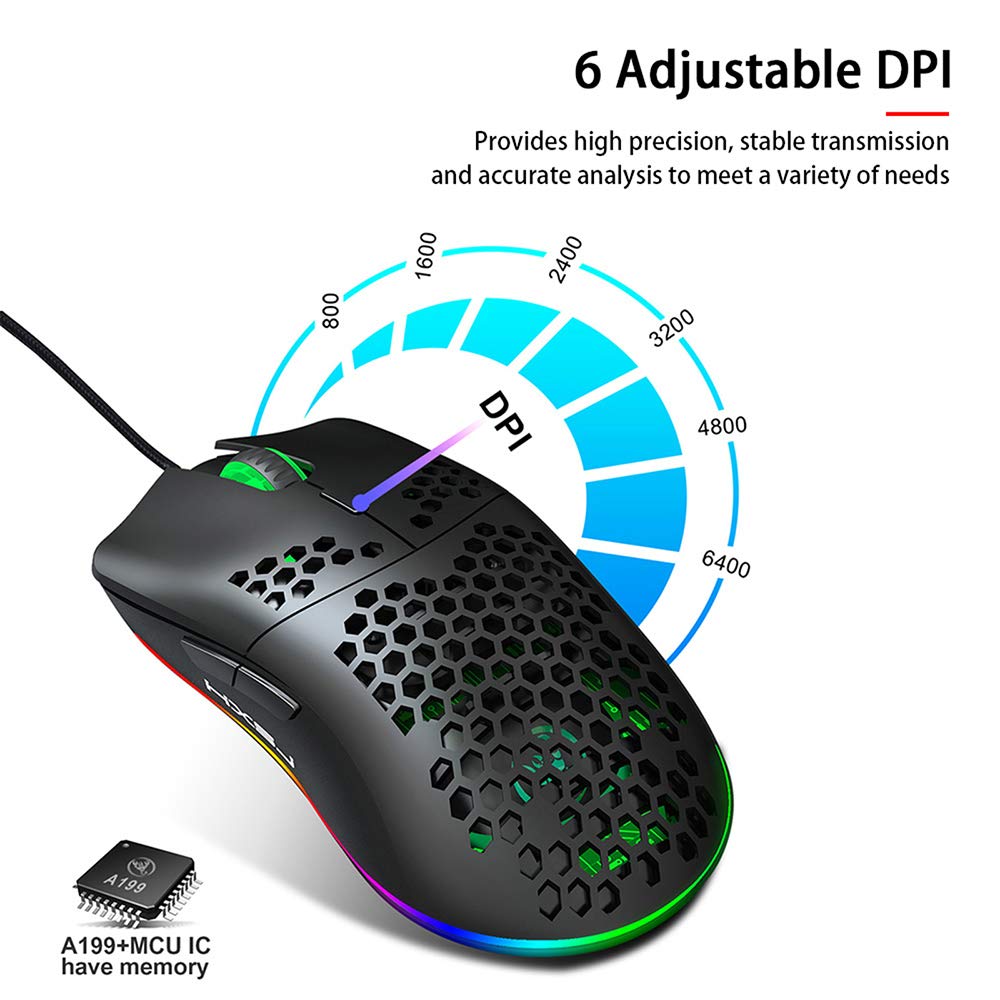
Figure 4.2: A hand is shown pressing the dedicated RGB light mode switch located on the underside of the Decdeal J900 mouse, demonstrating how to change lighting effects.

Figure 4.3: This image illustrates the adjustable DPI settings and various LED light modes available on the Decdeal J900 mouse.
5. Одржавање
To ensure the longevity and optimal performance of your Decdeal J900 mouse, follow these maintenance guidelines:
- Чишћење: Користите меку, суву крпу да обришете површину миша. За тврдокорну прљавштину, благо дamp Може се користити крпа, водећи рачуна да влага не уђе у унутрашње компоненте. Избегавајте јаке хемикалије или абразивна средства за чишћење.
- Нега каблова: Avoid bending or twisting the USB cable excessively. Do not pull the cable to disconnect the mouse; always grasp the USB connector.
- Складиштење: Када се не користи, чувајте миш на чистом и сувом месту, даље од екстремних температура и директне сунчеве светлости.
КСНУМКС. Решавање проблема
If you encounter issues with your Decdeal J900 mouse, refer to the following common solutions:
- Миш не реагује:
- Уверите се да је USB кабл безбедно повезан са USB портом вашег рачунара.
- Покушајте да повежете миш са другим УСБ портом.
- Поново покрените рачунар.
- Тестирајте миш на другом рачунару да бисте утврдили да ли је проблем са мишем или са рачунаром.
- DPI се не мења:
- Уверите се да притискате исправно дугме за подешавање DPI.
- Check if the mouse is properly connected and powered.
- RGB Lights Not Working/Changing:
- Verify the RGB light mode switch on the underside of the mouse is being pressed correctly.
- Ensure the mouse is receiving power via the USB connection.
7. Спецификације
| Бранд | Децдеал |
| Модел | Ј900 |
| Технологија повезивања | УСБ Виред |
| Технологија детекције покрета | Оптицал |
| Подесиви ДПИ | 800/1600/2400/3200/4800/6400 |
| Позадинско осветљење | RGB (7 режима) |
| Оријентација руке | Десна рука |
| Димензије производа | 15 к 10 к 5 цм |
| Тежина артикла | 150 г |
| Компатибилни оперативни системи | Линукс, Виндоус 7, Виндоус XP (и новије верзије) |

Figure 7.1: An exploded diagram of the Decdeal J900 mouse, revealing its internal components such as the left button, Gundam 6400DPI sensor, transparent roller, ten-million-life microswitch, PCB circuit board, tail logo, RGB marquee glow ring, hollow base, and UPE foot sticker.
8. Гаранција и подршка
The Decdeal J900 USB Wired Gaming Mouse comes with a standard manufacturer's warranty. For specific warranty terms, duration, and support inquiries, please refer to the warranty card included with your product or contact Decdeal customer service directly. Keep your purchase receipt as proof of purchase for warranty claims.