
Увод
This manual provides comprehensive instructions for the Docooler T-Wolf V11 Wired Gaming Mouse. It covers setup, operation, maintenance, and troubleshooting to ensure optimal performance and longevity of your device. The T-Wolf V11 is designed for both gaming and office use, featuring adjustable DPI, ergonomic design, and customizable RGB lighting.
Карактеристике производа
- Дизајн са 8 дугмади: Equipped with 8 programmable buttons suitable for various tasks in gaming and office applications.
- Подесиви ДПИ: Offers 6 levels of DPI adjustment (1000/1600/2400/3200/4800/6400) for precise cursor control and sensitive operation.
- Ergonomic Arc Design: Engineered for a comfortable grip, fitting closely to your palm to reduce fatigue during extended use.
- Integrated Weights: Features independent weights within the mouse, allowing customization for improved stability and precision to suit individual preferences.
- RGB Colorful Backlight: Provides 6 types of colorful RGB streaming light effects, enhancing the visual experience.
- Издржљива конструкција: Includes a lightweight aluminum alloy anti-skid roller for comfortable and reliable use.
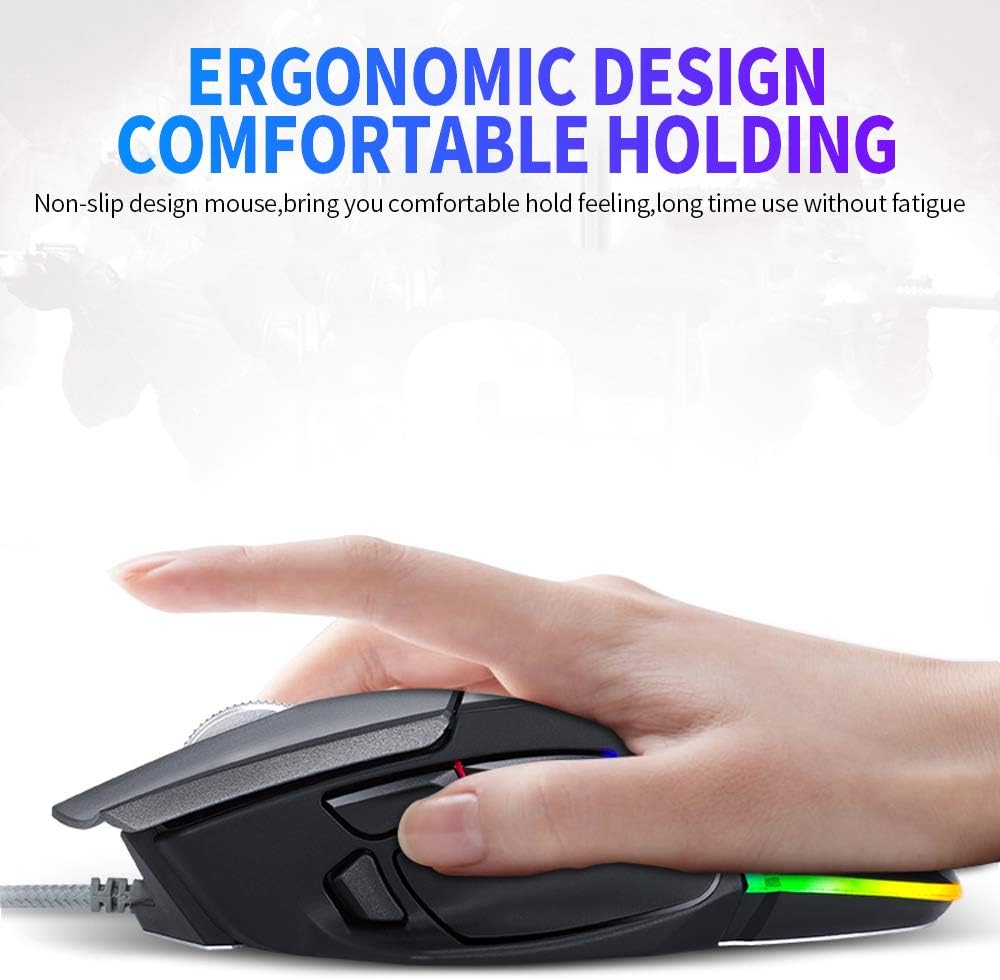
Image: The ergonomic design of the T-Wolf V11 mouse, demonstrating how it comfortably fits the hand to reduce strain during prolonged use.

Image: The T-Wolf V11 mouse illuminated with its dynamic RGB streaming light effects, showcasing the customizable lighting options.
Упутства за подешавање
- Распакујте миш: Carefully remove the T-Wolf V11 mouse from its packaging.
- Повежите се са рачунаром: Plug the USB connector of the mouse's cable into an available USB port on your computer (desktop or laptop).
- Инсталација драјвера: The mouse is typically plug-and-play. Your operating system (Windows, macOS, Linux) should automatically detect and install the necessary drivers. No additional software installation is usually required for basic functionality.
- Проверите функционалност: Once connected, move the mouse to check cursor movement and click the left and right buttons to ensure they are responsive.

Image: The Docooler T-Wolf V11 gaming mouse connected to a laptop, illustrating a typical setup scenario.
Упутство за употребу
Функције дугмета
- Леви клик (дугме 1): Стандардна функција примарног клика.
- Десни клик (дугме 2): Стандардна функција секундарног клика.
- Scroll Wheel (Button 3): Scrolls content up/down. Can also be pressed for middle-click functionality.
- DPI Cycle Button (Button 4): Located near the scroll wheel, press to cycle through DPI settings (1000/1600/2400/3200/4800/6400).
- Forward/Backward Buttons (Buttons 5 & 6): Typically located on the side, used for navigation in web претраживачи или file истраживачи.
- Additional Programmable Buttons (Buttons 7 & 8): These buttons can often be customized using third-party software or operating system settings for specific functions or macros.
ДПИ Адјустмент
Press the DPI cycle button (usually located behind the scroll wheel) to switch between the available DPI settings. Each press will change the sensitivity, allowing you to adapt to different tasks, from precise aiming in games to fast navigation in desktop environments. The RGB lighting may change color to indicate the current DPI level.
РГБ светлосни ефекти
The T-Wolf V11 features 6 types of colorful RGB streaming light effects. These effects are pre-programmed and cycle automatically, providing a dynamic visual experience. There is no specific button to change RGB modes on the mouse itself; the lighting patterns are typically fixed or cycle through automatically.

Слика: Детаљна view of the T-Wolf V11 mouse, illustrating its DPI adjustment capabilities and RGB streamer marquee lighting.
Одржавање
- Чишћење: Користите меку, суву крпу да обришете површину миша. За тврдокорну прљавштину, благо обришитеampen the cloth with water or a mild, non-abrasive cleaner. Avoid using harsh chemicals or excessive moisture.
- Чишћење сензора: Периодично чистите оптички сензор на доњој страни миша памучним штапићем како бисте осигурали прецизно праћење.
- Нега каблова: Avoid sharply bending or twisting the mouse cable to prevent internal damage. Store the cable neatly when not in use.
- Складиштење: Када се миш не користи дуже време, чувајте га на чистом и сувом месту, даље од директне сунчеве светлости и екстремних температура.
Решавање проблема
- Миш не реагује:
- Уверите се да је USB кабл безбедно прикључен у исправан USB порт на рачунару.
- Покушајте да прикључите миш на други УСБ порт.
- Поново покрените рачунар.
- Кретање курсора је неправилно или скачкасто:
- Очистите оптички сензор на дну миша.
- Уверите се да користите миш на чистој, нерефлектујућој и једноличној површини (нпр. подлога за миш).
- DPI се не мења:
- Press the DPI cycle button firmly.
- Ensure the mouse is properly connected and recognized by your system.
- РГБ светла не раде:
- Проверите УСБ везу.
- The RGB lighting is typically automatic; if it's not illuminating, ensure the mouse is receiving power.
Спецификације
| Бранд | Доцоолер |
| Модел | В11 |
| Боја | Црно |
| Технологија повезивања | Виред |
| Број дугмади | 8 |
| ДПИ подешавања | 1000/1600/2400/3200/4800/6400 (Adjustable) |
| Тип позадинског осветљења | RGB шарено |
| Цабле Ленгтх | 1.9 метара |
| Величина артикла | КСНУМКС к КСНУМКС к КСНУМКС цм (КСНУМКС к КСНУМКС к КСНУМКС инча) |
| Тежина артикла | 177 г (6.24 унци) |
| Компатибилни уређаји | Лаптоп, ПЦ |
| Хардверска платформа | PC |
| Извор напајања | Cable Electric (USB) |
Гаранција и подршка
For warranty information and technical support, please refer to the documentation provided with your purchase or contact Docooler customer service directly. Keep your proof of purchase for any warranty claims. Support contact details can typically be found on the manufacturer's official webсајту.