
Увод
The NITECORE TINI 2 is a compact, high-performance dual LED rechargeable keychain light. It features two OSRAM P8 LEDs and a total reflective optic lens, providing a maximum output of 500 lumens and a beam distance of up to 89 meters. This device incorporates a multifunctional OLED real-time display that shows essential information such as battery level, voltage, brightness level, current user mode, and remaining runtime. Designed for convenience and durability, the TINI 2 includes a built-in 280mAh Li-ion battery, offering up to 60 hours of runtime, and supports USB-C charging with multiple safeguards.
This manual provides detailed instructions for the proper setup, operation, and maintenance of your NITECORE TINI 2 keychain light.
Сетуп
Почетно пуњење
Before first use, fully charge the NITECORE TINI 2. Connect the included USB-C charging cable to the charging port on the side of the device and to a USB power source. The OLED display will indicate charging status. Charging is complete when the display shows a full battery icon.

Image: The NITECORE TINI 2 showing its USB-C charging port with the protective cover lifted, indicating where to connect the charging cable.
Attaching to Keychain
The TINI 2 features a robust screw post design for securing the included key clasp. This design is engineered to withstand significant weight, up to 30kg (66lbs), ensuring secure attachment to your keys or other gear.

Image: The NITECORE TINI 2 keychain light with a metal key clasp attached to its integrated screw post, ready for use on a keychain.
Упутство за употребу
Dual Switch Operation
The TINI 2 utilizes a dual switch interface for intuitive control:
- Дугме за напајање: Controls power on/off and mode switching.
- Дугме за режим: Adjusts brightness levels and accesses special modes.
Укључивање/искључивање
- Да бисте укључили: Притисните и држите дугме за напајање 1 секунду.
- Да искључите: Press and hold the Power Button for 1 second while the light is on.
Бригхтнесс Левелс
The TINI 2 offers 5 brightness levels: Ultralow, Low, Mid, High, and Turbo. The Turbo level is independently controlled for immediate maximum output.
- While the light is on, short press the Mode Button to cycle through brightness levels: Ultralow → Low → Mid → High.
- Директан приступ Турбо -у: While the light is on or off, press and hold the Mode Button to instantly activate Turbo mode. Release to return to the previous state.
- Direct Access to Ultralow: While the light is off, press and hold the Power Button to instantly activate Ultralow mode. Release to return to off.

Image: A visual representation of the NITECORE TINI 2's five brightness levels, ranging from 1 Lumen (Ultralow) to 500 Lumens (Turbo), with corresponding light output illustrations.
User Modes (Daily/Demo)
The TINI 2 features two user modes: Daily Mode and Demo Mode. Daily Mode provides continuous illumination, while Demo Mode automatically turns off after a short period to conserve battery.
- To switch between Daily Mode and Demo Mode, press and hold both the Power Button and Mode Button simultaneously for 2 seconds. The OLED display will indicate the current mode.
Режими закључавања
The TINI 2 offers two lockout modes to prevent accidental activation:
- Lockout 1 (Half Lockout): Press and hold the Power Button until the OLED display shows the lockout icon. In this mode, only direct access to Turbo is available by holding the Mode Button.
- Lockout 2 (Full Lockout): Press and hold both buttons until the OLED display shows the full lockout icon. All buttons are disabled.
- За откључавање: In either lockout mode, press and hold both buttons simultaneously until the lockout icon disappears and the light flashes once.
ОЛЕД екран у реалном времену
The integrated OLED display provides real-time information about the flashlight's status:
- Ниво и јачина звука батеријеtage: Shows the current battery charge and voltage.
- Ниво осветљености: Indicates the active brightness setting (e.g., ULTRALOW, LOW, MID, HIGH, TURBO).
- Кориснички режим: Displays whether Daily Mode or Demo Mode is active.
- Runtime Remaining: Estimates the remaining operating time at the current brightness level.

Слика: Четири бившаamples of the NITECORE TINI 2's multifunctional OLED display, illustrating battery level and voltage, current brightness level, active user mode (Demo/Daily), and estimated runtime remaining.
Одржавање
Пуњење
Regularly charge the TINI 2 to maintain optimal battery performance. The USB-C charging port is designed with multiple safeguards to ensure a safe charging process. Always ensure the charging port cover is securely closed when not charging to protect against water and dust.
Чишћење
Wipe the exterior of the flashlight with a soft, damp cloth as needed. Avoid using abrasive cleaners or solvents that could damage the finish or internal components.
Складиштење
When storing the TINI 2 for extended periods, ensure it is fully charged and activate a lockout mode to prevent accidental activation and battery drain. Store in a cool, dry place away from direct sunlight and extreme temperatures.
Решавање проблема
Светло се не укључује
- Check if the device is in a lockout mode. Refer to the "Lockout Modes" section to unlock the device.
- Ensure the battery is charged. Connect the TINI 2 to a USB-C power source and observe the OLED display for charging indication.
Dim Light Output or Short Runtime
- Батерија је можда празна. Потпуно напуните уређај.
- Ensure the lens is clean. Dust or debris on the lens can reduce light output.
- The Advanced Temperature Regulation (ATR) technology may be reducing output to prevent overheating. This is normal operation.
OLED Display Not Working
- Ensure the battery is charged. A critically low battery may not power the display.
- Ако проблем и даље постоји након пуњења, контактирајте корисничку подршку.
Спецификације
| Феатуре | Детаљ |
|---|---|
| ЛЕД диоде | 2 x OSRAM P8 |
| Макимум Бригхтнесс | 500 лумена |
| Вршна удаљеност снопа | 89 метара (97 јарди) |
| Вршни интензитет снопа | 2000 цд |
| ИП Ратинг | IP54 (отпоран на воду) |
| Отпорност на удар | 1 метар |
| Тип батерије | Уграђена литијум-јонска батерија од 280 mAh |
| Порт за пуњење | УСБ-Ц |
| Материјал | Алуминијум |
| Димензије (Д к Ш к В) | 1.83 к 0.98 к 0.49 инча |
| Тежина | 0.99 унце (28 грама) |
Излаз и време рада
| Режим | Излаз | Рунтиме |
|---|---|---|
| Турбо | 500 лумена | 15 минута* |
| Високо | 200 лумена | КСНУМКС минута |
| Мид | 65 лумена | 2.5 сата |
| Ниско | 15 лумена | 8 сата |
| Ултра низак | 1 лумена | 60 сата |
*The runtime for Turbo mode is tested without temperature regulation. Stated data is measured in accordance with international flashlight testing standards ANSI/PLATO FL1-2019, using the built-in 280mAh Li-ion battery under laboratory conditions. Actual data may vary due to battery usage and environmental factors.
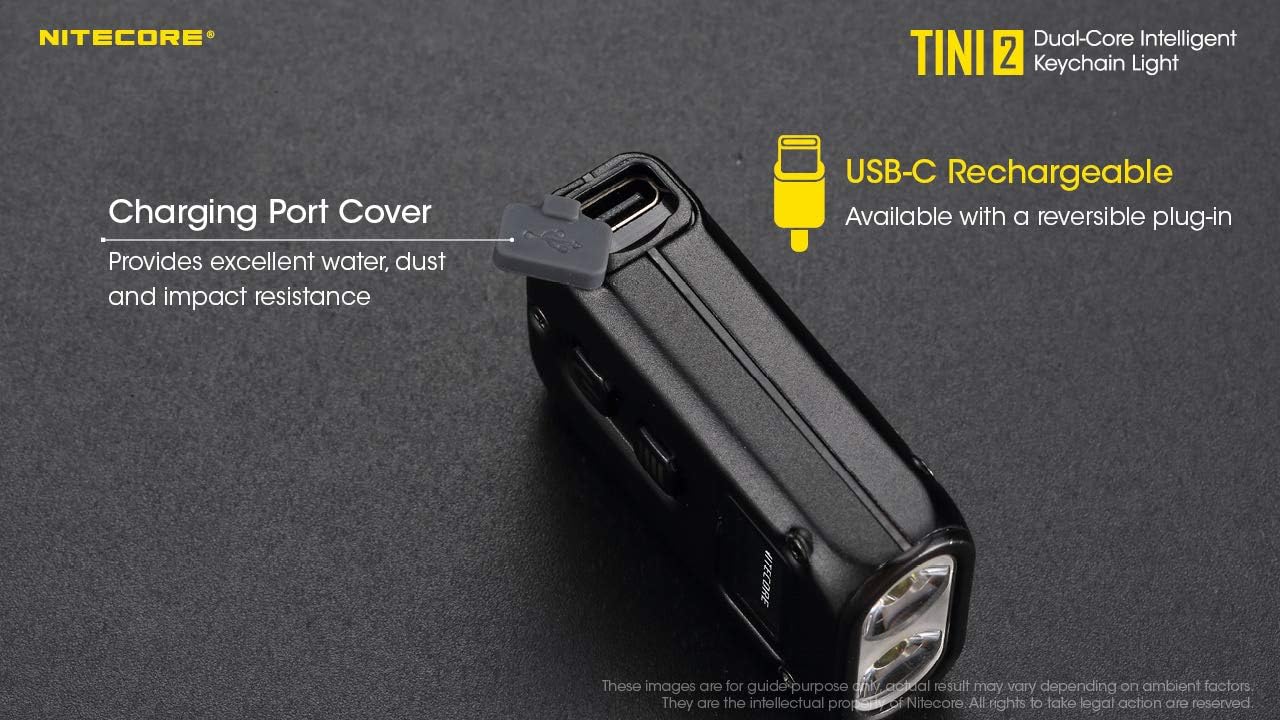
Image: A detailed table outlining the NITECORE TINI 2's technical data according to FL1 Standard, including output, runtime, beam distance, and peak beam intensity for each brightness level, along with impact resistance and IP rating.
Гаранција и подршка
Информације о гаранцији
Nitecore products are covered by a warranty against defects in materials and workmanship. For specific warranty terms and conditions, please refer to the warranty card included with your product or visit the official Nitecore webсајту.
Корисничка подршка
For technical assistance, troubleshooting, or warranty claims, please contact Nitecore customer support through their official website or the retailer from whom the product was purchased. You can visit the Nitecore продавница на Амазону за више информација.