
1. Увод
Thank you for choosing the ANJANK Wooden Digital Alarm Clock. This versatile device combines an alarm clock, FM radio, and a wireless charging station, designed to simplify your bedside or desk setup. This manual will guide you through the features and functions of your new device, ensuring optimal performance and user experience.
2. Садржај пакета
- ANJANK Wooden Digital Alarm Clock
- Повер Адаптер
- ФМ антенска жица
- Упутство за употребу
3. Производ је готовview

Слика 1: Предња страна view of the ANJANK Wooden Digital Alarm Clock with a smartphone charging wirelessly.

Figure 2: Top panel controls including wireless charging pad, time, alarm, radio, and volume buttons.

Figure 3: Rear panel with FM/BT Volume, DC 9V input, USB port, Night Light Dimmer, Alarm Set, Time Set, and Display Dimmer controls.
3.1 Предњи екран
- ЛЕД дисплеј времена: Large, easy-to-read digits for current time.
- Индикатор пре подне/по подне: Indicates morning or afternoon hours.
- Икона аларма: Appears when an alarm is active.
- Индикатор пуњења: Displays when a device is wirelessly charging.
3.2 Контроле на горњој плочи
- Подлога за бежично пуњење: For Qi-compatible devices.
- Дугме за одлагање/затамњивање: Snoozes active alarm or adjusts display brightness.
- Time Set Buttons: Adjusts hour and minute during time setting.
- Alarm Set Buttons: Configures alarm time and sound.
- FM Radio/Bluetooth Buttons: Controls radio functions and Bluetooth pairing.
3.3 Rear Panel Ports and Controls
- ДЦ 9В Улаз: Повезује се на адаптер за напајање.
- УСБ пуњач: For charging additional devices (5V/2A).
- FM Antenna Jack: Connects the included FM antenna.
- Night Light Dimmer: Adjusts the brightness of the ambient night light.
- Затамњивање екрана: Adjusts the brightness of the LED time display.
- 12/24H Button: Пребацује се између 12-часовног и 24-часовног формата времена.
4. Подешавање
4.1 Прикључак за напајање
- Прикључите приложени адаптер за напајање на ДЦ 9В улаз port on the rear of the alarm clock.
- Укључите адаптер за напајање у стандардну зидну утичницу. Екран ће се упалити.
4.2 Резервна батерија
The device requires 2 AAA batteries (not included) for battery backup. This feature preserves time and alarm settings during a power outage, but the display will not be active and alarms will not sound.
- Отворите поклопац одељка за батерије на дну уређаја.
- Уметните 2 ААА батерије, водећи рачуна о исправном поларитету (+/-).
- Вратите поклопац одељка за батерије.
4.3 Почетно подешавање времена
- Притисните и држите Тиме Сет button on the top panel until the hour digits begin to flash.
- Користите Сат и Минута adjustment buttons (usually labeled with arrows or +/-) to set the correct hour and minute.
- Притисните тастер Тиме Сет поново притисните дугме да бисте потврдили и изашли из режима подешавања времена.
- Да бисте прелазили између 12-часовног и 24-часовног формата, притисните 12/24Х дугме на задњој плочи.
5. Упутство за употребу
5.1 Подешавање аларма
The alarm clock supports multiple alarms and offers 9 different wake-up sounds, including a classic buzzer and FM radio.

Figure 4: The alarm clock offers 9 different wake-up sounds, including radio and beep, with a snooze function.
- Притисните и држите Аларм Сет button (often depicted as a bell icon) until the alarm hour digits flash.
- Користите Сат и Минута adjustment buttons to set your desired alarm time.
- Притисните Аларм Сет again to confirm the time. The alarm sound selection will now flash.
- Користите Сат и Минута adjustment buttons to cycle through the 9 available alarm sounds (e.g., buzzer, bird chirping, ocean waves, FM radio).
- Притисните Аларм Сет one more time to confirm your sound selection. The alarm icon will appear on the display, indicating the alarm is active.
- To activate/deactivate the alarm, short press the Аларм укључен/искључен дугме.
- To snooze an active alarm, press the large Сноозе/Диммер button on the top. The alarm will pause for 9 minutes and then sound again.
Рад са 5.2 FM радиом
Connect the included FM antenna wire to the FM Antenna Jack on the rear panel for optimal reception.
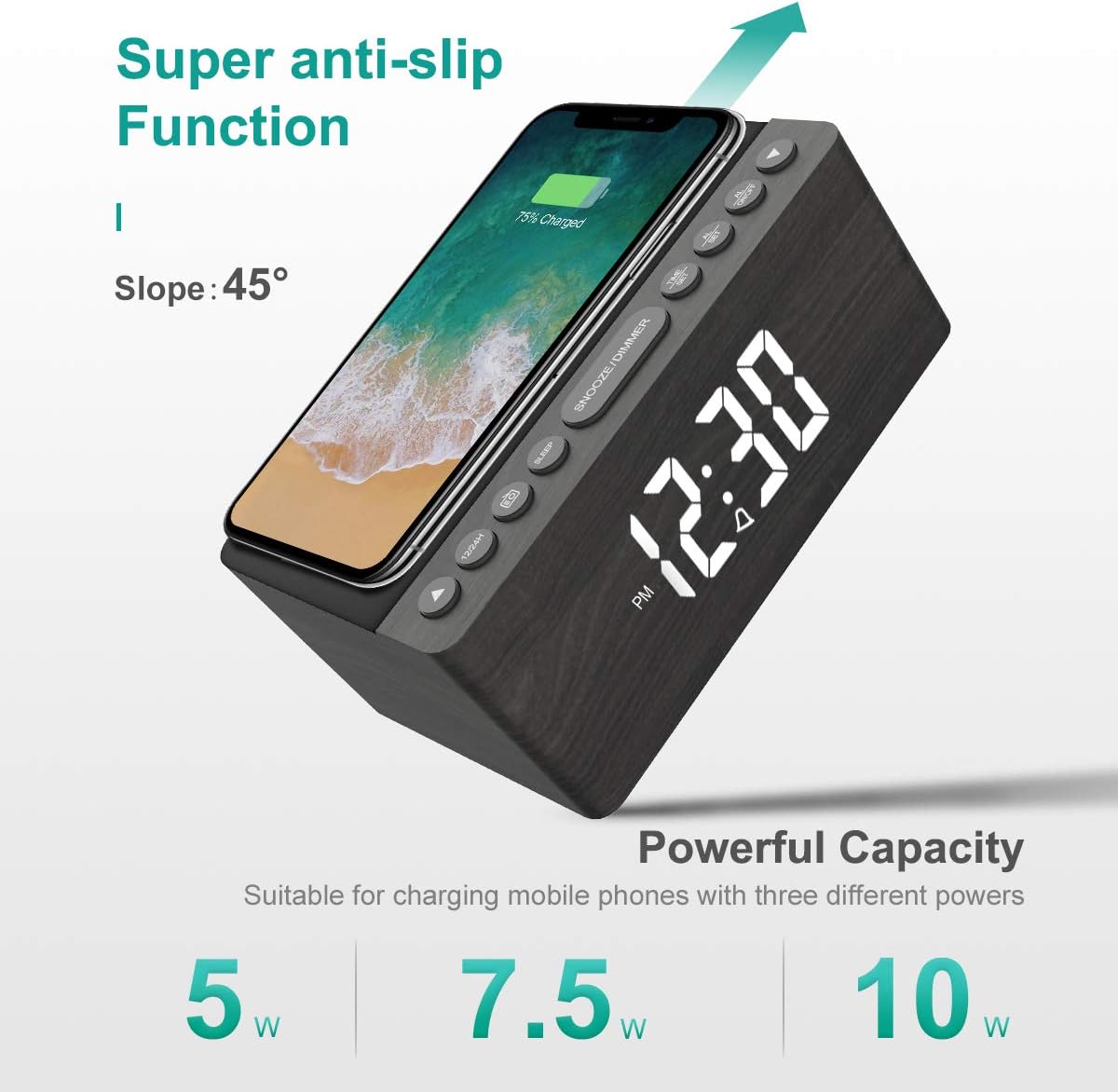
Figure 5: The alarm clock features an anti-slip surface for stable wireless charging and supports various charging powers.
Video 1: Demonstrates the FM Radio and Magnetic Wireless Charging features of a similar product.
- Притисните тастер ФМ Радио button (often labeled with a radio icon) to turn on the FM radio. The current frequency will be displayed.
- Аутоматско скенирање: Притисните и држите ФМ Радио дугме за аутоматско скенирање и чување доступних ФМ станица.
- Ручно подешавање: Користите Сат и Минута adjustment buttons to manually tune to a specific frequency.
- Подешавање јачине звука: Користите FM/BT Volume slider on the rear panel to adjust the radio volume.
- Мерач спавања: Притисните тастер Слееп Тимер button (often labeled with a crescent moon or 'SLEEP') to set a sleep timer (10-120 minutes). The radio will play for the set duration and then automatically turn off.
5.3 Бежично и USB пуњење
The ANJANK alarm clock features Qi-certified wireless charging and an additional USB port for wired charging.

Figure 6: The alarm clock provides both wireless charging for smartphones and a USB port for other electronic devices.
Video 2: Shows the wireless charging function of an alarm clock.
- Бежично пуњење: Place your Qi-compatible smartphone on the wireless charging pad on the top of the unit. Ensure the phone is centered for optimal charging. The charging indicator on the display will activate. The device supports 5W, 7.5W, and 10W adaptive charging.
- УСБ пуњење: Connect your device (e.g., second phone, power bank, smartwatch) to the УСБ прикључак за пуњење on the rear panel using a compatible USB cable.
5.4 Подешавање осветљености екрана
The LED display offers 5 levels of brightness, allowing you to customize it for comfort.

Figure 7: Visual representation of the five adjustable brightness levels for the LED display.
- Користите Дисплаи Диммер slider on the rear panel to adjust the brightness of the time display from low to high.
- The device also features an auto-dimmable function to adjust brightness based on ambient light.
5.5 Night Light Adjustment
The ambient night light can be adjusted to provide subtle illumination.
- Користите Нигхт Лигхт Диммер button on the rear panel to cycle through different brightness levels or turn the night light off.
6. Одржавање
- To clean the device, use a soft, dry cloth. Do not use liquid cleaners or abrasive materials.
- Држите уређај даље од воде и високе влажности.
- Избегавајте постављање уређаја на директну сунчеву светлост или близу извора топлоте.
КСНУМКС. Решавање проблема
- Без напајања/искључивање екрана: Ensure the power adapter is securely connected to both the device and a working power outlet. Check if batteries are inserted correctly for backup.
- Бежично пуњење не ради: Ensure your device is Qi-compatible and properly centered on the charging pad. Remove any thick phone cases that might interfere with charging.
- Poor FM Radio Reception: Fully extend the FM antenna wire. Try repositioning the antenna or the alarm clock for better signal.
- Аларм се не оглашава: Verify that the alarm is activated (alarm icon visible) and the volume is set to an audible level. Check if the correct alarm sound is selected.
- Екран је превише светао/там: Подесите Дисплаи Диммер slider on the rear panel.
8. Спецификације
| Феатуре | Детаљ |
|---|---|
| Бранд | АЊАНК |
| Модел | Радио |
| Боја | Греи |
| Дисплаи Типе | Дигитал ЛЕД |
| Извор напајања | Цордед Елецтриц |
| Бежично пуњење | 10W Qi Certified (5W, 7.5W, 10W adaptive) |
| УСБ прикључак за пуњење | Yes (5V/2A) |
| ФМ радио фреквенција | 87.5-108МХз |
| Звукови аларма | 9 (including radio and buzzer) |
| Дисплаи Диммер | 5 Levels, Auto Dimmable |
| Слееп Тимер | 10-120 минута |
| Баттери Бацкуп | Потребне су 2 ААА батерије (нису укључене) |
| Димензије производа | 3.9"W x 2.9"H (approx. 6.4" L x 4" W x 2.9" H from image) |
| Тежина артикла | 1.48 фунте (0.67 килограма) |
9. Гаранција и подршка
ANJANK offers a worry-free 18-month warranty for this product. Additionally, a 45-day return policy is available. For any questions or support, please contact ANJANK customer service. Responses are typically provided within 24 hours.