
Teslong TD450D85L1 Articulating Borescope User Manual
Model: TD450D85L1
1. Увод
The Teslong TD450D85L1 Articulating Borescope is a professional inspection tool designed for visual examination of hard-to-reach areas. It features a two-way 180-degree articulating probe, an integrated 4.5-inch IPS LCD monitor, and high-definition imaging capabilities. This manual provides essential information for the safe and effective use of your borescope.
2. Безбедносне информације
- Non-Waterproof Probe: The inspection probe of this borescope is НИЈЕ ВОДООТПОРНА. Do not submerge the probe or any part of the device in water or other liquids. Doing so will cause damage and void the warranty.
- Avoid using the device in environments with extreme temperatures or high humidity.
- Држите уређај даље од јаких магнетних поља.
- Не покушавајте да растављате или модификујете уређај. Поправке треба да обавља само овлашћено особље.
- Ensure the device is fully charged before use to prevent unexpected power loss during inspections.

3. Садржај пакета
Проверите да ли су све ставке наведене у наставку укључене у ваш пакет:
- TD450D85L1 Articulating Borescope Unit (with integrated 4.5-inch IPS monitor)
- УСБ кабл за пуњење типа Ц
- 8ГБ МицроСД картица (унапред инсталирана)
- Торбица за ношење
- Упутство за употребу

4. Производ је готовview и карактеристике
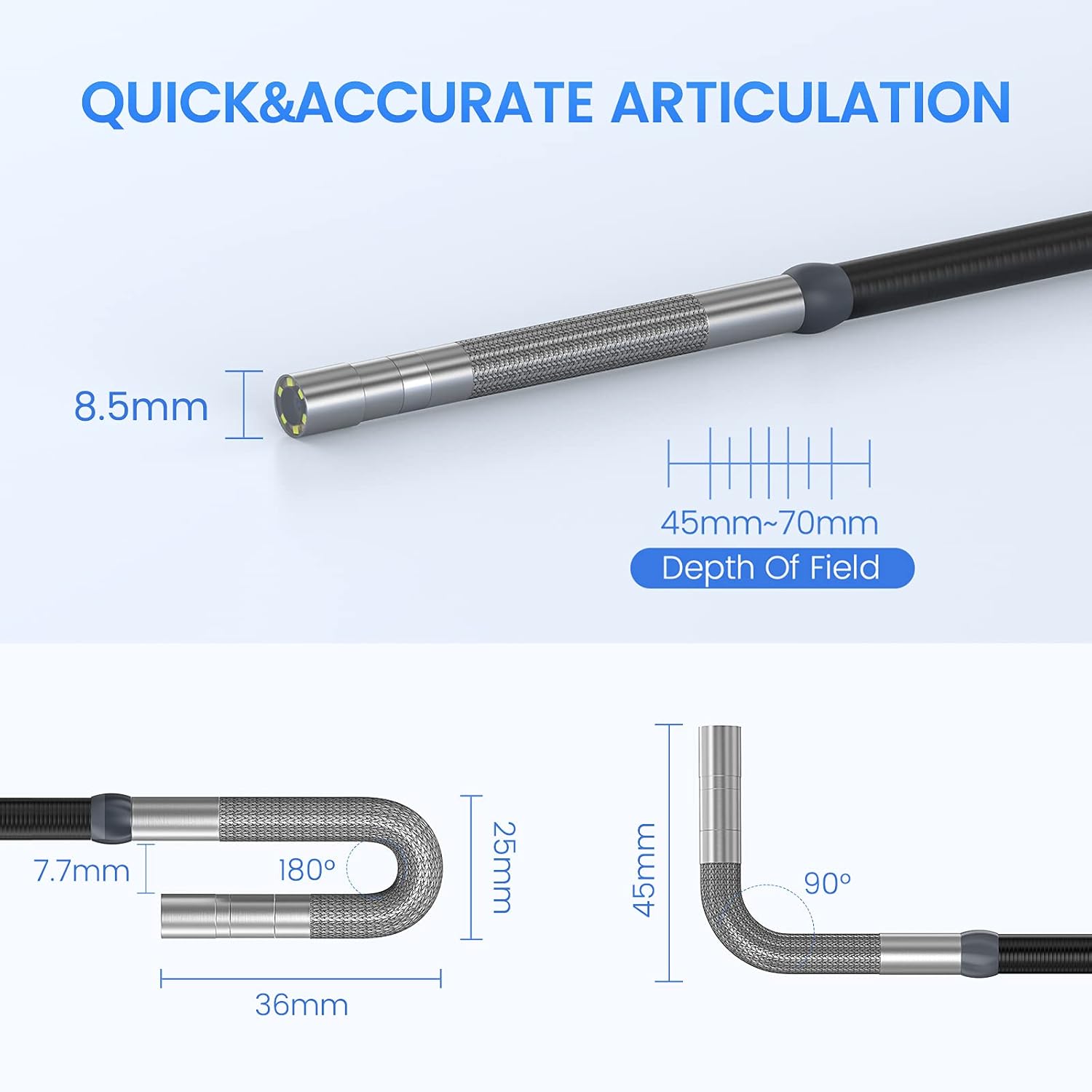
The Teslong TD450D85L1 is an advanced inspection camera designed for detailed visual inspections. It features a flexible gooseneck probe with an 8.5mm diameter and a 2.0MP CMOS sensor, providing 1080P HD image and video capture. The integrated 4.5-inch IPS LCD monitor offers a clear view without the need for external devices or Wi-Fi connections.
Кључне карактеристике:
- Two-Way 180° Articulation: Allows precise control of the probe tip for navigating complex spaces and maintaining optimal viewинг углова.
- Integrated 4.5-inch IPS LCD Monitor: Provides a clear, real-time display of the inspection area. No smartphone, Wi-Fi, or app required.
- Слика високе дефиниције: 1080P HD resolution with a 2.0MP CMOS sensor for capturing detailed images and videos.
- Подесиво ЛЕД осветљење: Built-in highlighting LEDs ensure clear visibility in dark conditions.
- Photo and Video Recording: Supports JPG image and AVI video recording directly to the included 8GB MicroSD card. Includes a microphone and speaker for audio recording.
- Дуг век трајања батерије: Equipped with a built-in 5000mAh rechargeable battery for extended operation.


5. Подешавање
5.1 Почетно пуњење
- Connect the USB Type-C charging cable to the borescope's charging port.
- Укључите други крај USB кабла у стандардни USB адаптер за напајање (није укључен) или USB порт рачунара.
- Allow the device to charge fully before first use. The charging indicator light will change when charging is complete.
5.2 Инсталација MicroSD картице
The 8GB MicroSD card is typically pre-installed. If it needs to be inserted or replaced:
- Locate the MicroSD card slot on the side of the monitor unit.
- Пажљиво уметните MicroSD картицу са златним контактима окренутим надоле док не кликне на своје место.
- Да бисте је уклонили, благо гурните картицу унутра док не искочи.

6. Упутство за употребу
6.1 Укључивање/искључивање
- To power on, press and hold the Power button until the screen illuminates.
- To power off, press and hold the Power button until the screen shuts down.
6.2 Controlling Articulation
The borescope probe features two-way 180-degree articulation. Use the control knob on the handle to adjust the direction of the probe tip:
- Rotate the knob clockwise or counter-clockwise to bend the probe tip left or right.
- The articulation can be locked in position for stable viewинг.

6.3 Adjusting LED Illumination
The probe tip is equipped with adjustable LED lights to illuminate the inspection area. Use the dedicated button on the monitor unit to cycle through different brightness levels or turn the lights off.
6.4 Снимање фотографија и видео записа
- Да снимите фотографију: Док је у живо view, press the Photo button (usually indicated by a camera icon) to capture a still image.
- Да бисте снимили видео: Press the Video button (usually indicated by a video camera icon) to start recording. Press it again to stop recording. The device will record audio through its built-in microphone.
- All captured media is saved to the installed MicroSD card.
6.5 Реviewинг Медиа
Access the playback mode from the main menu to view captured photos and videos. Use the navigation buttons to browse through your media files.
7. Одржавање
- Чишћење: Gently wipe the monitor screen and the probe with a soft, dry cloth. For stubborn dirt on the probe, use a slightly damp cloth and ensure it is completely dry before storage. Do not use abrasive cleaners or solvents.
- Складиштење: Store the borescope in its carrying case in a cool, dry place, away from direct sunlight and extreme temperatures.
- Одржавање батерије: For optimal battery life, charge the device regularly and avoid fully discharging it for extended periods. If storing for a long time, charge it to about 50% every few months.
- Ажурирања софтвера: Проверите произвођача website periodically for any available firmware updates.
КСНУМКС. Решавање проблема
| Проблем | Могући узрок | Решење |
|---|---|---|
| Уређај се не укључује. | Ниска батерија. | У потпуности напуните уређај. |
| Нема слике на екрану. | Probe cable not securely connected. | Ensure the probe cable is firmly connected to the monitor unit. |
| Слика је мутна или тамна. | Insufficient lighting; dirty camera lens; incorrect focus. | Adjust LED brightness. Clean the camera lens. Ensure the object is within the 45-70mm depth of field. |
| Не могу да снимам фотографије/видео записе. | MicroSD card full or not inserted correctly; card error. | Check MicroSD card insertion. Delete unnecessary files or replace the card. Format the card if necessary (this will erase all data). |
| Articulation is stiff or unresponsive. | Mechanical obstruction; debris in articulation mechanism. | Carefully inspect the probe tip for any obstructions. Do not force articulation. Contact customer support if the issue persists. |
9. Спецификације
| Феатуре | Спецификација |
|---|---|
| Назив модела | Articulating Endoscope Inspection Camera (TD450D85L1) |
| Величина екрана | 4.5-инчни IPS LCD екран |
| Ефективна резолуција мировања | 2 МП |
| Резолуција снимања видео записа | 1080п |
| Пречник сонде | 8.5мм |
| Артикулација | Two-Way 180 Degrees |
| Macro Focus Range (Depth of Field) | 45-70мм |
| Реал Англе оф View | 60 степени |
| Тип сензора | ЦМОС |
| Медиа Типе | Микро СД картица (8 ГБ укључена) |
| File Формат | JPG (images), AVI (videos) |
| Аудио Рецординг | Yes (with internal microphone) |
| Технологија повезивања | УСБ |
| Капацитет батерије | 5000мАх (пуњиво) |
| Ниво отпорности на воду | Not Waterproof (probe) |
10. Гаранција и подршка
Your Teslong TD450D85L1 Articulating Borescope comes with a 12-месечна гаранција from the date of purchase. This warranty covers manufacturing defects and ensures reliable performance under normal use.
For technical assistance, troubleshooting, or warranty claims, please contact Teslong customer service. Refer to the contact information provided on the official Teslong website or in your product packaging for the most up-to-date support channels.
Please have your model number (TD450D85L1) and purchase details ready when contacting support.