
1. Увод
This manual provides detailed instructions for the setup, operation, maintenance, and troubleshooting of your Hannspree HO275PTB LED-Monitor. Please read this manual thoroughly before using the product to ensure proper and safe operation.
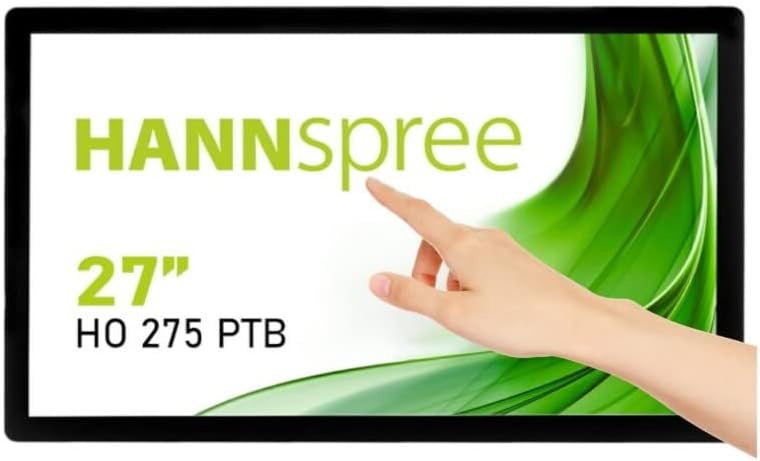
Слика 1.1: Предња страна view of the Hannspree HO275PTB LED-Monitor, showcasing its 27-inch display and touch functionality.
2. Подешавање
2.1 Распакивање
Пажљиво извадите све компоненте из паковања. Уверите се да су присутне све ставке наведене у наставку:
- Hannspree HO275PTB LED-Monitor
- Повер Цабле
- HDMI кабл (може да варира у зависности од региона)
- USB Cable (for touch functionality)
- Кориснички приручник (овај документ)
2.2 Физичка инсталација
The monitor can be placed on a flat surface or mounted using a VESA-compatible mount (not included).

Слика 2.1: Бочни професионалацfile of the monitor, illustrating its slim design.

Слика 2.2: Задња страна view of the monitor, highlighting the VESA mounting holes for wall or arm installation.
2.3 Каблови за повезивање
Connect the necessary cables to the corresponding ports on the back of the monitor. Ensure all connections are secure.
- Прикључак за напајање: Повежите кабл за напајање са улазом за напајање монитора, а затим са електричном утичницом.
- Видео веза: Connect an HDMI or DisplayPort cable from your computer's video output to the corresponding input on the monitor.
- USB Connection (for Touch): Connect the USB cable from your computer to the USB upstream port on the monitor to enable touch functionality.
- Аудио веза: If using external speakers or headphones, connect them to the audio output port.

Слика 2.3: Детаљно view of the monitor's connectivity ports, including power, USB, HDMI, and DisplayPort.
3. Руковање монитором
3.1 Укључивање/искључивање
Притисните дугме за напајање које се налази на монитору да бисте га укључили или искључили. Индикаторска лампица напајања ће светлети када је монитор укључен.
3.2 Избор улаза
The monitor automatically detects the active video input. If multiple sources are connected, you may need to manually select the input using the monitor's on-screen display (OSD) menu.
3.3 Приказ на екрану (ОСД) мени
Access the OSD menu to adjust various display settings such as brightness, contrast, color temperature, and aspect ratio. Refer to the quick start guide for specific button functions.
3.4 Функционалност додира
The Hannspree HO275PTB features multi-touch capability. Ensure the USB cable is connected to your computer for this feature to work. Drivers may be required for certain operating systems.
4. Одржавање
4.1 Чишћење монитора
Да бисте очистили екран монитора, нежно га обришите меком крпом која не оставља влакна. За тврдокорне мрље, дampБлаго навлажите крпу водом или неабразивним средством за чишћење екрана. Не прскајте течност директно на екран.
За монитор цasing, use a soft, dry cloth. Avoid using strong detergents or abrasive cleaners.
4.2 Складиштење
When storing the monitor for an extended period, disconnect all cables and place it in its original packaging or a protective cover to prevent dust accumulation and damage.
КСНУМКС. Решавање проблема
Ако наиђете на проблеме са монитором, погледајте следеће уобичајене проблеме и решења:
| Проблем | Могући узрок | Решење |
|---|---|---|
| Но Повер | Кабл за напајање није повезан или је проблем са утичницом. | Ensure power cable is securely connected to both the monitor and a working power outlet. |
| Нема сигнала | Видео кабл није повезан или је изабран погрешан улаз. | Check video cable connections (HDMI/DisplayPort). Select the correct input source via the OSD menu. |
| Display is Blurry/Distorted | Нетачна резолуција или брзина освежавања. | Подесите резолуцију екрана рачунара на 1920x1080 и брзину освежавања на 60Hz. |
| Функција додира не ради | USB cable not connected or driver issue. | Ensure the USB upstream cable is connected. Install or update touch screen drivers for your operating system. |
6. Спецификације
Below are the technical specifications for the Hannspree HO275PTB LED-Monitor:
- Модел: HO275PTB
- Величина екрана: 27 инча
- Резолуција: FHD 1080p (1920 x 1080 pixels)
- Размера: 16:9
- Површина екрана: Стан
- Произвођач: ХАННСПРЕЕ
- Димензије производа: 1.85 к 21.61 к 15.24 инча (4.7 к 54.9 к 38.7 цм)
- Тежина артикла: 19.36 фунте (8.78 кг)
- Волtage: 220В
- Брзина освежавања: 60 Хз
- Класа енергетске ефикасности (СДР): D
- Power Consumption (SDR): 16.8 В

Figure 6.1: Energy label for the Hannspree HO275PTB, indicating its energy efficiency class and consumption.
За детаљне информације о производу и податке о енергетској ефикасности, погледајте званичну EPREL базу података:
7. Гаранција и подршка
7.1 Информације о гаранцији
The Hannspree HO275PTB LED-Monitor comes with a minimum guaranteed product support period of 8 године and a general warranty period of 3 године које обезбеђује добављач.
7.2 Корисничка подршка
For technical assistance, warranty claims, or general inquiries, please contact Hannspree customer support:
- Webсајт: ввв.ханнспрее.цом
- Емаил: service@eu.hannspree.com
- Телефон: +49 (0) 21 59 / 81 45 7 - 0