
Увод
This manual provides instructions for the operation and maintenance of your WIITHINK Portable CD Boombox, model WTB771. This device features multiple audio playback options including CD, FM radio, Bluetooth, USB, and AUX input, designed for versatile use.

Слика: Фронт view of the WIITHINK Portable CD Boombox WTB771, black color, showing the display, control buttons, speakers, and handle.
Садржај пакета
- 1 x WIITHINK Portable CD Radio Boombox (WTB771)
- 1 к кабл за напајање
- 1 к АУКС линија
- 1 к Упутство за употребу
- 1 к даљински управљач
Сетуп
Повер Суппли
The boombox can be powered by AC power or batteries.
- АЦ напајање: Connect the provided power cable to the AC port on the back of the unit and plug it into a standard wall outlet (AC voltage: 220V / 50Hz, 110V / 60Hz).
- Снага батерије: For portable use, insert 4 C-sized batteries (not included) into the battery compartment located on the bottom of the unit. Ensure correct polarity.
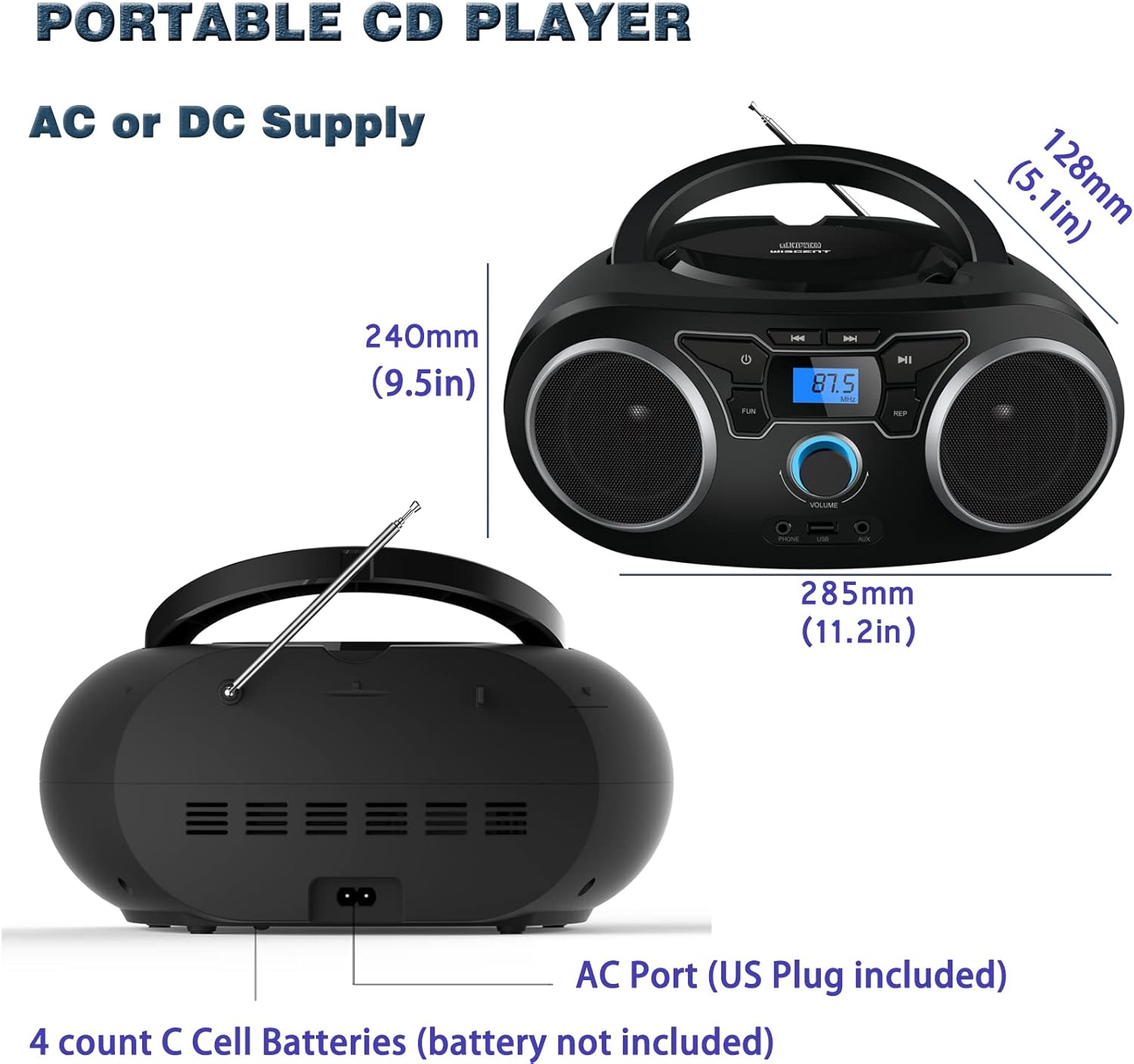
Слика: Позади view of the boombox, highlighting the AC power port and the battery compartment for 4 C-sized batteries.
Упутство за употребу
Опште контроле
The unit features a digital LCD screen and various control buttons and knobs. The main volume control is a rotary knob on the front. A remote control is also included for convenient operation.

Слика: Одозго надоле view of the boombox, showing the CD compartment, control buttons, and volume knob.
1. Репродукција ЦД-а
- Open the CD compartment lid located on the top of the unit.
- Place a CD (CD, CD-R, CD-RW, MP3-CD) onto the spindle with the label side facing up.
- Затворите поклопац одељка за ЦД.
- Притисните тастер МОДЕ дугме за избор ЦД режима.
- Притисните тастер ПЛАИ/ПАУСЕ дугме за почетак репродукције.
- Користите СКИП / ТРАЖИ дугмад за навигацију између нумера.
- Тхе РЕПЕАТ button allows for repeating a single track or all tracks.
- Тхе ПРОГРАМ function allows you to create a custom playback order for tracks.
The boombox supports MP3 and WMA audio formats on compatible discs.
2. Рад ФМ радија
- Извуците телескопску антену за оптималан пријем.
- Притисните тастер МОДЕ button to select FM Radio mode.
- Да бисте аутоматски скенирали и сачували станице, притисните и држите СЦАН button. The unit will automatically search for and store up to 30 FM stations.
- За ручно подешавање користите ТУНИНГ дугме или СКИП / ТРАЖИ buttons to find desired frequencies.
- Користите ПРЕСЕТ дугмад за навигацију кроз сачуване станице.
Video: A user demonstrating the FM radio tuning function on the WIITHINK Portable CD Boombox WTB771, showing the digital display changing frequencies.
3. Блуетоотх повезивање
- Притисните тастер МОДЕ button to select Bluetooth mode. The display will indicate "BT" and the unit will enter pairing mode.
- On your Bluetooth-enabled device (e.g., smartphone, tablet), search for available devices and select "WTB771".
- Once paired, you can stream audio wirelessly from your device to the boombox.
Видео: Кратак уводview demonstrating Bluetooth connectivity, showing a smartphone wirelessly connected to the boombox.
4. УСБ репродукција
- Убаците УСБ флеш диск који садржи МП3 fileс у УСБ порт на предњој страни јединице.
- Притисните тастер МОДЕ дугме за избор УСБ режима.
- The unit will automatically detect and begin playing MP3 fileс са УСБ диска.
- Use the playback controls (PLAY/PAUSE, SKIP/SEARCH) to manage your music.
5. АУКС улаз
- Connect an external audio device (e.g., MP3 player, laptop) to the AUX input jack on the front of the unit using the provided 3.5mm AUX cable.
- Притисните тастер МОДЕ дугме за избор AUX режима.
- Audio from the connected device will now play through the boombox speakers. Control playback from your external device.
Контроле и портови прекоview
| Феатуре | Опис |
|---|---|
| Дугме за напајање | Укључује/искључује уређај. |
| Дугме МОДЕ | Switches between CD, FM, Bluetooth, USB, and AUX modes. |
| Волуме Квачица | Adjusts the audio output level (up to 32 levels). |
| Дугме ПЛАИ/ПАУСЕ | Starts or pauses playback in CD, USB, and Bluetooth modes. |
| Дугмад ПРЕСКОЧИ/ПРЕТРАГА | Navigates tracks in CD/USB mode; tunes frequencies in FM mode. |
| Дугме РЕПЕАТ | Repeats current track or all tracks in CD/USB mode. |
| Дугме ПРОГРАМ | Sets a custom playback order for CD/USB tracks. |
| ФМ антена | Telescopic antenna for FM radio reception. |
| УСБ порт | Connects USB flash drives for MP3 playback. |
| АУКС улазни прикључак | 3.5 мм улаз за повезивање екстерних аудио уређаја. |
| Прикључак за слушалице | 3.5 мм излаз за приватно слушање. |
| Ремоте Цонтрол | Provides wireless control over all functions. |

Image: Close-up of the front panel, showing the USB port, AUX input, and headphone jack.
Одржавање
- Очистите уређај меком, сувом крпом. Не користите абразивна средства за чишћење или раствараче.
- Keep the CD compartment clean and free of dust.
- Избегавајте излагање уређаја екстремним температурама, влажности или директној сунчевој светлости.
- When not in use for extended periods, remove batteries and unplug the AC power cable.
Решавање проблема
| Проблем | Решење |
|---|---|
| Но Повер |
|
| Нема звука |
|
| Прескакање/не репродукује се CD |
|
| Слаб ФМ пријем |
|
| Проблеми са Блуетоотх упаривањем |
|
Спецификације
- Модел: ВТБ771
- Димензије производа: 7 к 10 к 4.8 инча (17.8 к 25.4 к 12.2 цм)
- Тежина артикла: 2.64 фунте (1.2 кг)
- Излазна снага: 2 к 2В РМС
- Повезивање: Помоћни, Блутут, УСБ
- Тип звучника: Уграђени
- Напајање: AC (220V/50Hz, 110V/60Hz) or 4 x C batteries (not included)
- Подржани типови дискова: CD, CD-R, CD-RW, MP3-CD
- Подржани аудио формати: МП3, ВМА
- FM Radio Presets: До 30 станица
Гаранција и подршка
WIITHINK offers an 18-month after-sales service for this product. For any inquiries or technical support, please contact WIITHINK customer service through your purchase platform. Lifetime technical support is provided.
For further assistance, you may refer to the "Your Orders" section on Amazon, locate your order, and contact "WIITHINK Direct".
Image: Graphic illustrating WIITHINK's customer support, including 18-month replacement and lifetime technical support.