
Увод
Thank you for choosing the RECCAZR TK18 TKL Mechanical Gaming Keyboard. This compact wired keyboard is designed for an enhanced gaming and typing experience, featuring RGB backlighting, brown mechanical switches, and anti-ghosting technology. This manual provides instructions for setup, operation, maintenance, and troubleshooting.

Image: The RECCAZR TK18 TKL Mechanical Gaming Keyboard, showcasinњегов компактни дизајн и RGB осветљење.
Сетуп
- Распакивање: Carefully remove the keyboard and any accessories from the packaging. Ensure all components, including the USB cable, are present.
- веза: Connect the USB cable from the keyboard to an available USB port on your computer. The keyboard is plug-and-play, meaning it should be recognized automatically by your operating system.
- Почетно укључивање: The keyboard's RGB backlighting should illuminate upon successful connection.

Image: The RECCAZR TK18 keyboard with icons indicating brown switches, 87 keys, ergonomic keycaps, RGB backlight, plug & play, and full key anti-ghosting.
Упутство за употребу
Кључне карактеристике
- Дизајн без кључа (TKL): This compact 87-key layout saves desktop space, making it ideal for gaming and comfortable for extended use.

Image: A visual representation of the RECCAZR TK18's tenkeyless design, showing the absence of a numeric keypad to save space.
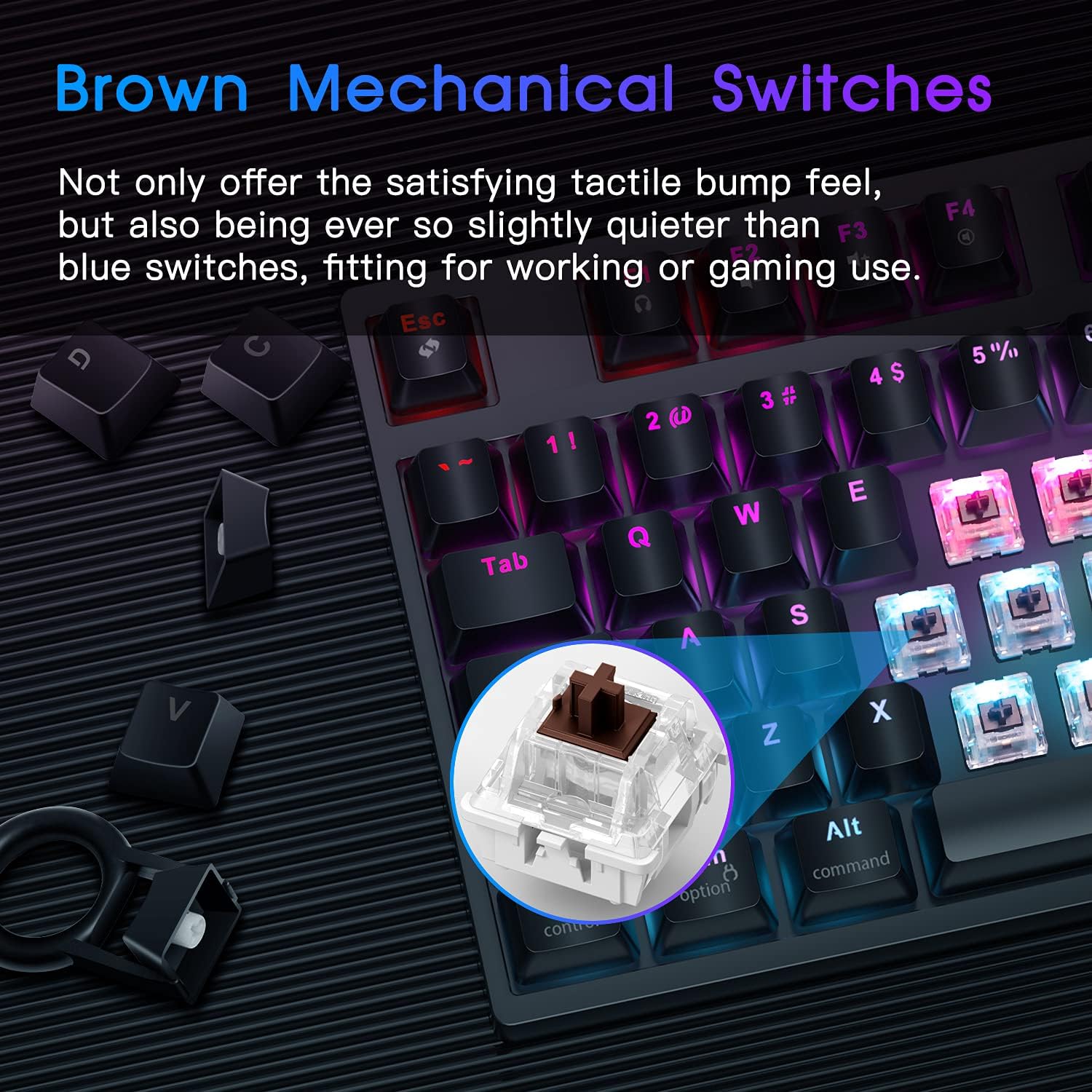
- Браон механички прекидачи: Equipped with dustproof brown switches, offering a tactile bump feedback that is quieter than blue switches, suitable for both typing and gaming. These switches are rated for 50 million keystrokes.

Слика: Детаљна view of the brown mechanical switches on the RECCAZR TK18 keyboard, highlighting their construction.
- Full Key Anti-Ghosting (N-Key Rollover): All 87 keys are conflict-free, ensuring every keystroke is registered accurately, even during rapid, simultaneous presses, which is crucial for gaming performance.

Image: Robotic hands pressing multiple keys on the RECCAZR TK18 keyboard, illustrating the full key anti-ghosting feature.
RGB контрола позадинског осветљења
The keyboard features 18 different RGB lighting modes and 5 user-defined modes. You can adjust colors, brightness, and breathing speed.
- Промена режима осветљења: Use the Fn key in combination with other keys (refer to the keyboard layout for specific combinations) to cycle through the 18 preset RGB modes.
- Custom Backlight Mode: Press Fn + 4, 5, 6, 7, or 8 to enter a custom backlight mode. Press Fn + Home to go to setting mode, then press Fn + Home again to save your custom settings.
- Adjusting Brightness/Speed: The roller wheel (default A Mode) can be used to adjust the brightness of the backlighting.

Image: The RECCAZR TK18 keyboard showcasing its vibrant RGB LED backlighting with different color patterns.
Multimedia and Roller Controller Functions
The keyboard includes 12 multimedia shortcut keys and a versatile roller controller.
- Multimedia Shortcuts (Fn + F-keys):
- Fn + F1: Open media player
- Fn + F2: Volume -
- Фн + Ф3: Јачина звука +
- Fn + F4: Mute Key
- Фн + Ф5: Стоп
- Фн + Ф6: Претходна нумера
- Фн + Ф7: Пусти/пауза
- Фн + Ф8: Следећа нумера
- Fn + F9: Open Email
- Fn + F10: Open HomePage
- Fn + F11: Open My Computer
- Фн + Ф12: Отворите калкулатор
- Roller Wheel Function: The 'M' key next to the roller wheel allows you to switch its function:
- A Mode (Default): Brightness Adjustment
- B Mode: Volume Adjustment
- Закључавање Виндовс тастера: Press Fn + WIN key to lock the Windows key, preventing accidental presses during gaming. Press again to release.
Слика: Детаљна view of the RECCAZR TK18 keyboard's function row and roller control, illustrating multimedia shortcuts and the scroll wheel's functionality.
Ергономски дизајн
The keyboard features an ergonomically designed stepped keycap layout and curved keycaps to provide a comfortable typing and gaming experience, reducing hand fatigue during prolonged use.
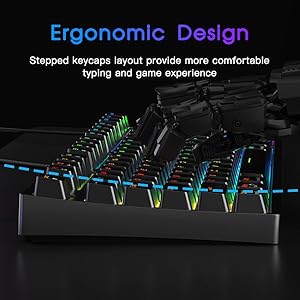
Слика: Споредни професионалацfile of the RECCAZR TK18 keyboard, showing the stepped keycap design for improved ergonomics.
Видео производа прекоview
Video: An official product video demonstrating the RECCAZR TK18 TKL Mechanical Gaming Keyboard's features, including its compact design, anti-ghosting capabilities, RGB lighting effects, and the functionality of the scroll wheel controller.
Одржавање
To ensure the longevity and optimal performance of your RECCAZR TK18 keyboard, follow these maintenance guidelines:
- Чишћење: Regularly clean the keyboard with a soft, dry cloth. For dust and debris between keys, use compressed air. For stubborn grime, lightly dampen a cloth with water or a mild, non-abrasive cleaner. Avoid spraying liquids directly onto the keyboard.
- Уклањање капице тастера (опционо): If necessary, keycaps can be carefully removed for deeper cleaning using a keycap puller (not included). Be gentle to avoid damaging the switches.
- Складиштење: Када се тастатура не користи дуже време, чувајте је на сувом и без прашине месту.
- Избегавајте изливање: Држите течности даље од тастатуре како бисте спречили оштећење унутрашњих компоненти.
Решавање проблема
If you encounter issues with your RECCAZR TK18 keyboard, refer to the following common solutions:
| Проблем | Могући узрок | Решење |
|---|---|---|
| Тастатура не реагује | Лабава УСБ веза, неисправан УСБ порт, проблем са драјвером. | Ensure the USB cable is securely connected. Try a different USB port on your computer. Restart your computer. |
| Позадинско осветљење не ради или је неисправно | Режим осветљења искључен, осветљеност подешена прениско, софтверски конфликт. | Check if the lighting is turned off or brightness is at minimum using the roller wheel or Fn key combinations. Try cycling through different lighting modes. |
| Кључеви се не региструју (ghosting) | Проблем са софтвером, ретки хардверски квар. | Ensure no background applications are interfering. The keyboard features N-key rollover, so true ghosting is unlikely. If the issue persists, contact support. |
| Мултимедијални тастери не раде | Incorrect Fn key combination, media player not active. | Ensure you are pressing the Fn key simultaneously with the correct F-key. Verify your media player is running. |
| Windows key is locked | Windows key lock activated. | Press Fn + WIN key again to unlock the Windows key. |
Ако ови кораци не реше ваш проблем, погледајте одељак Гаранција и подршка за додатну помоћ.
Спецификације
| Феатуре | Детаљ |
|---|---|
| Назив модела | TK18 (also referred to as TK10 BROWN in some specifications) |
| Бранд | РЕЦЦАЗР |
| Повезивање | Wired (USB Cable) |
| Број кључева | 87 (Без кључа) |
| Тип прекидача | Brown Mechanical Switches (Linear, tactile bump) |
| Кеицап Материал | ABS Anti-Fading Keycaps |
| Позадинско осветљење | RGB (18 modes, 5 user-defined) |
| Посебне карактеристике | Anti-Ghosting (N-Key Rollover), Roller Controller (Brightness/Volume), Multimedia Keys, Ergonomic Design |
| Компатибилни уређаји | PC, Gaming PC |
| Компатибилан ОС | Windows 10, 8, 7, Vista, XP; Ограничена подршка за Mac OS |
| Тежина артикла | Приближно 2 фунти |
Гаранција и подршка
RECCAZR products are designed for durability and performance. For warranty information and customer support, please refer to the documentation included with your purchase or visit the official RECCAZR website. If you experience any issues not covered in this manual, our customer service team is available to assist you.
For direct support, please contact RECCAZR customer service through the contact information provided on your product packaging or the official brand webсајту.

Image: An illustration representing the RECCAZR customer service team, indicating 24/365 support availability.