
1. Увод
The Razer Seiren Mini is a compact USB condenser microphone designed for clear audio capture in various applications, including gaming, podcasting, and video production. Its unidirectional polar pattern focuses on sound directly in front of the microphone, reducing background noise for professional-grade recordings.
This manual provides essential information for setting up, operating, and maintaining your Razer Seiren Mini microphone. Please read it thoroughly before use.
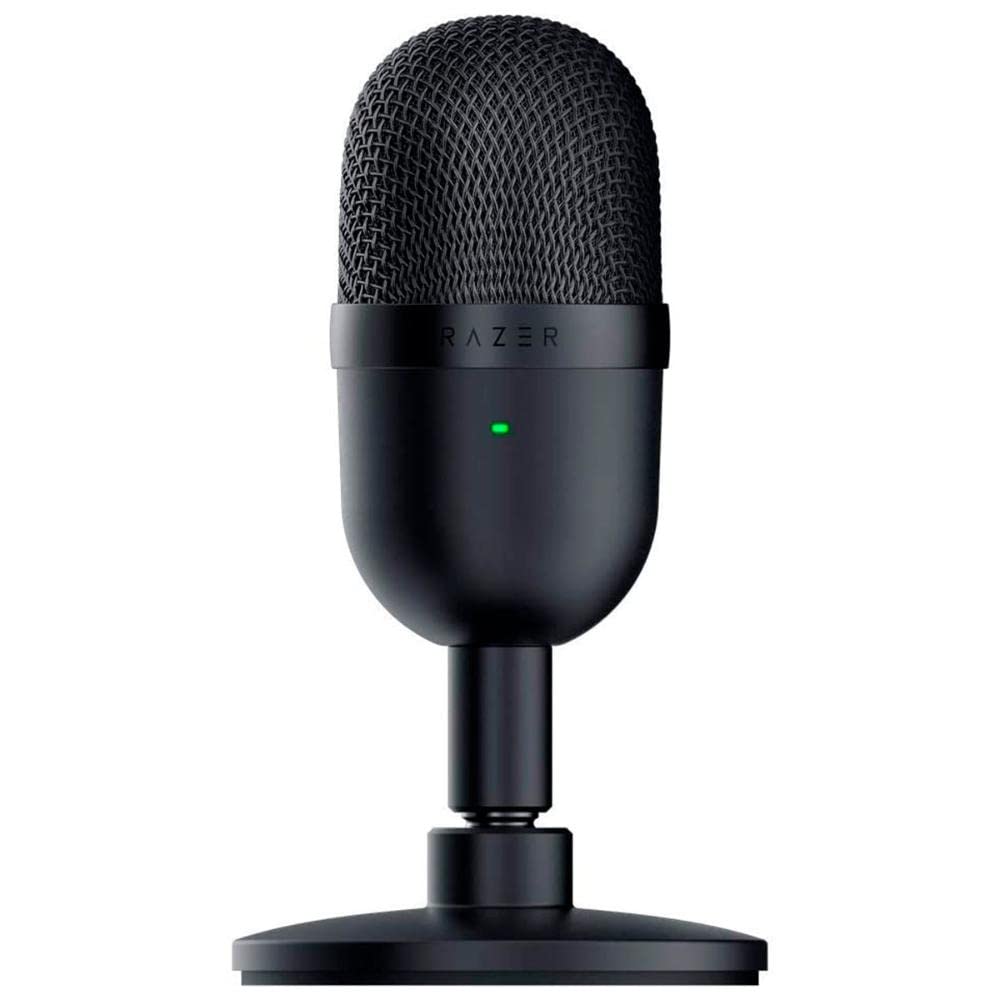
Image 1.1: The Razer Seiren Mini Microphone, showcasinг његов компактни дизајн.
2. Безбедносне информације
- Do not expose the microphone to water or excessive moisture.
- Избегавајте испуштање или излагање микрофона јаким ударцима.
- Keep the microphone away from heat sources and direct sunlight.
- Користите само приложени USB кабл за повезивање.
- Do not attempt to disassemble or modify the microphone. This will void the warranty.
- Clean the microphone with a soft, dry cloth only.
3. Садржај пакета
Проверите да ли су све ставке присутне у вашем пакету:
- Razer Seiren Mini Microphone (Model: RZ19-03450100-R3U1)
- УСБ-А на УСБ-Б кабл
- Detachable Desk Stand
- Important Product Information Guide (not included in this digital manual)
4. Подешавање
4.1 Склапање микрофона
- Attach the microphone to the included desk stand by screwing it onto the threaded mount.
- Ensure the microphone is securely fastened to prevent accidental tipping.
Image 4.1: Diagram showing how to attach the microphone to its desk stand.
4.2 Connecting to Your PC
- Connect the USB-B end of the provided cable to the port on the back of the Razer Seiren Mini.
- Повежите USB-A крај кабла са доступним USB портом на рачунару.
- The microphone is plug-and-play and should be automatically recognized by your operating system (Windows or macOS). No additional drivers are typically required.
Image 4.2: Illustration of connecting the USB cable to the microphone and PC.
4.3 Configuring Audio Settings (Windows)
- Right-click the speaker icon in the system tray and select "Sound Settings" or "Open Sound settings".
- Under the "Input" section, select "Razer Seiren Mini" as your input device.
- Adjust the input volume (gain) to an appropriate level. Speak into the microphone and observe the input level meter to ensure it's not peaking (red).
4.4 Configuring Audio Settings (macOS)
- Go to "System Preferences" > "Sound".
- Click the "Input" tab.
- Select "Razer Seiren Mini" from the list of devices.
- Adjust the input volume (gain) using the slider.
5. Упутство за употребу
5.1 Постављање микрофона
The Razer Seiren Mini features a unidirectional (supercardioid) polar pattern, meaning it is most sensitive to sound coming from directly in front of it and rejects sound from the sides and rear. For optimal audio quality:
- Position the microphone directly in front of your mouth, facing the side with the Razer logo.
- Maintain a distance of approximately 6-12 inches (15-30 cm) from your mouth. Adjust as needed to find the sweet spot for your voice.
- Ensure the microphone is not obstructed by objects that could block sound waves.
Image 5.1: Diagram illustrating optimal microphone placement for clear audio capture.
5.2 Интеграција софтвера
Once connected and configured in your operating system, the Razer Seiren Mini will function with any audio recording or communication software (e.g., Discord, OBS Studio, Zoom, Audacity). Select "Razer Seiren Mini" as your input device within the application's audio settings.
Adjust microphone sensitivity within your software as needed, in conjunction with the system-level input volume, to achieve the desired audio level without distortion.
6. Одржавање
6.1 Чишћење
- Ensure the microphone is disconnected from your PC before cleaning.
- Use a soft, dry, lint-free cloth to wipe the exterior of the microphone.
- Do not use harsh chemicals, solvents, or abrasive materials, as these can damage the finish or internal components.
6.2 Складиштење
When not in use, store the microphone in a clean, dry environment, away from extreme temperatures and humidity. Keeping it in its original packaging or a protective case can help prevent dust accumulation and physical damage.
КСНУМКС. Решавање проблема
7.1 No Sound / Microphone Not Detected
- Проверите УСБ везу: Ensure the USB cable is securely connected to both the microphone and your PC. Try a different USB port.
- Verify System Settings: Confirm that "Razer Seiren Mini" is selected as the input device in your operating system's sound settings (refer to Section 4.3/4.4).
- Подешавања апликације: Check the audio input settings within your recording or communication software to ensure the Razer Seiren Mini is selected.
- Поново покрените рачунар: Понекад једноставно поновно покретање може решити проблеме са детекцијом.
- Test on Another PC: If possible, test the microphone on another computer to rule out a system-specific issue.
7.2 Distorted or Low-Quality Sound
- Подесите улазну јачину: If sound is distorted, the input volume (gain) might be too high. Lower it in your system's sound settings or application settings. If sound is too low, increase the input volume.
- Положај микрофона: Ensure the microphone is positioned correctly (refer to Section 5.1) and not too far or too close to the sound source.
- Еколошка бука: The unidirectional pattern helps, but excessive background noise can still be picked up. Try to record in a quieter environment.
- Интегритет кабла: Inspect the USB cable for any damage. A faulty cable can cause audio issues.
8. Спецификације
| Феатуре | Детаљ |
|---|---|
| Бранд | Разер |
| Назив модела | РЗ19-03450100-Р3У1 |
| Технологија повезивања | УСБ |
| Тип конектора | УСБ тип-А |
| Компатибилни уређаји | PC |
| Укључене компоненте | УСБ-кабл |
| Полар Паттерн | Једносмерни (суперкардиоидни) |
| Фактор форме микрофона | Мини |
| Извор напајања | Електрични са каблом (УСБ напајање) |
| Број канала | 1 |
| Тежина артикла | 280 грама |
| Димензије артикла (Д к Ш к В) | 8 к 9 к 16.1 центиметара |
| Препоручена употреба | Gaming, Podcasting, Video production |
9. Гаранција и подршка
Razer products come with a limited manufacturer's warranty. Please refer to the official Razer website or the Important Product Information Guide included with your purchase for specific warranty terms and conditions.
For technical support, troubleshooting assistance, or warranty claims, please visit the official Razer Support website or contact their customer service directly. You will typically need your product model number (RZ19-03450100-R3U1) and proof of purchase.
Official Razer Support: суппорт.разер.цом