
1. Увод
Thank you for choosing the Lenco SCD-720 Boombox. This versatile audio system offers a wide range of playback options, including DAB+ and FM radio, Bluetooth 5.0 connectivity, a CD/MP3 player, a cassette player, and a USB port for digital audio files. It features 2 x 6W RMS audio output with Bass Reflex for enhanced sound and comes with a remote control for convenient operation. This manual provides essential information for setting up, operating, and maintaining your device.
2. Важне информације о безбедности
- Пажљиво прочитајте сва упутства пре употребе уређаја.
- Сачувајте ово упутство за будућу употребу.
- Не излажите уређај киши или влази како бисте спречили пожар или струјни удар.
- Обезбедите одговарајућу вентилацију. Не блокирајте вентилационе отворе.
- Не постављајте уређај у близини извора топлоте као што су радијатори, грејни уређаји, шпорети или други уређаји (укључујући ampлифиерс) који производе топлоту.
- Заштитите кабл за напајање од гажења или прикљештења, посебно на утикачима, утичницама и на месту где излазе из уређаја.
- Користите само додатке/прибор које је навео произвођач.
- Искључите овај апарат из струје током олуја са грмљавином или када га не користите дуже време.
- Све сервисирање препустите квалификованом сервисном особљу. Сервисирање је потребно када је уређај оштећен на било који начин, као што је оштећен кабл за напајање или утикач, ако је течност проливена или су предмети упали у апарат, ако је апарат био изложен киши или влази, не ради нормално , или је одбачено.
3. Производ је готовview
Familiarize yourself with the main components and controls of your Lenco SCD-720 Boombox.
Фронт View са УСБ портом

This image shows the front of the Lenco SCD-720 Boombox, highlighting the main control panel, speakers, and a USB stick inserted into the USB port on the top left.
Фронт View with CD Compartment Open

This image displays the Lenco SCD-720 Boombox from the front, with the top-loading CD compartment lid open, ready for CD insertion.
Позади View
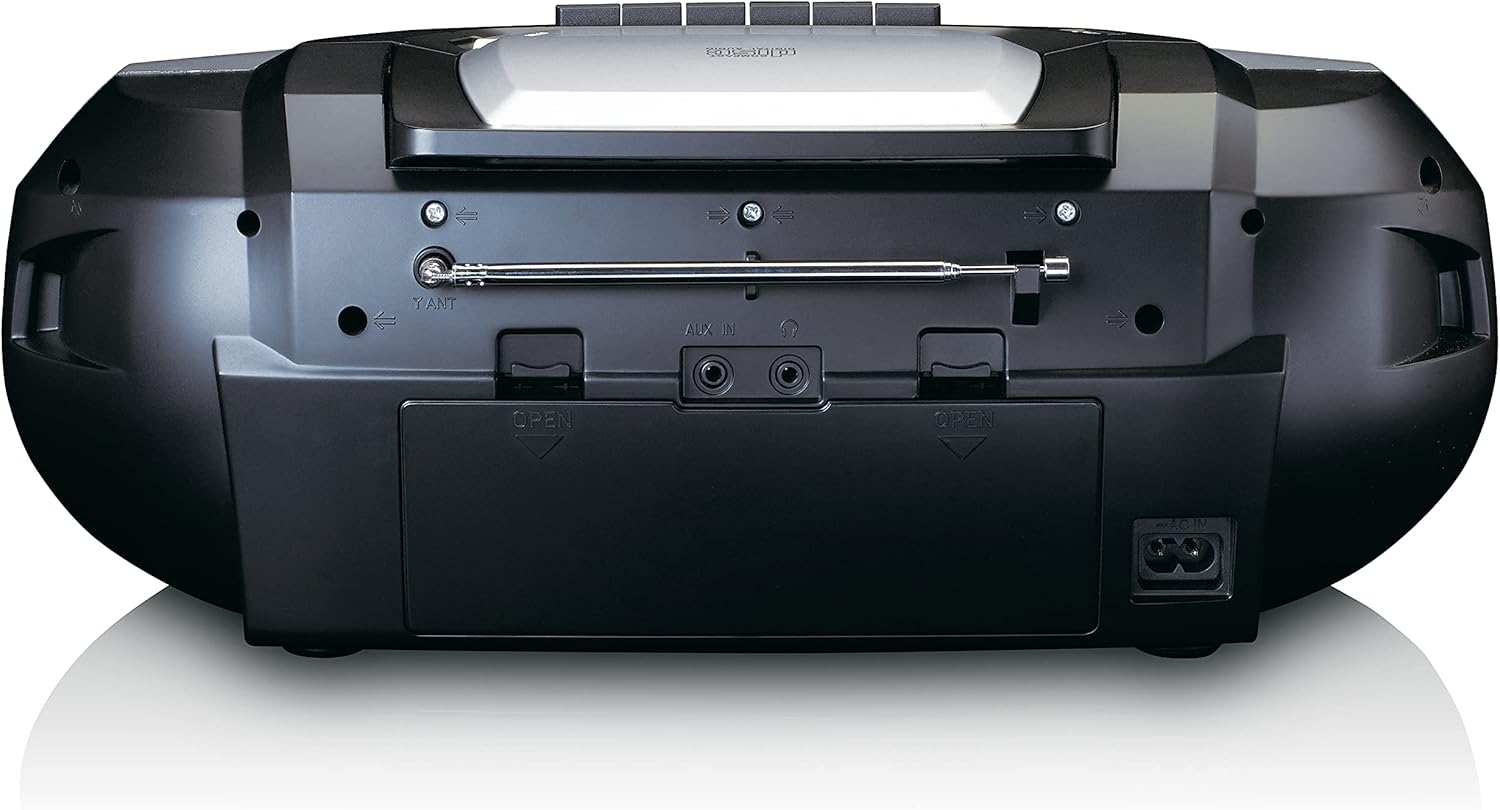
This image shows the back of the Lenco SCD-720 Boombox, featuring the telescopic antenna, AUX input, headphone jack, and the AC power input socket.
Control Panel Close-up

Детаљно view of the Lenco SCD-720 Boombox's central control panel, including the digital display, source selection buttons, tuning/navigation buttons, and the illuminated volume knob.
Boombox with Remote Control
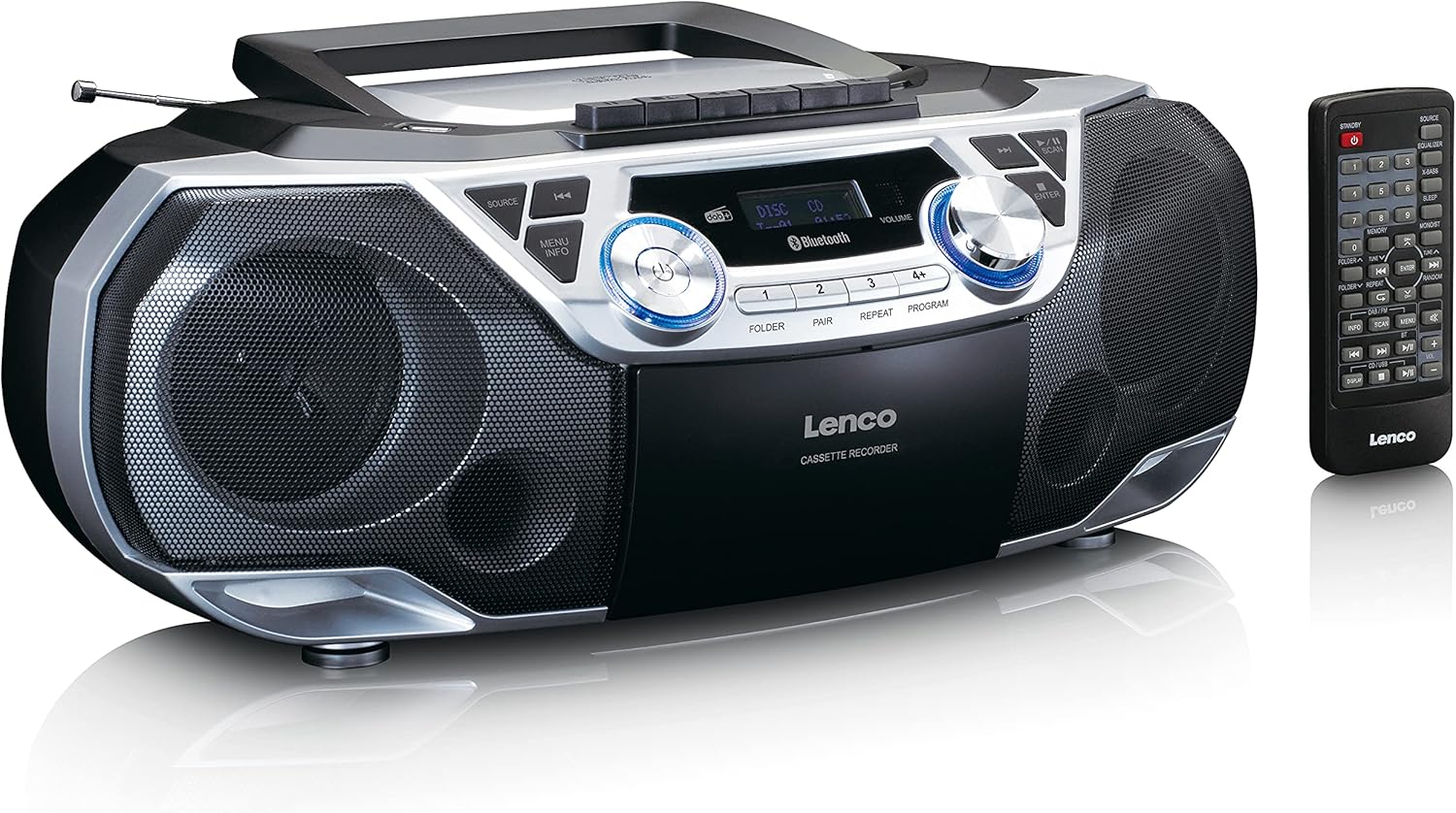
The Lenco SCD-720 Boombox is displayed next to its included remote control, illustrating the complete package.
Изглед даљинског управљача

A close-up image of the remote control for the Lenco SCD-720 Boombox, showing all buttons for power, source selection, playback, tuning, and other functions.
4. Подешавање
4.1 Прикључак за напајање
The Lenco SCD-720 Boombox can be powered by AC mains or batteries.
- АЦ напајање: Connect the supplied AC power cord to the AC IN socket on the rear of the unit and then to a standard wall outlet.
- Рад батерије: For portable use, open the battery compartment on the rear of the unit and insert 8 x 'C' type batteries (not included), ensuring correct polarity. Close the compartment securely.
4.2 Подешавање антене
For optimal radio reception, extend the telescopic antenna fully. Adjust its position and angle to achieve the best signal quality for both DAB+ and FM broadcasts.
4.3 Почетно укључивање
Притисните тастер ПОВЕР button on the unit or remote control to turn on the boombox. The display will light up, and the unit will typically start in the last used mode.
5. Упутство за употребу
5.1 Опште контроле
- Укључивање/искључивање: Притисните тастер ПОВЕР дугме.
- Контрола јачине звука: Ротирајте ВОЛУМЕ дугме на уређају или користите Јачина звука + / - дугмад на даљинском управљачу.
- Избор извора: Притисните тастер ИЗВОР button on the unit or the dedicated source buttons (DAB/FM, CD/USB, BT) on the remote to switch between modes (DAB+, FM, CD, USB, Bluetooth, AUX).
5.2 Рад радија (DAB+/FM)
- Изаберите режим: Притисните тастер ИЗВОР button until DAB+ or FM mode is selected.
- Аутоматско скенирање: У DAB+ или FM режиму, притисните СЦАН дугме за аутоматско претраживање и чување доступних станица.
- Ручно подешавање: Користите TUNE < / > дугмад за ручно подешавање фреквенције.
- Унапред подешене станице: The unit allows you to save your favorite stations. Press and hold one of the numbered preset buttons (1-4) to store the current station. Briefly press a preset button to recall a stored station.
- DAB+ Information: У ДАБ+ режиму притисните ИНФО button to cycle through various information such as program type, signal strength, time, and date.
5.3 CD/MP3 Playback
- Учитај ЦД: Open the CD compartment lid by pressing the ОПЕН button. Place a CD or MP3 CD with the label side facing up. Close the lid securely.
- Репродукција: The CD will start playing automatically. If not, press the ПЛАИ/ПАУСЕ дугме.
- Контроле: Користите SKIP << / >> buttons to skip tracks. Press and hold to fast forward/rewind.
- Поновите: Притисните РЕПЕАТ to repeat the current track or all tracks.
- Програм: Притисните ПРОГРАМ to create a custom playback order for tracks.
5.4 Репродукција и снимање касете
- Load Cassette: Open the cassette compartment. Insert a cassette tape.
- Репродукција: Притисните тастер ПЛАИ дугме.
- Снимање: To record from Radio, CD, USB, or AUX, select the desired source. Insert a blank cassette. Press the РЕЦОРД button (usually red) along with the ПЛАИ дугме истовремено.
- Контроле: Користите БРЗО ПРЕМОТЕ и РЕВИНД дугмад. Притисните СТОП/ЕЈЕЦТ to stop playback and open the compartment.
5.5 Bluetooth 5.0 повезивање
- Уђите у Блуетоотх режим: Притисните тастер ИЗВОР button until 'BT' or 'Bluetooth' appears on the display. The unit will enter pairing mode, indicated by a flashing Bluetooth icon.
- Упаривање: On your smartphone or tablet, enable Bluetooth and search for available devices. Select 'Lenco SCD-720' from the list. Once paired, the Bluetooth icon will stop flashing.
- Репродукција: Start playing audio on your connected device. The sound will be streamed to the boombox.
5.6 Репродукција са УСБ-а
- Insert USB: Убаците УСБ флеш диск који садржи МП3 fileс у УСБ порт.
- Изаберите USB режим: Притисните тастер ИЗВОР button until 'USB' appears. The unit will automatically scan and begin playing MP3 files.
- Контроле: Користите дугмад за контролу репродукције (PLAY/PAUSE, SKIP << / >>) to manage your music.
5.7 АУКС улаз
Connect external audio devices (e.g., MP3 players, smartphones without Bluetooth) to the АУКС ИН jack on the rear of the unit using a 3.5mm audio cable (not included). Select AUX mode via the ИЗВОР дугме.
5.8 Излаз за слушалице
For private listening, connect headphones to the ХЕАДПХОНЕ jack on the rear of the unit. The main speakers will be muted automatically.
5.9 Даљински управљач
The included remote control provides full functionality for the boombox, allowing you to control power, source, volume, playback, tuning, and other settings from a distance. Ensure the remote has working batteries and is pointed towards the front of the boombox.
6. Одржавање
6.1 Чишћење јединице
Wipe the exterior of the boombox with a soft, dry cloth. Do not use abrasive cleaners, waxes, or solvents as they may damage the finish. For stubborn stains, a slightly damp Може се користити крпа, а затим сува крпа.
6.2 Нега CD сочива
If CD playback becomes erratic, the CD lens may need cleaning. Use a commercially available CD lens cleaner disc. Do not touch the lens directly.
6.3 Чишћење главе касете
Regularly clean the cassette heads, pinch rollers, and capstans with a cotton swab lightly moistened with isopropyl alcohol to ensure optimal sound quality and prevent tape damage.
6.4 Замена батерије
If the unit is powered by batteries and performance degrades, replace all 8 'C' type batteries with new ones, ensuring correct polarity. Do not mix old and new batteries or different types of batteries.
КСНУМКС. Решавање проблема
| Проблем | Могући узрок | Решење |
|---|---|---|
| Нема струје | Кабл за напајање није повезан; Батерије су празне или неправилно уметнуте. | Check AC cord connection; Replace batteries, ensuring correct polarity. |
| Нема звука | Јачина звука је прениска; изабран је погрешан извор; повезане су слушалице. | Increase volume; Select correct source; Disconnect headphones. |
| Лош радио пријем | Антена није правилно испружена или постављена; Слаб сигнал. | Extend and adjust the telescopic antenna; Try moving the unit to a different location. |
| CD/USB се не репродукује | Disc dirty/scratched; USB format not supported; Incorrect mode. | Clean or replace disc; Ensure USB contains MP3 files; Select CD or USB mode. |
| Блуетоотх упаривање није успело | Boombox not in pairing mode; Device too far; Bluetooth off on device. | Ensure boombox is in BT pairing mode; Move device closer; Enable Bluetooth on your device. |
| Cassette recording issues | Incorrect source selected; Cassette write-protect tab engaged. | Select the desired recording source; Ensure the write-protect tab on the cassette is not broken off. |
8. Спецификације
- Модел: СЦД-720СИ
- Бренд: Ленцо
- Повезивање: DAB+, FM Radio, Bluetooth 5.0, CD/MP3 Player, Cassette Player, USB Playback, AUX Input, Headphone Output
- Аудио излаз: 2 к 6В РМС
- Извор напајања: AC 230V ~ 50Hz or 8 x 'C' type batteries (DC 12V)
- Подржани аудио формати: CD, CD-R/RW, MP3 (from CD/USB)
- Посебне карактеристике: Bass Reflex, Remote Control
- Димензије (Д к Ш к В): Приближно 38.5 цм x 23.5 цм x 14.5 цм
- Боја: Сребро
- Произвођач: Lenco GmbH
- Земља порекла: Кина
9. Гаранција и подршка
Lenco products are covered by a warranty in accordance with European law. For specific warranty terms and conditions, please refer to the warranty card included with your product or visit the official Lenco website. For technical support, service, or spare parts information, please contact Lenco customer service or your local dealer. Please have your model number (SCD-720SI) and purchase details ready when contacting support.
Information regarding software updates and spare parts availability is not provided at this time.