
1. Увод
Welcome to the user manual for your new Q Link Wireless Serrano 3 Smartphone. This guide provides essential information on setting up, operating, maintaining, and troubleshooting your device. Please read this manual thoroughly to ensure optimal performance and longevity of your smartphone.

Слика 1: Предња и задња страна view of the Serrano 3 Smartphone.
2. Шта је у кутији
Upon unboxing your Serrano 3 Smartphone, please verify that all the following items are included:
- Serrano 3 Smartphone
- Сцреен Протецтор
- Кабл за пуњење (USB)
- Повер Адаптер
- Водич за брзи почетак

Figure 2: Serrano 3 Smartphone and accessories within its packaging.
3. Подешавање
3.1. Пуњење уређаја
Before first use, fully charge your Serrano 3 Smartphone. Connect the charging cable to the phone's charging port and the power adapter to a wall outlet. The battery indicator on the screen will show charging progress.
3.2. Уметање SIM картице и SD картице
To insert your SIM card (for cellular service) and an optional microSD card (for expanded storage):
- Locate the SIM/SD card tray on the side of the phone.
- Користите приложени алат за избацивање СИМ картице да бисте отворили лежиште.
- Place your SIM card(s) and microSD card into their respective slots, ensuring correct orientation.
- Пажљиво гурните лежиште назад у телефон док не кликне на своје место.
3.3. Укључивање/искључивање
- За укључивање: Press and hold the Power button (usually on the right side) until the Q Link Wireless logo appears.
- За искључивање: Притисните и држите дугме за напајање док се не појави мени са опцијама напајања. Изаберите „Искључи“ и потврдите.
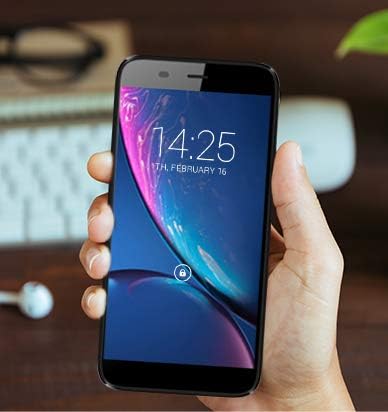
Figure 3: The Serrano 3 Smartphone being held, demonstrating its size and display.
4. Управљање вашим уређајем
4.1. Навигација
The Serrano 3 features a responsive touchscreen for all interactions. Use gestures such as tapping, swiping, pinching, and spreading to navigate menus, open applications, and control content.
4.2. Обављање позива и слање порука
Access the Phone app to make calls by dialing numbers or selecting contacts. Use the Messages app to send and receive SMS/MMS messages. Ensure your SIM card is properly inserted and activated for cellular services.
4.3. Повезивање на Ви-Фи
Да бисте се повезали на Ви-Фи мрежу:
- Иди на Подешавања > Мрежа и интернет > Ви-Фи.
- Укључите Ви-Фи.
- Изаберите жељену мрежу са листе и унесите лозинку ако се то од вас затражи.
4.4. Употреба камере
The Serrano 3 is equipped with a 2MP front camera and a 5MP rear camera. Open the Camera app to capture photos and videos. Tap the screen to focus and press the shutter button to take a picture.
5. Одржавање
Proper care will extend the life of your Serrano 3 Smartphone:
- Чишћење: Користите меку крпу која не оставља влакна за чишћење екрана и кућишта. Избегавајте абразивне материјале или јаке хемикалије.
- Отпорност на воду: Овај уређај није водоотпоран. Избегавајте излагање течностима.
- температура: Не излажите уређај екстремним температурама (врућим или хладним).
- Одржавање батерије: Avoid fully discharging the battery frequently. Charge the device regularly.
- Ажурирања софтвера: Редовно ажурирајте софтвер свог уређаја како бисте осигурали оптималне перформансе и безбедност.
КСНУМКС. Решавање проблема
If you encounter issues with your Serrano 3 Smartphone, refer to the table below for common problems and their solutions.
| Проблем | Могуће решење |
|---|---|
| Уређај се не укључује. | Уверите се да је батерија напуњена. Прикључите пуњач и сачекајте неколико минута пре него што поново покушате да је укључите. |
| Екран не реагује. | Restart the device by holding the Power button. If unresponsive, force restart by holding Power button for 10-15 seconds. |
| Повезивање на Ви-Фи није могуће. | Check Wi-Fi settings, ensure Wi-Fi is enabled, and re-enter the password. Restart your Wi-Fi router. |
| Лош квалитет позива или нема сигнала. | Check SIM card insertion. Move to an area with better network coverage. Contact your service provider. |
| Device is stuck in a boot loop or shows "corrupt" message. | This indicates a potential software or hardware issue. Try a factory reset (consult online resources for your specific model's reset procedure, as it may vary). If the issue persists, contact customer support for further assistance. |
7. Спецификације
Key technical specifications for the Q Link Wireless Serrano 3 Smartphone:
| Феатуре | Детаљ |
|---|---|
| Назив модела | Q Link Wireless Connecting America Serrano 3 |
| Број модела ставке | Serrano H6 |
| Оперативни систем | Андроид Го |
| Величина екрана | 5.5 инча |
| Резолуција | 566 к 319 |
| РАМ | 2 ГБ |
| Капацитет меморије | 16 ГБ |
| Задња камера | 5 МП |
| Предња камера | 2 МП |
| Капацитет батерије | 2200 Милиampпре сат времена (мАх) |
| Време пуњења | 2 сата |
| Димензије производа | 6 к 2.48 к 0.42 инча |
| Тежина артикла | 3.53 унци (100 грама) |
| Боја | Црно |
| Бежичне комуникационе технологије | Мобилна мрежа (4G LTE) |
| Цоннецтивити Тецхнологиес | Wi-Fi, GPS |
| Аудио Јацк | 3.5 мм |
8. Гаранција и подршка
Q Link Wireless provides support for its products. For specific warranty details, please refer to the documentation included with your purchase or visit the official Q Link Wireless webсајту.
Политика враћања: Овај производ обично има политику враћања у року од 30 дана за повраћај новца или замену, у складу са условима и одредбама продавца.
For technical assistance or further inquiries, please contact Q Link Wireless customer support through their official channels.