
Bytech BY-AU-BS-152-BK
Bytech True Wireless Bluetooth Boost Link True Speaker User Manual
Model: BY-AU-BS-152-BK
Увод
Хвала вам на куповиниasing the Bytech True Wireless Bluetooth Boost Link True Speaker. This manual provides essential information for setting up, operating, and maintaining your new speakers. Please read this manual thoroughly before use to ensure proper operation and to maximize your listening experience. These speakers feature True Wireless Stereo (TWS) functionality, Bluetooth connectivity, FM Radio, and Bass Boost for rich audio.
Безбедносне информације
- Do not expose the speakers to extreme temperatures, humidity, or direct sunlight.
- Avoid dropping or subjecting the speakers to strong impacts.
- Do not disassemble, repair, or modify the speakers yourself. Refer all servicing to qualified personnel.
- Држите звучнике даље од воде и других течности.
- Користите само назначени кабл за пуњење и адаптер за напајање.
- Clean the speakers with a soft, dry cloth. Do not use abrasive cleaners or solvents.
- Listen at moderate volume levels to avoid hearing damage.
Садржај пакета

Image: The Bytech Boost Link True Wireless Speakers shown in their retail packaging, highlighting the two speakers and the Bluetooth connectivity feature.
Молимо вас да проверите да ли су сви предмети присутни и у добром стању:
- 2 x Bytech Boost Link True Wireless Speakers
- 1 x Кабл за пуњење (USB)
- 1 x Упутство за употребу (овај документ)
Производ је завршенview

Слика: Крупни план предње стране view of the two Bytech Boost Link True Wireless Speakers, showing the speaker grilles and control buttons at the bottom.
Familiarize yourself with the speaker's components and controls:
- Решетка звучника: Protects the speaker driver.
- Контролна дугмад:
- Дугме за напајање: Power On/Off, Play/Pause.
- Дугме за режим: Switch between Bluetooth, FM Radio, etc.
- Дугме за претходну нумеру/утишавање: Кратак притисак за претходну нумеру, дуг притисак за смањивање јачине звука.
- Следећа нумера/дугме за појачавање звука: Кратак притисак за следећу нумеру, дуг притисак за појачавање јачине звука.
- Порт за пуњење: За повезивање УСБ кабла за пуњење.
- ЛЕД индикатор: Shows power status, charging status, and pairing status.
Сетуп
Пуњење звучника
Before first use, fully charge both speakers. Connect the supplied USB charging cable to the charging port on each speaker and plug the other end into a USB power adapter (not included) or a computer's USB port. The LED indicator will show charging status and turn off or change color when fully charged.
Укључивање/искључивање
- За укључивање: Press and hold the Power button on each speaker until the LED indicator lights up and you hear a power-on prompt.
- За искључивање: Press and hold the Power button on each speaker until the LED indicator turns off and you hear a power-off prompt.
Упутство за употребу
Bluetooth Pairing (Single Speaker Mode)
- Уверите се да је звучник укључен и у режиму упаривања путем Bluetooth-а (LED индикатор ће трептати).
- На свом уређају (паметном телефону, таблету, лаптопу) омогућите Блутут и потражите доступне уређаје.
- Select "BYTECH BOOST LINK" (or similar name) from the list.
- Након упаривања, ЛЕД индикатор ће престати да трепери и остати непрекидно светлећи, а чућете и звук потврде.
True Wireless Stereo (TWS) Pairing (Two Speakers)
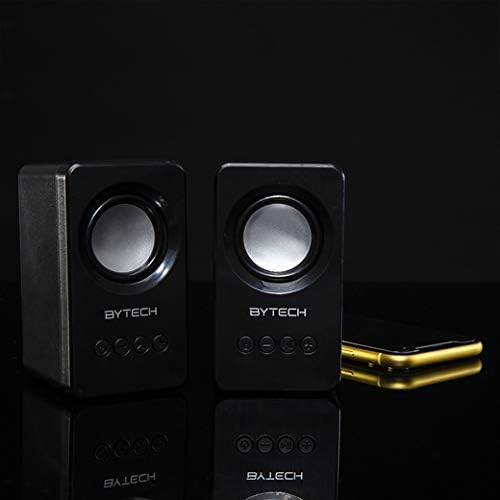
Image: The two Bytech Boost Link True Wireless Speakers positioned next to a smartphone, symbolizing their ability to connect wirelessly to each other and a device for stereo sound.
For a true stereo sound experience, you can pair both speakers together:
- Power on both Bytech Boost Link speakers. Do not connect them to your Bluetooth device yet.
- The speakers will automatically attempt to pair with each other. You will hear a confirmation sound when they are successfully linked for TWS. One speaker will become the master (left channel) and the other the slave (right channel).
- Once TWS paired, the master speaker will enter Bluetooth pairing mode (LED flashing).
- On your device, enable Bluetooth and search for "BYTECH BOOST LINK". Connect to this single entry.
- Оба звучника ће сада репродуковати звук у стерео режиму.
- Напомена: If the speakers do not automatically pair, try double-pressing the Mode button on one of the speakers to initiate TWS pairing.
Операција ФМ радија
- Power on the speaker(s).
- Притисните тастер Режим више пута притискајте дугме док не чујете обавештење о ФМ радију.
- Да бисте аутоматски скенирали и сачували станице, притисните и држите Пусти/Паузирај button. The speaker will scan and store available FM stations.
- Користите Превиоус Трацк и Нект Трацк дугмад за навигацију између сачуваних станица.
Репродукција звука и контрола јачине звука
- Пусти/паузирај: Кратко притисните дугме за напајање.
- Следећа нумера: Short press the Next Track/Volume Up button.
- Претходни запис: Short press the Previous Track/Volume Down button.
- Појачавање звука: Long press the Next Track/Volume Up button.
- Смањивање јачине звука: Long press the Previous Track/Volume Down button.
Одржавање
- Чишћење: Use a soft, dry, lint-free cloth to clean the surface of the speakers. Do not use liquid cleaners, aerosols, or solvents.
- Складиштење: Када се звучници не користе дуже време, чувајте их на хладном и сувом месту, даље од директне сунчеве светлости и екстремних температура.
- Одржавање батерије: To prolong battery life, avoid fully discharging the battery frequently. Charge the speakers regularly, even if not in use.
Решавање проблема
| Проблем | Могући узрок | Решење |
|---|---|---|
| Звучник се не укључује. | Ниска батерија. | Потпуно напуните звучник. |
| Није могуће упаривање преко Bluetooth-а. | Звучник није у режиму упаривања; Блутут уређаја је искључен; Предалеко од уређаја. | Ensure speaker LED is flashing; Turn on Bluetooth on your device; Move speaker closer to device (within 10 meters). |
| Нема звука. | Volume too low; Speaker not connected; Incorrect mode. | Increase volume on speaker and device; Re-pair Bluetooth; Ensure correct mode (Bluetooth/FM). |
| Упаривање TWS-а не успева. | Speakers already connected to a device; Speakers too far apart. | Disconnect speakers from any device; Power off and on both speakers, then try TWS pairing again; Ensure speakers are close to each other. |
| Слаб ФМ радио пријем. | Слаб сигнал; Сметње. | Relocate the speaker to an area with better reception; Extend the charging cable (can act as an antenna). |
Спецификације
- Модел: БИ-АУ-БС-152-БК
- Бренд: Битецх
- Технологија повезивања: бежични (Блуетоотх)
- Режим аудио излаза: Сурроунд
- Тип звучника: Сурроунд Соунд
- Посебне карактеристике: Wireless Bluetooth, Bass Boost, FM Radio, True Wireless Stereo (TWS)
- Препоручена употреба: За музичке плејере
- Компатибилни уређаји: Лаптоп, таблет, паметни телефон
- Тип контролера: On-device buttons
- Димензије пакета: 20.7 к 16 к 9 цм
- Тежина: 560 г
Гаранција и подршка
Bytech products are designed and manufactured to the highest quality standards. For information regarding warranty coverage, technical support, or service inquiries, please refer to the warranty card included with your purchase or visit the official Bytech webсајт. Молимо вас да сачувате доказ о куповини за потребе гаранције.
For further assistance, please contact Bytech customer support.
Ask a question about this manual
Ask about setup, troubleshooting, compatibility, parts, safety, or missing instructions. Manuals+ will review the question and use this page’s manual context to help answer it.