
1. Увод
This manual provides instructions for the installation, setup, and operation of the Layfuz Tuya WiFi M515EGWT Intelligent Pull Bead Curtain Motor. This device is designed to automate bead-chain roller blinds, allowing control via a mobile application or voice commands through compatible smart home assistants.
2. Производ је готовview
The Layfuz M515EGWT motor offers convenient automation for your curtains. It integrates with the Tuya Smart App for remote control and supports voice commands via Amazon Alexa and Google Home. Key features include:
- Mobile APP Control: Manage your curtains from anywhere using the Tuya Smart App.
- Контрола гласом: Компатибилно са Amazon Alexa и Google Home за рад без употребе руку.
- Временска функција: Schedule curtain opening and closing times to suit your daily routine.
- Adjustable Travel Limits: Set custom upper, lower, and intermediate stop positions.
- Direct Current Power Supply: Ensures safe and reliable operation.

Слика 2.1: Layfuz M515EGWT motor with compatible bead chain types. The motor is designed to work with various bead chain sizes and materials, including 2mm, 4mm, 6mm, 4.5*6mm, 4.5*12mm, metal chain, beaded, and 3.2mm chains.
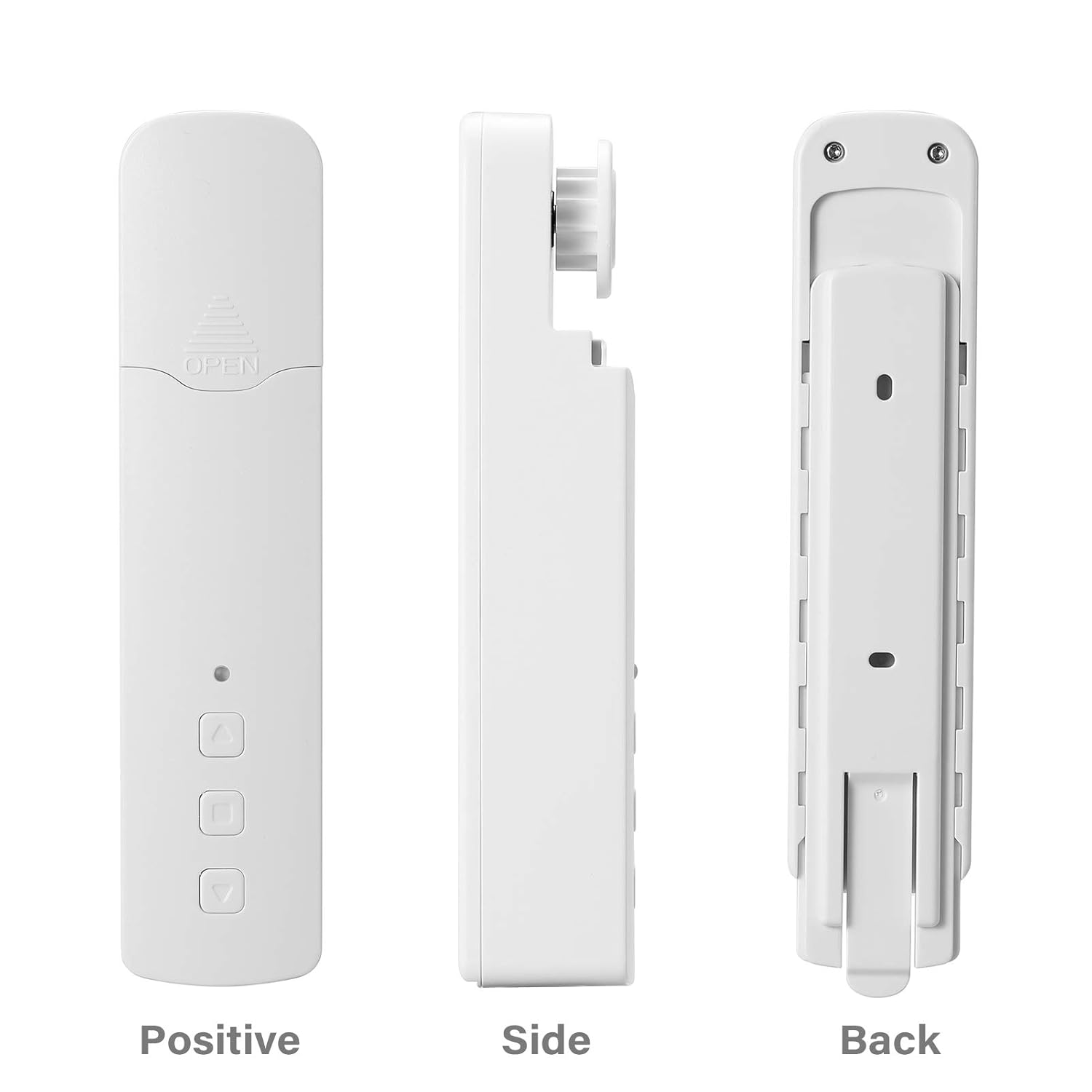
Слика 2.2: Другачије views of the Layfuz M515EGWT motor, showing its positive (front), side, and back profiles. The front includes an indicator light and control buttons, while the back features mounting points.

Слика 2.3: The motor is suitable for various curtain types, including Venetian blinds, vertical blinds, honeycomb shades, triple shades, roller shades, and zebra shades, provided they use a compatible bead chain mechanism.

Слика 2.4: This image highlights the motor's control buttons: Up, Stop, and Down. It also shows the Set button and the charging port. Compatibility logos for Amazon Alexa, Google Home, and Tuya Smart are visible, indicating smart home integration.
3. Садржај пакета
Молимо вас да проверите да ли су све ставке присутне у пакету:
- 1 x Curtain Motor (M515EGWT)
- 1 x Power Adapter (EU, UK, USA, or AU type, optional based on region)
- 1 к Упутство за употребу
4. Спецификације
| Феатуре | Спецификација |
|---|---|
| Бранд | Layfuz |
| Број модела | M515EGWT |
| Материјал | АБС |
| Боја | Бела |
| Ратед Волtage | 5В ДЦ |
| Називна снага | 6.0В |
| Ратед Торкуе | 0.45Нм |
| Ротатинг Спеед | 30рпм |
| Радна температура | -20℃ ~ +65℃ |
| Built-in Receiving Frequency | 915 МХз, 2.4 ГХз |
| Димензије производа | 22 к 18.5 к 4 цм |
| Тежина артикла | 640 г |
| Земља порекла | Кина |
5. Инсталација
Follow these steps to install the curtain motor. Refer to Figure 5.1 for visual guidance.

Слика 5.1: Comprehensive guide for the Layfuz M515EGWT motor, detailing its appearance, step-by-step installation, Tuya Smart App connection process, and instructions for setting and deleting travel limits.
5.1 Product Installation Steps (Refer to '2 Product install' in Figure 5.1)
- Fix the Wall Panel: Secure the mounting panel to the wall at the desired location for the motor.
- Инсталирајте мотор: Slide the motor onto the fixed wall panel until it clicks into place.
- Insert the Bead Chain: Carefully place the curtain's bead chain into the motor's drive wheel. Ensure it is seated correctly.
- Close Wheel Cover: Close the wheel cover and tighten the curtain bead chain to prevent slippage.

Слика 5.2: The motor features fast switching capability for different drive gears, making it applicable to multiple models of bead chains. Ensure the correct gear is installed for your curtain's bead chain type.
6. Подешавање
After physical installation, proceed with the smart app setup and limit settings. Refer to '3 Instructions for use' and '3.2 Limit Setting' in Figure 5.1.
6.1 Add Tuya Smart App (Refer to '3.1 Add Tuya Smart App' in Figure 5.1)
- Преузми апликацију: Download the Tuya Smart App from your mobile phone's app store (Google Play or Apple App Store).
- Регистрација/Пријава: Отворите апликацију и региструјте нови налог или се пријавите са постојећим.
- Додај уређај: Click '+' or 'Add Device' in the app. The indicator light on the motor should be flashing red. If not, press and hold the 'Set' key for 3-5 seconds until it flashes rapidly.
- Изаберите тип уређаја: Choose 'Manual Add' or 'Auto Scan'. For manual, select 'Curtain Motor'.
- Повежите се на Ви-Фи: Enter your 2.4GHz Wi-Fi network name and password. Ensure your phone is connected to the same 2.4GHz Wi-Fi network.
- Упаривање: The app will search for and connect to the device. Once connected, you can rename the device.
6.2 Limit Setting (Refer to '3.2 Limit Setting' in Figure 5.1)
Setting the upper and lower travel limits is crucial for proper operation. You must set these limits before setting any middle limits.
- Подесите горњу границу: Press the 'Set' key once. The indicator light will flash red. Use the 'Up' key to move the curtain to the desired upper limit. Press the 'Set' key again to confirm. The indicator light will flash red three times, indicating the upper limit is set.
- Подесите доњу границу: Press the 'Set' key once. The indicator light will flash red. Use the 'Down' key to move the curtain to the desired lower limit. Press the 'Set' key again to confirm. The indicator light will flash red three times, indicating the lower limit is set.
6.3 Middle Limit Setting (Refer to '3.3 Middle Limit Setting' in Figure 5.1)
You can set an intermediate stop point for your curtain.
- Initiate Middle Limit Setting: Press the 'Set' key once. The indicator light will flash red.
- Move to Desired Position: Use the 'Up' or 'Down' keys to move the curtain to the desired middle stop position.
- Confirm Middle Limit: Press the 'Set' key again. The indicator light will flash red three times, confirming the middle limit is set.
6.4 Delete Middle Limit (Refer to '3.4 Delete Middle Limit' in Figure 5.1)
To remove a previously set middle limit:
- Initiate Deletion: Press the 'Set' key once. The indicator light will flash red.
- Confirm Deletion: Press and hold the 'Set' key for 5 seconds. The indicator light will flash red, release, and then flash red three times, indicating the middle limit has been deleted.
7. Операција
The Layfuz M515EGWT motor can be operated via its physical buttons, the Tuya Smart App, or voice commands.
7.1 Manual Control (Device Buttons)
- Дугме горе: Moves the curtain upwards.
- Дугме доле: Moves the curtain downwards.
- Стоп дугме: Зауставља завесу на њеном тренутном положају.
- Подесите дугме: Used for pairing and setting travel limits (as described in Section 6).
7.2 Туја паметна контрола апликације
Once the motor is successfully paired with the Tuya Smart App (Section 6.1), you can:
- Open/Close Curtains: Use the virtual buttons in the app to fully open or close the curtains.
- Подесите позицију: Precisely control the curtain's position by sliding a bar or setting a percentage.
- Поставите распореде: Utilize the timing function to create automated schedules for opening and closing curtains at specific times.
- даљински управљач: Operate your curtains from any location with internet access.
7.3 Управљање гласом
The motor is compatible with Amazon Alexa and Google Home. After linking your Tuya Smart account to your voice assistant, you can use commands such as:
- "Alexa, open the curtain."
- "Hey Google, close the curtain."
- "Alexa, set the curtain to 50%."
8. Одржавање
To ensure the longevity and optimal performance of your Layfuz M515EGWT motor, follow these maintenance guidelines:
- Чишћење: Wipe the motor's exterior with a soft, dry cloth. Do not use abrasive cleaners or immerse the device in water.
- Прикључак за напајање: Ensure the power adapter and cable are securely connected and free from damage. Disconnect power before cleaning or performing any maintenance.
- Bead Chain Inspection: Periodically check the curtain's bead chain for wear, damage, or obstructions that could hinder motor operation. Ensure the chain is properly seated in the motor's drive wheel.
- Услови животне средине: Operate the motor within the specified temperature range (-20℃ to +65℃) and avoid excessive humidity.
КСНУМКС. Решавање проблема
If you encounter issues with your Layfuz M515EGWT motor, refer to the following common problems and solutions:
- Мотор не реагује:
- Check if the power adapter is securely connected and the motor is receiving power.
- Уверите се да је утичница функционална.
- Verify that the bead chain is correctly installed and not jammed.
- Difficulty Connecting to Tuya App:
- Ensure your mobile phone is connected to a 2.4GHz Wi-Fi network. The motor does not support 5GHz Wi-Fi.
- Confirm that the motor's indicator light is flashing rapidly during pairing mode. If not, press and hold the 'Set' button for 3-5 seconds.
- Проверите тачност лозинке за Wi-Fi.
- Move the motor closer to your Wi-Fi router to improve signal strength.
- Restart your Wi-Fi router and try the pairing process again.
- Curtain Not Moving to Correct Limits:
- Re-calibrate the upper and lower travel limits as described in Section 6.2.
- Ensure the bead chain is not slipping or obstructed.
- Гласовна контрола не ради:
- Verify that your Tuya Smart account is correctly linked to your Amazon Alexa or Google Home app.
- Проверите своју интернет везу.
- Ensure the device name in the Tuya app is recognized by your voice assistant.
10. Безбедносне информације
Молимо вас да прочитате и придржавате се следећих мера безбедности:
- Овај уређај је само за унутрашњу употребу.
- Do not expose the motor to water, moisture, or extreme temperatures.
- Ensure the power adapter and cable are not damaged. Do not use if damaged.
- Држите уређај ван домашаја деце и кућних љубимаца.
- Do not attempt to disassemble or repair the motor yourself. Contact qualified personnel for service.
- Ensure the curtain's bead chain is installed correctly and securely to prevent accidents.
11. Гаранција и подршка
For warranty information and technical support, please refer to the documentation provided at the time of purchase or contact your retailer. Keep your purchase receipt as proof of purchase.