
Увод
The Cooler Master MasterAir MA624 Stealth is a high-performance dual tower CPU air cooler designed to provide exceptional thermal dissipation. Featuring dual SickleFlow fans and a robust heatsink with 6 heat pipes, it ensures efficient cooling for a wide range of processors. Its all-black aesthetic offers a sleek, stealthy look for any PC build.
Кључне карактеристике
- Dual SickleFlow 140 Fan: Twin fans utilize a Push-Pull setup for optimal airflow and pressure.
- Dual Tower Heat Sink: Dual heatsink combination provides twice the surface area for better cooling.
- 6 Heat Pipes with Nickel Plated Base: 6 heat pipes and nickel plated base provides optimal coverage for optimal cooling.
- RAM Clearance Option: Optional 3rd SickleFlow 120mm fan included for necessary RAM compatibility and clearance.
- Широка компатибилност: Supports AMD AM4/AM3+/AM3/AM2+/AM2/FM2+/FM2/FM1 and Intel LGA1700*/1200/1151/1150/1155/1156/1366/2066/2011-v3/2011 sockets.
Визуелни прикази производа

Предња страна view of the Cooler Master MasterAir MA624 Stealth CPU Air Cooler, showcasing its all-black design.

Фронт view of the Cooler Master MasterAir MA624 Stealth fan, highlighting the central Cooler Master logo.
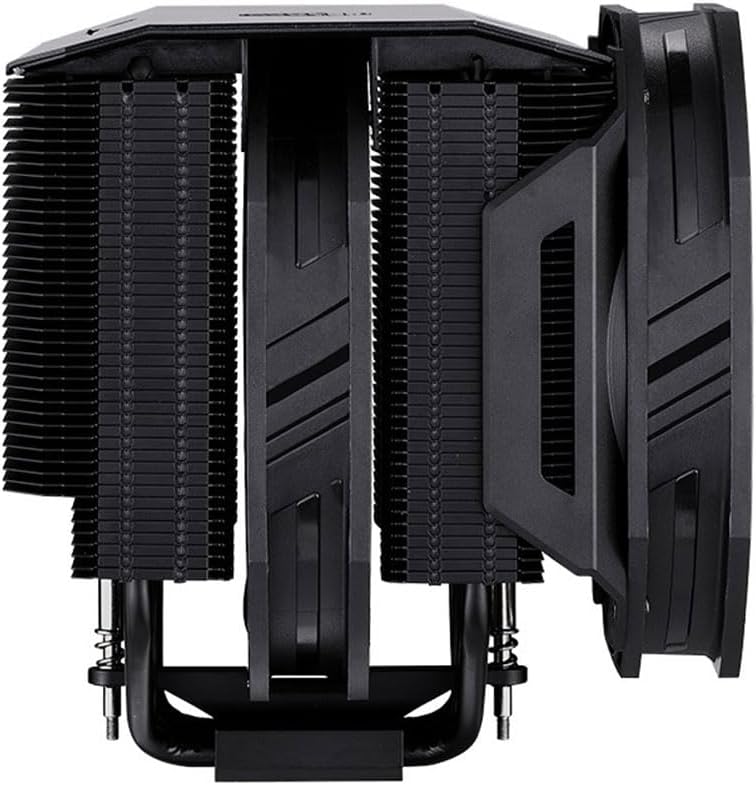
Сиде проfile of the Cooler Master MasterAir MA624 Stealth, showing the dual tower heatsink and fan configuration.
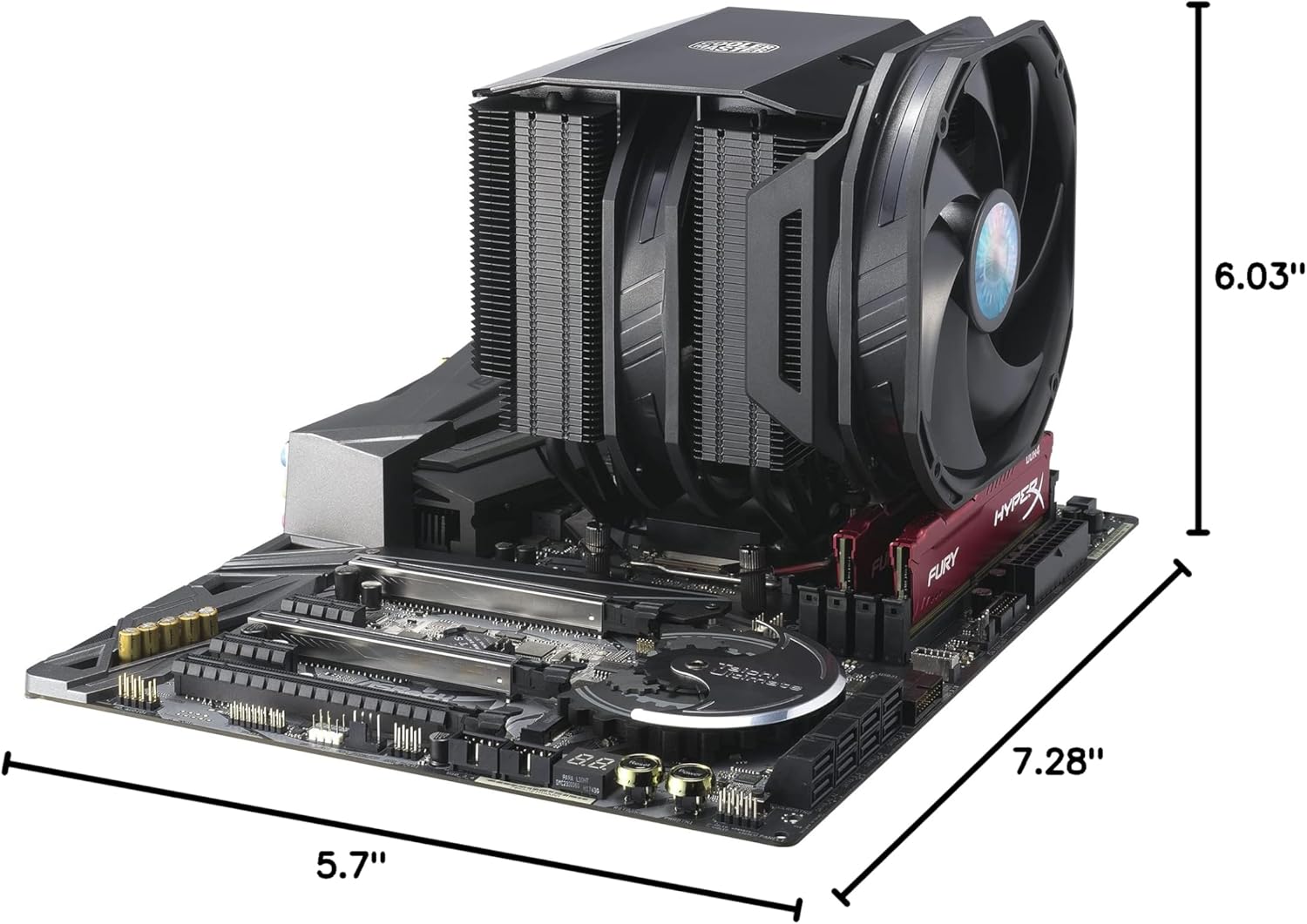
Cooler Master MasterAir MA624 Stealth installed on a motherboard, with dimensions indicating its length, width, and height.

Diagram illustrating the dual SickleFlow fan design with optimized airflow and pressure for superior Push-Pull performance.

Diagram showing RAM clearance with an optional 3rd SickleFlow 120mm fan for compatibility.

Цлосе-уп view of the cooler's base with six copper heat pipes and nickel-plated base for optimal heat transfer.

Intel LGA 1700 upgrade kit bracket, available separately for newer CPU sockets.

Врх view of the Cooler Master MasterAir MA624 Stealth, showcasing its premium aluminum black top cover.

Сиде view of the cooler highlighting the cut-out design at the base of the heatsink for improved RAM and VRM clearance.
Званични видео снимци производа
Cooler Master MA624 Stealth Overview
This official product video from Cooler Master provides a visual overview of the MA624 Stealth's design, features, and cooling capabilities. It highlights the dual tower heatsink, 6 heat pipes, and SickleFlow fans.
Подешавање и инсталација
The Cooler Master MasterAir MA624 Stealth features an easy mounting system for various Intel and AMD sockets. Below are the general steps for installation:
- Припремите задњу плочу: Locate the universal backplate included in the package. Insert the mounting bolts through the designated holes in the backplate and secure them with the small plastic locking pieces on each corner.
- Mount Backplate: Carefully align the prepared backplate with the CPU cooler mounting holes on the back of your motherboard. Thread the bolts through the motherboard's holes.
- Secure Backplate: Flip your motherboard over to the front side. Secure the backplate by attaching the appropriate locking bolts (thumb screws) onto the threaded bolts protruding through the motherboard.
- Install Mounting Bars: Attach the correct Intel or AMD mounting bars (straight bars for Intel) onto the motherboard. These bars will secure to the locking bolts you just installed.
- Нанесите термалну пасту: Apply a small amount of thermal paste (included) to the center of your CPU's integrated heat spreader (IHS).
- Place Cooler: Carefully place the MasterAir MA624 Stealth cooler on top of your CPU, ensuring the screws on the cooler align with the holes in the mounting bars.
- Безбедни хладњак: Using a screwdriver, tighten the screws on the cooler in an alternating pattern (e.g., diagonal) to ensure even pressure distribution. It may be easier to remove the front fan temporarily during this step for better access, then re-install it afterward.
- Повежите навијаче: Use the included Y-cable to connect both 140mm SickleFlow fans. Then, connect the Y-cable to your motherboard's CPU fan header.
Упутство за употребу
Once installed, the Cooler Master MasterAir MA624 Stealth operates automatically, regulating fan speed based on CPU temperature. Ensure your motherboard's BIOS/UEFI settings are configured to manage CPU fan speeds effectively (e.g., PWM mode for optimal control). For best performance, ensure adequate airflow within your PC case.
Одржавање
Regular maintenance helps ensure optimal performance and longevity of your CPU cooler:
- Уклањање прашине: Periodically clean dust from the heatsink fins and fan blades using compressed air or a soft brush. Ensure fans are not spinning during cleaning.
- Термална паста: Reapply thermal paste if you remove the cooler from the CPU for any reason. Thermal paste typically lasts for several years, but reapplication can improve performance over time.
- Инспекција вентилатора: Check fan cables for secure connections and ensure fan blades are free from obstructions.
Решавање проблема
If you encounter issues with your Cooler Master MasterAir MA624 Stealth, consider the following:
- Високе температуре процесора:
- Verify proper installation and contact between the cooler base and CPU.
- Ensure sufficient thermal paste application.
- Check fan connections and ensure they are spinning.
- Confirm adequate case airflow and fan configuration.
- Прекомерна бука вентилатора:
- Проверите да ли има препрека у лопатицама вентилатора.
- Ensure fans are securely mounted.
- Adjust fan curves in BIOS/UEFI to reduce speeds at lower temperatures.
- Проблеми са компатибилношћу:
- Verify your motherboard socket is supported (LGA1700 kit may be required for newer Intel CPUs).
- Check RAM clearance; use the included 120mm fan if your RAM modules are too tall for the 140mm fan.
Спецификације
| Димензије производа | 5.7 cm D x 6.03 cm Š x 7.28 cm V |
| Бранд | Цоолер Мастер |
| Тип конектора за напајање | 4-Пин |
| Волtage | 12 Волтс |
| Ватtage | 1.8 вати |
| Метод хлађења | Фан |
| Компатибилни уређаји | Десктоп |
| Ниво буке | 30 дБ |
| Материјал | Aluminum, Nickel |
| Максимална брзина ротације | 1400 РПМ |
| Број модела ставке | MAM-D6PS-314PK-R1 |
| Тежина артикла | 3.56 фунти |
Шта је у кутији
- MasterAir MA624 Stealth CPU Cooler
- Хардвер за инсталацију
- 2x 140mm SickleFlow Fans
- 1x 120mm SickleFlow Fan (for RAM clearance)
Гаранција и подршка
За информације о гаранцији и техничку подршку, обратите се званичном сервису компаније Cooler Master. webсајт или контактирајте њихову корисничку службу. Сачувајте доказ о куповини за потребе гаранције.