
iPower 4 Inch 195 CFM Duct Inline Ventilation
iPower 4 Inch 195 CFM Duct Inline Ventilation Fan User Manual
Brand: iPower
Model: 4 Inch 195 CFM Duct Inline Ventilation
Увод
This manual provides essential information for the safe and efficient operation, installation, and maintenance of your iPower 4 Inch 195 CFM Duct Inline Ventilation Fan. Designed for optimal air circulation, this fan is suitable for various environments including grow tents, greenhouses, hydroponics setups, kitchens, bathrooms, basements, and garages to manage humidity, clear air, and regulate temperatures. Please read this manual thoroughly before use and retain it for future reference.
Карактеристике производа
- High Effective Airflow: Transfers air quickly and quietly with a fan speed of 2500 RPM, providing an air flow of 195 CFM.
- Дизајн са ниским нивоом буке: Features a flow deflector that concentrates the fan stream and reduces turbulent kinetic energy, resulting in a low sound output of just 30 dB.
- Компактна конструкција: Lightweight and compact design ensures minimal space occupation, making it ideal for installations where larger fans may not fit.
- Multifunctional Application: Perfect for use in grow tents, greenhouses, hydroponics, kitchens, bathrooms, basements, locker rooms, and garages to reduce humidity, clear the air, and lower temperatures.
- Easy Installation & Maintenance: Equipped with removable duct ends and locking tabs for straightforward removal and maintenance. Includes a 5.9 feet long power cord for convenient setup.
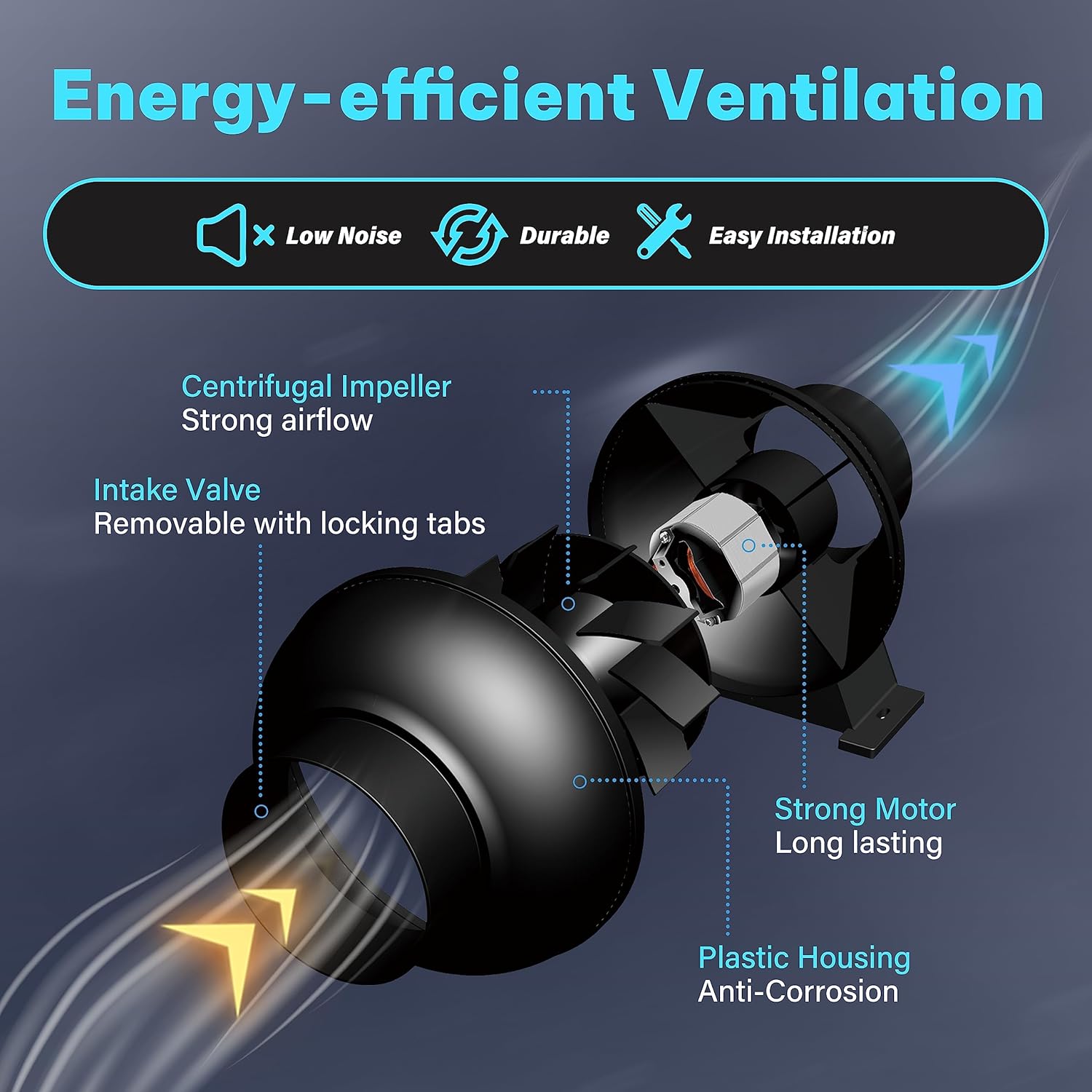
Figure 1: Energy-efficient Ventilation Features

Figure 2: High Effective Airflow

Слика 3: Рад са ниским нивоом буке
Спецификације
| Спецификација | Валуе |
|---|---|
| Бранд | иПовер |
| Боја | Црно |
| Дизајн електричног вентилатора | Бловер |
| Извор напајања | Цордед Елецтриц |
| Димензије производа | 7.7"Д к 8.1"Ш к 7"В |
| Ниво буке | 30 дБ |
| Ватtage | 28 вати |
| Капацитет протока ваздуха | 195 кубних стопа у минути (ЦФМ) |
| Бладе Ленгтх | 4 инча |
| Брзина | 2500 РПМ |
| Волtage | 120В |
| Тежина артикла | 2.72 фунте (1.24 килограма) |
| Укључене компоненте | 4 Inch 195 CFM Duct Inline Ventilation Fan |
| Унутрашња/спољна употреба | Индоор |
| Контролни метод | App (Note: Product description mentions app control, but the fan itself is simple. This might refer to a kit version or general brand feature.) |
| Бладе Материал | Пластика |

Слика 4: Спецификације и димензије производа
Подешавање и инсталација
The iPower Inline Duct Ventilation Fan is designed for easy installation. Follow these general guidelines:
- Raspakujte: Carefully remove the fan and any accessories from the packaging. Inspect for any damage.
- Пласман: Determine the optimal location for your fan. It can be installed in-line with ducting to exhaust air from a space or to bring fresh air in. Ensure the fan is placed on a stable surface or securely mounted if suspended.
- Прикључак канала: Connect appropriate ducting (not included) to both ends of the fan. The fan features removable duct ends with locking tabs for secure attachment. Use duct clamps to ensure airtight connections.
- Прикључак за напајање: Plug the fan's 5.9-foot power cord into a standard 120V electrical outlet.
- Смер струјања ваздуха: Ensure the fan is oriented to move air in the desired direction (intake or exhaust). The fan typically has an arrow indicating airflow direction.

Figure 5: Easy to Install Design

Слика 6: Прample Installation in a Grow Tent
Видео водич за инсталацију
Video 1: iPower Inline Fan Overview and Installation. This video demonstrates the features of the iPower inline fan, including its powerful airflow, low noise operation, and ease of installation. It also shows examples of its application in various settings like offices, homes, and greenhouses for air circulation and freshness.
Упутство за употребу
Once properly installed, operating your iPower Inline Duct Ventilation Fan is straightforward:
- Укључивање/искључивање: Simply plug the fan into a live electrical outlet to turn it on. Unplug it to turn it off.
- Континуирани рад: The fan is designed for continuous operation to maintain consistent air circulation and ventilation.
- Побољшање квалитета ваздуха: Use the fan to exhaust stale air, odors, and excess humidity, or to bring in fresh air, depending on your setup.
- Регулација температуре: In enclosed spaces like grow tents or basements, the fan helps regulate temperature by moving air and preventing heat buildup.
Applications in Use
The iPower Inline Fan is versatile and can be used in various environments to improve air quality and circulation:
- Канцеларијско окружење: Helps maintain fresh air and comfortable temperatures in office spaces.
- Стамбене куће: Ideal for kitchens, bathrooms, and basements to reduce humidity and eliminate odors.
- Greenhouses & Grow Tents: Essential for providing consistent air exchange, managing humidity, and regulating temperature for optimal plant growth.
Refer to Video 1 for visual examples of the fan's application in different settings.
Одржавање
Regular maintenance ensures the longevity and optimal performance of your iPower Inline Duct Ventilation Fan. The fan's design allows for easy disassembly for cleaning.
- Искључивање струје: Always unplug the fan from the power outlet before performing any maintenance or cleaning.
- Спољно чишћење: Обришите спољашњост вентилатора меком крпомamp тканина. Немојте користити јаке хемикалије или абразивна средства за чишћење.
- Impeller and Housing Cleaning: Periodically, disconnect the ducting and carefully separate the fan housing (using the removable duct ends and locking tabs) to access the impeller. Gently clean any dust or debris from the impeller blades and inside the housing using a soft brush or cloth. Ensure no foreign objects are lodged in the fan.
- Инспекција канала: Inspect the connected ducting for any blockages, tears, or leaks that could impede airflow.
- Поновно састављање: After cleaning, reassemble the fan components securely and reconnect the ducting.
Note: The fan's motor is sealed and does not require lubrication.
Решавање проблема
If you encounter issues with your iPower Inline Duct Ventilation Fan, refer to the following common troubleshooting steps:
| Проблем | Могући узрок | Решење |
|---|---|---|
| Вентилатор се не укључује. | Нема струје у утичници. Fan is unplugged. Проблем са унутрашњим ожичењем. | Проверите прекидач. Ensure the fan is securely plugged in. Contact customer support if power is confirmed and fan still doesn't work. |
| Низак проток ваздуха. | Ducting blockage or leaks. Dirty impeller blades. Неправилна оријентација вентилатора. | Inspect ducting for obstructions or loose connections. Clean the impeller blades as per maintenance section. Verify the fan is installed to push/pull air in the correct direction. |
| Прекомерна бука или вибрација. | Лабава монтажа. Крхотине у радном колу. Worn bearings (unlikely for new unit). | Ensure the fan is securely mounted and ducting is not vibrating. Disconnect power and check for debris in the impeller. Ако се бука и даље јавља, контактирајте корисничку подршку. |
If these steps do not resolve the issue, please contact iPower customer support for further assistance.
Гаранција и подршка
For detailed warranty information and customer support, please refer to the official user manual PDF or visit the iPower webсајту.
Званично упутство за употребу (PDF): Преузмите ПДФ
iPower Store: Visit iPower Store on Amazon
For any technical assistance or product inquiries, please reach out to iPower customer service through their official channels.
Ask a question about this manual
Ask about setup, troubleshooting, compatibility, parts, safety, or missing instructions. Manuals+ will review the question and use this page’s manual context to help answer it.