
Увод
This manual provides detailed instructions for the setup, operation, and maintenance of your FULODE AX-666 Professional Karaoke Processor. Please read this manual thoroughly before using the device to ensure proper functionality and to maximize your audio experience.
Садржај пакета
Проверите да ли су све ставке наведене у наставку укључене у ваш пакет:
- Audio Pre-Effector x 1
- Микрофон к 2
- Кабл за напајање к 1
- Одвијач к 1
- Даљински управљач к 1
- Non-Slip Ring x 2
- Упутство за употребу к 1

Image: The FULODE AX-666 unit with its dimensions and a visual list of included accessories: screwdrivers, non-slip mats, US plug, remote controls, microphones, and user manual.
Производ је завршенview
The FULODE AX-666 is a professional digital karaoke processor designed to enhance your audio experience with advanced features and versatile connectivity.
Изглед предњег и задњег панела
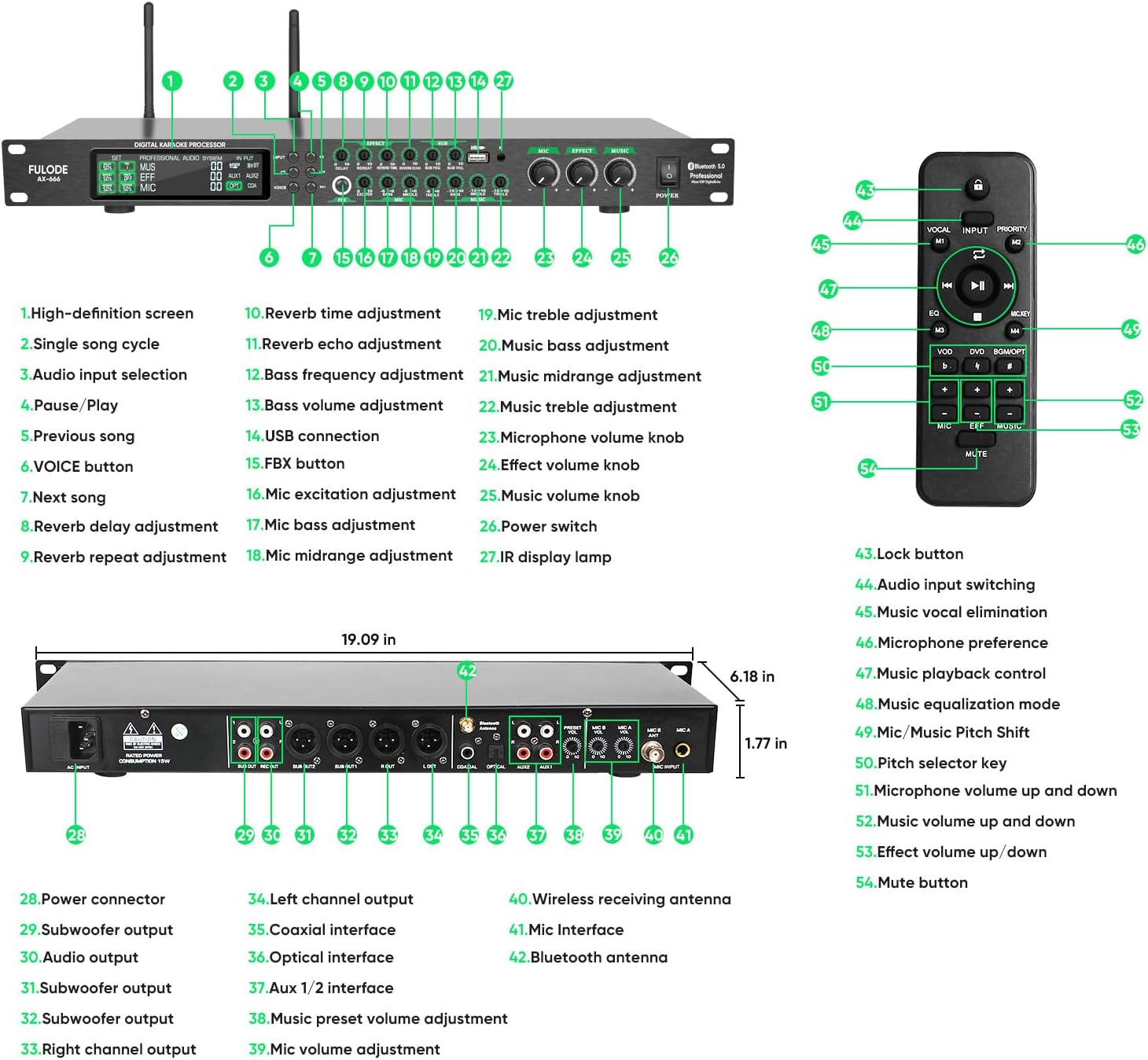
Image: Detailed diagram of the FULODE AX-666 front and rear panels, labeling all buttons, knobs, and input/output ports for easy identification.
- Екран високе дефиниције
- Single song cycle button
- Дугме за избор аудио улаза
- Дугме за паузу/репродукцију
- Дугме за претходну песму
- VOICE button (Vocal Elimination)
- Дугме за следећу песму
- Reverb delay adjustment knob
- Reverb repeat adjustment knob
- Reverb time adjustment knob
- Reverb echo adjustment knob
- Bass frequency adjustment knob
- Bass volume adjustment knob
- УСБ прикључак за повезивање
- FBX button (Anti-Howling)
- Mic excitation adjustment knob
- Mic bass adjustment knob
- Mic midrange adjustment knob
- Mic treble adjustment knob
- Music bass adjustment knob
- Music midrange adjustment knob
- Music treble adjustment knob
- Дугме за јачину звука микрофона
- Effect volume knob
- Дугме за јачину звука музике
- Прекидач за напајање
- IR display lamp
- Конектор за напајање
- Subwoofer output (Left)
- Subwoofer output (Right)
- Audio output (Left)
- Audio output (Right)
- Излаз десног канала
- Излаз левог канала
- Коаксијални интерфејс
- Оптички интерфејс
- Aux 1/2 interface
- Music preset volume adjustment
- Подешавање јачине звука микрофона
- Wireless receiving antenna ports
- Mic interface (XLR)
- Блуетоотх антена
Функције даљинског управљача

Image: The infrared remote control for the FULODE AX-666, showing buttons for power, play/pause, volume, vocal elimination, and input selection.
- Дугме за закључавање
- Audio input switching
- Music vocal elimination
- Microphone preference
- Контрола репродукције музике
- Music equalization mode
- Mic/Music Pitch Shift
- Pitch selector key
- Microphone volume up and down
- Music volume up and down
- Effect volume up/down
- Дугме за искључивање звука
Водич за подешавање
Follow these steps to set up your FULODE AX-666 Karaoke Processor:
- Прикључак за напајање: Connect the provided power cord to the processor's power input (28) and then to a 110V AC power outlet.
- Антенска веза: Attach the wireless receiving antennas to the designated ports (40) on the rear panel for optimal microphone signal reception.
- Аудио излаз: Connect the audio output ports (31, 32, 33) to your amplifier or sound system using appropriate cables (e.g., XLR, RCA).
- Аудио улаз: Choose your desired audio input source and connect it to the corresponding port on the rear panel:
- УСБ: Insert a USB drive into the USB port (14) on the front panel for lossless audio playback.
- Блуетоотх: Ensure the Bluetooth antenna (42) is connected. Activate Bluetooth on your device and pair with "FULODE AX-666".
- Оптички: Connect an optical cable from your source device (e.g., TV, media player) to the optical interface (36).
- Коаксијални: Connect a coaxial cable from your source device to the coaxial interface (35).
- помоћни: Use RCA cables to connect devices to the Aux 1/2 interfaces (37).
- Повезивање микрофона: The system comes with two wireless microphones. Ensure they are powered on and paired with the processor. For wired microphones, connect them to the Mic interfaces (41) on the rear panel.

Image: A visual guide to the input interfaces on the FULODE AX-666, highlighting USB, Bluetooth, Optical, Coaxial, and Auxiliary connections.
Упутство за употребу
Укључивање/искључивање
Press the Power switch (26) on the front panel to turn the unit on or off. The high-definition screen (1) will illuminate upon power-on.
Избор улазног извора
Use the Audio input selection button (3) on the front panel or the Audio input switching button (44) on the remote control to cycle through available input sources (USB, Bluetooth, Optical, Coaxial, Aux1, Aux2).
Употреба микрофона
The system includes two wireless microphones. Ensure they are charged and powered on. The processor's extended receiving antennas provide a stable reception range of up to 164 feet.

Image: The FULODE AX-666 processor with its extended receiving antennas, illustrating the 164ft reception distance for the wireless microphones.
To adjust microphone volume, use the Microphone volume knob (23) on the front panel or the Microphone volume up and down buttons (51) on the remote.
Each microphone has 15 adjustable frequency points. To change the frequency, press the button on the microphone handle.

Image: Diagram showing how to tune microphone frequencies on the FULODE AX-666, with examples of frequency points for Mic A and Mic B.
Video: A demonstration of how to operate the microphones with the FULODE AX-666 system, including pairing and basic functions.
Anti-Howling Function (FBX)
The processor features a built-in frequency shift feedback suppression module. To activate or deactivate the anti-howling function, press the FBX button (15) on the front panel. This helps eliminate unwanted feedback during performances.
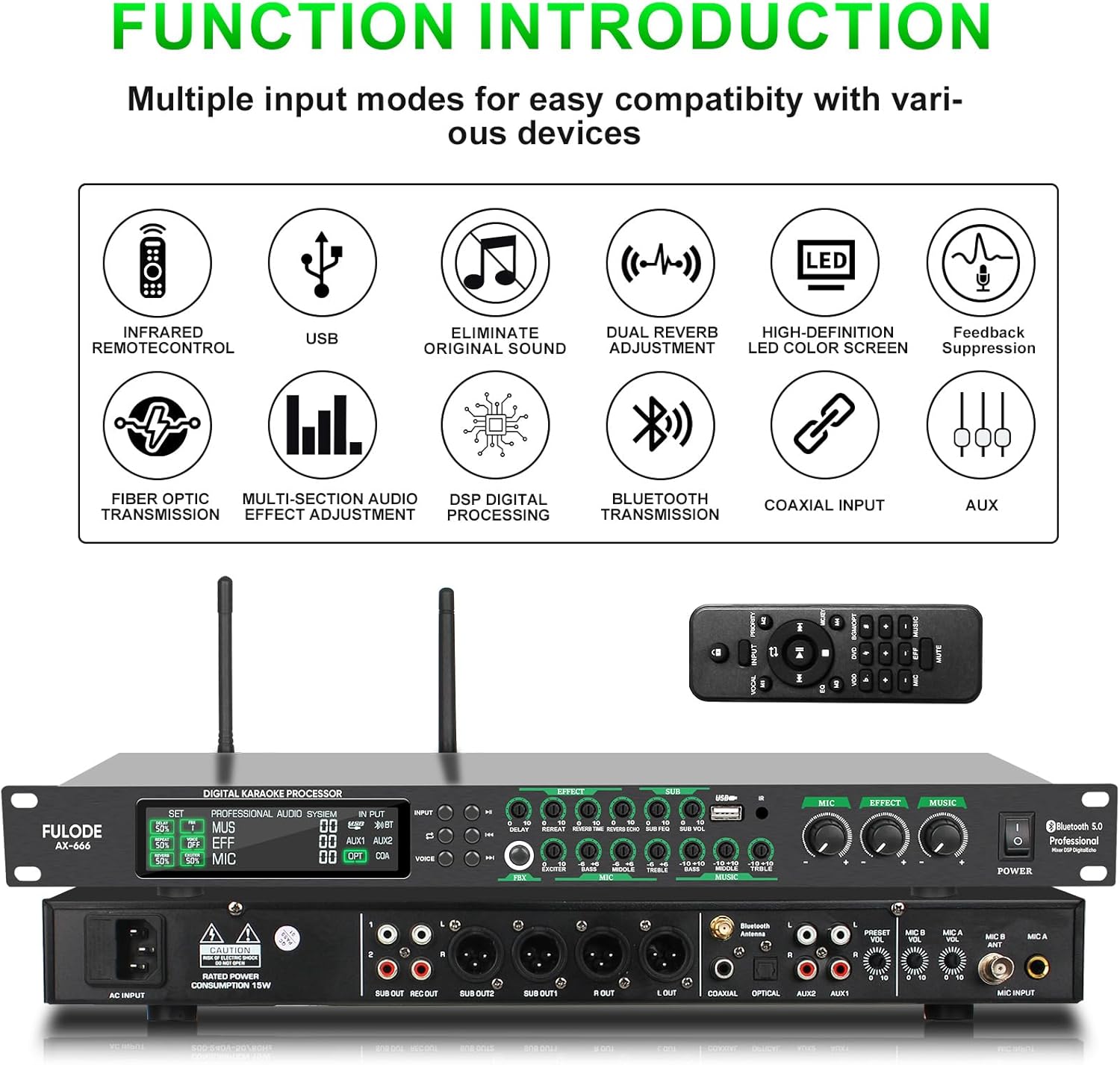
Image: Visual representation of the one-key anti-howling feature (FBX) on the FULODE AX-666, showing its activation and effect on sound waves.
Vocal Elimination (VOICE)
To remove original vocals from a track and create an accompaniment, press the VOICE button (6) on the front panel or the Music vocal elimination button (45) on the remote control.

Image: Illustration of the one-click original sound elimination feature on the FULODE AX-666, demonstrating how vocals can be removed from a song.
Аудио Адјустментс
The FULODE AX-666 offers independent tuning controls for microphone, reverb, and music. Use the dedicated knobs on the front panel for precise adjustments:
- Подешавања микрофона: Mic bass (17), Mic midrange (18), Mic treble (19), Mic excitation (16), and Microphone volume (23).
- Reverb Adjustments: Reverb delay (8), Reverb repeat (9), Reverb time (10), Reverb echo (11), and Effect volume (24).
- Music Adjustments: Music bass (20), Music midrange (21), Music treble (22), and Music volume (25).
Hidden rotary knobs are available for fine-tuning specific parameters like Delay, Repeat, Bass, Mid, and Treble. Use the included screwdriver for these adjustments.

Image: The FULODE AX-666 front panel, highlighting the independent adjustment knobs for microphone, effects, and music, along with a screwdriver for fine-tuning hidden controls.
General Usage Videos
Video: A comprehensive guide demonstrating the general usage and various functions of the FULODE AX-666 Karaoke Processor.
Видео: Оверview of the FULODE AX-666 KTV Mixer, highlighting its features including dual wireless microphones, DSP, USB, MP3, Bluetooth, and Optical connectivity.
Одржавање
To ensure the longevity and optimal performance of your FULODE AX-666 Karaoke Processor, follow these maintenance guidelines:
- Чишћење: Use a soft, dry cloth to clean the exterior of the unit. Avoid using liquid cleaners or abrasive materials, as they may damage the finish or internal components.
- вентилација: Обезбедите да уређај има одговарајућу вентилацију. Не блокирајте вентилационе отворе.
- Складиштење: When not in use for extended periods, store the processor in a cool, dry place away from direct sunlight and extreme temperatures.
- Одржавање микрофона: Keep the wireless microphones clean and dry. Store them in a protective case when not in use to prevent damage.
Решавање проблема
If you encounter issues with your FULODE AX-666, refer to the following common problems and solutions:
| Проблем | Могући узрок | Решење |
|---|---|---|
| Нема струје | Кабл за напајање није повезан; Прекидач за напајање је искључен; Нема струје из утичнице. | Ensure power cord is securely connected. Turn on the power switch. Check the power outlet with another device. |
| Нема излаза звука | Incorrect input selected; Volume levels too low; Output cables not connected correctly. | Select the correct input source. Increase master volume and individual channel volumes. Verify output cables are securely connected to an ampЛифиер/звучнички систем. |
| Микрофони не раде | Microphones off; Low battery; Out of range; Frequency interference. | Ensure microphones are powered on. Replace or charge batteries. Move closer to the processor. Try changing microphone frequencies. |
| Audio feedback (howling) | Microphone too close to speakers; FBX function off; High microphone gain. | Move microphones away from speakers. Activate the FBX (Anti-Howling) function. Reduce microphone volume or gain. |
| Проблеми са Блуетоотх везом | Device not in pairing mode; Interference; Processor not discoverable. | Ensure your device's Bluetooth is on and in pairing mode. Restart both devices. Ensure no other devices are connected to the processor via Bluetooth. |
If the problem persists after trying these solutions, please contact FULODE customer support for further assistance.
Спецификације
| Феатуре | Детаљ |
|---|---|
| Бранд | ФУЛОДЕ |
| Број модела | АКС-666 |
| Број канала | 2 |
| Димензије производа (Д x Ш x В) | 6.18"Д к 19.09"Ш к 1.77"В |
| Тежина артикла | 2.35 кг |
| Технологија повезивања | USB, XLR, Bluetooth, Auxiliary |
| Извор напајања | Цордед Елецтриц |
| Тип излазног конектора | КСЛР |
| Аудио улаз | USB, XLR, Bluetooth, Auxiliary, Optical, Coaxial |
| Волtage | 110В АЦ |
| Wireless Microphone Range | До 164 стопа |
| Microphone Frequencies | 15 adjustable frequency points per mic |
Гаранција и подршка
The FULODE AX-666 Professional Karaoke Processor comes with a 360-дневна гаранција од дана куповине.
For any issues, questions, or technical support, please do not hesitate to contact FULODE customer service. We are committed to providing excellent customer service and will assist you promptly.
Contact information can typically be found on the FULODE official webсајту или путем ваше платформе за куповину.