
Eurom 262845
Eurom Cool-Eco 120 A+ Mobile Air Conditioner User Manual
Модел: 262845
Увод
Thank you for choosing the Eurom Cool-Eco 120 A+ Mobile Air Conditioner. This manual provides important information regarding the safe operation, installation, maintenance, and troubleshooting of your new appliance. Please read this manual thoroughly before using the air conditioner and keep it for future reference.
Важне информације о безбедности
УПОЗОРЕЊЕ: Да бисте смањили ризик од пожара, струјног удара или повреде, увек се придржавајте основних мера безбедности приликом коришћења овог уређаја.
- Уверите се да напајање одговара запреминиtagе наведен на етикети са рејтингом.
- Не користите клима уређај са оштећеним каблом или утикачем.
- Не стављајте прсте или стране предмете у улаз или излаз ваздуха.
- Држите уређај даље од запаљивих материјала и отвореног пламена.
- Увек искључите јединицу пре чишћења или сервисирања.
- Овај уређај није намењен за употребу од стране особа (укључујући децу) са смањеним физичким, чулним или менталним способностима, или недостатком искуства и знања, осим ако им је дат надзор или упутства о употреби уређаја од стране особе одговорне за њихову безбедност.
- Децу треба надзирати како би се осигурало да се не играју са уређајем.
Производ је завршенview
Главна јединица
The Eurom Cool-Eco 120 A+ is a compact and portable air conditioning unit designed for efficient cooling. It features a sleek white design with integrated wheels for easy mobility.

This image shows the front of the Eurom Cool-Eco 120 A+ mobile air conditioner, highlighting its clean, white design and the Eurom logo at the bottom.

Ова слика приказује бочни професионалацfile of the air conditioner, revealing the connection point for the exhaust hose and the unit's compact dimensions.
Цонтрол Панел
The control panel is located on the top of the unit, providing easy access to all functions and settings.

This image shows a close-up of the air conditioner's top control panel, featuring buttons for power, mode, fan speed, timer, sleep, and swing, along with LED indicators.

Ова слика пружа детаљан view of the digital display on the unit, showing the current temperature setting.
Ремоте Цонтрол
A convenient remote control is included for operating the air conditioner from a distance.

This image displays the remote control, which includes a small screen and buttons for adjusting temperature, mode, fan speed, and other functions.
Прибор
The package includes essential accessories for installation and operation.

This image shows the various accessories provided, such as the flexible exhaust hose, window slider kit, and a small drainage tube.
Сетуп
Распакивање
Carefully remove the air conditioner and all accessories from the packaging. Retain the packaging for future storage or transport.
Пласман
Place the air conditioner on a flat, stable surface. Ensure there is at least 30 cm (12 inches) of space around the unit for proper airflow. Do not block the air inlets or outlets.
Инсталација издувног црева
- Screw one end of the exhaust hose onto the exhaust port on the back of the unit.
- Продужите црево до најближег прозора или отвора.
- Причврстите адаптер за прозор на други крај издувног црева.
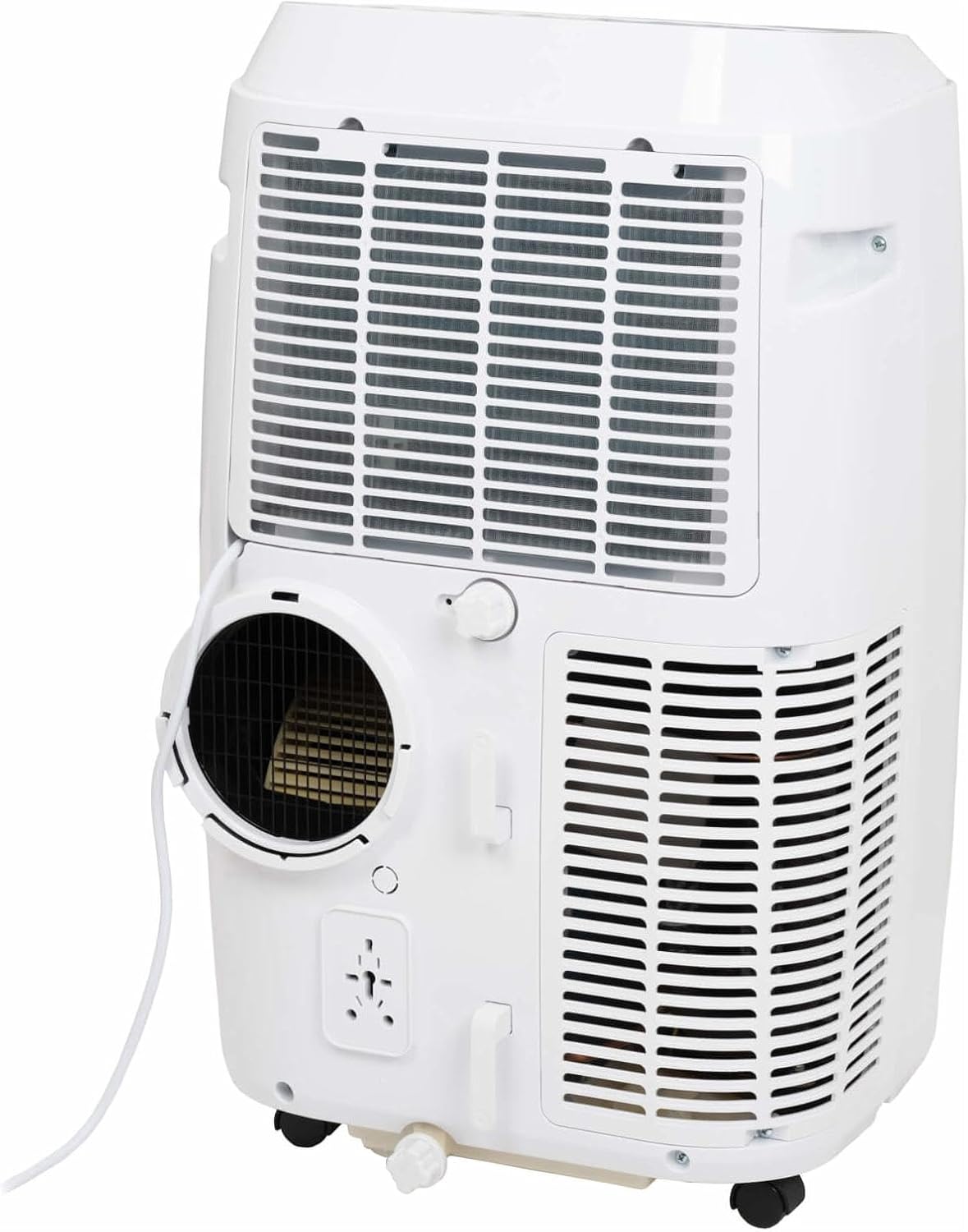
This image shows the rear of the air conditioner, illustrating where the exhaust hose connects to the unit.
Инсталација комплета за прозоре
Use the provided window sealing kit to secure the exhaust hose in a window opening. Adjust the slider kit to fit your window, then place the window adapter into the opening.
Руковање вашим клима уређајем
Функције контролне табле
The control panel on top of the unit allows you to manage all settings. Press the ПОВЕР дугме да бисте укључили или искључили уређај. Користите МОДЕ button to cycle through cooling, fan, and dehumidification modes.
- СНАГА: Укључује или искључује јединицу.
- НАЧИН: Selects operating mode (Cool, Fan, Dry/Dehumidify).
- Стрелице горе/доле: Adjusts temperature setting or timer.
- БРЗИНА: Changes fan speed (Low, Medium, High).
- ТАЈМЕР: Подешава време аутоматског укључивања или аутоматског искључивања.
- СВИНГ: Активира или деактивира аутоматско окретање жалузина.
- СПАВАЊЕ: Активира режим спавања за тиши рад и постепено подешавање температуре.
Функције даљинског управљача
The remote control duplicates most functions available on the control panel, offering convenience. Ensure the remote control is pointed towards the unit's receiver when pressing buttons.
The remote control features a display showing the current settings and buttons for power, mode selection, temperature adjustment, fan speed, timer, and sleep mode.
Оперативни режими
- Режим хлађења: Provides cooling. Set your desired temperature using the UP/DOWN arrows.
- Режим вентилатора: Циркулише ваздух без хлађења. Подесите брзину вентилатора по жељи.
- Режим сушења (одвлаживања): Reduces humidity in the room. The fan speed is fixed in this mode.
Смарт Апп Цонтрол
This model supports Smart App Control. Refer to the separate Smart App manual or the manufacturer's website for detailed instructions on connecting and controlling your unit via the app.
Нега и одржавање
Чишћење ваздушног филтера
The air filter should be cleaned every two weeks or more frequently depending on usage. A dirty filter can reduce efficiency and airflow.
- Искључите клима уређај из утичнице.
- Пронађите панел ваздушног филтера (обично на задњој или бочној страни уређаја).
- Уклоните филтер.
- Оперите филтер топлом водом са сапуном. Добро исперите и оставите да се потпуно осуши на ваздуху пре него што га поново уметнете.
Одвод воде
During dehumidification or in very humid conditions, water will accumulate inside the unit. The unit has an internal water tank that will trigger a "Full" indicator when full. You will need to drain the water manually.
- Поставите плитку посуду или посуду испод отвора за одвод воде на доњем задњем делу уређаја.
- Уклоните чеп за одвод.
- Дозволите да се сва вода испразни.
- Чврсто вратите чеп за одвод.
Складиштење
Before storing the unit for an extended period, ensure the water tank is completely drained. Clean the air filter and store the unit in a dry, cool place, preferably in its original packaging.
Решавање проблема за
| Проблем | Могући узрок | Решење |
|---|---|---|
| Јединица се не укључује. | Нема струје; кабл за напајање је искључен из струје; осигурач је искључен. | Проверите прикључак за напајање; ресетујте осигурач. |
| Уређај се не хлади ефикасно. | Dirty air filter; exhaust hose not properly installed; room too large; windows/doors open. | Clean air filter; ensure hose is sealed; close windows/doors; check room size suitability. |
| Индикатор пуног резервоара за воду је упаљен. | Унутрашњи резервоар за воду је пун. | Испустите воду из јединице. |
| Јединица је бучна. | Уређај није на равној површини; вентилатор је зачепљен. | Поставите на равну површину; проверите да ли има препрека у подручју вентилатора. |
Техничке спецификације
| Феатуре | Спецификација |
|---|---|
| Бранд | Еуром |
| Број модела | 262845 |
| Капацитет хлађења | 12000 БТУ |
| Извор напајања | Електрични кабл |
| Water Capacity (Internal Tank) | 1.2 литара |
Гаранција и корисничка подршка
Информације о гаранцији
This product comes with a manufacturer's warranty. Please refer to the warranty card included with your purchase or visit the official Eurom webсајт за детаљне услове гаранције. Сачувајте доказ о куповини за потребе подношења захтева за гаранцију.
Корисничка подршка
For technical assistance, spare parts, or service, please contact Eurom customer support. Contact details can typically be found on the Eurom website or in the product packaging. When contacting support, please have your model number (262845) and serial number ready.
Ask a question about this manual
Ask about setup, troubleshooting, compatibility, parts, safety, or missing instructions. Manuals+ will review the question and use this page’s manual context to help answer it.