
1. Увод
The Hantek DSO2D15 is a 2-channel digital storage oscilloscope featuring a 150MHz bandwidth, 1GSa/s sampling rate, and 8M memory depth. It also includes a built-in 25MHz DDS waveform generator. This instrument is designed for various electronic testing and measurement applications, offering advanced trigger modes, serial protocol decoding, and automatic measurement functions.
This manual provides essential information for the safe and efficient operation of your DSO2D15 oscilloscope. Please read it thoroughly before use and retain it for future reference.
2. Безбедносне информације
Always observe the following safety precautions to prevent injury and avoid damage to the instrument or connected devices.
- Извор напајања: Ensure the oscilloscope is connected to a power source within the specified voltage range (100-240V AC, 50/60Hz). Use only the provided power cord or an approved equivalent.
- уземљење: The instrument must be properly grounded to prevent electric shock. Do not defeat the grounding feature of the power plug.
- Услови животне средине: Operate the oscilloscope in a dry, well-ventilated area. Avoid exposure to extreme temperatures, humidity, dust, or corrosive gases.
- Хазардоус Волtage: Хазардоус волtages are present inside the device. Do not remove the cover unless performed by qualified service personnel. Refer to the warning label on the rear panel.
- Сонде: Користите само сонде предвиђене за запреминуtage and frequency being measured. Ensure probes are properly connected before making measurements.
- Чишћење: Искључите напајање пре чишћења. Користите меку,amp тканина. Немојте користити абразивна средства за чишћење или раствараче.
- Сервисирање: Све сервисирање препустите квалификованом особљу.

Figure 2.1: Rear panel of the DSO2D15, highlighting the power input and safety warning label regarding hazardous voltage.
3. Подешавање
3.1 Распакивање и преглед
Carefully unpack the oscilloscope and all accessories. Inspect for any signs of damage during transit. If any damage is found, contact your supplier immediately.
3.2 Садржај пакета
The standard package for the Hantek DSO2D15 includes the following items:
- Hantek DSO2D15 Oscilloscope Unit
- 1 PP150B 150MHz Probe
- 1 Hantek PP150 100MHz Probe (for 2nd channel)
- 1 УСБ кабл
- 2 Clip Lines
- 1 US Power Cable (Note: Some units may include a European power cable. If so, a compatible US power cable will be required for operation in the US.)

Figure 3.1: The DSO2D15 oscilloscope unit shown with its various included accessories, such as probes, cables, and clip lines.

Figure 3.2: A closer look at the included oscilloscope probes, various clip lines, and a wire stripping tool, essential for connecting to circuits.
3.3 Прикључак за напајање
- Connect the provided power cable to the AC input on the rear panel of the oscilloscope.
- Укључите други крај кабла за напајање у уземљену утичницу са наизменичном струјом.
- Ensure the power switch (usually located near the AC input) is in the OFF position before connecting to power.
3.4 Повезивање сонде
Connect the oscilloscope probes to the BNC input connectors on the front panel (CH1, CH2). Ensure a secure connection by twisting the BNC connector until it locks.
Before making measurements, perform probe compensation to ensure accurate readings. Refer to the "Probe Compensation" section in the Operating Instructions.
4. Упутство за употребу
4.1 Укључивање/искључивање
- To power on, press the power switch located on the rear panel. The display will illuminate, and the system will boot up.
- Да бисте искључили напајање, поново притисните прекидач за напајање.
4.2 Предња плоча прекоview
The front panel of the DSO2D15 features a large display, control buttons, and input connectors. Familiarize yourself with the layout for efficient operation.
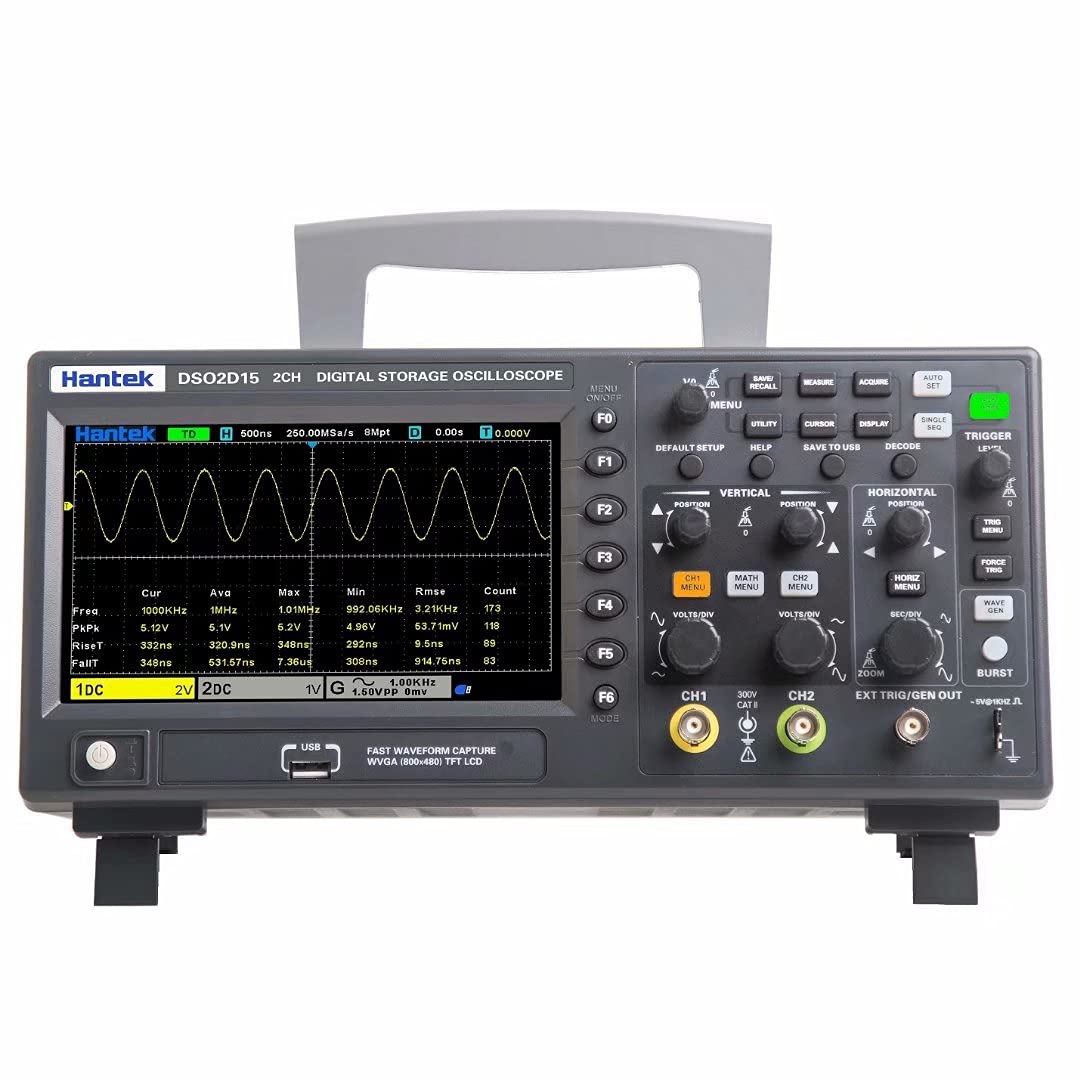
Figure 4.1: Front panel of the DSO2D15, showing the display, function buttons (F1-F6), vertical and horizontal controls, trigger controls, and channel inputs.
4.3 Основне функције осцилоскопа
- Вертикалне контроле: Адјуст волtage per division (Volts/Div) and vertical position for each channel (CH1, CH2).
- Хоризонталне контроле: Adjust time per division (Sec/Div) and horizontal position to control the time base.
- Систем окидача: Use the trigger controls to stabilize waveforms. Select trigger type (Edge, Pulse, Video, Slope, etc.), source, and level. The DSO2D15 offers 14 kinds of trigger modes.
- Acquisition Mode: Select between Normal, Peak Detect, and Average modes for waveform acquisition.
- мерења: Access automatic measurement functions (32 kinds available) to display parameters like frequency, period, Vpp, Vmax, Vmin, etc.
- Serial Protocol Decoding: The unit supports 5 kinds of serial protocol decoding. Refer to the on-screen menu for specific setup and analysis.
4.4 DDS Waveform Generator
The DSO2D15 includes a built-in 25MHz DDS waveform generator. This generator can produce various standard waveforms (sine, square, triangle, etc.) for testing circuits.
- Connect the DDS output (labeled EXT TRIG/GEN OUT) to the circuit under test.
- Access the generator menu via the front panel controls.
- Select the desired waveform type, frequency, ampлитуда и помак.
- Enable the output to generate the waveform.
Note: The built-in DDS generator is suitable for general testing but should not be confused with a dedicated arbitrary waveform generator for complex signal generation.
5. Одржавање
5.1 Општа нега
- Одржавајте инструмент чистим и сувим.
- Избегавајте испуштање или излагање уређаја јаким ударцима.
- Store in a dust-free environment when not in use.
5.2 Чишћење
To clean the exterior of the oscilloscope:
- Искључите кабл за напајање из утичнице за наизменичну струју.
- Лагано користите меку крпу дampиспрати водом или благим, неабразивним средством за чишћење.
- Wipe the surfaces gently. Do not allow liquids to enter the instrument.
- Уверите се да је уређај потпуно сув пре него што га поново укључите у напајање.
5.3 Ажурирања фирмвера
Periodically check the Hantek official website for available firmware updates. Updating the firmware can improve performance, add features, or resolve known issues. Follow the instructions provided with the firmware update package carefully.
КСНУМКС. Решавање проблема
This section addresses common issues you might encounter with your DSO2D15 oscilloscope.
| Проблем | Могући узрок | Решење |
|---|---|---|
| Јединица се не укључује. | Power cable not connected or faulty. Incorrect power cord for region. | Ensure power cable is securely connected to both the unit and a live AC outlet. Verify the power cord is appropriate for your region (e.g., US power cable for US outlets). |
| Waveform not displayed or unstable. | Incorrect probe connection. Improper trigger settings. Vertical/Horizontal scale issues. | Check probe connections. Adjust trigger level and source. Verify Volts/Div and Sec/Div settings are appropriate for the input signal. Perform probe compensation. |
| Unit freezes or locks up. | Software glitch. Outdated firmware. | Perform a power cycle (turn off, wait a few seconds, then turn on). Check for and install the latest firmware updates from the Hantek webсајту. |
| Нетачна волtagе читања. | Uncompensated probes. Faulty probes. | Perform probe compensation. Test probes with a known signal source or try a different probe. Ensure probe attenuation settings (1X/10X) match the oscilloscope's settings. |
7. Спецификације
The following are key technical specifications for the Hantek DSO2D15 oscilloscope:
- пропусни опсег: 150 МХз
- Канали: 2 аналогних канала
- Sampлинг рате: 1 Гса/с (у реалном времену)
- Дубина меморије: 8M points
- Built-in DDS Waveform Generator: 25 МХз
- Режими окидача: 14 types (Edge, Pulse, Video, Slope, etc.)
- Serial Protocol Decoding: 5 врсте
- Аутоматска мерења: 32 врсте
- Приказ: 7-инчни ТФТ ЛЦД
- Повезивање: USB Host, USB Device
Физички и еколошки
- Димензије пакета: 14.3 к 8.25 к 7.75 инча
- Тежина артикла: 6.14 фунти
- Произвођач: Кингдао Хантек Елецтрониц Цо., Лтд.
- Оператинг Волtage: 100-240В АЦ, 50/60Хз
- Датум прве доступности: 24. марта 2021. године
8. Гаранција и подршка
8.1 Информације о гаранцији
Hantek products are typically covered by a limited warranty against defects in materials and workmanship. The specific terms and duration of the warranty may vary by region and retailer. Please retain your proof of purchase for warranty claims.
For detailed warranty information, please refer to the warranty card included with your product or visit the official Hantek webсајту.
8.2 Техничка подршка
If you encounter issues not covered in this manual or require further assistance, please contact Hantek technical support. You can typically find contact information on the official Hantek webсајту или преко вашег продавца производа.
When contacting support, please have your product model (DSO2D15) and serial number ready, along with a detailed description of the issue.
Такође можете посетити Hantek Store on Amazon за додатне информације о производима и ресурсе.