
Forever ForeVigo 2 SW-330
Forever Smartwatch ForeVigo 2 SW-330 User Manual
Model: ForeVigo 2 SW-330
1. Увод
Welcome to your new Forever Smartwatch ForeVigo 2 SW-330. This manual provides essential information for setting up, operating, and maintaining your device. Please read it carefully to ensure proper use and to maximize the features of your smartwatch.
The ForeVigo 2 SW-330 is designed to be your daily companion, offering a range of features including sports tracking, health monitoring, and smart notifications. Its durable design and long-lasting battery make it suitable for various activities.
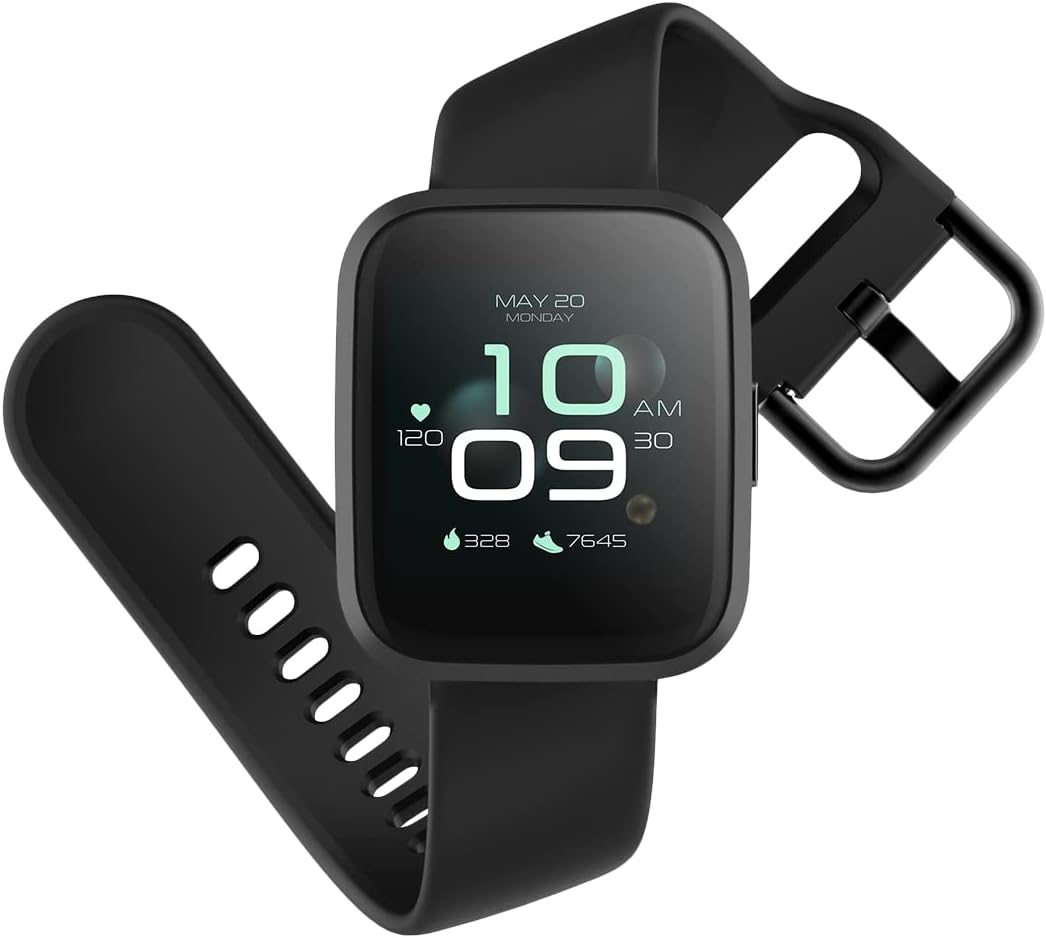
Image: The ForeVigo 2 SW-330 smartwatch with its main display showing the time, heart rate, and step count.
2. Подешавање
2.1. Пуњење паметног сата
Before first use, fully charge your smartwatch. The device features a 180 mAh battery, providing up to 12 days of usage on a single charge. A quick charge function is available.
- Повежите кабл за пуњење са портом за пуњење на задњој страни паметног сата.
- Прикључите УСБ крај кабла у стандардни УСБ адаптер за напајање (није укључен) или УСБ порт рачунара.
- The screen will display a charging indicator.
- Дозволите приближно 2 сата за потпуно пуњење.

Image: The smartwatch screen showing a battery icon with a lightning bolt, indicating it is charging.
2.2. Укључивање/искључивање
- За укључивање: Притисните и држите бочно дугме док се екран не упали.
- За искључивање: Navigate to the 'Settings' menu on the smartwatch, then select 'Power Off' or press and hold the side button and confirm power off.
2.3. Инсталација и упаривање апликације
To unlock the full potential of your smartwatch, download the companion application on your smartphone. The ForeVigo 2 SW-330 is compatible with both Android and iOS devices.
- Тражи the official 'Forever Smart' or 'ForeVigo' app in your smartphone's app store (Google Play Store for Android, Apple App Store for iOS).
- Инсталирајте апликацију.
- Отворите апликацију и пратите упутства на екрану да бисте креирали налог или се пријавили.
- Омогућите Блуетоотх на свом паметном телефону.
- In the app, select 'Add Device' or 'Pair Smartwatch' and choose 'ForeVigo 2 SW-330' from the list of available devices.
- Потврдите захтев за упаривање и на паметном телефону и на паметном сату.
3. Управљање паметним сатом
3.1. Навигација
The ForeVigo 2 SW-330 features a 1.4-inch high-quality touchscreen for intuitive navigation. Swipe left, right, up, or down to access different functions and menus. Press the side button to return to the home screen or wake the device.

Image: The smartwatch screen showing a grid of application icons, including Goals, Heart rate, Sleep, and Messages.
3.2. Спортске функције
The smartwatch supports various sports modes to track your physical activity:
- пливање: Track your performance during water activities.
- ходање: Monitor steps, distance, and calories burned.
- Трчање: Record your runs with detailed metrics.
- планинарење: Track outdoor adventures.
- Бициклизам: Monitor your bike rides.
Access these modes through the 'Sports' menu on your smartwatch. The device includes a calorie counter, distance tracker, stopwatch, and pedometer.

Image: The smartwatch screen displaying a list of application icons, including Goals, Heart rate, Messages, and Sports.
3.3. Праћење здравља
- Праћење сна: The smartwatch monitors your sleep patterns, including light and deep sleep stagес. View detailed reports in the companion app.
- Монитор пулса: The integrated heart rate sensor continuously tracks your heart rate. Access real-time data on the watch or historical data in the app.

Image: The smartwatch screen showing sleep tracking data, including light sleep, deep sleep, and total sleep time.
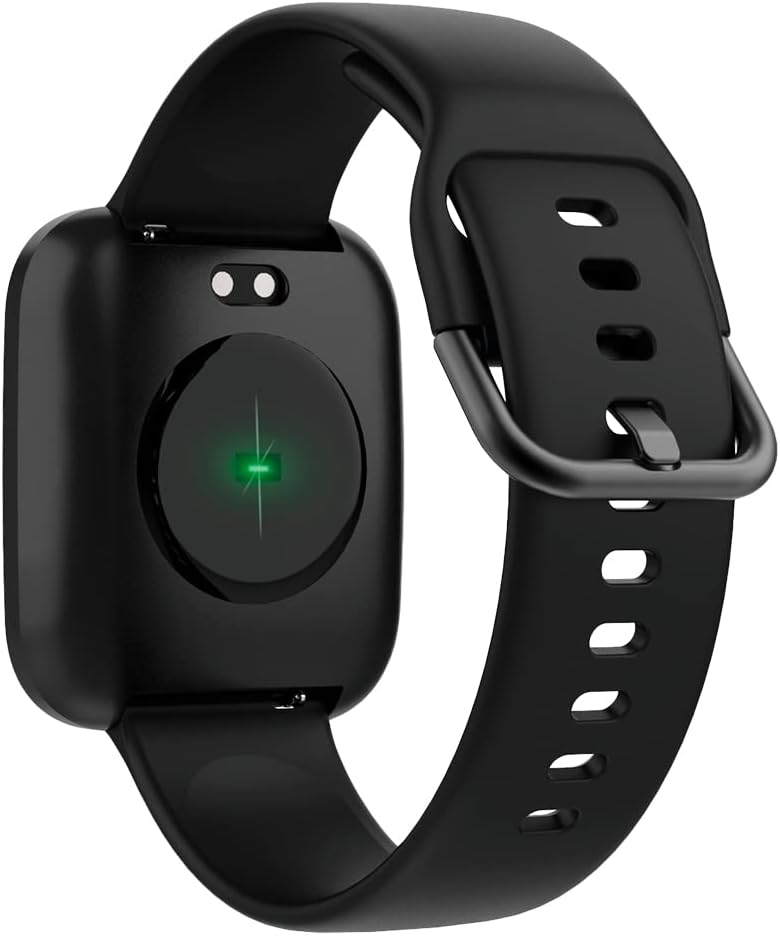
Image: The back of the smartwatch, highlighting the green light of the optical heart rate sensor.
3.4. Паметне карактеристике
- Обавештења путем телефона: Receive alerts for calls, messages, and app notifications directly on your wrist. Configure notification settings in the companion app.
- Контрола музике: Control music playback on your smartphone (play, pause, skip tracks) directly from your smartwatch.
- Даљински управљач камере: Use your smartwatch as a remote shutter for your smartphone's camera.
- Daily Goals & Activity Reminders: Set daily activity goals and receive reminders to stay active throughout the day.
- Device Locator: Use the app to locate your smartwatch if it's within Bluetooth range.
4. Одржавање
4.1. Отпорност на воду
The ForeVigo 2 SW-330 is waterproof according to the IP68 standard, meaning it can withstand total immersion in water. This allows for tracking swimming activities. However, it is not recommended for hot water activities (e.g., hot showers, saunas) as steam can damage the seals.
4.2. Чишћење и њега
- Редовно чистите паметни сат и каиш меком крпомamp тканина.
- Избегавајте употребу јаких хемикалија или абразивних материјала.
- Уверите се да су контакти за пуњење чисти и суви пре пуњења.
4.3. Interchangeable Straps
The smartwatch features elegant and interchangeable straps made of silicone and metal. To change the strap, locate the quick-release pins on the underside of the strap and gently slide them to detach. Attach new straps by aligning the pins and sliding them into place.
КСНУМКС. Решавање проблема
If you encounter issues with your ForeVigo 2 SW-330, try the following solutions:
- Паметни сат се не укључује: Уверите се да је уређај потпуно напуњен. Повежите га са пуњачем најмање 30 минута.
- Не може се упарити са паметним телефоном:
- Уверите се да је Блуетоотх омогућен на вашем паметном телефону.
- Уверите се да је паметни сат у домету вашег паметног телефона.
- Поново покрените и паметни сат и паметни телефон.
- Проверите да ли је пратећа апликација ажурирана на најновију верзију.
- Нетачни здравствени подаци: Ensure the smartwatch is worn snugly on your wrist, but not too tight. Clean the heart rate sensor regularly.
- Обавештења се не приказују: Check notification settings in the companion app and your smartphone's system settings to ensure the app has necessary permissions.
- Екран не реагује: Покушајте да поново покренете паметни сат. Ако проблем и даље постоји, уверите се да је екран чист и сув.
For further assistance, refer to the support section of the companion app or contact customer support.
6. Спецификације
| Феатуре | Детаљ |
|---|---|
| Бранд | ФОРЕВЕР |
| Број модела | СВ-КСНУМКС |
| Боја | Црно |
| Компатибилност оперативног система | Андроид, иОС |
| Величина екрана | 1.4 инча |
| Посебне карактеристике | Lightweight, Stopwatch |
| Компатибилни уређаји | Смартпхоне |
| Капацитет батерије | 180 мАх |
| Трајање батерије | До 12 дана |
| Бежична комуникација | Блуетоотх |
| ГПС | Интегрисани ГПС |
| Отпорност на воду | ИП68 |
| Тежина | 34 г |
| Димензије | 36 к 42 к 11 мм |
7. Гаранција и подршка
Your Forever Smartwatch ForeVigo 2 SW-330 comes with a manufacturer's warranty. Please refer to the warranty card included in your product packaging for specific terms and conditions. For technical support, product inquiries, or warranty claims, please contact your retailer or the official Forever customer service through their website or the companion application.
Сачувајте доказ о куповини за потребе гаранције.
Ask a question about this manual
Ask about setup, troubleshooting, compatibility, parts, safety, or missing instructions. Manuals+ will review the question and use this page’s manual context to help answer it.