
Производ је завршенview
The ANJANK AC190-DE is a versatile digital radio alarm clock designed to enhance your daily routine. It features a 10W fast wireless charger, a convenient USB charging port, and a clear, dimmable LED display. Enjoy your favorite stations with its integrated FM radio, complete with a programmable sleep timer. For private listening, a 3.5mm audio jack is included. The device operates on mains power and includes a battery backup system to retain settings during power interruptions.

The ANJANK AC190-DE Digital Radio Alarm Clock, showcasing its wooden finish and clear LED display.

This infographic highlights the three primary functions of the device: an alarm clock, an FM radio, and a wireless charger.
Упутства за подешавање
- Прикључак за напајање: Connect the provided DC 9V power adapter to the "DC9V" port on the back of the unit. Plug the adapter into a standard wall outlet.
- Резервна батерија: For retaining time and alarm settings during power outages, insert two AAA batteries (not included) into the battery compartment located on the bottom of the unit.
- ФМ антена: For optimal FM radio reception, fully extend the integrated FM antenna.
Управљање уређајем
Цонтролс Оверview
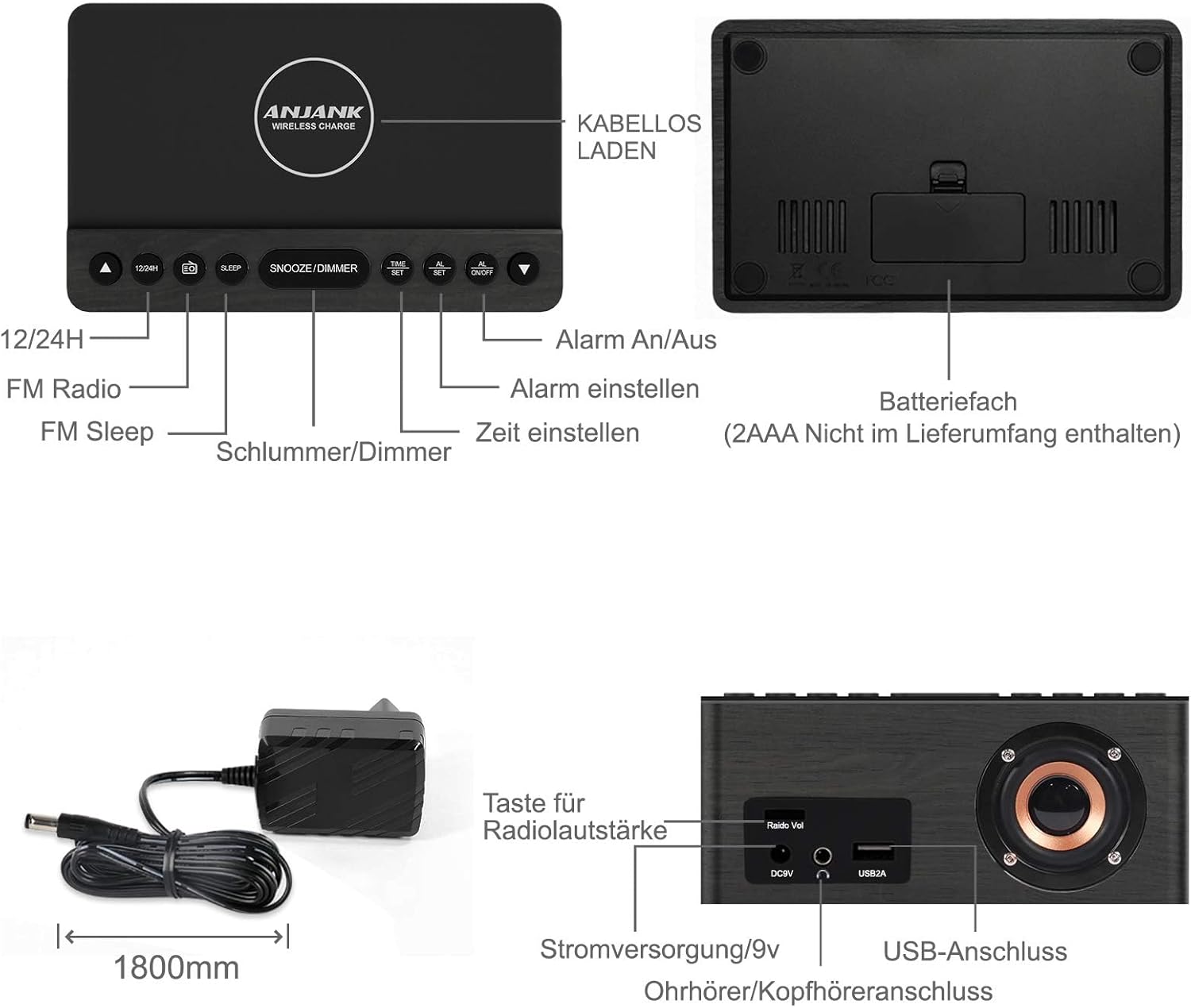
This diagram illustrates the location and function of the control buttons on the top panel and the ports on the rear of the ANJANK AC190-DE Digital Radio Alarm Clock. Key controls include 12/24H, FM Radio, Sleep, Snooze/Dimmer, Alarm On/Off, Time Set, and Alarm Set. Rear ports include DC9V power input, 3.5mm headphone jack, and USB 2A charging port.
Подешавање времена
- Притисните и држите ВРЕМЕНСКИ СКЛОП дугме. Цифре за сате ће почети да трепћу.
- Користите UP or ДОВН дугмад за подешавање сата.
- Притисните ВРЕМЕНСКИ СКЛОП again to confirm the hour and proceed to minute adjustment.
- Користите UP or ДОВН дугмад за подешавање минута.
- Притисните ВРЕМЕНСКИ СКЛОП to save the current time.
- Да бисте прелазили између 12-часовног и 24-часовног формата, притисните 12/24Х button. In 12-hour format, "AM" or "PM" indicators will be displayed.
Подешавање аларма
The device supports two independent alarms (AL1 and AL2).
- Притисните и држите АЛАРМ СЕТ button. "AL1" will flash, and the hour digits will begin to flash.
- Користите UP or ДОВН buttons to set the desired alarm hour for Alarm 1.
- Притисните АЛАРМ СЕТ to confirm the hour and move to minute adjustment.
- Користите UP or ДОВН buttons to set the desired alarm minutes for Alarm 1.
- Притисните АЛАРМ СЕТ to select the alarm source: Buzzer or FM Radio. Use UP or ДОВН бирати.
- Притисните АЛАРМ СЕТ to set the alarm volume (for FM Radio alarm). Use UP or ДОВН прилагодити.
- Притисните АЛАРМ СЕТ to save Alarm 1 settings.
- Repeat steps 1-7 for Alarm 2 by pressing АЛАРМ СЕТ until "AL2" flashes.
- Да бисте активирали или деактивирали аларм, притисните дугме АЛАРМ УКЉУЧЕН / ИСКЉУЧЕН button repeatedly until the desired alarm indicator (AL1 or AL2) appears or disappears on the display.
- Одгода функција: Када се огласи аларм, притисните дугме СНООЗЕ / ДИММЕР button to temporarily silence it for 9 minutes. The alarm will sound again after 9 minutes.
- Заустављање аларма: To stop an alarm completely, press any button other than СНООЗЕ / ДИММЕР. The alarm will reset for the next day.
Операција ФМ радија

This image highlights the FM radio capabilities of the ANJANK AC190-DE, including its frequency range of 87.5-108 MHz, adjustable volume, sleep timer (10-120 minutes), and support for headphones.
- Укључи/искључи: Притисните тастер ФМ Радио дугме за укључивање или искључивање радија.
- Аутоматско скенирање: Притисните и држите ФМ Радио button to automatically scan and save available FM stations. The device can store up to 30 stations.
- Ручно подешавање: Користите UP or ДОВН дугмад за ручно подешавање одређене фреквенције.
- Контрола јачине звука: Користите Радио Вол knob on the back of the unit to adjust the radio volume.
- Мерач спавања: Док радио свира, притисните дугме СЛЕЕП button repeatedly to set a sleep timer (10-120 minutes). The radio will automatically turn off after the selected duration.
- Употреба слушалица: Connect 3.5mm headphones to the headphone jack on the back for private listening.
Бежично пуњење
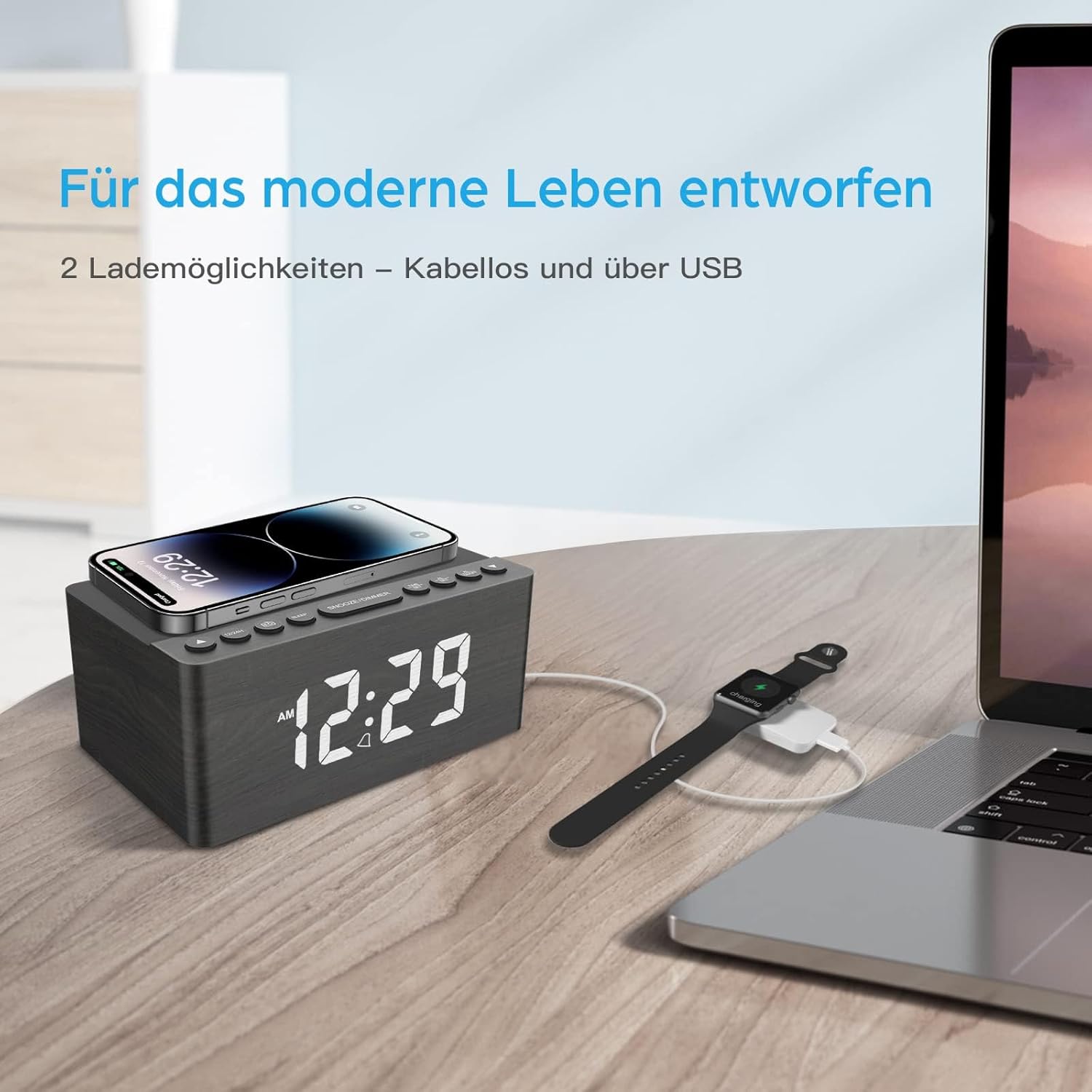
This image demonstrates the dual charging capabilities of the ANJANK AC190-DE, showing a smartphone being wirelessly charged on the top pad and a smartwatch connected to a laptop via USB, illustrating the convenience of charging multiple devices.
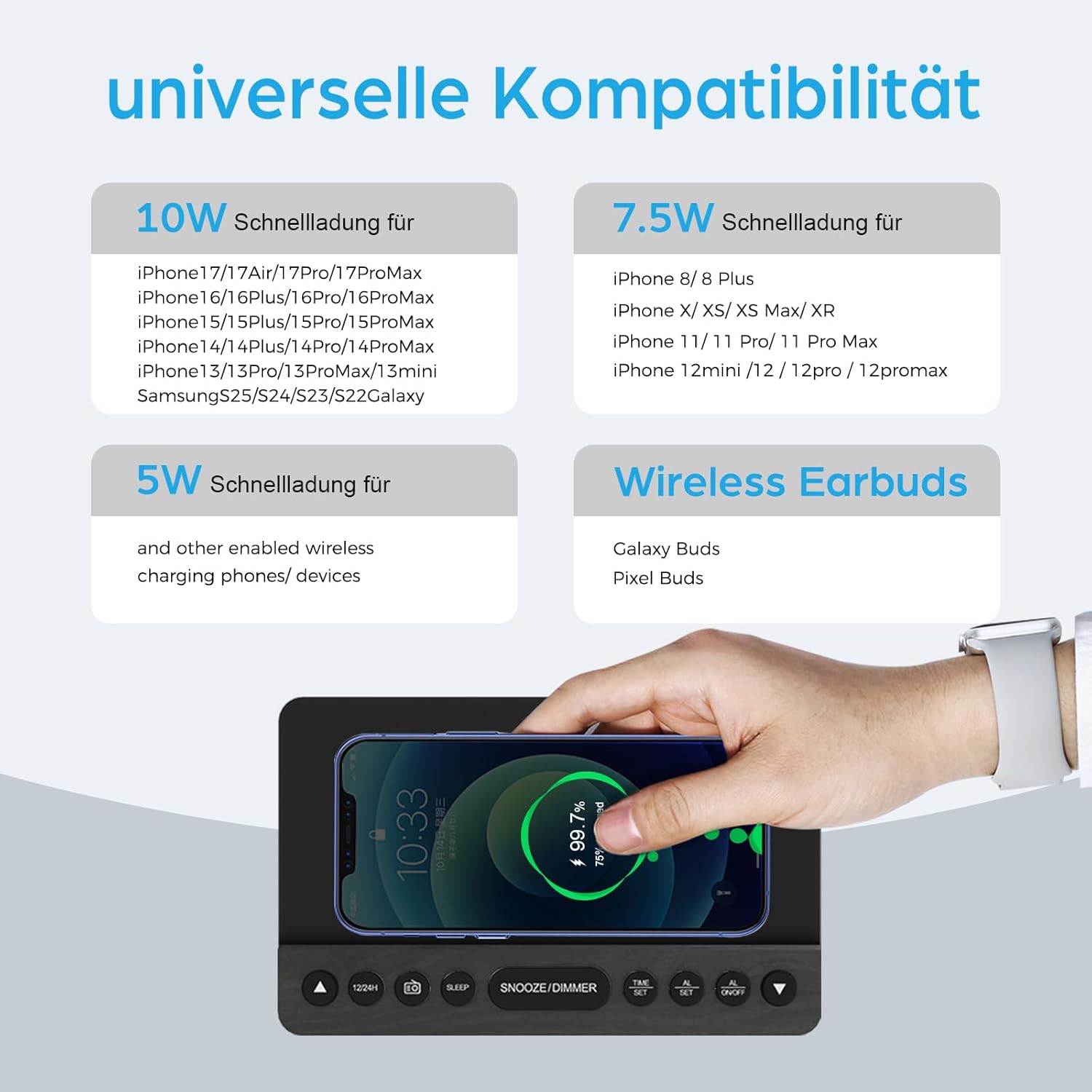
This infographic provides details on the universal compatibility of the wireless charging feature, specifying 10W fast charging for newer iPhone and Samsung models, 7.5W for other iPhone models, and 5W for other wireless charging phones and devices, including wireless earbuds.
- Place your Qi-compatible smartphone or device on the wireless charging pad located on the top surface of the clock.
- Уверите се да је уређај центриран на пуњачу ради оптималног пуњења.
- The charging indicator on the clock (if available) or on your device will confirm charging status.
- The charger supports 5W, 7.5W, and 10W adaptive charging.
УСБ пуњење
- Connect your device's USB charging cable to the УСБ2А port on the back of the clock.
- This port provides 2A output for charging other electronic devices like a second phone, power bank, or smartwatch.
Дисплаи Диммер

This image demonstrates the 5-level dimmer function of the ANJANK AC190-DE, allowing users to adjust the LED display brightness from maximum to completely off, ensuring comfort in various lighting conditions.
- Притисните тастер СНООЗЕ / ДИММЕР button (when no alarm is sounding) to cycle through the 5 brightness levels of the LED display.
- Select the brightness level that is most comfortable for your environment.
Одржавање
- Чишћење: Обришите уређај меком, сувом крпом. Не користите течна средства за чишћење или абразивне материјале.
- Пласман: Избегавајте постављање уређаја на директну сунчеву светлост, близу извора топлоте или у просторијама са високом влажношћу.
- Снага: Disconnect the power adapter if the unit will not be used for an extended period.
Решавање проблема
- Без напајања/искључивање екрана:
- Уверите се да је адаптер за напајање безбедно повезан са уређајем и исправном утичницом.
- Check if the display dimmer is set to the lowest (off) level. Press СНООЗЕ / ДИММЕР за повећање осветљености.
- Verify battery backup if applicable.
- Бежично пуњење не ради:
- Ensure your device is Qi-compatible and properly centered on the charging pad.
- Remove any thick phone cases or metallic objects between the phone and the charging pad.
- Check if the clock is powered on.
- Poor FM Radio Reception:
- Fully extend and reposition the FM antenna.
- Try moving the unit to a different location to improve signal.
- Perform an auto-scan again to find stronger stations.
- Аларм се не оглашава:
- Ensure the alarm is activated (AL1 or AL2 indicator visible on the display).
- Check if the alarm volume is set appropriately (for radio alarm).
- Verify the time and alarm settings are correct.
Спецификације
| Феатуре | Детаљ |
|---|---|
| Бранд | АЊАНК |
| Број модела | AC190-DE |
| Боја | Grey + FM |
| Димензије производа | 12.3 к 3.81 к 10.2 цм |
| Тежина артикла | 720 грама |
| Снага/Ватtage | 10 вати |
| Материјал | Дрво |
| Посебне карактеристике | Adjustable Brightness, Adjustable Volume, Alarm, Charging Port, Charging Station, Programmable, Radio, Snooze, Timers |
| Извор напајања | Виред |
| Облик предмета | Правоугаона |
| Тема | Музика |
| Материјал оквира | Дрво |
| Батерије укључене | No (Requires 2x AAA for backup) |

This image provides the physical dimensions of the ANJANK AC190-DE Digital Radio Alarm Clock.
Информације о гаранцији
ANJANK offers a 30-day return policy for this product. Please refer to your purchase documentation or retailer's policy for specific terms and conditions regarding returns and warranty claims.
Корисничка подршка
For any inquiries or assistance, ANJANK provides 24-hour customer service. Please refer to the product packaging or the official ANJANK webсајт за контакт информације и додатне ресурсе за подршку.