
Увод
The Seagate Expansion Portable Hard Drive provides an easy-to-use solution for instantly adding storage to your computer. This portable hard drive is designed for simple drag-and-drop file saving and offers automatic recognition with both Windows and Mac computers. It features a sleek, compact design, making it ideal for carrying your photos, movies, music, and other important files on the go. The device connects via USB 3.0, ensuring fast data transfer speeds and power directly from the USB port.
Шта је укључено
Проверите да ли су све ставке присутне у пакету:
- Seagate Expansion portable hard drive
- УСБ 18 кабл од 45.72 инча (3.0 цм).
- Водич за брзи почетак
- Limited Warranty: APAC - 3 years
- Rescue Data Recovery Services information
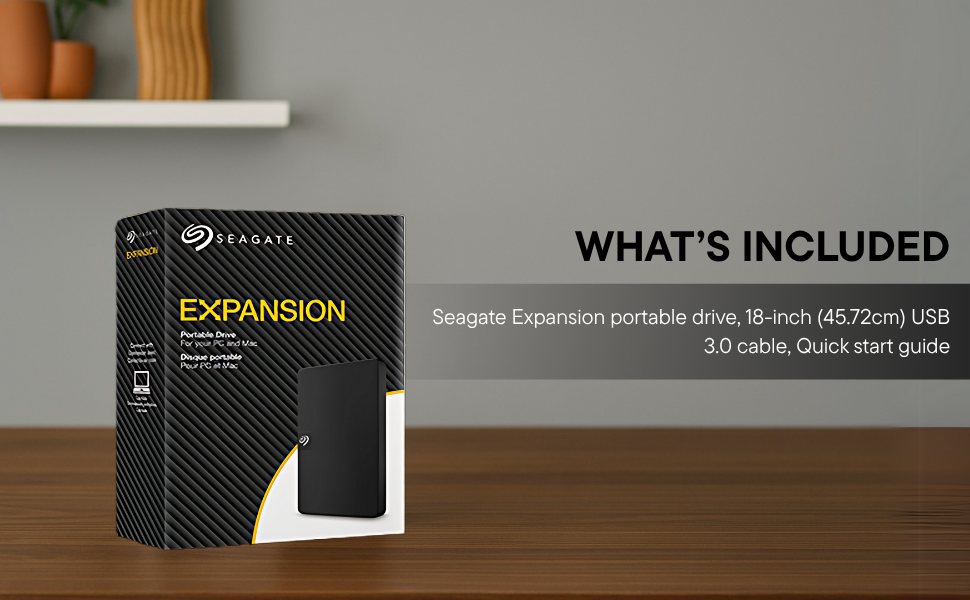
Image: Contents of the Seagate Expansion portable hard drive package, including the drive, USB cable, and documentation.
Сетуп
- Повежите УСБ кабл: Plug the small end of the included USB 3.0 cable into the Seagate Expansion portable hard drive.
- Повежите се са рачунаром: Plug the larger end of the USB 3.0 cable into an available USB port on your computer. The drive is USB 3.0 powered, so no external power adapter is needed.
- Аутоматско препознавање: The drive will be automatically recognized by your Windows or Mac operating system. No software installation is typically required for basic functionality.
- For Mac Users (Time Machine): If you intend to use the drive with Apple Time Machine for backups, reformatting the drive is required. Refer to your Mac's documentation for instructions on how to reformat and set up Time Machine.

Image: A Seagate Expansion portable hard drive connected to a laptop via a USB cable, demonstrating the plug-and-play setup.

Image: A hand holding the Seagate Expansion drive, with Windows and Mac compatibility logos displayed next to it.
Упутство за употребу
Once connected, the Seagate Expansion drive functions like any other external storage device on your computer.
- Приступ диску: On Windows, the drive will appear under 'This PC' or 'My Computer'. On Mac, it will appear on the desktop or in Finder under 'Locations'.
- Савинг Files: Да сачувам files, simply drag and drop them from your computer's internal storage to the Seagate Expansion drive's icon or open folder. You can also use the 'Copy' and 'Paste' functions.
- Организовање Files: Create folders on the drive to organize your data efficiently.
- Безбедно избацивање: Always safely eject the drive before disconnecting it to prevent data corruption. On Windows, right-click the drive icon in the system tray and select 'Eject'. On Mac, drag the drive icon to the Trash or click the Eject button next to the drive in Finder.

Image: A hand demonstrating the drag-and-drop method to transfer files from a laptop to the Seagate Expansion portable hard drive.
Одржавање
Proper maintenance ensures the longevity and optimal performance of your Seagate Expansion drive.
- Физичка нега: Handle the drive with care. Avoid dropping it or exposing it to extreme temperatures, moisture, or strong magnetic fields.
- Чишћење: Use a soft, dry, lint-free cloth to clean the exterior of the drive. Do not use liquid cleaners or solvents.
- Резервна копија података: While the drive is designed for storage, it is always recommended to maintain backups of critical data on multiple devices or cloud services.
- Ажурирања фирмвера: Периодично проверавајте подршку за Seagate webсајт за сва доступна ажурирања фирмвера за ваш модел како бисте осигурали оптималне перформансе и компатибилност.
Решавање проблема
If you encounter issues with your Seagate Expansion drive, consider the following steps:
- Диск није откривен:
- Уверите се да је УСБ кабл безбедно повезан и са диском и са рачунаром.
- Покушајте да повежете диск са другим УСБ портом на рачунару.
- Test the drive with a different USB cable, if available.
- Поново покрените рачунар.
- Споре перформансе:
- Уверите се да користите USB 3.0 порт за оптималне брзине. USB 2.0 портови ће резултирати споријим преносом података.
- Затворите све непотребне апликације које раде у позадини.
- Check your computer's disk management or disk utility to ensure the drive is healthy.
- Приступ Files: Ако не можете да приступите files, ensure the drive is properly mounted and not in use by another application.
За детаљније решавање проблема, погледајте званичне Seagate Troubleshooting Guide (PDF).
Спецификације
| Број модела | СТКМ1000400 |
| Капацитет дигиталног складиштења | 1 ТБ |
| Хард Диск Интерфаце | УСБ 2.0/3.0 |
| Технологија повезивања | УСБ |
| Бранд | Сеагате |
| Посебна карактеристика | Data Recovery Service, Portable |
| Фактор облика тврдог диска | 2.5 инча |
| Опис чврстог диска | Механички чврсти диск |
| Компатибилни уређаји | Стони рачунар, Лаптоп |
| Врста инсталације | Екстерни чврсти диск |
| Боја | Црно |
| Брзина ротације чврстог диска | 5400 РПМ |
| Брзина читања | 120 мегабајта у секунди |
| Димензије ставке Д x Ш x Дебљина | 11.7L x 8W x 1.5Th Centimeters |
| Тежина артикла | 0.4 фунти |
| Материјал кућишта | Пластика |
Гаранција и подршка
Your Seagate Expansion portable hard drive comes with comprehensive support and warranty coverage.
- Ограничена гаранција: The product includes a 3-year limited warranty. This covers device replacement or repair for manufacturing defects.
- Услуге спасавања података: For added peace of mind, your purchase includes 3 years of Rescue Data Recovery Services. This service covers data loss due to accidents, mechanical errors, or natural disasters, providing a chance to recover your valuable data.

Image: The 'Rescue Services' logo, indicating the inclusion of 3 years of data recovery services.
Контакт информације
For warranty claims, technical support, or inquiries regarding Rescue Data Recovery Services, please contact Seagate Customer Care:
- Seagate Technology (Thailand) Limited. India Customer Care No: 18003092525
Please have your product model number (STKM1000400) and proof of purchase ready when contacting support.