
DELTACO GAMING DM210
DELTACO GAMING DM210 Ultralight RGB Gaming Mouse User Manual
Model: DM210 (GAM-108)
1. Увод
Thank you for choosing the DELTACO GAMING DM210 Ultralight RGB Gaming Mouse. This manual provides essential information for setting up, operating, and maintaining your new gaming mouse. The DM210 is designed for performance, featuring an ultralight construction, customizable RGB lighting, and programmable buttons to enhance your gaming experience.
2. Садржај пакета
- 1x DELTACO GAMING DM210 Ultralight RGB Gaming Mouse
- 1к упутство за употребу
3. Производ је готовview
The DELTACO GAMING DM210 mouse features an ergonomic design with a honeycomb shell for reduced weight and improved airflow. It includes 7 buttons for versatile control and customizable RGB lighting.
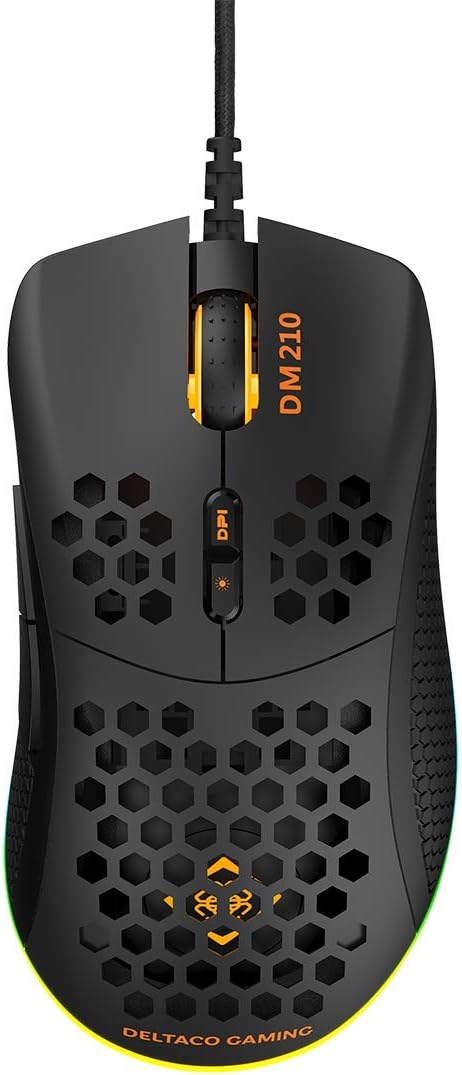
Слика 3.1: Врх view of the DM210 mouse. This image displays the left and right click buttons, the scroll wheel, and the two DPI adjustment buttons located below the scroll wheel. The ultralight honeycomb shell design is visible across the top surface of the mouse.
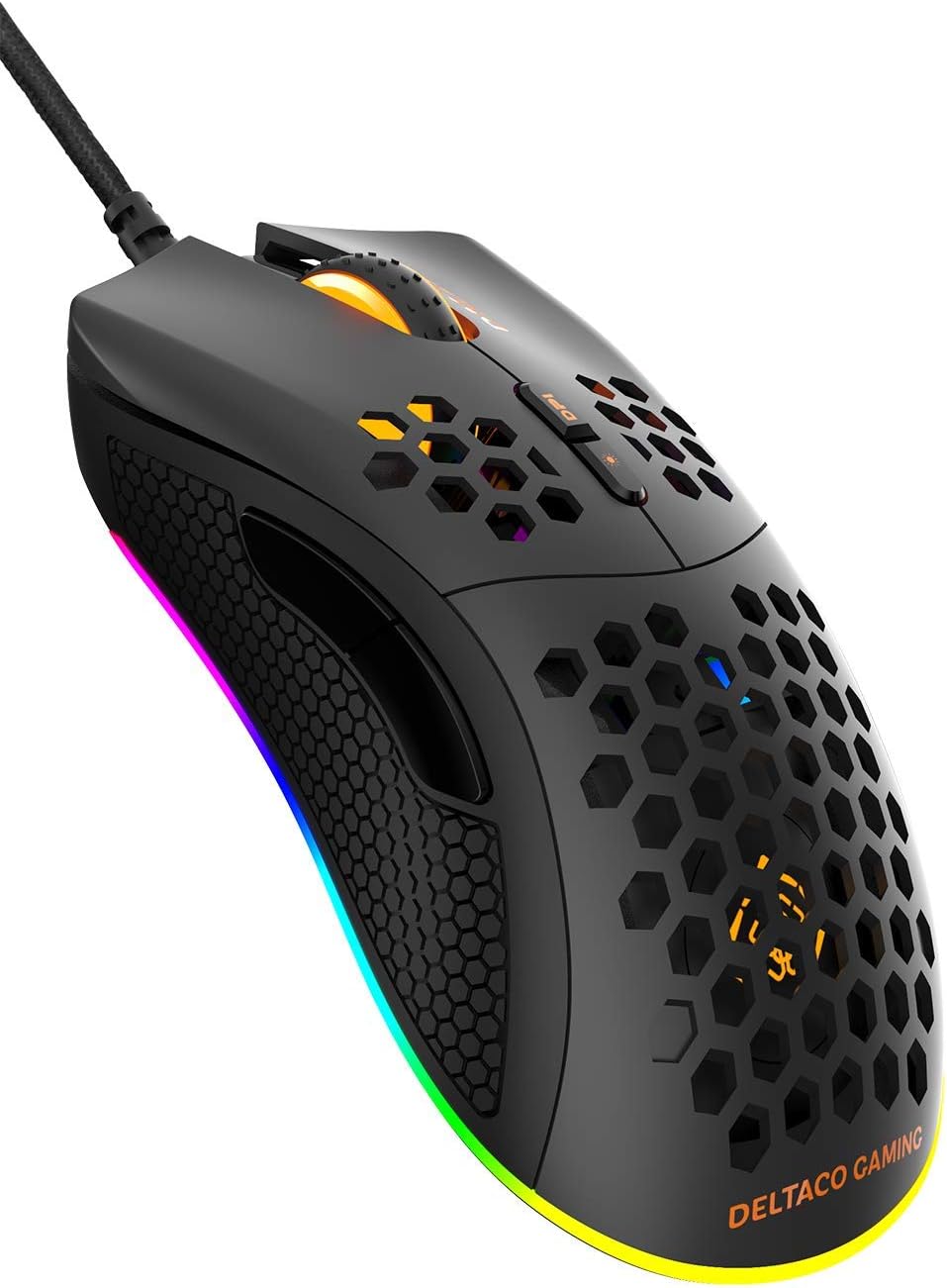
Слика 3.2: Англед view of the DM210 mouse from the front-right. This image highlights the two side buttons (forward and back) located on the left side of the mouse, designed for easy thumb access. The RGB lighting strip along the base of the mouse is also visible.
Функције дугмета:
- Леви клик: Стандардна функција примарног клика.
- Десни клик: Стандардна функција секундарног клика.
- Точак за померање: For scrolling through documents and web pages. Also functions as a middle click button.
- Дугме DPI+: Повећава осетљивост DPI-ја.
- DPI дугме: Decreases the DPI sensitivity. (Note: The product description mentions a single DPI button and a separate LED button. For this model, the two buttons below the scroll wheel are typically for DPI adjustment.)
- Дугме за напред: Навигација напред у web прегледачи или апликације.
- Дугме за назад: Навигација уназад web прегледачи или апликације.
4. Подешавање
- Повежите миш: Plug the USB connector of the DELTACO GAMING DM210 mouse into an available USB port on your computer.
- Инсталација драјвера: Your operating system (Windows 7/8/10) will automatically detect and install the necessary drivers. This process may take a few moments.
- Инсталација софтвера (опционо): For advanced customization, including programmable buttons and RGB lighting effects, download the DELTACO GAMING software. Refer to the product packaging or the official DELTACO GAMING website for the software download link.
5. Упутство за употребу
5.1. Подешавање DPI-ја
The DM210 mouse features multiple DPI (Dots Per Inch) settings, allowing you to adjust cursor sensitivity on the fly. Use the DPI buttons (located below the scroll wheel) to cycle through the available DPI levels:
- 400 ДПИ
- 800 ДПИ
- 1200 ДПИ
- 1600 ДПИ
- 3200 ДПИ
- 6400 ДПИ
Each DPI level may be indicated by a specific LED color or pattern, depending on the current RGB settings.
5.2. RGB контрола осветљења
The mouse features dynamic RGB lighting. While some basic lighting modes might be accessible via a dedicated button (if present, often combined with DPI control), full customization of the RGB loop and logo lighting is achieved through the DELTACO GAMING software. The software allows you to select from 16 million colors and various lighting effects.
5.3. Programmable Buttons and Software
The 7 buttons on the DM210 mouse are programmable using the DELTACO GAMING software. This software allows you to:
- Remap button functions to suit your preferences.
- Create macros for complex in-game actions.
- Adjust polling rate (up to 1000 Hz).
- Прилагодите RGB светлосне ефекте и боје.
Install the software from the official DELTACO GAMING website for access to these advanced features.
6. Одржавање
To ensure the longevity and optimal performance of your DELTACO GAMING DM210 mouse, follow these maintenance guidelines:
- Чишћење: Користите меку, благо дamp cloth to clean the surface of the mouse. Avoid using harsh chemicals, abrasive cleaners, or solvents, as these can damage the finish and internal components.
- Нега каблова: Avoid sharp bends or excessive pulling on the USB cable. Store the cable neatly when not in use to prevent tangling and damage.
- Окружење: Keep the mouse away from extreme temperatures, direct sunlight, and excessive moisture.
КСНУМКС. Решавање проблема
If you encounter issues with your DELTACO GAMING DM210 mouse, refer to the following common solutions:
- Миш не реагује:
- Уверите се да је USB кабл безбедно прикључен у исправан USB порт на рачунару.
- Покушајте да прикључите миш на други УСБ порт.
- Поново покрените рачунар.
- Тестирајте миш на другом рачунару да бисте утврдили да ли је проблем са мишем или вашим системом.
- DPI се не мења:
- Уверите се да притискате исправна дугмад за подешавање DPI-ја.
- If using the software, check if DPI settings have been reconfigured or if a specific profile је активан.
- RGB осветљење не ради/нетачно:
- Проверите да ли је миш правилно повезан.
- Check the DELTACO GAMING software for lighting settings and ensure they are configured as desired.
- Уверите се да је софтвер ажуриран.
- Дугмад не функционишу исправно:
- If using the DELTACO GAMING software, check button assignments to ensure they haven't been accidentally remapped.
- Test the mouse on another computer to rule out software conflicts on your primary system.
8. Спецификације
| Бранд | ДЕЛТАЦО ГАМИНГ |
| Модел | DM210 (GAM-108) |
| Повезивање | УСБ |
| ДПИ подешавања | 400 / 800 / 1200 / 1600 / 3200 / 6400 |
| Поллинг Рате | 1000 Хз |
| Дугмад | 7 (Програмабилно) |
| Тежина | 70г |
| Осветљење | RGB (16 милиона боја) |
| Компатибилност | Виндовс 7 / 8 / 10 |
| Боја | Црно |
9. Информације о гаранцији
The DELTACO GAMING DM210 Ultralight RGB Gaming Mouse comes with a 5 година гаранције from the date of purchase. This warranty covers manufacturing defects and ensures the product meets its specified performance. Please retain your proof of purchase for warranty claims. For detailed warranty terms and conditions, refer to the official DELTACO GAMING webсајту или контактирајте корисничку подршку.
10. Подршка
For further assistance, software downloads, frequently asked questions (FAQs), and the latest product information, please visit the official DELTACO GAMING website. You can also contact DELTACO GAMING customer support for technical issues or warranty inquiries.
Ask a question about this manual
Ask about setup, troubleshooting, compatibility, parts, safety, or missing instructions. Manuals+ will review the question and use this page’s manual context to help answer it.