
HOTT HA09
HOTT MP3 Player HA09 User Manual
Модел: ХА09
Увод
This user manual provides detailed instructions for the operation and maintenance of your HOTT MP3 Player, model HA09. Please read this manual thoroughly before using the device to ensure proper functionality and to prevent damage.
Безбедносне информације
- Не излажите уређај екстремним температурама, директној сунчевој светлости или високој влажности.
- Избегавајте испуштање или излагање уређаја јаким ударима.
- Do not disassemble or attempt to repair the device yourself. Contact qualified service personnel for assistance.
- Држите уређај даље од воде и других течности.
- Користите само наведену додатну опрему за пуњење.
Садржај пакета
Молимо вас да проверите пакет за следеће ставке:
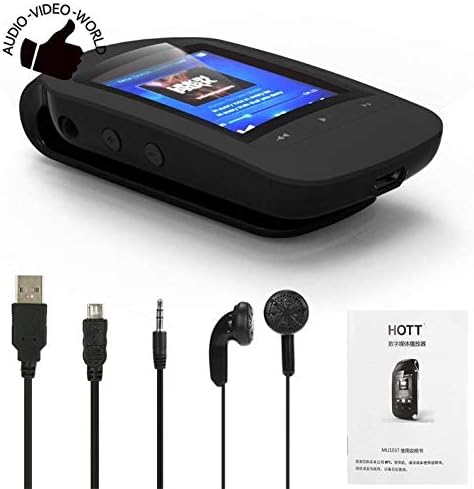
- HOTT MP3 Player (HA09)
- УСБ кабл за пуњење
- Слушалице
- Кориснички приручник (овај документ)
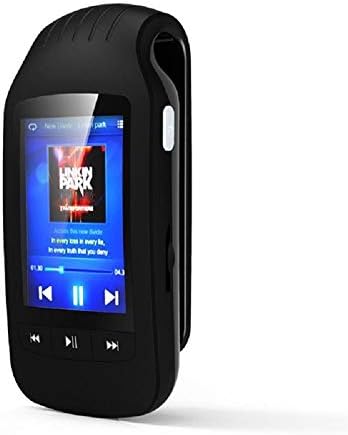
Figure 1: HOTT MP3 Player HA09 with its standard accessories, including charging cables and earphones.
Производ је завршенview
The HOTT MP3 Player HA09 features a compact design with a 1.8-inch screen and intuitive controls for easy navigation.
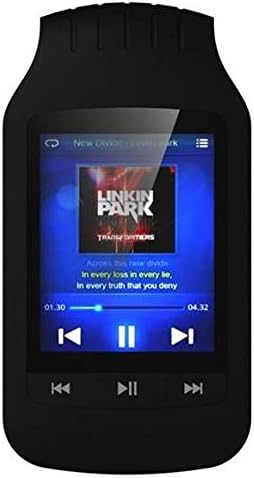
Слика 2: Предња страна view of the HOTT MP3 Player HA09, showing the display and control buttons.
Слика 3: Страна view of the HOTT MP3 Player HA09, illustrating its clip design for portability.
Кључне компоненте:
- 1.8-инчни екран: For navigating menus, viewing track information, e-books, and images.
- Контролна дугмад: Play/Pause, Next/Previous Track, Volume Up/Down, Menu, Back.
- УСБ порт: За пуњење и пренос података.
- Слушалице: За повезивање слушалица.
- Интегрисани клип: Allows for easy attachment to clothing or bags.
Сетуп
Пуњење уређаја:
- Connect the small end of the USB charging cable to the USB port on the MP3 player.
- Повежите други крај USB кабла са USB адаптером за напајање (није укључен) или USB портом рачунара.
- The battery indicator on the screen will show charging status. A full charge typically takes approximately 2-3 hours.
Укључивање/искључивање:
- To power on, press and hold the Power button until the screen lights up.
- To power off, press and hold the Power button until the "Power Off" prompt appears, then confirm.
Трансферинг Files:
- Повежите МП3 плејер са рачунаром помоћу УСБ кабла.
- The device will appear as a removable disk drive on your computer.
- Превуците и испустите жељени аудио files (MP3, WMA, WAV, APE, FLAC), e-books (TXT), or images into the appropriate folders on the device.
- Safely eject the device from your computer before disconnecting the USB cable.
Упутство за употребу
Репродукција музике:
Navigate to the "Music" menu to browse and play your audio files. The player supports MP3, WMA, WAV, APE, and FLAC formats.
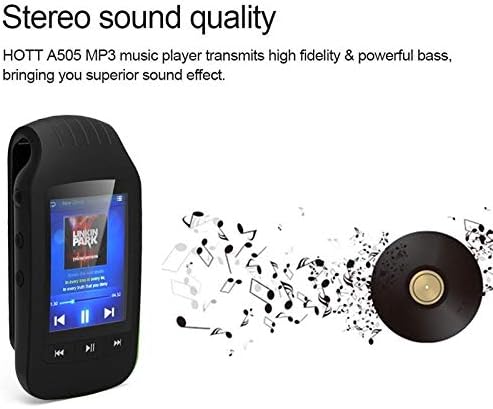
Figure 4: The HOTT MP3 Player HA09 delivers high-fidelity stereo sound for an enhanced listening experience.
- Use the navigation buttons to select a song or album.
- Притисните дугме за репродукцију/паузу да бисте покренули или паузирали репродукцију.
- Користите дугмад Следеће/Претходно да бисте прескакали нумере.
- Подесите јачину звука помоћу посебних дугмади за јачину звука.
Блуетоотх повезивање:
The device supports Bluetooth for wireless audio streaming to compatible headphones or speakers.
- Go to the "Bluetooth" menu in the settings.
- Укључите Блуетоотх.
- Тражи available devices and select your Bluetooth headphones/speaker to pair.
ФМ радио:
Connect your earphones (which act as an antenna) to use the built-in FM radio.
- Access the "FM Radio" option from the main menu.
- Користите функцију аутоматског скенирања да бисте пронашли и сачували доступне станице.
- Manually tune to specific frequencies if desired.
Диктафон:
Record audio using the integrated microphone. Recordings are saved in MP3 or WAV format.
- Select "Recorder" from the main menu.
- Притисните дугме за снимање да бисте започели снимање.
- Press the stop button to end and save the recording.
Читач е-књига:
View TXT format e-books directly on the device.
- Transfer TXT files to the "E-book" folder on the device.
- Open the "E-book" application and select your desired book.
Pedometer and Stopwatch:
Track your steps and exercise duration with the built-in pedometer and stopwatch functions.
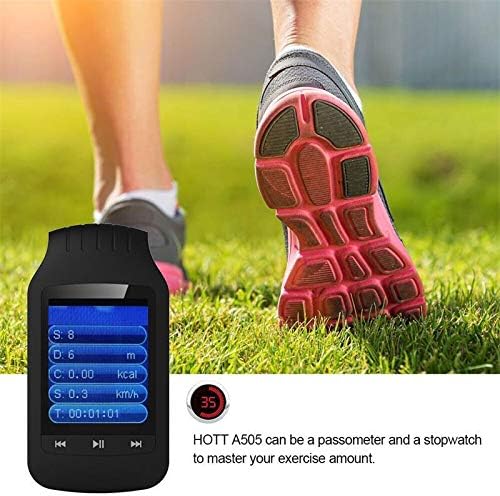
Figure 5: The HOTT MP3 Player HA09 functions as a pedometer and stopwatch, helping users monitor their exercise.
- Access these features from the main menu.
- Follow on-screen prompts to start, pause, and reset tracking.
Слика Viewер:
View слике сачуване на уређају.
- Transfer image files to the "Pictures" folder.
- Open the "Image Viewer" application to browse your photos.
Одржавање
- Чишћење: Користите меку, суву крпу за чишћење уређаја. Не користите течна средства за чишћење или аеросоле.
- Складиштење: Уређај чувајте на хладном и сувом месту, даље од директне сунчеве светлости и екстремних температура.
- Одржавање батерије: Да бисте продужили век трајања батерије, избегавајте често потпуно пражњење батерије. Редовно пуните уређај, чак и ако га не користите дуже време.
Решавање проблема
| Проблем | Могући узрок | Решење |
|---|---|---|
| Уређај се не укључује. | Батерија је празна. | Пуните уређај најмање 30 минута. |
| Није могуће пренети files. | Incorrect USB connection or driver issue. | Уверите се да је USB кабл добро повезан. Покушајте са другим USB портом или рачунаром. |
| Нема звука из слушалица. | Earphones not properly connected or volume too low. | Check earphone connection. Increase volume. Test with different earphones. |
| Блутут уређај се не упарује. | Device not in pairing mode or too far. | Ensure the Bluetooth device is in pairing mode and within range. Restart both devices. |
Спецификације
| Феатуре | Детаљ |
|---|---|
| Број модела | ХА09 |
| Бранд | ХОТТ |
| Величина екрана | 1.8 инча |
| Интерна меморија | 8 ГБ |
| Подршка за екстерно складиштење | Up to 64 GB (MicroSD card, not included) |
| Материјал тела | Пластика |
| Аудио формати | МП3, ВМА, ВАВ, АПЕ, ФЛАЦ |
| Формати снимача | МПКСНУМКС, ВАВ |
| Формат е-књиге | ТКСТ |
| Однос сигнала и шума | ≥89дБ |
| Повезивање | Блуетоотх, УСБ |
| Додатне функције | FM Radio, Stopwatch, Pedometer, Image Viewer |
| Подржани језици | 24 languages (e.g., English, German, French, Italian, Dutch, Portuguese, Spanish, Russian) |
| Боја | Црно |
Гаранција и подршка
For warranty information and technical support, please refer to the warranty card included with your product or visit the official HOTT webсајт. Сачувајте рачун као доказ о куповини за потребе гаранције.
Напомена: Посебни услови гаранције могу се разликовати у зависности од региона.
Ask a question about this manual
Ask about setup, troubleshooting, compatibility, parts, safety, or missing instructions. Manuals+ will review the question and use this page’s manual context to help answer it.