1. Увод
This manual provides detailed instructions for the installation, operation, and maintenance of your XTRONS PSP10ISL Android 10 Car Stereo. Designed specifically for Lexus IS250, IS300, and IS350 models from 2006 to 2012, this head unit enhances your driving experience with advanced features and a user-friendly interface.
Молимо вас да пажљиво прочитате ово упутство пре употребе производа како бисте осигурали исправно функционисање и спречили оштећења.
2. Кључне карактеристике
- Андроид 10.0 ОС: Experience a faster and smoother interface with the latest Android operating system.
- 10.1-инчни IPS екран осетљив на додир: Enjoy a high-definition 1024x600 display with a 2.5D curved capacitive touch screen for sensitive and scratch-resistant interaction.
- Built-in Wired CarAutoPlay: Seamlessly integrate your iPhone for navigation, calls, music, and voice assistants.
- Built-in DSP (Digital Sound Processor): Customize your audio experience with a 30-band EQ, fader, balance, and digital time delay.
- Блуетоотх КСНУМКС: Connect your mobile phone for hands-free calls, phonebook access, and Bluetooth music streaming.
- ГПС навигација: Supports various Android navigation software including Google Maps, Waze, Sygic, and IGO.
- Пресликавање екрана: Display your smartphone's content directly on the car stereo screen.
- Пуни RCA излаз: Share all features simultaneously with rear-seat passengers.
- Дуал Зоне Функција: Transmit videos to rear monitors while navigating on the head unit.
- Dual Channel CANbus: Integrates with vehicle information and steering wheel controls.
- PIP Mode (Picture-in-Picture): Watch videos while multitasking (supports built-in video player only).
- Dual Theme UI: Choose between two user interface themes.
- 1080P Video Support: Play high-definition video formats.
- Thickened Heat Sink: Efficient heat dissipation for reliable performance.
3. Спецификације
| Феатуре | Детаљ |
|---|---|
| Бранд | КСТРОНС |
| Број модела | PSP10ISL |
| Оперативни систем | Андроид 10 |
| Процесор | Четворојезгарни процесор |
| РАМ | 2ГБ |
| РОМ | 32ГБ |
| Величина екрана | 10.1 инча |
| Резолуција екрана | 1024к600 ХД |
| Тип екрана | IPS 2.5D Curved Capacitive Touch Screen |
| Блуетоотх верзија | 5.0 |
| Технологија повезивања | Bluetooth, Wi-Fi (Built-in), USB, RCA |
| Режим аудио излаза | Стерео |
| Подржане Интернет услуге | Мапе, Јутјуб |
| Контролни метод | Додирните |
| Тип аудио излаза | Звучници |
| Компатибилни уређаји | Smartphone (iPhone for CarAutoPlay) |
| Излазна снага | КСНУМКСкКСНУМКСВ |
4. Подешавање и инсталација
The XTRONS PSP10ISL is designed for a specific fit in Lexus IS250, IS300, and IS350 models (2006-2012). Professional installation is recommended due to the complexity of car stereo wiring and vehicle integration.
4.1 Садржај пакета
Пре инсталације, проверите да ли су све компоненте присутне:
- 1 × ISO Wiring Harness
- 1 × RCA Cable
- КСНУМКС × УСБ кабл
- 1 × Camera Cable
- 1 × CANbus Box
- 1 × GPS Antenna
- 1 × OBD Cable
- 2 × Installation Kit
- 10 × Завртњи
- 1 × Упутство за употребу (овај документ)

Image: Included accessories for the XTRONS PSP10ISL car stereo. This image displays the ISO wiring harness, RCA cable, USB cables, camera cable, CANbus box, GPS antenna, OBD cable, installation kit, screws, and user manual.
4.2 Дијаграм ожичења
Refer to the detailed wiring diagram for correct connections. Ensure all cables are securely connected to their corresponding ports to avoid malfunctions.

Image: Comprehensive wiring diagram for the XTRONS PSP10ISL car stereo, showing connections for power, speakers, USB, camera, and other peripherals.
4.3 Напомене о компатибилности
This unit is compatible with Lexus IS200/IS220/IS250/IS300/IS350 Convertible (2-door) models from 2006-2012. If your car has an original navigation or fiber amplifier system, an extra cable (XTRONS AK/PSP10ISL/MOST) may be required for installation.

Image: A side-by-side comparison showing the car's dashboard before and after the installation of the XTRONS PSP10ISL car stereo, highlighting the integrated look and larger screen.
5. Упутство за употребу
5.1 Основна навигација
The unit features a 10.1-inch IPS touch screen. Tap icons to open applications. Swipe left or right to access additional screens or menus.
5.2 Блуетоотх 5.0
To connect your mobile phone via Bluetooth:
- Додирните икону „Bluetooth“ на почетном екрану.
- Уверите се да је Блуетоотх омогућен на вашем мобилном уређају.
- Тражи "DEV:XTRONS" in your phone's Bluetooth settings and pair.
- Once connected, you can make/receive hands-free calls, access your phone book, call logs, and stream Bluetooth music.
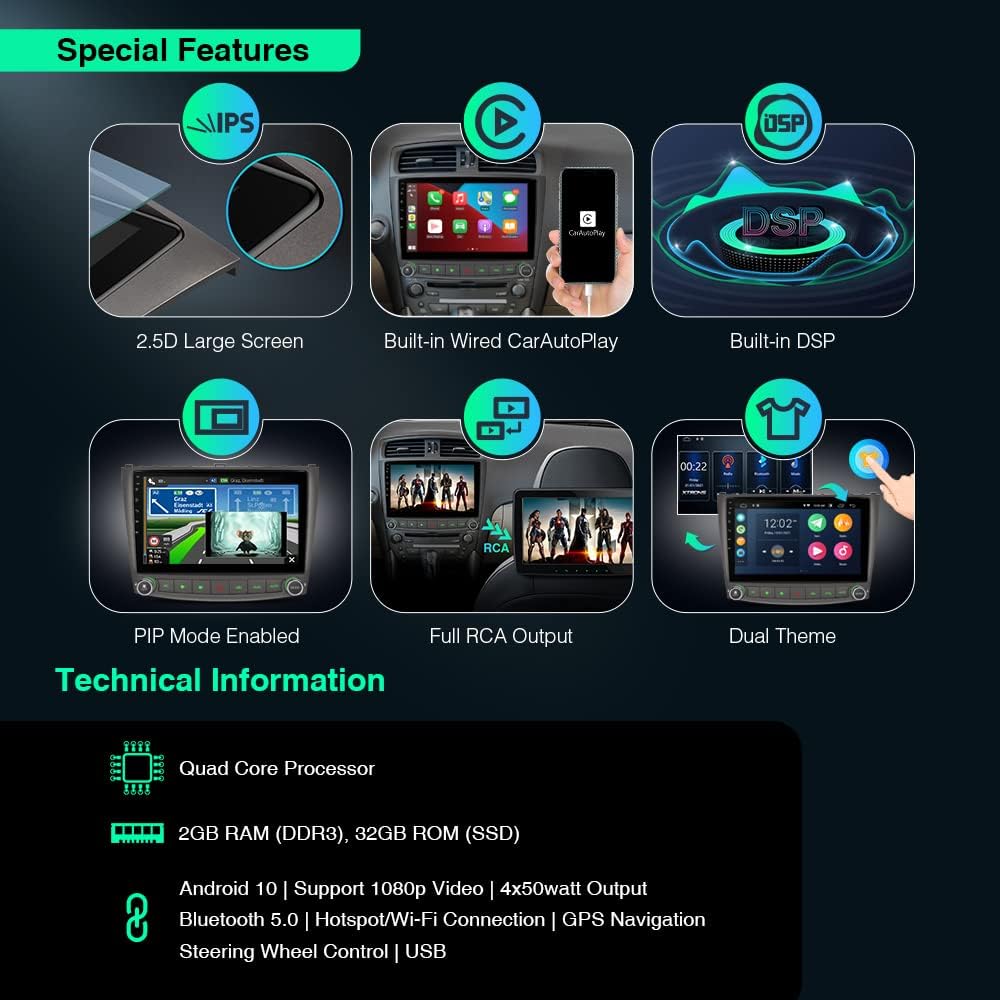
Слика: Оверview of the XTRONS PSP10ISL's special features, including 2.5D large screen, built-in wired CarAutoPlay, built-in DSP, PIP mode, full RCA output, and dual theme options.
5.3 ГПС навигација
The unit supports various Android navigation software. Tap the "Maps" or your preferred navigation app icon to start. Ensure the GPS antenna is properly installed for optimal signal reception.
5.4 Built-in Wired CarAutoPlay
Connect your iPhone to the designated USB port (often labeled "mirrorlink" or similar) using a compatible iPhone cable. This allows you to safely access GPS, calls, music, Google Assistant, or Siri directly from the car stereo screen.

Image: The XTRONS PSP10ISL displaying the CarAutoPlay interface, with a smartphone connected via USB, demonstrating seamless integration for navigation, music, and calls.
5.5 Уграђени DSP (дигитални звучни процесор)
Access the DSP settings to fine-tune your audio. You can adjust the 30-band equalizer, fader, balance, and digital time delay to optimize sound quality for your vehicle's interior.

Image: The XTRONS PSP10ISL screen showing the Digital Sound Processor (DSP) interface with options for 30-band EQ, fader and balance, and digital time delay adjustments.
5.6 Пресликавање екрана
This feature allows you to mirror your smartphone's screen onto the head unit. Follow the on-screen instructions within the "PhoneLink" or "Screen Mirroring" app to establish a connection.
5.7 PIP Mode (Picture-in-Picture)
When playing a video using the built-in video player, you can enable PIP mode by tapping the down arrow on the screen. This allows the video to float over other applications, enabling multitasking.
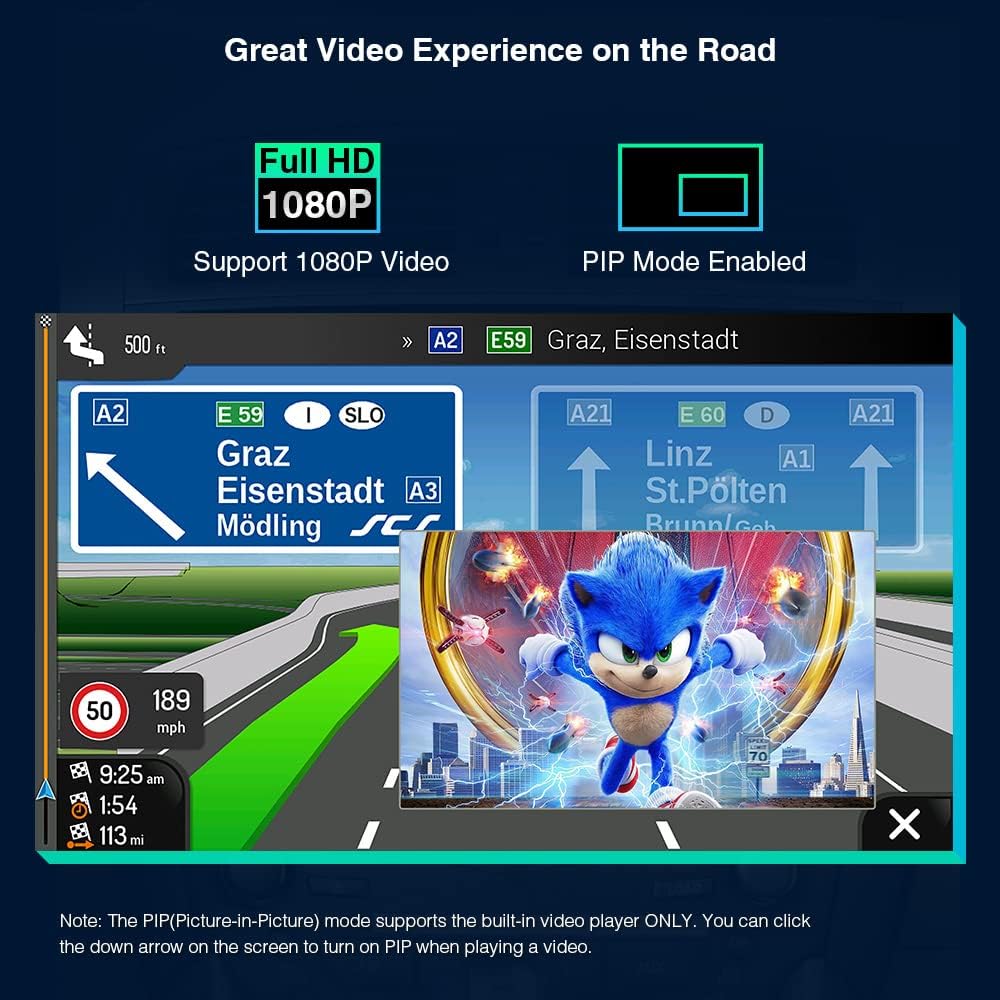
Image: The XTRONS PSP10ISL screen demonstrating Picture-in-Picture (PIP) mode, where a video is playing in a smaller window while a navigation app is active in the background.
5.8 Dual Theme UI
Customize the look of your user interface by selecting one of the two available themes. Navigate to the settings menu to switch themes.

Image: The XTRONS PSP10ISL displaying two different user interface themes, showing how users can customize the visual appearance of the system.
5.9 Опциона додатна опрема
Enhance your experience with optional accessories:
- ОБД2: Connect an OBD2 adapter (e.g., ASIN: B015MU8UN6 / B08HQ9LQ9X) for real-time vehicle diagnostics.
- ТПМС: Integrate a TPMS system (e.g., ASIN: B07WQFKV5G) for tire pressure monitoring.
- камере: Add front or reversing cameras (e.g., ASIN: B07HMLYLJJ / B00GY3BVT6) for improved safety.
- External DVR: Connect an external DVR (e.g., ASIN: B07MBYCG4C / B08ZN33K1M) for driving recording.
6. Одржавање
To ensure the longevity and optimal performance of your XTRONS PSP10ISL car stereo, follow these maintenance guidelines:
- Чишћење екрана: Користите меку крпу која не оставља длачицеampОпрати водом или средством за чишћење екрана посебно дизајнираним за електронику. Избегавајте абразивне материјале или јаке хемикалије.
- Ажурирања софтвера: Periodically check for software updates from XTRONS to ensure you have the latest features and bug fixes. Follow the instructions provided with the update package carefully.
- Избегавајте екстремне температуре: Иако је уређај дизајниран за аутомобилска окружења, дуготрајно излагање екстремној топлоти или хладноћи може утицати на перформансе.
- Кабловске везе: Regularly check all cable connections to ensure they are secure and free from damage. Loose connections can lead to intermittent issues.
- вентилација: Ensure the unit's ventilation areas are not blocked to allow for proper heat dissipation.
КСНУМКС. Решавање проблема
If you encounter issues with your XTRONS PSP10ISL, refer to the following common problems and solutions:
| Проблем | Могући узрок | Решење |
|---|---|---|
| Јединица се не укључује. | Лабав прикључак за напајање, прегорели осигурач, проблем са акумулатором возила. | Check power cables and fuse. Ensure vehicle battery is charged. Consult a professional installer if issues persist. |
| Нема звука из звучника. | Неправилно ожичење звучника, прениска јачина звука, активирано искључивање звука, DSP подешавања. | Verify speaker connections. Increase volume. Check if mute is active. Adjust DSP settings. |
| ГПС сигнал је слаб или нетачан. | GPS антена није правилно инсталирана или је заклоњена. | Ensure GPS antenna is placed in a clear location with an unobstructed view неба. Проверите везу антене. |
| Проблеми са Bluetooth везом. | Device not discoverable, incorrect pairing, interference. | Ensure Bluetooth is enabled on both devices and the unit is in pairing mode. Try unpairing and re-pairing. Move closer to the unit. |
| CarAutoPlay not connecting. | Faulty USB cable, incorrect USB port, phone software issue. | Use a high-quality, original USB cable. Ensure you are using the correct USB port. Restart your phone and the head unit. |
| Touch screen unresponsive or lagging. | Temporary software glitch, excessive background apps. | Рестартујте уређај. Затворите непотребне апликације у позадини. Вратите уређај на фабричка подешавања ако се проблем и даље јавља (напомена: ово ће обрисати све податке). |
If the problem persists after trying these solutions, please contact XTRONS customer support or a qualified technician.
8. Информације о гаранцији
XTRONS products are covered by a limited warranty. The specific terms and duration of your warranty may vary based on your region and point of purchase. Please retain your proof of purchase for warranty claims.
For detailed warranty information, please refer to the warranty card included with your product or visit the official XTRONS webсајту.
9. Корисничка подршка
For technical assistance, product inquiries, or service requests, please contact XTRONS customer support through the following channels:
- Webсајт: Visit the official XTRONS webсајт за често постављана питања, чланке подршке и контакт форме.
- Емаил: Refer to your product packaging or the XTRONS website for the appropriate support email address.
- Телефон: Check the XTRONS webсајт за регионалне бројеве телефона корисничке службе.
When contacting support, please have your product model number (PSP10ISL) and proof of purchase readily available.
10. Видео демонстрација производа
Video: Official XTRONS demonstration of the Android 10 Car Stereo (PSP10ISL) for Lexus IS models, showcasing its features, interface, and functionality.