
1. Увод
The Magewell Ultra Encode SDI (Model 53050) is a versatile live stream encoder designed for professional AV applications. It supports high-quality H.264, H.265 (HEVC), and NDI|HX encoding, along with multiple streaming protocols. This manual provides detailed instructions for setting up, operating, maintaining, and troubleshooting your Ultra Encode SDI device.
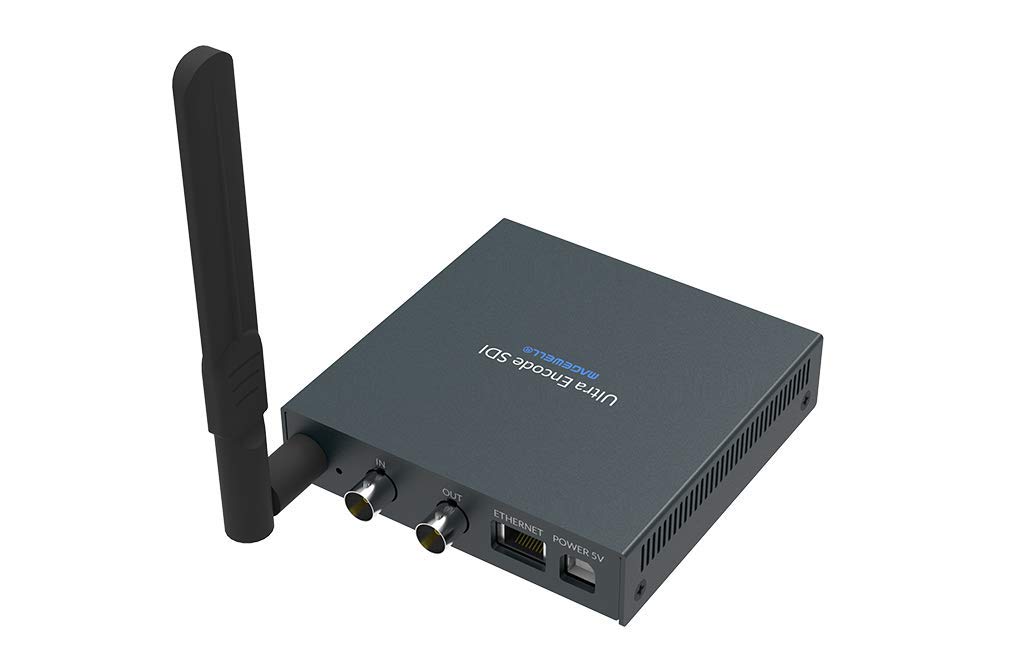
Figure 1.1: Magewell Ultra Encode SDI (Model 53050) device.
2. Садржај пакета
Please verify that all items listed below are included in your package. If any items are missing or damaged, contact your vendor or Magewell support.
- Magewell Ultra Encode SDI (Model 53050) Unit
- Power Adapter (with regional plugs)
- USB 2.0 Type B cable
- Ви-Фи антена
- T-bracket
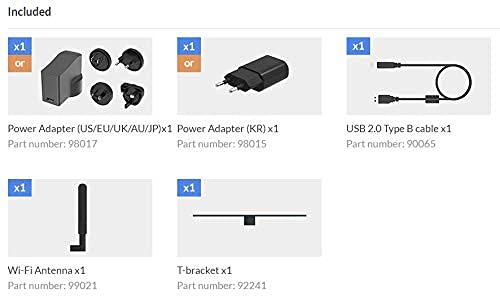
Figure 2.1: Included accessories with the Ultra Encode SDI.
3. Производ је готовview
The Ultra Encode SDI features various ports and indicators for connectivity and status monitoring. Familiarize yourself with these components before setup.
3.1 Front/Side Panel

Figure 3.1: Front/Side panel with audio ports, status LEDs, and USB port.
- ЛИНЕ ОУТ: 3.5 мм аудио излаз.
- ЛИНИЈА У: 3.5 мм аудио улаз.
- ПВР ЛЕД: Индикатор напајања.
- ИН ЛЕД: Input signal status.
- ЛИВЕ ЛЕД: Streaming status.
- ЕТХ ЛЕД: Ethernet connection status.
- Ви-Фи ЛЕД: Статус Ви-Фи везе.
- ОПЦИЈА: USB port for optional accessories or configuration.
3.2 Задња плоча

Figure 3.2: Rear panel with video, network, and power connections.
- IN (SDI): SDI/3G video input.
- OUT (SDI): SDI/3G loop-through output.
- МРЕЖНИ: RJ45 порт за жичану мрежну везу.
- POWER 5V: Улазни порт за напајање.
3.3 Дијаграм портова

Figure 3.3: Comprehensive port and indicator diagram.
4. Подешавање
Follow these steps to set up your Magewell Ultra Encode SDI device.
4.1 Физичке везе
- Прикључите напајање: Укључите приложени адаптер за напајање у ПОВЕР 5В port on the rear panel and then into a power outlet. The ПВР LED on the front panel should illuminate.
- Connect Video Input: Connect your SDI/3G video source to the IN (SDI) port on the rear panel. If you need to loop the signal through, connect a cable from the OUT (SDI) port to your monitoring device.
- Повежите аудио (опционо): If using analog audio, connect your audio source to the ЛИНЕ ИН port and your audio monitoring device to the ЛИНЕ ОУТ лука.
- Повежите мрежу:
- Виред: Connect an Ethernet cable from your network router or switch to the МРЕЖНИ port on the rear panel. The ЕТХ LED should illuminate.
- бежични: Screw the provided Wi-Fi antenna onto the antenna socket. You will configure the Wi-Fi connection via the web приступ. Тхе Ви-Фи LED will indicate connection status.
4.2 Почетна конфигурација (Web Интерфејс)
The Ultra Encode SDI is configured via a web-based interface. To access it:
- Ensure your computer is on the same network as the Ultra Encode SDI.
- Use a network scanning tool or check your router's connected devices list to find the IP address of the Ultra Encode SDI. Alternatively, some devices may have a default IP or a discovery tool.
- Отвори а web browser and enter the device's IP address in the address bar.
- Log in using the default credentials (refer to the device's quick start guide or Magewell documentation for default username and password).
- Фром тхе web interface, you can configure network settings (including Wi-Fi), video/audio input parameters, encoding settings, and streaming destinations.
5. Упутство за употребу
The Ultra Encode SDI offers flexible encoding and streaming capabilities.
5.1 Подешавања кодирања
- The device supports H.264 and H.265 (HEVC) video encoding. Select the desired codec and adjust parameters such as bitrate (up to 16Mbps), resolution, and frame rate via the web интерфејс.
- Audio encoding options are also available for optimal quality and compatibility.
5.2 Streaming Protocols
The Ultra Encode SDI supports various streaming protocols:
- RTMP/RTMPS: Commonly used for live streaming to platforms like YouTube, Facebook, and Twitch. Configure the server URL and stream key in the web интерфејс.
- ХЛС: HTTP Live Streaming for adaptive bitrate delivery.
- SRT: Secure Reliable Transport protocol for low-latency, high-quality video transport over unreliable networks.
- NDI|HX: NewTek's NDI|HX encoding for IP production workflows. Enable and configure NDI|HX output in the web интерфејс.
5.3 Configurable Presets
The device includes configurable presets for easy streaming to popular platforms:
- Access the presets section in the web интерфејс.
- Select a platform (e.g., Facebook, Twitch, YouTube) and enter your stream key or login details as prompted.
- Activate the preset to begin streaming.
6. Одржавање
Proper maintenance ensures the longevity and optimal performance of your Ultra Encode SDI.
- Чишћење: Користите меку, суву крпу за чишћење спољашњости уређаја. Избегавајте течна средства за чишћење или абразивне материјале.
- вентилација: Уверите се да је уређај постављен у добро проветреном простору како бисте спречили прегревање. Не блокирајте вентилационе отворе.
- Ажурирања фирмвера: Periodically check the Magewell official website for firmware updates. Updating the firmware can provide new features, performance improvements, and bug fixes. Follow the instructions provided by Magewell for safe firmware updates.
- Складиштење: Када се уређај не користи дуже време, чувајте га на хладном и сувом месту, даље од директне сунчеве светлости и екстремних температура.
КСНУМКС. Решавање проблема
Овај одељак се бави уобичајеним проблемима на које можете наићи.
- Нема напајања:
- Уверите се да је адаптер за напајање безбедно повезан са уређајем и исправном утичницом.
- Verify the power adapter is the correct one supplied with the device.
- Без видео улаза:
- Check the SDI cable connection between the source and the device's IN (SDI) лука.
- Confirm the video source is active and outputting a compatible SDI signal.
- Проверите IN ЛЕД статус.
- Нема мрежне везе:
- For wired connection, ensure the Ethernet cable is properly connected and the ЕТХ LED is active.
- For Wi-Fi, ensure the antenna is attached, and Wi-Fi settings are correctly configured in the web interface. Check the Ви-Фи ЛЕД.
- Verify your network router is functioning correctly.
- Не могу приступити Web Интерфејс:
- Ensure your computer is on the same network as the encoder.
- Verify the IP address of the encoder.
- Покушајте да обришете кеш меморију прегледача или да користите други прегледач.
- Streaming Issues (Buffering, Disconnections):
- Check your internet connection speed and stability.
- Reduce the encoding bitrate in the web interface if your network bandwidth is limited.
- Verify streaming server URL and stream key are correct.
- Проверите ЛИВЕ ЛЕД статус.
For further assistance, refer to the Magewell support webсајту или контактирајте њихов тим за техничку подршку.
8. Спецификације
| Феатуре | Спецификација |
|---|---|
| Бранд | Мејџвел |
| Модел | 53050 |
| Димензије производа | 10.5 к 10.6 к 2.5 цм |
| Тежина артикла | 596 г (0.6 килограма) |
| Видео улаз | SDI/3G Input |
| Видео Оутпут | SDI/3G Loop |
| Аудио улаз | Line-In (3.5mm) |
| Аудио излаз | Line-Out (3.5mm) |
| Формати кодирања | H.264, H.265 (HEVC), NDI|HX |
| Мак Битрате | До 16 Мбпс |
| Стреаминг Протоцолс | RTMP, RTMPS, HLS, SRT |
| Мрежна повезаност | Ethernet (RJ45), Wi-Fi (802.11ac) |
| Повер Суппли | 12 волти (ДЦ) |
| Компатибилни уређаји | Laptop (for configuration) |
| Посебне карактеристике | Wireless connectivity, Configurable presets for streaming platforms |
9. Гаранција и подршка
For information regarding product warranty, technical support, and service, please refer to the official Magewell website or contact your authorized Magewell dealer. Keep your purchase receipt as proof of purchase for warranty claims.
Magewell Official Webсајт: ввв.магевелл.цом