
1. Увод
Хвала вам на куповиниasing the QFX PBX-8080 Portable Bluetooth Speaker. This manual provides important information regarding the setup, operation, and maintenance of your device. Please read it thoroughly before use and retain it for future reference.
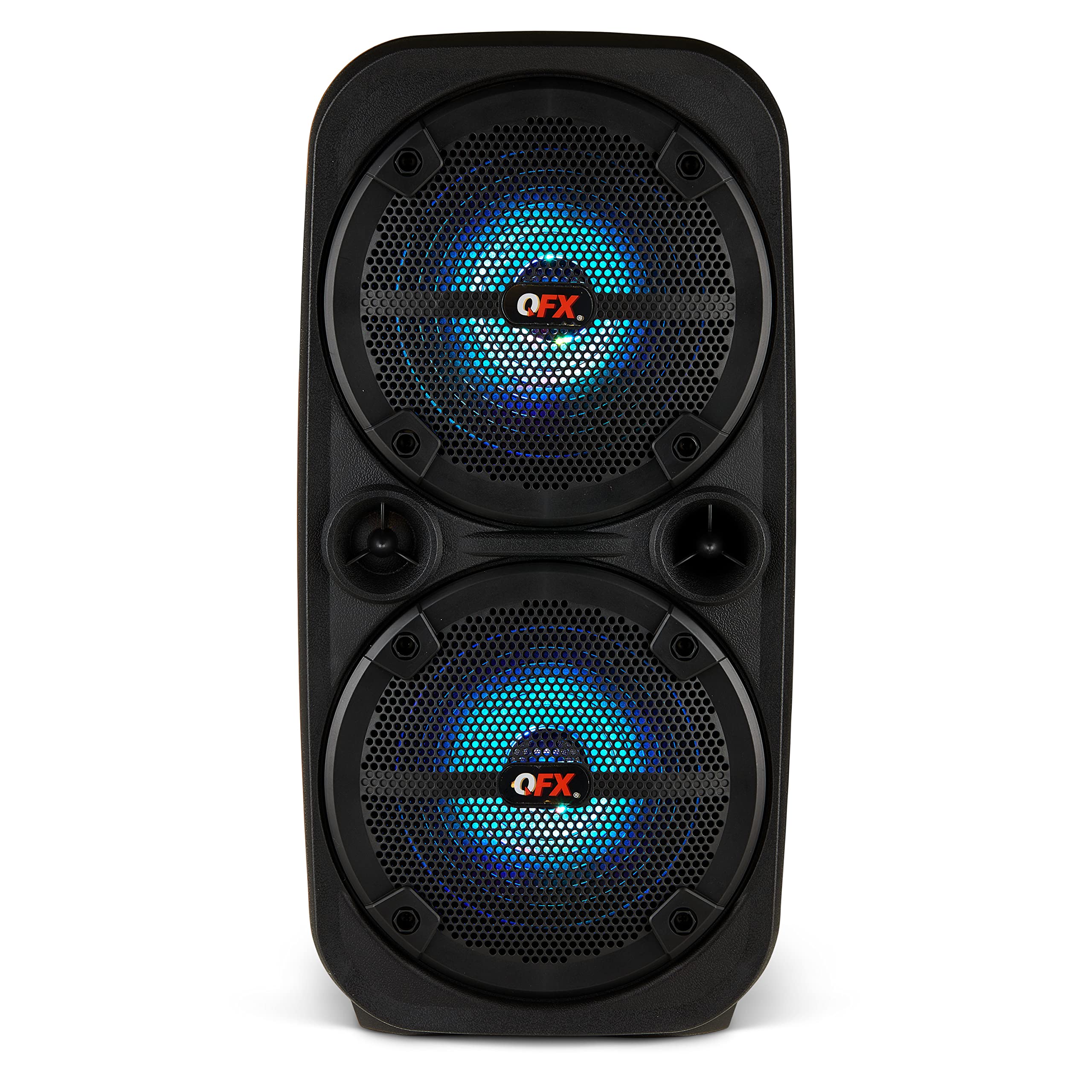
Слика 1.1: Предња страна view of the QFX PBX-8080 Portable Bluetooth Speaker. This image displays the speaker's robust design, featuring two 8-inch woofers, a central control panel, and illuminated LED party lights, indicating its readiness for use.
2. Безбедносна упутства
- Прочитајте упутства: Прочитајте сва упутства за безбедност и употребу пре употребе производа.
- Сачувајте упутства: Сачувајте упутства за безбедност и рад за будућу употребу.
- Обратите пажњу на упозорења: Придржавајте се свих упозорења на производу иу упутству за употребу.
- Следите упутства: Пратите сва упутства за употребу и употребу.
- Вода и влага: Не користите овај апарат у близини воде.
- Чишћење: Чистите само сувом крпом.
- вентилација: Не блокирајте отворе за вентилацију. Инсталирајте у складу са упутствима произвођача.
- топлота: Не постављајте у близини извора топлоте као што су радијатори, грејни регистри, пећи или други уређаји (укључујући ampлифиерс) који производе топлоту.
- Заштита кабла за напајање: Заштитите кабл за напајање од гажења или прикљештења, посебно на утикачима, утичницама и на месту где излазе из уређаја.
- Прилози: Користите само додатке/прибор које је навео произвођач.
- Муња: Искључите овај апарат из струје током олуја са грмљавином или када га не користите дуже време.
- Сервисирање: Све сервисирање препустите квалификованом сервисном особљу. Сервисирање је потребно када је уређај оштећен на било који начин, као што је оштећен кабл за напајање или утикач, ако је течност проливена или су предмети упали у апарат, ако је апарат био изложен киши или влази, не ради нормално , или је одбачено.
3. Садржај пакета
Молимо вас да означите поље за следеће ставке:
- QFX PBX-8080 Portable Bluetooth Speaker
- УСБ кабл за пуњење
- Упутство за употребу (овај документ)
4. Производ је готовview
The QFX PBX-8080 is a versatile portable speaker designed for powerful audio output and various connectivity options. It features dual 8-inch woofers, LED party lights, and multiple input methods.
Кључне компоненте:
- Dual 8-inch Woofers: For powerful bass and clear audio.
- Контролна табла: Located on the top or front, featuring buttons for power, mode selection, volume, playback control, and LED light control.
- ЛЕД светла за забаву: Integrated lights that synchronize with music or can be set to various patterns.
- Улазни портови: USB, Aux-in (3.5mm), Microphone input.
- Порт за пуњење: За повезивање УСБ кабла за пуњење.
- ручке: За лаку преносивост.
5. Подешавање
5.1 Пуњење звучника
- Пронађите прикључак за пуњење на звучнику.
- Прикључите приложени УСБ кабл за пуњење на порт за пуњење звучника.
- Повежите други крај USB кабла са компатибилним USB адаптером за напајање (није укључен) или USB портом са напајањем.
- The charging indicator light (if present) will illuminate, typically red, during charging.
- Once fully charged, the indicator light may change color (e.g., turn off or turn green). A full charge typically takes several hours.
- The speaker supports "Charge & Play," allowing you to use it while it is charging.
5.2 Укључивање/искључивање
- To power on the speaker, press and hold the Power button (usually marked with ⏻ or "POWER") for a few seconds until you hear an audible prompt or see the display/LEDs light up.
- Да бисте искључили звучник, поново притисните и држите дугме за напајање док се он не искључи.
6. Упутство за употребу
6.1 Блуетоотх упаривање
- Ensure the speaker is powered on and in Bluetooth mode. If not, press the "MODE" button until "Bluetooth" or "BT" is displayed/announced. The Bluetooth indicator will typically flash, indicating it's in pairing mode.
- На свом мобилном уређају (паметном телефону, таблету итд.) омогућите Блутут и потражите доступне уређаје.
- Select "QFX PBX-8080" from the list of found devices.
- Након упаривања, звучник ће емитовати звучну потврду, а индикаторска лампица за Bluetooth ће престати да трепери и остати непрекидно светлећа.
- Сада можете да репродукујете звук са свог уређаја преко звучника.
6.2 Функција правог бежичног стерео звука (TWS)
The TWS function allows you to connect two PBX-8080 speakers wirelessly for a stereo sound experience.
- Ensure both PBX-8080 speakers are powered on and in Bluetooth mode, but не повезан са било којим уређајем.
- On one of the speakers, press and hold the "TWS" button (or a similar button, refer to speaker markings) for a few seconds.
- The speakers will attempt to connect to each other. Once connected, you will hear a confirmation tone.
- Now, connect your mobile device to one of the paired PBX-8080 speakers via Bluetooth (as described in section 6.1). Both speakers will play audio in stereo.
6.3 LED Party Lights
The PBX-8080 features dynamic LED party lights. Use the "LIGHT" button (or similar) on the control panel to cycle through different light modes or to turn the lights off.
6.4 Улаз за микрофон
- Connect a wired microphone (not included) to the "MIC IN" jack on the speaker.
- Adjust the microphone volume using the dedicated "MIC VOL" knob or buttons on the control panel.
- You can use the microphone while playing music from other sources.
6.5 Аук улаз
- Connect an external audio device (e.g., MP3 player, laptop) to the "AUX IN" jack using a 3.5mm audio cable (not included).
- Press the "MODE" button on the speaker until "AUX" mode is selected.
- Control playback and volume from your connected device or the speaker's main volume control.
6.6 УСБ улаз
- Insert a USB flash drive (containing MP3 audio files) into the "USB" port.
- The speaker will automatically switch to USB mode and begin playing music from the drive. If not, press the "MODE" button to select "USB" mode.
- Use the playback controls (Play/Pause, Next/Previous Track) on the speaker to manage your music.
6.7 ФМ Радио
- Press the "MODE" button until "FM" radio mode is selected.
- Press the "PLAY/PAUSE" button (or a dedicated scan button) to automatically scan and save available FM radio stations.
- Use the "NEXT/PREVIOUS" buttons to navigate between saved stations.
- For better reception, ensure the speaker is in an open area.
7. Одржавање
- Чишћење: Користите меку, суву крпу за чишћење спољашњости звучника. Не користите абразивна средства за чишћење, воскове или раствараче.
- Складиштење: Када се звучник не користи дуже време, чувајте га на хладном и сувом месту, даље од директне сунчеве светлости и екстремних температура.
- Одржавање батерије: Да бисте продужили век трајања батерије, избегавајте често потпуно пражњење батерије. Редовно пуните звучник, чак и ако га не користите, како бисте одржали здравље батерије.
- Избегавајте воду: This speaker is not waterproof. Keep it away from water and moisture to prevent damage.
КСНУМКС. Решавање проблема
| Проблем | Могуће решење |
|---|---|
| Звучник се не укључује. |
|
| Нема звука из звучника. |
|
| Блуетоотх упаривање није успело. |
|
| Пријем ФМ радија је лош. |
|
9. Спецификације
| Феатуре | Детаљ |
|---|---|
| Назив модела | ПБКС-8080 |
| Бранд | КФКС |
| Спеакер Типе | Woofer (2 x 8-inch) |
| Технологија повезивања | Блуетоотх |
| Посебне карактеристике | Bluetooth, True Wireless Stereo (TWS), LED Party Lights, Microphone Input, Aux Input, USB Input, FM Radio, Rechargeable, Handles |
| Режим аудио излаза | Стерео |
| Извор напајања | Corded Electric (for charging), Rechargeable Battery |
| Тежина артикла | 5.73 фунти (2.6 кг) |
| Димензије јединице (ШкДкВ) | 9.65 к 7.36 к 19.69 инча (приближно) |
| УПЦ | 606540039670 |
10. Гаранција и подршка
QFX products are designed and manufactured to the highest quality standards. For specific warranty information, please refer to the warranty card included with your purchase or visit the official QFX website. If you encounter any issues or require technical assistance, please contact QFX customer support.
QFX Customer Support:
- For the most up-to-date support information, please visit the QFX Store on Amazon or the official QFX webсајту.