
1. Увод
This manual provides detailed instructions for the safe and effective operation of your MASINGO Soprano X1 Portable Karaoke Machine. Please read this manual thoroughly before using the product and retain it for future reference. The Soprano X1 is a versatile portable PA speaker system designed for karaoke and audio playback, featuring wireless microphones, various input options, and integrated lighting effects.
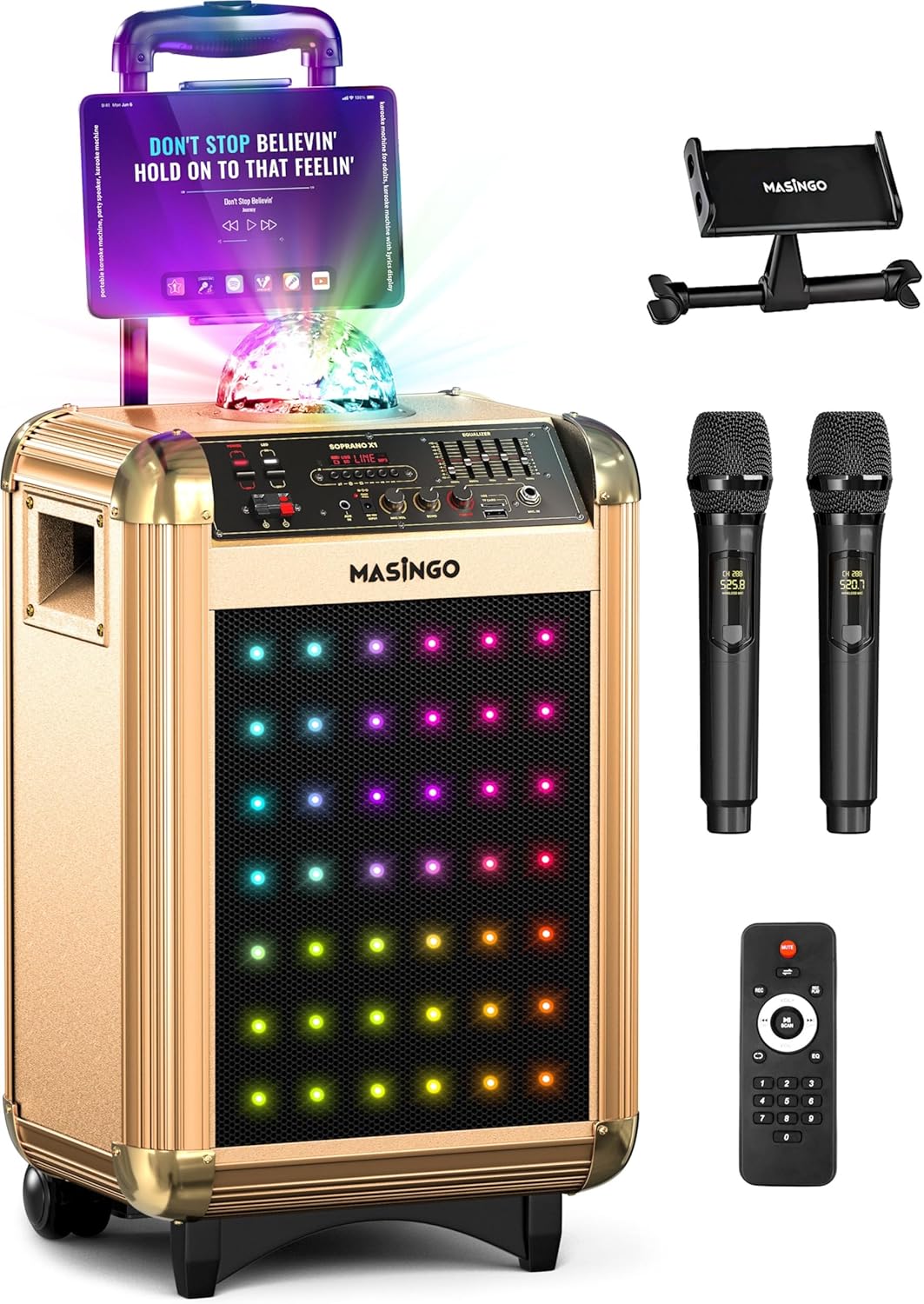
Image 1.1: The MASINGO Soprano X1 Portable Karaoke Machine, showcasing its main unit, tablet holder, two wireless microphones, and remote control.
2. Садржај пакета
Проверите да ли су све ставке наведене у наставку укључене у ваш пакет. Ако неке ставке недостају или су оштећене, обратите се корисничкој подршци.
- Soprano X1 Karaoke Machine (Main Unit)
- 2 бежична микрофона
- Кориснички приручник (овај документ)
- Држач таблета
- Power Plug (AC adapter)
- Auxiliary Cable (3.5mm)
- TV Cable (AUX-RCA)
- Car Plug (for 12V car charging)
- Ремоте Цонтрол

Image 2.1: Visual representation of the Soprano X1 main unit and all included accessories: two wireless microphones, 3.5mm AUX cable, AUX-RCA TV cable, 15V charging cable, device holder, and remote control.
3. Производ је готовviewКонтроле и портови
Familiarize yourself with the various controls and connection ports on your Soprano X1 unit.

Image 3.1: Close-up of the Soprano X1 control panel, indicating the location of various inputs, controls, and switches.
- Прекидач: Укључује или искључује јединицу.
- LED Lights Switch: Activates or deactivates the front LED lights.
- Disco Ball Switch: Turns the top disco ball light on or off.
- Дугме за режим: Cycles through input modes (Bluetooth, USB, Micro-SD, AUX, FM Radio).
- Дугме за јачину звука микрофона: Подешава јачину звука повезаних микрофона.
- Дугме за ехо микрофона: Controls the echo effect applied to microphone audio.
- Главно дугме за јачину звука: Adjusts the overall output volume of the system.
- Equalizer (EQ) Sliders: Fine-tune audio frequencies (bass, mid, treble).
- УСБ порт: За репродукцију са УСБ диска.
- Утор за микро СД картицу: For Micro-SD card playback.
- AUX улаз (3.5 мм): For connecting external audio devices via auxiliary cable.
- TV Audio Input (RCA): For connecting to a TV for audio output.
- ДЦ 15В Улаз: За повезивање АЦ адаптера за напајање.
- EXT DC 12V Input: За повезивање ауто пуњача.

Image 3.2: The two wireless microphones included with the Soprano X1, highlighting their individual displays for settings like volume, echo, and EQ.
4. Подешавање
4.1. Charging the Main Unit
- Connect the provided AC power adapter to the DC 15V input port on the Soprano X1.
- Прикључите адаптер у стандардну зидну утичницу.
- The unit will begin charging. A full charge typically takes several hours. The battery indicator on the unit will show charging status.
- For car charging, use the provided car plug and connect it to the EXT DC 12V input.
4.2. Подешавање микрофона
- Unscrew the bottom cap of each wireless microphone.
- Insert two AA batteries (not included) into each microphone, observing the correct polarity (+/-).
- Замените доњи поклопац.
- Press and hold the power button on each microphone to turn it on. The microphone will automatically connect to the Soprano X1 when the main unit is powered on.
4.3. Installing the Tablet Holder
- Locate the mounting slot on the top of the Soprano X1 unit.
- Insert the tablet holder into the slot until it is securely in place.
- Adjust the holder to accommodate your tablet or smartphone for lyrics display.
5. Упутство за употребу
5.1. Укључивање/искључивање
- To power on the Soprano X1, toggle the main power switch to the 'ON' position.
- To power off, toggle the main power switch to the 'OFF' position.
5.2. Блуетоотх упаривање
- Turn on the Soprano X1. The unit will automatically enter Bluetooth pairing mode, indicated by a flashing Bluetooth icon on the display.
- На паметном телефону, таблету или другом уређају који подржава Bluetooth, идите на подешавања Bluetooth-а.
- Select "MASINGO Soprano X1" from the list of available devices.
- Once paired, the Bluetooth icon on the Soprano X1 display will become solid, and you can play audio wirelessly from your device.
5.3. Media Playback (USB, Micro-SD, AUX)
- USB/Micro-SD: Insert a USB drive or Micro-SD card containing audio files into the respective port/slot. Press the 'Mode' button until 'USB' or 'SD' is displayed. The unit will automatically begin playing compatible audio files.
- АУКС улаз: Connect an external audio device (e.g., MP3 player, laptop) to the 3.5mm AUX input using the provided auxiliary cable. Press the 'Mode' button until 'AUX' is displayed.
- ТВ звук: Connect your TV's audio output to the RCA TV Audio input using the provided TV cable. Select the appropriate input mode on the Soprano X1.
5.4. Microphone Adjustments
- Јачина звука микрофона: Use the 'Mic Volume' knob on the main unit to adjust the overall volume of both microphones.
- Ехо микрофона: Use the 'Mic Echo' knob to add or reduce the echo effect on your vocals.
- Individual Microphone Settings: Each wireless microphone has its own controls for volume, echo, and EQ, accessible via its display. Adjust these settings directly on the microphone for personalized sound.
5.5. Светлосни режими
- Предња ЛЕД светла: Toggle the 'LED Lights' switch on the control panel to activate or deactivate the colorful LED lights on the front speaker grille.
- Disco Ball: Toggle the 'Disco Ball' switch to turn the top-mounted disco ball light on or off.
5.6. ФМ радио
- Press the 'Mode' button until 'FM' is displayed.
- Use the playback control buttons (e.g., Play/Pause, Next/Previous) to scan for and select FM radio stations.
5.7. Преносивост
The Soprano X1 features a telescoping handle and wheels for easy transport. Extend the handle and tilt the unit to roll it to your desired location.

Image 5.1: The Soprano X1 being transported with its integrated wheels and extendable handle, highlighting its design for on-the-go use.
6. Одржавање
- Чишћење: Користите меку, суву крпу за чишћење спољашњости уређаја. Не користите течна средства за чишћење или абразивне материјале.
- Складиштење: Када се не користи, чувајте уређај на хладном и сувом месту, даље од директне сунчеве светлости и екстремних температура.
- Одржавање батерије: If storing for extended periods, it is recommended to fully charge the unit every 3-6 months to maintain battery health. Remove batteries from microphones if not used for a long time.
КСНУМКС. Решавање проблема
| Проблем | Могући узрок | Решење |
|---|---|---|
| Нема струје | Unit not charged; Power adapter not connected; Power switch off. | Ensure unit is charged or connected to power. Verify power switch is in 'ON' position. |
| Нема звука из звучника | Master volume too low; Incorrect input mode selected; Audio source issue. | Increase Master Volume. Press 'Mode' button to select correct input. Check audio source device. |
| Микрофони не раде | Microphone batteries low/dead; Microphones not powered on; Mic volume too low. | Replace microphone batteries. Ensure microphones are powered on. Increase 'Mic Volume' knob. |
| Блуетоотх се често прекида | Device too far from unit; Interference; Bluetooth device issue. | Keep Bluetooth device within 30 feet (10 meters) of the Soprano X1. Avoid obstacles. Re-pair the device. |
| Excessive echo | 'Mic Echo' knob set too high. | Adjust the 'Mic Echo' knob counter-clockwise to reduce the effect. |
8. Спецификације
- Модел: Сопрано Кс1
- Тежина артикла: 24 фунти
- Димензије производа: 13.2 к 15.4 к 24 инча
- Снага звучника: 40 вати
- Број говорника: 1 (three-way woofer)
- Тип батерије: 12В Оловна киселина
- Капацитет батерије: 7.4V 6000 mAh (approx. 2-3 hours run time)
- Извор напајања: Battery Powered / 15V DC (AC adapter) / 12V DC (Car plug)
- Повезивање: Bluetooth, USB, Micro-SD, 3.5mm AUX, RCA (TV Audio)
- Посебне карактеристике: Portable, Rechargeable, Wireless Microphones, Disco Ball, LED Lights, FM Radio
9. Гаранција и подршка
Тхе МASINGO Soprano X1 Karaoke Machine comes with a 60-day warranty from the date of purchase. This warranty covers manufacturing defects and malfunctions under normal use. It does not cover damage caused by misuse, accidents, unauthorized modifications, or normal wear and tear.
For technical support, warranty claims, or any questions regarding your product, please refer to the contact information provided on the MASINGO official website or your purchase documentation. Please have your model number (Soprano X1) and proof of purchase ready when contacting support.