
1. Увод
The Alesis Recital Grand is an 88-key digital piano designed to provide an authentic piano playing experience. It features graded hammer-action weighted keys and a selection of 16 realistic built-in sounds. This instrument is suitable for various skill levels, from beginners to advanced players, offering a comprehensive set of features for practice and performance. This manual provides detailed instructions for setting up, operating, and maintaining your Recital Grand digital piano.
2. Садржај пакета
Verify that all items listed below are included in your package. If any items are missing or damaged, please contact Alesis support.
- Recital Grand Digital Piano
- Повер Адаптер
- Мусиц Рест
- Сустаин Педал
- Картица за преузимање софтвера
- Упутство за употребу (овај документ)
- Приручник за безбедност и гаранцију

Image: The Alesis Recital Grand digital piano shown with its essential accessories: a sustain pedal, a music rest, and the power adapter. These components are crucial for the instrument's functionality and user convenience.
3. Подешавање
Follow these steps to set up your Alesis Recital Grand digital piano:
- Пласман: Place the digital piano on a stable, flat surface or a compatible keyboard stand. Ensure there is adequate space for playing and connecting cables.
- Музички одмор: Insert the music rest into the designated slot on the top panel of the piano.
- Сустаин педала: Connect the included sustain pedal to the 'Sustain Pedal' input on the rear panel of the piano.
- Прикључак за напајање: Connect the power adapter to the 'DC 12V' input on the rear panel, then plug the adapter into a power outlet.
- Укључено: Press the Power button located on the top left of the control panel to turn on the instrument.
- Headphones/External Audio (Optional): For private practice, connect headphones to the 1/4" (6.35mm) or 1/8" (3.5mm) headphone outputs. For external amplification, connect the 1/4" (6.35mm) stereo outputs to an ampлајфер или миксерска конзола.

Слика: Детаљна view of the rear panel connectivity options on the Alesis Recital Grand. This includes ports for USB, the sustain pedal, stereo 1/4-inch outputs, and an auxiliary input, illustrating how to connect various external devices.
4. Карактеристике
The Alesis Recital Grand offers a range of features designed to enhance your playing experience:
- 88 Graded Hammer-Action Weighted Keys: Provides a realistic piano feel with heavier touch in the lower register and lighter touch in the upper register. Adjustable touch response allows customization.
- 16 Premium Multi-Sampled Voices: Includes Grand Piano, Electric Piano, Organ, Synthesizers, and more, offering a diverse sound palette.
- 128 Max Polyphony: Ensures that notes do not cut off prematurely, even when playing complex passages with sustain.
- 50W Micro-Array Speaker System: Custom-voiced speakers deliver clear, full, and realistic sound in any environment.
- 5 Adjustable Reverb FX: Adds depth and ambiance to your sound.
- Сплит режим: Divides the keyboard into two zones, allowing you to play different instrument tones with each hand simultaneously.
- Режим слоја: Stacks two different instrument tones to be played together with each key press.
- Режим лекције: Divides the keyboard into two zones with the same pitch and voice, ideal for student and teacher to play together.
- Режим снимања: Allows you to record and playback your performances for review and practice.
- Повезивање: Stereo 1/4" (6.35mm) outputs, 1/4" (6.35mm) and 1/8" (3.5mm) headphone outputs, and USB-MIDI output for connection to computers or educational software.

Image: A user demonstrates the Alesis Recital Grand, emphasizing its 88 full-sized, graded hammer-action keys and the adjustable touch response feature, which provides a customizable playing feel.

Image: The control panel of the Alesis Recital Grand, illustrating the dedicated buttons for Split, Layer, Lesson, and Record modes. This image also highlights the integration with Melodics and Skoove for enhanced learning.
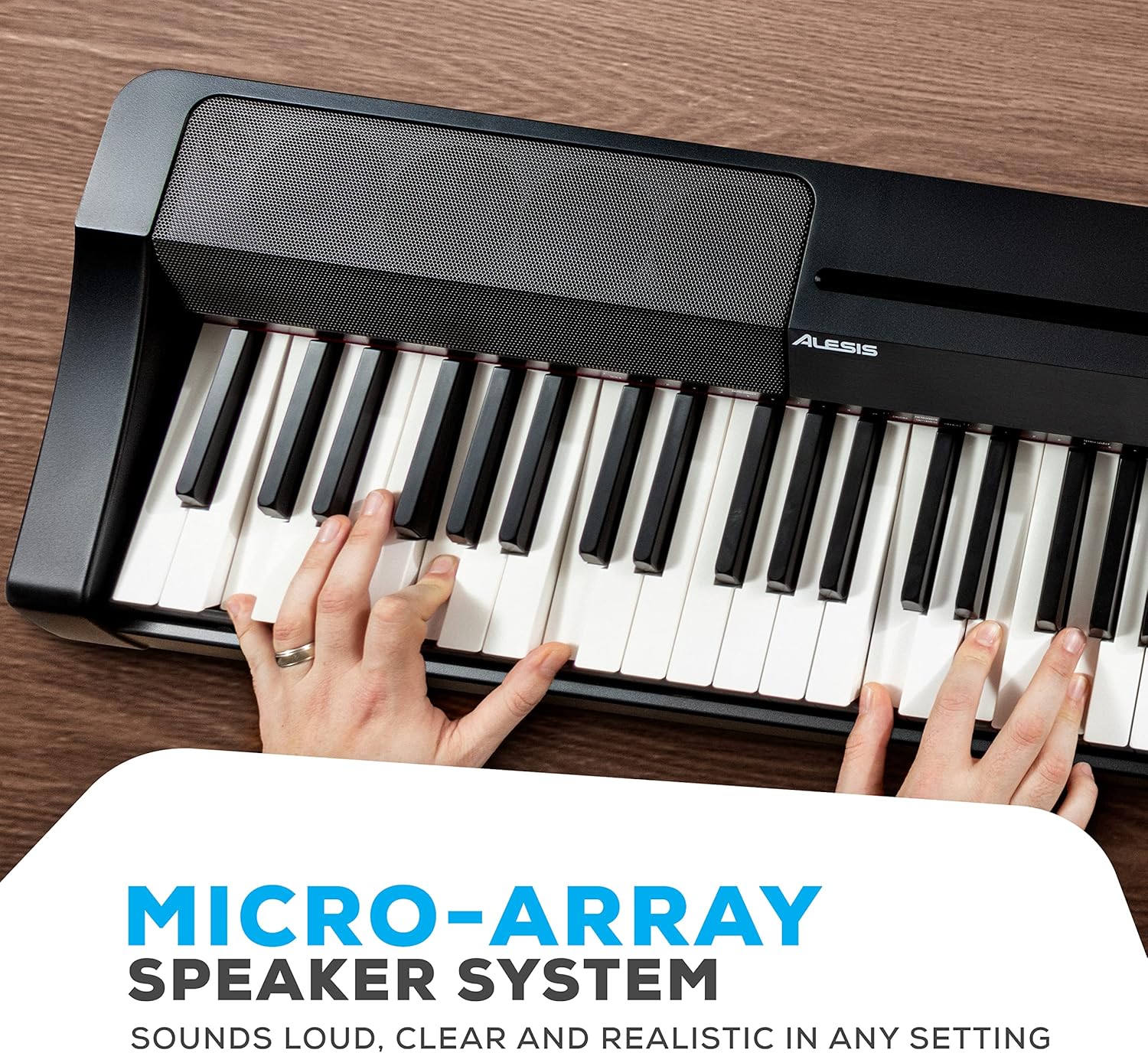
Слика: Детаљна view of the Alesis Recital Grand's micro-array speaker system, designed to deliver clear and powerful audio output.
5. Упутство за употребу
5.1 Укључивање/искључивање и јачина звука
- Снага: Притисните тастер Повер button to turn the piano on or off.
- Волумен: Користите Волуме knob to adjust the overall output level of the piano.
5.2 Избор гласова
The Recital Grand features 16 built-in voices, accessible via dedicated buttons and combinations:
- Притисните тастер Пиано button to select the Grand Piano voice. Hold the Piano button to access the Dark Piano or Harpsichord variations.
- Притисните тастер Електрични клавир button to select the MK1/Suitcase Electric Piano voice. Hold the Electric Piano button to access the Wurlitzer or FM Piano variations.
- Similarly, use the Орган, Стрингс, Синтх, и Бас buttons to select their primary voices and hold them for variations.
5.3 Split and Layer Modes
- Сплит режим: Притисните тастер Сплит button. The keyboard will be divided into two sections, each playing a different voice. The split point can be adjusted.
- Режим слоја: Притисните тастер Лаиер button. Two selected voices will sound simultaneously when a key is pressed.
5.4 Lesson and Record Modes
- Режим лекције: Притисните тастер Лекција button to activate. This mode is useful for teaching, as it duplicates the keyboard range.
- Режим снимања: Притисните тастер Рец/Старт/Стоп button to begin recording your performance. Press it again to stop. Press the Играј button to listen to your recorded track.
5.5 Ефекти
- Реверб: Користите Реверб button to cycle through and adjust the 5 available reverb effects.
Video: An official Alesis performance video demonstrating the sound and playability of the Recital Grand digital piano. This video showcases various voices and musical styles.
Video: An official Alesis demonstration video providing an overview of the Recital Grand's features and sound capabilities. This video highlights key aspects of the instrument's design and functionality.
6. Одржавање
Proper care will ensure the longevity and optimal performance of your Alesis Recital Grand:
- Чишћење: Користите меку, суву крпу за брисање површине клавира. За тврдокорну прљавштину, благо дamp Може се користити прхана крпа, а затим сува крпа. Избегавајте абразивна средства за чишћење, раствараче или воскове.
- Чишћење кључева: Нежно обришите тастере меком, благо крпомamp крпа. Не користите прекомерну влагу.
- Складиштење: When not in use, cover the piano with a dust cover to protect it from dust and debris. Avoid placing heavy objects on the keys or control panel.
- Окружење: Keep the piano away from direct sunlight, heat sources, and areas with high humidity or extreme temperature changes.
- превоз: When moving the piano, ensure it is properly secured to prevent damage.
КСНУМКС. Решавање проблема
If you encounter issues with your Alesis Recital Grand, refer to the following common problems and solutions:
| Проблем | Могући узрок | Решење |
|---|---|---|
| Нема звука | Јачина звука је прениска; слушалице су повезане; спољни amplifier off/disconnected. | Increase volume knob; disconnect headphones; check external amplifier connections and power. |
| Keys not responding or inconsistent touch | Touch sensitivity setting; dust/debris under keys. | Adjust touch sensitivity setting (refer to full user manual); gently clean keys. |
| Изобличен звук | Volume too high; incorrect audio cable connection; faulty speakers/headphones. | Lower volume; ensure audio cables are correctly connected; test with different headphones/speakers. |
| MIDI not working | Incorrect USB-MIDI connection; driver issues; software settings. | Ensure USB cable is securely connected; install necessary drivers; check MIDI settings in your software. |
For more detailed troubleshooting or issues not listed here, please refer to the full User Manual (PDF) available on the Alesis website or contact Alesis customer support.
8. Спецификације
Below are the technical specifications for the Alesis Recital Grand digital piano:
- Бренд: Алесис
- Назив модела: Рецитал Гранд
- Број кључева: 88
- Тип кључа: Градирани, пондерисани тастери са чекићастом механиком
- гласови: 16 Premium Multi-Sampled Voices
- полифонија: 128 Макс
- Ефекти: 5 Adjustable Reverb FX
- Систем звучника: 50W Micro-Array
- Повезивање: Stereo 1/4" (6.35mm) Outputs, 1/4" (6.35mm) Headphone Jack, 1/8" (3.5mm) Headphone Jack, USB-MIDI Output, Sustain Pedal Input, Power Adapter Input
- Извор напајања: Електрични са каблом (12V DC)
- Димензије (Д к Ш к В): 9.65" x 57.87" x 15.55" (24.5 цм x 147 цм x 39.5 цм)
- Тежина артикла: 12.8 килограма (28.2 лбс)
- Боја: Црно
- Ниво вештина: Beginner to Professional

Image: A diagram illustrating the physical dimensions of the Alesis Recital Grand digital piano, including its length, width, and height.
9. Гаранција и подршка
9.1 Информације о гаранцији
The Alesis Recital Grand digital piano comes with a Двогодишња гаранција произвођача. This warranty covers defects in materials and workmanship under normal use. Please retain your proof of purchase for warranty claims. For full details regarding warranty terms and conditions, refer to the Safety & Warranty Manual included in your package or visit the official Alesis webсајту.
9.2 Корисничка подршка
For technical assistance, product inquiries, or warranty service, please contact Alesis customer support through their official website. You can typically find support contact information, FAQs, and additional resources at www.alesis.com/support.
Additionally, a comprehensive User Manual (PDF) is available for download from the Alesis website, providing more in-depth information on all features and functions.